Avo: a Ruby-defined admin panel that plugs into an existing Rails app
The Essential Toolkit for building Internal Tools and admin panels with Ruby on Rails
At a glance
- What is it?
- avo-hq/avo builds admin panels, internal tools and dashboards for Ruby on Rails from resource classes you write in Ruby, without touching your application's own models or views. It is actively released, but it is licensed commercially, which changes what you can do with the source.
- Who is it for?
- Avo fits a Rails team that wants an admin surface generated from resource classes it already understands, and that can accept a commercial licence. It does not fit a project that needs a permissive open source dependency, or a team whose admin needs diverge from CRUD over Active Record, because custom tools and custom fields exist but the shape of the interface is the gem's.
- Can I use it commercially?
- Check first. The repository uses a licence we do not classify automatically, so read its LICENSE file before any commercial use.
- Is it still maintained?
- Yes. The repository received new commits within the last day.
- What is it written in?
- Mainly Ruby, according to GitHub's language statistics.
Answers come from the project's GitHub data, last synced on October 23, 2026, and from our analysis. They are not legal advice.
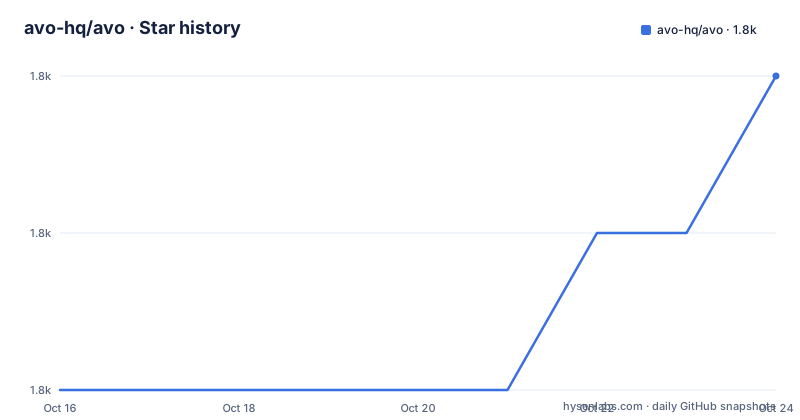
Star history
- avo-hq/avo1,812 ★ · +1
| Repository | 2026-10-16 | 2026-10-23 |
|---|---|---|
| avo-hq/avo | 1.8k | 1.8k |
1 Stars in the last 7 days, measured from the daily GitHub snapshot. Compare with other projects
Editorial analysis
Configuration is Ruby, so the admin lives in your repo
The defining choice in Avo is that the admin interface is described by Ruby code rather than by a data format, a dashboard configuration file, or a hosted service. The README calls this code driven configuration and points at a documentation page on manually defining resources. Once a resource class exists, Avo derives a CRUD interface from it, which is the mechanism that removes the copy-pasted view and controller files such a panel normally accumulates.
From there the pieces extend along obvious lines. Associations are followed, including `belongs_to`, `has_many` and polymorphic ones, and a belongs_to field can be made fuzzy-searchable so a dropdown of a large table does not become an unusable list. Active Storage attachment is described as a one-line integration, single or multi-file. Search spans one or more resources at once, and filters and actions are user-defined rather than fixed.
The escape hatches matter as much as the generated parts, because an admin that only does CRUD becomes the thing you fight. Avo has custom fields for anything the built-in set misses, custom tools for pages that are not CRUD at all, and a grid view for card-style layouts instead of tables. Actions can target one record or many.
Authorization is delegated to Pundit policies rather than implemented separately, which is the right call for a Rails app that already uses Pundit and the wrong call for one that does not, since you would be adding a policy layer to your own models to get access control in the admin.
One Rails template is the whole install step
The README gives a single command, and it is a template application rather than a gem add:
rails app:template LOCATION='https://avohq.io/app-template'That is the fast path. The fuller guide lives in the documentation under installation, and that is also where the generator command for a resource lives, described in the README as creating a CRUD interface for an Active Record model from one command.
Two design decisions in the repository are worth knowing before you run anything. The first is asset ownership. The feature list claims no asset pipeline pollution, and the package manifest confirms it: the JavaScript is bundled with esbuild into `app/assets/builds/avo` and the CSS is compiled by the Tailwind CLI into the same directory, but `package.json` is marked `"private": true` and its license field reads `"Commercial"`. Your application keeps control of its own asset pipeline and Avo ships prebuilt assets into it.
The second is the Rails coupling. This is a Rails engine with its own `app/`, `config/`, `db/` and `lib/` directories, its own views and its own release process. It is not usable outside Rails, and the cost of adopting it is the cost of living with a gem that mounts a whole interface into your app rather than a library you call.
Translation keys for tabs and panels are derived, then overridden
The localization section of the README documents one concrete convention well enough to reproduce. Tab and panel titles use the resource's translation key with the title parameterised as the final segment, under `avo.resource_translations`:
en:
  avo:
    resource_translations:
      user:
        tabs:
          activity: Activity
        panels:
          contact_information: Contact information
For a tab titled "Activity" and a panel titled "Contact information", the lookup is `avo.resource_translations.user.tabs.activity` and `avo.resource_translations.user.panels.contact_information`. The configured title stays as the fallback when no key exists, which means an untranslated panel degrades to English rather than rendering blank.
When the generated key does not suit the case, both items accept a full `translation_key:`. That matters for any app where the same panel title appears under several resources and you want one shared string rather than repeated copies.
Beyond strings, Avo advertises a mobile interface and a tabbed interface where tabs are shown conditionally, plus a menu builder for grouping. Whether that is enough for a field team is a question the demo app answers faster than the documentation will.
The licence is the sharpest constraint in the repository
Two licence signals sit next to each other in the repository and they point the same way. `package.json` carries `"license": "Commercial"`, and the root contains both `LICENSE.md` and `COMM-License.md`, the latter evidently covering commercial use. GitHub cannot classify the repository as a standard open source identifier. That is not a nitpick: it decides whether you can fork it, redistribute it inside another product, or only use the released gem in an application you own.
The README's own framing is sales-shaped, promising to save teams months of development time, and it points to the website at avohq.io with a public documentation site and a hosted demo app. Whether a paid tier with a different licence exists is not something the README settles, so treat the licensing question as one to answer with your own legal reading of the two licence files, not from this review.
The upgrade path is documented separately from the README, in a release document and an upgrade guide. Both were being written at the same moment as the v4.3.1 and v3.33.1 tags, both dated 2026-10-14, which tells you something about release velocity in this project: it ships often, and the upgrade guide is the file to read before each bump.
The repository is not archived.
Where Avo stops and you start writing Rails
The honest boundary is between generated CRUD and everything else. Avo is fast at the second half of an internal tool's life, when the data model is settled and the screens are lists, forms and filters. It is least useful at the first half, when the admin has to encode a business process, and where a bespoke Rails controller with a hand-built view is both faster to write and easier to reason about.
A different approach exists inside the same ecosystem and is worth naming: writing the admin as ordinary Rails controllers and views, or generating it from a scaffolding approach with no gem at all. The difference is ownership. With Avo you declare a resource and inherit a large amount of behaviour, including its routing, its authorization expectations and its UI conventions, and you accept upgrades to all of it. With hand-written controllers you own every line and spend the days Avo is offering to save. Teams that have already standardized on Rails engines and Pundit policies usually get more out of Avo; teams with one admin screen and unusual requirements usually do not.
A third option is a hosted admin product. That removes the credential and routing decisions entirely and adds a vendor, a per-seat cost and your data leaving the application. Avo is the opposite end of that spectrum: it runs inside your app, against your own database, and the cost is the licence and the coupling.
Editorial conclusion
Avo fits a Rails team that wants an admin surface generated from resource classes it already understands, and that can accept a commercial licence. It does not fit a project that needs a permissive open source dependency, or a team whose admin needs diverge from CRUD over Active Record, because custom tools and custom fields exist but the shape of the interface is the gem's. Verify before adopting: whether your use of the gem falls inside the terms in LICENSE.md and COMM-License.md, whether the documented installation method suits your app's existing routing and authentication, and whether the Rails and Ruby versions in `.ruby-version` and Appraisals match your stack.
Frequently asked questions
How do I install Avo in a Rails application?
The README gives a single command that applies a Rails template: `rails app:template LOCATION='https://avohq.io/app-template'`. A more detailed guide is in the installation page of the documentation.
Does Avo change my existing Rails application?
The feature list says you do not need to change your app to use Avo, and that you can drop it into an existing app or add it to a new one. It ships its assets into `app/assets/builds/avo` rather than taking over your asset pipeline.
What licence does Avo use?
GitHub reports a custom licence it cannot classify, `package.json` declares `"license": "Commercial"`, and the repository root contains both `LICENSE.md` and `COMM-License.md`. Read those files before shipping it in a product.
How does Avo handle authorization?
It uses Pundit policies to build the authorization layer, so your existing policy objects govern access rather than a separate permission system inside the gem.
Can I add screens to Avo that are not CRUD?
Yes. The README lists custom fields for anything the built-in set does not cover, and custom tools for pages that are not CRUD at all.
How do I translate Avo tab and panel titles?
Tab and panel titles look up `avo.resource_translations.<resource>.tabs.<title>` and `avo.resource_translations.<resource>.panels.<title>`, with the configured title as fallback. You can also pass a full `translation_key:` to either item.
Official sources
Add this badge to your README
If you maintain this project, the badge below links readers to this analysis and shows its maintenance status from the daily GitHub snapshot. Paste the markdown into your README; add ?metric=license or ?metric=stars to the image URL for a different field.

[](https://hysenlabs.com/projects/avo-hq-avo)Star history chart for your README
[](https://hysenlabs.com/projects/avo-hq-avo)Was this useful?