Powertools for AWS Lambda TypeScript is thirteen packages, not one dependency
Powertools for AWS is a developer toolkit to implement Serverless best practices and increase developer velocity.
At a glance
- What is it?
- AWS Powertools for TypeScript splits tracing, logging, metrics, parsing and the rest into individual npm packages under @aws-lambda-powertools, with middleware integration for Middy. It suits teams already on Lambda who want observability and parameter handling without hand-rolling it, at the cost of an AWS-shaped dependency set.
- Who is it for?
- Adopt this toolkit if your handlers already run on Lambda and you have no internal equivalent of structured logging with context injection, idempotency keys or a Zod-based parser, since each of those is a day of careful work to get right once and a liability to maintain. Skip it if you are on ECS, Fargate or plain containers, where most of the value is AWS-specific plumbing you cannot use, or if a vendor-neutral abstraction across clouds is a requirement.
- Can I use it commercially?
- Yes. MIT-0 is a permissive licence: you can use, modify and sell software built on it, as long as you keep its copyright and licence notices.
- Is it still maintained?
- Yes. The repository last received commits 1 day ago.
- What is it written in?
- Mainly TypeScript, according to GitHub's language statistics.
Answers come from the project's GitHub data, last synced on November 7, 2026, and from our analysis. They are not legal advice.
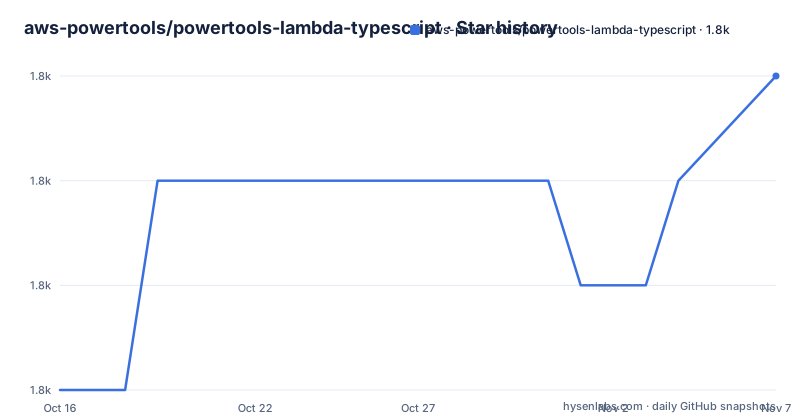
Star history
- aws-powertools/powertools-lambda-typescript1,797 ★ · +3
| Repository | 2026-10-16 | 2026-11-07 |
|---|---|---|
| aws-powertools/powertools-lambda-typescript | 1.8k | 1.8k |
3 Stars in the last 22 days, measured from the daily GitHub snapshot. Compare with other projects
Editorial analysis
Thirteen utilities that share one repository, not one package
The most consequential fact about this project is visible in the install section rather than the feature list. Every utility is a separate npm package, and the README lists them one per line with the exact command. Logger, Metrics, Tracer, Event Handler, Parameters, Idempotency, Batch Processing, JMESPath Functions, Parser, Validation, Kafka, Data Masking and Signer. You install the ones you use.
Two of those lines show why this matters. Parameters is `npm install @aws-lambda-powertools/parameters @aws-sdk/client-ssm`, and Idempotency is `npm install @aws-lambda-powertools/idempotency @aws-sdk/client-dynamodb @aws-sdk/lib-dynamodb`. Some installation commands also require an AWS SDK client. Those explicit dependencies show how the utilities connect to AWS services.
The repository is a monorepo to match. The root package.json declares workspaces for `packages/commons`, `packages/jmespath`, `packages/logger`, `packages/metrics`, `packages/tracer`, `packages/parameters`, `packages/idempotency`, `packages/parser`, `packages/batch`, `packages/testing`, `packages/event-handler`, `packages/validation`, `packages/kafka`, `packages/data-masking` and `packages/signer`, plus `examples/snippets` and `layers`.
There is also a `packages/commons`, which is where the shared plumbing lives, and a `layers/` directory that builds the Lambda Layer versions.
Installing one utility, then wiring it into a handler
The README states you can install with your dependency manager of choice, or via Lambda Layers, and that all features are available as individual packages. A first real use starts with one of them:
npm install @aws-lambda-powertools/loggerThat single package is enough to get structured logging. The feature list describes it as structured logging made easier, plus a middleware that enriches log items with key details of the Lambda context. The context injection is the part worth noting: request ID and function context end up on log records without each handler passing them along.
If you prefer a parser instead, the README's line is:
npm install @aws-lambda-powertools/parser zodThe installation command installs Zod alongside Parser. Parser gives you data validation and parsing driven by Zod schemas; Validation is the separate utility that does JSON Schema validation for events and responses, with JMESPath support to unwrap events before validating.
Those two overlap on purpose, which is also a source of confusion. Parser is schema-first and TypeScript-native; Validation is JSON Schema and works on both events and responses. Pick per handler if that suits you, but do not adopt both by reflex.
Idempotency and batch processing target the failure cases
Two utilities exist to solve specific AWS failure modes rather than general convenience, and they are the strongest argument for the toolkit.
Idempotency is offered three ways: a class method decorator, Middy middleware, and a function wrapper. Its purpose is to prevent duplicate execution based on payload content. On Lambda that matters because the platform can invoke a function more than once for the same event, and a payment or a notification handler that assumes exactly once will eventually be wrong. The DynamoDB-backed install line shows the design: something has to store the record of what has been processed.
Batch Processing handles partial failure. Its description names the three event sources: Amazon SQS, Kinesis Data Streams and DynamoDB Streams. The problem is common and easy to get wrong by hand: a batch of records arrives, some succeed, and you must report failures at item granularity so the service retries only those. The utility is the wrapper for that report.
Between them, these two are the parts you would otherwise write yourself, test carefully, and maintain. Everything else in the toolkit is convenience.
Observability runs through CloudWatch EMF and Middy
Tracer handles both synchronous and asynchronous Lambda handlers, and its job is to instrument the handler so spans reach AWS X-Ray. Metrics is described as custom metrics created asynchronously via CloudWatch Embedded Metric Format. EMF matters because it means your function writes a structured log line containing a metrics directive, and CloudWatch turns it into custom metrics, so you do not need the CloudWatch agent or a sidecar.
Event Handler is described as lightweight routing to reduce boilerplate for API Gateway REST and HTTP API, ALB, and Lambda Function URLs. That is a router with parse-and-validate built in, in the shape of a familiar framework, but scoped to the four AWS event sources rather than to arbitrary HTTP.
Middy appears across the feature list as the integration point for Logger and Idempotency, and the middleware form is what makes the utilities additive rather than invasive: your handler signature stays a handler and the context enrichment happens outside it.
Kafka is the one that is easy to miss. It handles message deserialization and parsing for Kafka events, with the README pointing at separate documentation for Avro and Protobuf support. That is a narrower gap it fills than the AWS-native tools do, and it is a reason to look at this package even if you are not otherwise on Lambda.
Deployment is either a dependency or a Layer, and the choice matters
There are two supported ways to ship this code, and the README does not push you toward one. Dependencies in your bundle, or Lambda Layers built from the `layers/` workspace.
The trade-offs are the usual ones and they are worth deciding deliberately. A Layer means the code is not in your artefact, so your package version and the deployed Layer version can drift apart, and someone has to remember to publish the Layer when you upgrade. Dependencies mean the code travels with your artefact and your lockfile, so the version is pinned the moment you pin it, at the cost of a larger bundle.
Neither is documented here as universally recommended, which is honest. What is clear is that both paths exist in the repository and that they are not interchangeable once you have deployed.
Other infrastructure signals in the root package.json give a sense of how the project is operated. Tests run across workspaces with `npm t -ws`, there is a separate `test:e2e`, Husky is wired in through `setup-local`, formatting is handled by `biome.json`, and the docs are MkDocs built into a Docker image with `docs:docker:build` and served on port 8000. API documentation is generated with typedoc. This is a conventionally managed repository rather than a loose collection of scripts.
Where the toolkit stops being the right answer
Powertools is AWS-shaped, and that is its limit as much as its strength. Parameters wraps SSM Parameter Store, Secrets Manager, AppConfig and DynamoDB. Signer produces AWS Signature Version 4 requests so you can call IAM-authenticated endpoints. Data Masking encrypts, decrypts and irreversibly erases values. None of that transfers to another cloud, and none of it helps if your runtime is ECS or Fargate. On a container platform the only pieces still carrying weight are Parser and Validation.
Second, there is a version question worth noticing. The repository metadata reports the licence as MIT-0, while the root package.json declares `"license": "MIT"`. Those are not the same licence, MIT-0 being the variant with no attribution requirement, so if your compliance tooling scans the repository rather than the published tarball you may get a different answer from the one you expect. Check the LICENSE file against what your process records before it becomes a procurement question.
Third, the dependency surface. Some utilities require AWS SDK clients in their installation commands. If dependency size or initialization time matters, measure the packages and runtime configuration your handler actually uses. The README makes no claim about bundle size or init time, so if that is your concern you have to measure it yourself on your own runtime and memory settings.
Finally, the feature list is long enough that adopting the whole thing is easy and undesirable. Thirteen utilities means thirteen configuration surfaces, thirteen places where behaviour can surprise you, and a team that now has to learn when Logger, when Metrics and when both. Adopting two of them well beats enabling all of them.
Version, language coverage and who maintains it
The library is on version 2.x, with v2.36.0 released on 2026-10-06, v2.35.0 on 2026-08-18 and v2.34.0 on 2026-07-10. The repository received a push on 2026-10-16, after the latest listed release.
Node support is advertised for versions 22 and 24. That is a narrow and current window. If your functions run on an older runtime, check that before anything else, because this is the kind of constraint that ends an evaluation immediately.
The library can be used from JavaScript as well as TypeScript, which the README states explicitly and which matters because the Zod-based Parser pulls in something fundamentally TypeScript-friendly. The fact that it works from plain JavaScript does not mean the type-driven parts of Parser feel natural there.
Maintenance is by AWS, under the aws-powertools organisation, with MAINTAINERS.md, CODING_STANDARDS.md, CODE_OF_CONDUCT.md and SECURITY.md at the repository root, and sibling implementations for Python, Java and.NET. That sibling relationship is a useful signal: the same set of ideas is being implemented across languages, so a feature missing in one is usually a gap in progress rather than a deliberate omission.
Editorial conclusion
Adopt this toolkit if your handlers already run on Lambda and you have no internal equivalent of structured logging with context injection, idempotency keys or a Zod-based parser, since each of those is a day of careful work to get right once and a liability to maintain. Skip it if you are on ECS, Fargate or plain containers, where most of the value is AWS-specific plumbing you cannot use, or if a vendor-neutral abstraction across clouds is a requirement. Before installing more than one package, check whether Lambda Layers suit your deployment, because the same code can arrive either as dependencies or as a layer and the two have different cold start and versioning consequences, and confirm which licence your compliance process records, since the repository is MIT-0 while the root package.json says MIT.
Frequently asked questions
How do I install Powertools for AWS Lambda TypeScript?
Install only the utilities you need, for example `npm install @aws-lambda-powertools/logger` or `npm install @aws-lambda-powertools/parser zod`. The README also documents installation via Lambda Layers.
What is the difference between Parser and Validation in Powertools?
Parser provides validation and parsing using Zod, a TypeScript-first schema library. Validation does JSON Schema validation for events and responses, and supports JMESPath to unwrap events before validating.
Which Node versions does Powertools for AWS Lambda support?
The README badge lists Node 22 and Node 24. Recent releases include v2.36.0 on 2026-10-06 and v2.35.0 on 2026-08-18.
What does the Idempotency utility need to work?
The README install line is `npm install @aws-lambda-powertools/idempotency @aws-sdk/client-dynamodb @aws-sdk/lib-dynamodb`. It offers a class method decorator, Middy middleware and a function wrapper to prevent duplicate execution based on payload content.
Does Powertools work outside AWS Lambda?
The utilities are built around AWS services, including SSM Parameter Store, Secrets Manager, AppConfig and DynamoDB, so most of the value is tied to Lambda. The repository also ships sibling implementations for Python, Java and .NET.
Official sources
Add this badge to your README
If you maintain this project, the badge below links readers to this analysis and shows its maintenance status from the daily GitHub snapshot. Paste the markdown into your README; add ?metric=license or ?metric=stars to the image URL for a different field.

[](https://hysenlabs.com/projects/aws-powertools-powertools-lambda-typescript)Star history chart for your README
[](https://hysenlabs.com/projects/aws-powertools-powertools-lambda-typescript)Was this useful?