How the open data registry turns one YAML file into a browsable dataset catalogue
A registry of publicly available datasets on AWS
At a glance
- What is it?
- The AWS Open Data Registry is a directory of public datasets hosted on AWS resources, built as YAML metadata files validated against a schema and published as a browser, a combined listing and per-dataset files. The interesting part is the metadata contract that keeps the catalogue consistent.
- Who is it for?
- The registry suits a team looking for a public dataset already hosted on an S3 bucket or similar AWS resource, and it suits a data producer who wants their dataset listed with an attribution statement already written. It does not help if you need a database, an API contract, or any guarantee that a publisher still updates the data, because the registry only records what the publisher declared.
- Can I use it commercially?
- Yes. Apache-2.0 is a permissive licence: you can use, modify and sell software built on it, as long as you keep its copyright and licence notices.
- Is it still maintained?
- Yes. The repository last received commits 2 days ago.
- What is it written in?
- Mainly Python, according to GitHub's language statistics.
Answers come from the project's GitHub data, last synced on November 7, 2026, and from our analysis. They are not legal advice.
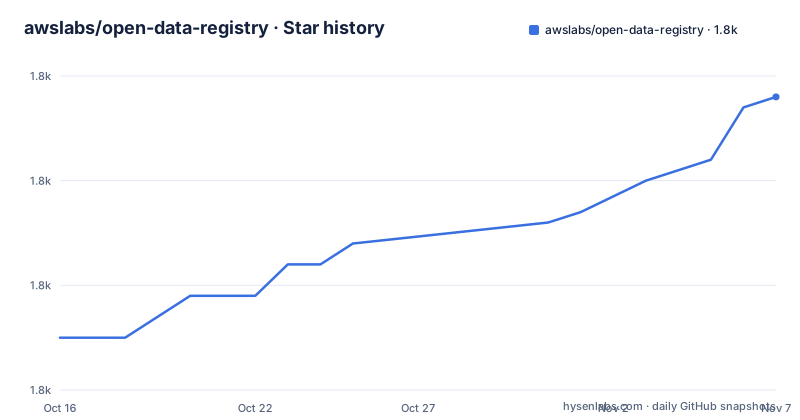
Star history
- awslabs/open-data-registry1,828 ★ · +23
| Repository | 2026-10-16 | 2026-11-07 |
|---|---|---|
| awslabs/open-data-registry | 1.8k | 1.8k |
23 Stars in the last 22 days, measured from the daily GitHub snapshot. Compare with other projects
Editorial analysis
One YAML file per dataset, and three things generated from it
The whole catalogue is a directory of YAML files. The README states that each dataset in the repository is described with metadata saved in a YAML file in the /datasets directory, and that those files are used to provide three services: the Registry of Open Data on AWS browser at registry.opendata.aws, a hosted YAML file listing all of the dataset entries, and hosted YAML files for each dataset.
That third service is the one engineers actually use. Because every entry is also available as its own YAML file, the registry is consumable by a script rather than only by a human reading a web page. You can fetch the listing, iterate, and keep a machine-readable record of which datasets you use. No scraping is required, and no API key is described anywhere in the project.
The repository layout follows from this. datasets/ holds the entries, while tags.yaml, resources.yaml and services.yaml hold the controlled vocabularies that entries must draw from. schema.yaml holds the structure, ext.py and requirements.txt belong to the tooling, adx_categories.yaml carries a separate categorisation set, and buildspec.yml is the continuous integration definition that turns the files into the published output.
The controlled vocabularies are the real editorial mechanism
Three files constrain what can appear in an entry, and each has the same escalation rule: if what you need is missing, open a pull request against the vocabulary file rather than inventing a value.
Tags must be related to an intrinsic property or descriptor of the dataset, and the supported list lives in tags.yaml. Resources must be one of a small set, described as CloudFront Distribution, DB Snapshot, S3 Bucket or SNS Topic, with the list in resources.yaml. For tutorials, the AWS services applied are listed and validated against services.yaml.
This is a modest but real design decision. A free-text tag field would produce a catalogue with nine spellings of the same subject and no way to browse it. Centralising the vocabulary means a pull request to add one term is reviewed as a change to the taxonomy, which is a much easier thing to argue about than a new spelling in one entry. The cost is that adding a genuinely new kind of data still requires touching a central file, so a producer with an unusual dataset cannot be listed until the schema catches up.
Required fields, and the ones that decide whether you can use the data
The required field list is Name, Description, Documentation, Contact, ManagedBy, UpdateFrequency, Tags, License and Resources. Name must be between 5 and 130 characters and acronyms are to be spelled out. Only the first 600 characters of Description are displayed on the homepage, which is worth knowing before writing a paragraph. Citation is optional and gets appended to a default string of the form "[DATASET NAME] was accessed on [DATE] at registry.opendata.aws/[dataset]".
Each resource entry needs Description, ARN, Region and Type. The ARN is a plain Amazon Resource Name such as arn:aws:s3:::commoncrawl and the Region is an AWS region identifier such as us-east-1. Three optional resource fields change whether the data is reachable for you: RequesterPays, a boolean appropriate only for S3 buckets, which tells you a bucket charges the reader; AccountRequired, for cases where an account is needed outside of the Requester Pays scenario; and ControlledAccess, where you must supply a URL explaining how to request access to the bucket.
That last field is the one to read carefully. ControlledAccess means the ARN is a reference to something you cannot yet read, and the entry gives you a request URL instead of data. An entry can therefore be perfectly well formed and still be useless without a granted request.
ManagedBy deserves a note too. The instructions ask for the laboratory, institution or organisation responsible for the data ingest process, tell submitters to avoid naming individuals, and ask that an institution managing several datasets list itself identically. The example given is the Managed By section of the TARGET dataset entry.
Adding an entry means writing the file, not filling a form
There is no submission web form and no API call described in this repository. Adding a dataset means adding a YAML file under datasets/ that follows the documented structure:
Name:
Description:
Documentation:
Contact:
ManagedBy:
UpdateFrequency:
Tags:
  -
License:
Citation:
Resources:
  - Description:
    ARN:
    Region:
    Type:
    Explore:
DataAtWork:
  Tutorials:
    - Title:
      URL:
      NotebookURL:
      AuthorName:
      AuthorURL:
      Services:
DeprecatedNotice:
A DeprecatedNotice key exists at the end of the structure, which tells you the schema has a first-class way to mark an entry as retired rather than deleting it.
Validation is the other half of adding an entry. The repository carries requirements.txt with pinned dependencies:
pykwalify==1.8.0
requests==2.23.0
pykwalify is a YAML schema validator, and schema.yaml at the root is what it validates against. requests is the library the scripts use to fetch and check the AWS resources named in entries. Both are pinned to exact versions, which is what you would expect from a schema definition that has to keep behaving identically. The repository also carries buildspec.yml, so a malformed entry fails in continuous integration rather than reaching the published listing.
The README section describing the submission process is truncated in the documentation available here, so the exact branch and pull request conventions live in CONTRIBUTING.md rather than in what this project publishes.
The registry describes storage, not a data contract
The single most important line in the README is the disclaimer. Datasets in this registry are available via AWS resources, but they are not provided by AWS; they are owned and maintained by a variety of government organisations, researchers, businesses and individuals.
That sentence governs every practical expectation. The ARN tells you where the bytes are. It does not tell you the schema of the files inside, whether a column was redefined between two versions, whether the publisher has fixed a bug in place and left your downloaded copy inconsistent, or whether the update schedule described in UpdateFrequency has held. There is no version field and no immutability guarantee in the entry structure.
The stated value of the arrangement is that sharing data in the cloud lets users spend more time on analysis rather than acquisition, with compute and analytics products including Amazon EC2, Amazon Athena, Amazon Lambda and Amazon EMR named as the intended consumers. That is accurate for a bulk dataset that would otherwise cost transfer fees to collect. It does not hold for a small dataset, and it does not hold for a dataset whose access terms change.
License is a free-text string with an explanation and optionally a URL to the terms of use, not a machine-readable SPDX identifier. You cannot filter the registry by licence from the metadata alone, which for a research or compliance workflow means reading the terms per dataset.
Enrichment fields show how a dataset is actually used
The DataAtWork block is optional and is the most human part of the schema. It carries three parallel lists: Tutorials, Tools and Applications, and Publications. A tutorial entry can additionally carry NotebookURL, a link to a Jupyter notebook file (.ipynb) on GitHub demonstrating use of the data, and Services, the AWS services the tutorial applies.
Each item in those lists needs a Title, a URL and an AuthorName, with an optional AuthorURL. Author lists are capped: for scientific publications, limit the list to the first six authors in Last Name First Initial format followed by et al.
The Explore field under Resources is the bucket-browsing counterpart. It takes additional links for exploring the resource, such as a link to an S3 JS Explorer index.html for the bucket or to the AWS S3 console. That is a convenience shortcut, not a service, and its availability depends on whoever maintains the bucket having created it.
What none of these fields provide is a quality signal. A dataset with twelve publications and a dataset with none look identical in the schema. Popularity is expressed by how many tutorials people contributed, which is a lagging and self-selected measure.
What to check before you point a job at an entry
An evaluator's first pass through an entry should be short and mechanical. Confirm the Region matches the one you will run in, because copying an ARN from a us-east-1 entry into a eu-west-1 job will fail in a way that looks like a permissions problem. Confirm Type, and if it is S3 Bucket, look for RequesterPays, since that changes your cost model rather than your access. Look for ControlledAccess and follow the request instructions, because that is the field that most often turns into a wait.
Then read License and Documentation rather than trusting the registry summary. License is prose, and the Documentation link is the one field the instructions explicitly want pointing at the provider's own website or repository.
On the operational side, this repository has no GitHub releases, so there is no version stream to pin against. It is not archived and the last push was on 2026-10-16. Licence for the repository itself is Apache-2.0 with LICENSE at the root, which covers the metadata and tooling but says nothing about the datasets it points at, since each of those carries its own terms.
Editorial conclusion
The registry suits a team looking for a public dataset already hosted on an S3 bucket or similar AWS resource, and it suits a data producer who wants their dataset listed with an attribution statement already written. It does not help if you need a database, an API contract, or any guarantee that a publisher still updates the data, because the registry only records what the publisher declared. Before relying on an entry, open its YAML in datasets/, check the Region and ARN against the bucket you intend to read, and verify whether UpdateFrequency is described as anything other than a past tense event.
Frequently asked questions
How do I add a dataset to the AWS Open Data Registry?
Each dataset is described by a metadata YAML file in the datasets directory, following the documented field structure and validated against schema.yaml. The README describes no submission form or API, so adding an entry means adding a file to the repository.
Does AWS host the datasets listed in the open data registry?
No. The README states that the datasets are available via AWS resources but are not provided by AWS, and are owned and maintained by government organisations, researchers, businesses and individuals.
Can I filter or fetch the registry as machine-readable data?
The README states that the YAML files provide a hosted YAML file listing all dataset entries as well as hosted YAML files for each dataset, alongside the browser at registry.opendata.aws. That means entries can be consumed as files rather than scraped from the site.
What does RequesterPays mean on a registry entry?
It is an optional boolean on a Resources entry, appropriate only for Amazon S3 buckets, indicating whether the bucket has Requester Pays enabled. It changes who pays for reads rather than whether the bucket can be reached.
What is the default citation for a dataset in the registry?
The default citation language is "[DATASET NAME] was accessed on [DATE] at registry.opendata.aws/[dataset]". An entry may supply its own Citation field, which is appended to that default string.
Official sources
Add this badge to your README
If you maintain this project, the badge below links readers to this analysis and shows its maintenance status from the daily GitHub snapshot. Paste the markdown into your README; add ?metric=license or ?metric=stars to the image URL for a different field.

[](https://hysenlabs.com/projects/awslabs-open-data-registry)Star history chart for your README
[](https://hysenlabs.com/projects/awslabs-open-data-registry)Was this useful?