gh-signoff: posting a GitHub commit status from your local test run
Local CI. Sign off on your own work.
At a glance
- What is it?
- gh-signoff is a GitHub CLI extension from Basecamp that posts a commit status to GitHub after your local tests pass. At v0.4.1 it adds rulesets, a --commit flag for stacked branches and a fail subcommand for marking broken runs.
- Who is it for?
- gh-signoff suits teams that already run tests locally and only need GitHub to record when they pass. It is a poor fit for parallel jobs, matrix builds or anything that depends on a fresh environment.
- Can I use it commercially?
- Yes. MIT is a permissive licence: you can use, modify and sell software built on it, as long as you keep its copyright and licence notices.
- Is it still maintained?
- Yes. The repository last received commits 62 days ago.
- What is it written in?
- Mainly Shell, according to GitHub's language statistics.
Answers come from the project's GitHub data, last synced on October 22, 2026, and from our analysis. They are not legal advice.
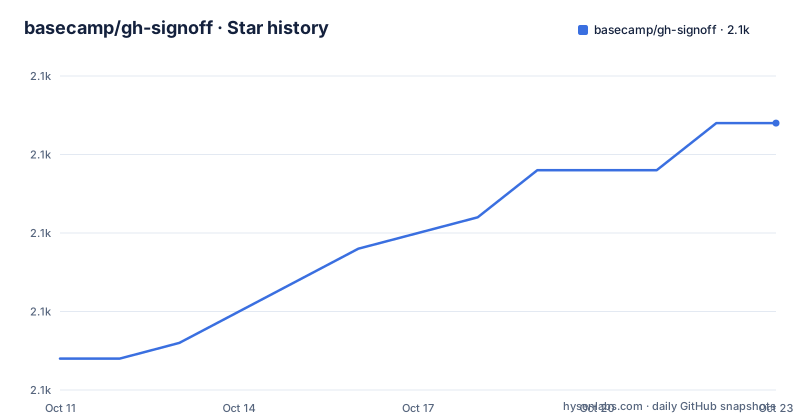
Star history
- basecamp/gh-signoff2,092 ★ · +15
| Repository | 2026-10-11 | 2026-10-22 |
|---|---|---|
| basecamp/gh-signoff | 2.1k | 2.1k |
15 Stars in the last 11 days, measured from the daily GitHub snapshot. Compare with other projects
Editorial analysis
What gh-signoff replaces and what it leaves to you
Cloud CI runners give teams repeatable builds and parallel execution. For projects that already have good test and push discipline, that machinery adds cost without adding signal. Basecamp's position is direct: developer laptops are fast and chronically underutilized, while cloud CI services are slow, expensive and rented.
What gh-signoff addresses is a workflow gap rather than a technical one. GitHub's merge requirements can block a pull request unless a commit status shows green. Getting that green status has historically meant either skipping it entirely or paying for a cloud runner. gh-signoff adds a third path: run your test suite on your own machine, and when the tests pass, call gh signoff to post the status directly to GitHub. The repository root holds 6 top-level entries: CHANGELOG.md, MIT-LICENSE, README.md, bin/, gh-signoff and test/.
The project comes from Basecamp and ships as a Shell extension under the MIT license. Its most recent release is v0.4.1, with the repository last pushed on 2026-08-22. What gh-signoff does not supply is test execution, environment isolation, caching, parallelism or any of the infrastructure a cloud runner provides. You bring the tests; it posts the result.
Installing the extension and posting the first status
gh-signoff is a GitHub CLI extension, so the GitHub CLI itself must be present before installing it. Once it is, the extension installs with one command.
gh extension install basecamp/gh-signoffAfter that, the workflow is two steps: run your tests, then call gh signoff when they pass.
gh signoffThat posts a commit status to GitHub for HEAD. The status appears on the commit and, if a branch protection or ruleset requires it, satisfies that requirement. No runner is involved, no YAML is written and no build queue is waited on.
By default, signoff requires HEAD to be contained in @{push}. When @{push} does not resolve, the extension falls back to @{upstream} only in one narrow case: push.default simple or unset, an upstream on a real remote whose single push URL matches its fetch URL, and no pushRemote, pushDefault or push-refspec rerouting. If none of those conditions hold, signoff refuses entirely. CI worktrees that check out a differently-named tracking branch should run git config push.default upstream to avoid that refusal.
The -f flag overrides the cleanliness check when needed. It is the escape hatch for cases where the normal resolution would report published work as unpushed, such as a stale tracking ref on a new clone.
How the extension resolves which commit to post before it contacts GitHub
Before gh-signoff posts anything, it verifies that the commit is actually on a remote. That check exists because signing off a commit that no one else can see would be meaningless as a CI gate.
When the tracking ref is stale or absent, the extension does not refuse immediately. It fetches the remote once and rechecks before deciding. A CI runner's slot and any second machine are the two named cases where this fetch-and-recheck step matters, since both can have a stale or missing tracking ref without meaning the commit was never pushed. The same logic applies to --commit when deciding whether a given SHA has landed on any remote.
Fork pull requests introduce a separate complication. A branch checked out from a cross-repository pull request via gh pr checkout tracks a bare URL rather than a named remote, so neither @{push} nor @{upstream} resolves normally. In that case, signoff issues one git ls-remote call against the tracked URL and accepts HEAD when it matches the advertised tip. If the tip is not already in the local repository, or if a push would not provably land on the same URL, the extension refuses rather than guess.
Silently posting a green status for a commit that has not reached the target repository is not an option the extension will take.
--commit lets you sign off a commit that is not HEAD
gh signoff targets HEAD by default. For stacked or virtual branches, the commit under test may not be what is currently checked out. The --commit flag handles that case.
gh signoff --commit abc1234
gh signoff --commit HEAD~1 tests
gh signoff status --commit abc1234
The flag accepts anything that git rev-parse resolves. The same cleanliness requirement applies: the commit must be on a remote. A commit that has not been pushed cannot be signed off without -f, which overrides the cleanliness check.
GitButler is named as one example context where this matters. With virtual branches, the branch whose commit you want to sign off may not be the one currently checked out, so the ability to target an arbitrary SHA is the difference between the extension being usable and being blocked in that workflow.
Without -f, a local-only commit is refused. For normal pre-push workflows, this is rarely an issue since tests run before the push. It becomes relevant when using commit-before-push patterns where the test run and the push happen in sequence but are not atomic.
gh signoff fail marks a broken run when silence looks like never ran
A CI process that dies silently is harder to debug than one that leaves a visible failure. gh signoff fail exists for that case.
gh signoff fail
gh signoff fail tests
gh signoff fail --commit abc1234 --description "suite exploded"
gh signoff fail --commit "$SHA" --url "$RUN_URL"
The failure status is a warning, not an attestation. That distinction is why no cleanliness check applies and no git identity is needed. The only requirement is that GitHub already knows the commit. The default description is the user's name followed by ": CI failed", or just "CI failed" on a checkout with no identity configured. GitHub caps descriptions at 140 characters and cuts longer ones to fit.
The fail subcommand is useful on an actual CI runner where a crashing test runner may exit without calling any notification step. A job that crashes before the test report is written will otherwise leave the commit with no status at all, which GitHub cannot distinguish from a job that was never scheduled. A red status makes the failure visible immediately.
One naming detail from v0.4.0: fail is now a command word alongside create and check. A context literally named fail is still reachable, but through gh signoff create fail rather than gh signoff fail.
gh signoff install writes a repository ruleset, not branch protection
Requiring signoff before merging is optional. When you want it enforced at the repository level, gh signoff install sets it up.
gh signoff installThis creates a repository ruleset named signoff (or signoff (<branch>) for a non-default branch) that requires the signoff commit status, blocks force pushes and blocks branch deletion. Repository admins can bypass it. That admin bypass matches how signoff has always worked. The install subcommand arrived in v0.4.0, released on 2026-08-22, which introduced the ruleset-based approach in place of the earlier branch-protection model.
The extension manages only its own namespace inside the ruleset. Any other check, rule, admin-bypass setting or enforcement setting already present is preserved across install and uninstall. Only signoff checks, specifically unpinned signoff and signoff/<context> statuses, are added or removed.
Uninstall deletes the ruleset only when it is pristine: nothing but the shape gh-signoff writes, no foreign checks or rules, a non-strict policy, its default admin bypass and its canonical targeting. If anything has been customized, uninstall removes only the signoff checks and leaves the ruleset intact. Two rulesets sharing the reserved name will cause the extension to refuse to act until the duplicate is removed.
The --url flag and what happens when no target_url is set
Every GitHub commit status carries a Details link, and without a target_url value that link is inert. The --url flag gives it a real destination.
gh signoff --url "$RUN_URL"
git config signoff.url https://ci.example.com/runs
--url wins over the git config value. When neither is set, the status carries no target_url at all: an inert link is better than a boilerplate one that sends people to a dead end when they expect CI results. Only http and https URLs are accepted. A bad signoff.url value in git config is refused before anything is posted.
For a developer who signs off manually before each push, the bare status is sufficient. For a team running the extension from an actual CI runner, pointing the link at the run log makes the status far more actionable than a bare green or red indicator. The extension does not validate that the URL resolves to anything real. It checks the scheme and refuses on a bad config value, but whether the link actually returns a response is left to the person posting the status.
Editorial conclusion
gh-signoff suits teams that already run tests locally and only need GitHub to record when they pass. It is a poor fit for parallel jobs, matrix builds or anything that depends on a fresh environment. Before adopting it, run gh extension install basecamp/gh-signoff in a test repository and then call gh signoff install on a branch with no existing ruleset. If your repository has a custom ruleset already, read the uninstall conditions before proceeding: a customized ruleset is never deleted automatically, so a stale signoff check can persist after you think you have removed it.
Frequently asked questions
How do I install gh-signoff?
The GitHub CLI must be present first. Once it is, run gh extension install basecamp/gh-signoff. After that, gh signoff is available as a subcommand of gh.
Does gh-signoff check that my commit is on a remote before posting?
Yes. By default, signoff requires HEAD to be contained in @{push}. If the tracking ref is stale or absent, the extension fetches the remote once and rechecks before deciding whether to refuse.
Can gh-signoff work with stacked or virtual branches?
Yes, using the --commit flag. It accepts anything that git rev-parse resolves, so you can target a specific SHA or a relative ref like HEAD~1 instead of the currently checked-out commit. The commit still must be on a remote unless you pass -f.
How do I require signoff before merging a pull request?
Run gh signoff install in the repository. It creates a ruleset named signoff that requires the signoff commit status and blocks force pushes. Repository admins can bypass it.
What does gh signoff fail do?
It posts a red commit status to GitHub without a cleanliness check. No git identity is required. The default description is the user's name followed by CI failed, and GitHub caps descriptions at 140 characters.
Official sources
Add this badge to your README
If you maintain this project, the badge below links readers to this analysis and shows its maintenance status from the daily GitHub snapshot. Paste the markdown into your README; add ?metric=license or ?metric=stars to the image URL for a different field.

[](https://hysenlabs.com/projects/basecamp-gh-signoff)Star history chart for your README
[](https://hysenlabs.com/projects/basecamp-gh-signoff)Was this useful?