Vocalinux: On-Device Voice Dictation for Linux with Three Engine Choices
Project brief: Free, open-source, 100% offline voice dictation for Linux. Speak and type anywhere via whisper.cpp, Whisper & VOSK engines, GPU-accelerated, works on X11 + Wayland!
At a glance
- What is it?
- Vocalinux is a free, AGPL-3.0 desktop app that turns speech into text in any Linux application, using local models and three optional recognition engines. It targets X11 and Wayland, with GPU acceleration via Vulkan, but its installer and engine quirks deserve scrutiny before adoption.
- Who is it for?
- Adopt Vocalinux if you need fully offline, on-device dictation across Linux applications and can accept the AGPL-3.0 license and the need to download models once. Skip it if you require a commercial license, need NVIDIA-only PyTorch acceleration, or want a single supported engine rather than three choices to manage.
- Can I use it commercially?
- Yes, with strict conditions. AGPL-3.0 is a network copyleft licence: if people use a modified version over a network, for example as a hosted service, you must offer them its source code under the same licence.
- Is it still maintained?
- Yes. The repository received new commits within the last day.
- What is it written in?
- Mainly Python, according to GitHub's language statistics.
Answers come from the project's GitHub data, last synced on November 14, 2026, and from our analysis. They are not legal advice.
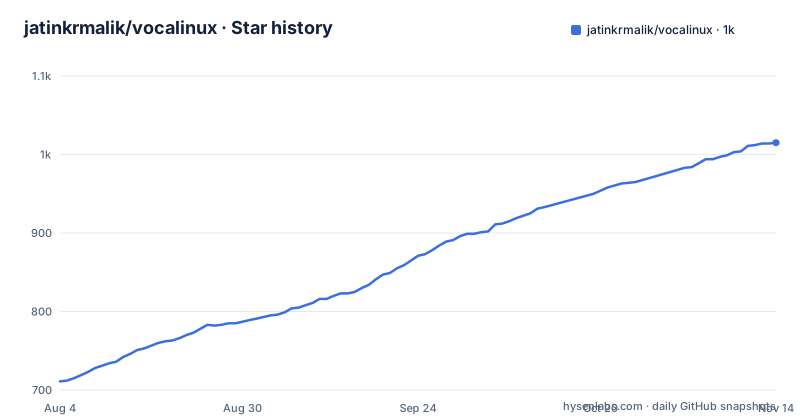
Star history
- jatinkrmalik/vocalinux1,015 ★ · +304
| Repository | 2026-08-04 | 2026-11-14 |
|---|---|---|
| jatinkrmalik/vocalinux | 711 | 1k |
304 Stars in the last 102 days, measured from the daily GitHub snapshot. Compare with other projects
Editorial analysis
What Vocalinux Solves and Who It Is For
Linux has long lacked a polished voice dictation tool that works system-wide. Vocalinux addresses that by providing a desktop application that transcribes your speech into any application, whether you are using X11 or Wayland. The target user is someone who wants to type hands-free without sending audio to a cloud service. The README emphasizes that after downloading a model, speech-to-text stays on your machine. This is particularly relevant for privacy-conscious users, journalists, developers, or those with accessibility needs who cannot rely on proprietary or networked dictation. The project positions itself as 'free, open-source, 100% offline voice dictation,' and the license is AGPL-3.0, which aligns with other VocaHQ projects. If you need dictation for a project with strict licensing requirements, the AGPL-3.0 is a significant factor to evaluate, though it is not legal advice.
Three Engines: whisper.cpp, OpenAI Whisper, and VOSK
Vocalinux does not lock you into one recognition engine. The default is whisper.cpp, a high-performance C++ implementation that works with any GPU via Vulkan. The second option is OpenAI Whisper, which is PyTorch-based and, according to the README, supports NVIDIA GPUs only. The third is VOSK, described as lightweight and suitable for older systems. This choice is a double-edged sword. On one hand, it lets users match the engine to their hardware: whisper.cpp for general GPU acceleration, Whisper for NVIDIA users who want the original model, VOSK for low-resource machines. On the other hand, it means the project must maintain integration with three different backends, each with its own dependencies and quirks. The v0.16.0 release notes mention fixes for GPU and AppImage handling, but they also show that engine-specific issues persist. For example, the Test Dictation feature was fixed to not report no speech when recognition never started, which suggests that engine startup failures were a real problem. Users should expect to configure and possibly troubleshoot the engine they pick.
How It Works: Local Models, Vulkan, and System-Wide Injection
The core mechanism is straightforward: you download a speech model once, and then Vocalinux runs recognition locally. The README states that models are downloaded once, and after that, speech-to-text stays on your machine. The app uses system tray integration to show listening status, and you control it with keyboard shortcuts: toggle mode or push-to-talk. The default for new installs is hold Right Alt for push-to-talk, as noted in v0.16.0. Audio feedback is provided via tones, with a tone picker that includes options like Lift, Flick, Ember, and others. The transcription is injected into whatever application has focus, which is how it works universally across apps. On Wayland, this injection is more complex than on X11, and the release notes mention safer scoped injection and IBus engine restore after teardown, indicating that input method handling is a delicate part of the system. GPU acceleration is automatic via Vulkan, which supports AMD, Intel, and NVIDIA. However, the README also notes that the installer skips software Vulkan and honors bundled GPU libraries, so users with older GPUs or missing Vulkan drivers may fall back to CPU, which could be slow. The documentation does not specify minimum RAM or CPU requirements, so performance on low-end hardware is uncertain.
Getting It Running: Installer and Setup Commands
The recommended installation method is an interactive installer that you fetch with curl. The README gives this exact command: `curl -fsSL raw.githubusercontent.com/VocaHQ/vocalinux/main/install.sh -o /tmp/vl.sh && bash /tmp/vl.sh`. The installer auto-detects your hardware, including GPU, RAM, and Vulkan support, and recommends the best engine. You can choose between whisper.cpp, Whisper, or VOSK during setup. The installer also requires `python3-gi` from your distro, and the release notes mention a Justfile and uv lockfiles for the installer. This is a change from earlier versions that may have used pip for PyGObject; v0.16.0 explicitly says 'no pip sdist of PyGObject,' which means you need the distro package. For Arch users, there is an AUR package. The app is also available on PyPI, but the installer is the primary path. After installation, you download a model through the graphical settings, and then you can start dictating. The settings dialog is graphical and includes pages for Speech Engine, Recognition, Audio, Performance, General, and Advanced. There is also a log viewer for debugging. If you prefer manual installation, the repository likely contains a Justfile, but the README does not provide direct commands beyond the installer.
Real Limitations and Failure Modes
The biggest limitation is that the installer and engine setup are not foolproof. The v0.16.0 release notes list several fixes that hint at prior pain points: 'filter unsafe virtual capture devices,' 'restore after ydotool paste,' and 'engine restore after teardown.' These are not marketing bullet points; they are bug fixes for real edge cases. For example, the clipboard restoration after ydotool paste suggests that the paste mechanism can fail or interfere with the clipboard, which could be annoying if you rely on copy-paste while dictating. Another limitation is that the OpenAI Whisper engine is NVIDIA-only, so if you have an AMD GPU and want the original Whisper model, you are out of luck; you must use whisper.cpp or VOSK. Also, the README states that the installer skips software Vulkan, which means if your hardware does not have Vulkan drivers, the app may not use GPU acceleration, and CPU transcription could be slow. The documentation does not mention any offline model size or storage requirements, so you need to check the model sizes separately. Finally, the project's license is AGPL-3.0, which is more restrictive than MIT or BSD; if you plan to integrate this into a proprietary product, you may need to open your source or find an alternative.
Alternative: Comparing with Other Linux Dictation Tools
The most direct alternative is to use a browser-based dictation tool like Google Docs voice typing, but that requires an internet connection and a browser, and it does not work system-wide. For a native approach, you could use the open-source project `nerd-dictation`, which uses VOSK and also works offline, but it typically requires manual setup with a virtual microphone and does not offer a graphical settings interface or multiple engines. Another alternative is `Whisper` itself via a command-line script, but that does not provide system-wide injection or a tray icon. The key difference is that Vocalinux is a full desktop application with a graphical settings dialog, system tray integration, and push-to-talk support, whereas other tools are often scripts that you run manually. Vocalinux also abstracts the engine choice, so you can switch without rewriting your workflow. However, that abstraction adds complexity. If you only need dictation in a specific app, a simpler tool might be easier to maintain. The README does not mention any built-in comparison, but the existence of three engines suggests that the project tries to cover a wide range of hardware, which is a different approach from single-engine tools.
Maintenance and Upgrade Costs
Vocalinux is under active development, with nightly builds and a recent v0.16.0 release. The project has an in-app update checker that checks stable and nightly channels and shows a tray notification when a newer release is available. This is a plus for maintenance, as users are informed of updates. However, the release notes also show that the installer is still being hardened; v0.16.0 mentions 'Justfile, uv lockfiles, distro python3-gi required' and notes that 'Epic #701 still open.' This suggests that installation may change between versions, and users may need to re-run the installer or update dependencies. The README points to `docs/UPDATE.md` for updating instructions, but the truncated material does not include its content, so we cannot confirm the exact upgrade steps. The license is AGPL-3.0, which means if you modify the code and distribute it, you must provide source under the same license. For personal use, this is not a concern, but for organizations, it is a factor. The project also has a Discord and X presence, which may be useful for support, but the README does not specify response times or support guarantees.
Editorial conclusion
Adopt Vocalinux if you need fully offline, on-device dictation across Linux applications and can accept the AGPL-3.0 license and the need to download models once. Skip it if you require a commercial license, need NVIDIA-only PyTorch acceleration, or want a single supported engine rather than three choices to manage. Before deploying, verify the installer's handling of python3-gi on your distro, confirm Vulkan support for your GPU, and test the push-to-talk shortcut on your window manager. The project is actively maintained with nightly builds, but the v0.16.0 notes show that installer hardening and engine-specific issues are still in flux, so check the latest release notes for your desktop environment.
Frequently asked questions
how to use vocalinux
Run the installer, which detects your hardware, recommends an engine, downloads a default model and sets up desktop integration. New installs bind push-to-talk to holding the right Alt key and existing configurations keep their own shortcut. After that, focus any application and dictate; text is injected through a chain of synthetic keyboard methods with a clipboard fallback.
Which speech engines does Vocalinux support?
Five local ones: whisper.cpp as the default with Vulkan across AMD, Intel and NVIDIA, OpenAI's Whisper on a PyTorch path with NVIDIA and CUDA, a faster Whisper variant that is CPU-friendly through CTranslate2 with int8, VOSK for low memory, and Parakeet on CPU through sherpa-onnx covering 25 European languages. An optional remote HTTP API and a local gateway are also selectable and are both marked as not on-device.
How does Vocalinux type text on Wayland?
Through the input-method bus, a Wayland virtual keyboard tool, a ydotool variant, or a clipboard fallback, with an X11 automation tool used on X11. The AppImage still requires these host injection tools to be installed separately, so the single-file build is portable in packaging but not in dependencies.
What does the Vocalinux AppImage require?
It is built against glibc 2.35, so Debian 12 or newer, Ubuntu 22.04 or newer, Fedora 36 or newer, Arch, or Tumbleweed. Host text-injection tools are still required. Current AppImages rebuild whisper.cpp with Vulkan and use the host GPU driver, and the documentation recommends the installer instead when you want system dependencies, a CUDA build and models configured automatically.
Is Vocalinux available on Flathub?
No. Flatpak installs come from a self-hosted project remote on the organisation's GitHub Pages, which adds that remote and resolves the GNOME runtime through Flathub. You can also sideload a release bundle, which the documentation notes does not auto-update, or build locally against the GNOME platform and SDK version 50. The Snap channel is also an edge channel.
Official sources
Add this badge to your README
If you maintain this project, the badge below links readers to this analysis and shows its maintenance status from the daily GitHub snapshot. Paste the markdown into your README; add ?metric=license or ?metric=stars to the image URL for a different field.

[](https://hysenlabs.com/projects/jatinkrmalik-vocalinux)Star history chart for your README
[](https://hysenlabs.com/projects/jatinkrmalik-vocalinux)Was this useful?