Beekeeper Studio: a GPLv3 SQL client for Postgres, MySQL and SQLite, with paid database drivers
Modern and easy to use SQL client for MySQL, Postgres, SQLite, SQL Server, and more. Linux, MacOS, and Windows.
At a glance
- What is it?
- Beekeeper Studio is a cross-platform desktop SQL editor and database manager. The community edition covers Postgres, MySQL, SQLite, SQL Server and a handful of others under GPLv3; the long tail of databases sits behind a paid licence in the same repository.
- Who is it for?
- Adopt Beekeeper Studio if your daily work is Postgres, MySQL, SQLite, SQL Server, MariaDB, CockroachDB, Redshift, TiDB, BigQuery, Redis or GreengageDB, and you want a desktop client you can audit under GPLv3. Do not adopt it expecting the paid drivers for free: Oracle, Cassandra, MongoDB, ClickHouse, DuckDB and the rest are marked as paid-edition features in the README table, and the commercial code carries a separate licence.
- Can I use it commercially?
- Check first. The repository uses a licence we do not classify automatically, so read its LICENSE file before any commercial use.
- Is it still maintained?
- Yes. The repository last received commits 1 day ago.
- What is it written in?
- Mainly TypeScript, according to GitHub's language statistics.
Answers come from the project's GitHub data, last synced on November 14, 2026, and from our analysis. They are not legal advice.
Star history
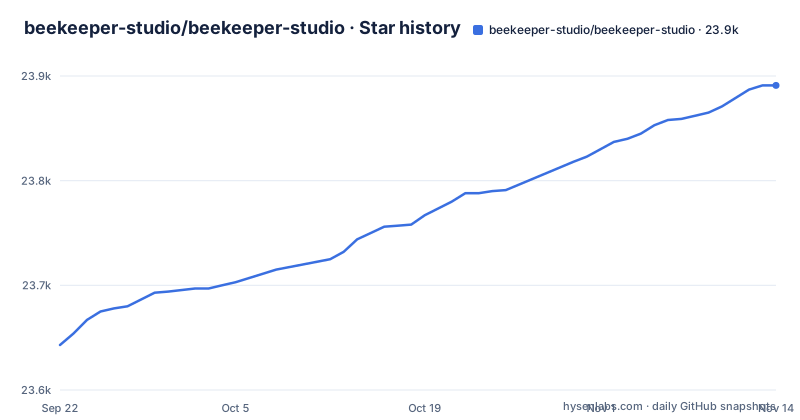
- beekeeper-studio/beekeeper-studio23,891 ★ · +248
| Repository | 2026-09-22 | 2026-11-14 |
|---|---|---|
| beekeeper-studio/beekeeper-studio | 23.6k | 23.9k |
248 Stars in the last 53 days, measured from the daily GitHub snapshot. Compare with other projects
Editorial analysis
What Beekeeper Studio is for, and who it leaves out
Beekeeper Studio is a desktop application for writing SQL and browsing database structure. The README describes it as a cross-platform SQL editor and database manager for Linux, Mac and Windows, and the repository ships binaries for all three. The audience is the developer or analyst who wants a graphical client that opens quickly, rather than a full IDE with a plugin ecosystem.
The supported-databases table splits the audience in two. Postgres, MySQL, SQLite, SQL Server, Amazon Redshift, CockroachDB, MariaDB, TiDB, BigQuery, Redis and GreengageDB are marked as Community and Paid Editions, meaning the community build can connect to them. Oracle, Cassandra, ScyllaDB, Firebird, LibSQL, ClickHouse, DuckDB, SQL Anywhere, MongoDB, Trino, Presto, SurrealDB, Snowflake and DynamoDB are marked Paid Editions only. DynamoDB is additionally flagged as beta support, and SAP HANA is listed as coming soon.
That split is the single most important fact about the project. If your work is Postgres and SQLite, the free download is the whole product. If your work is Oracle and MongoDB, the free download is a demo of a different product.
How the app is put together: Electron, a UI kit workspace, and a licence boundary inside one repo
The repository is a pnpm workspace monorepo, with pnpm-workspace.yaml and pnpm-lock.yaml at the root, and the root package.json marks the root package private. Scripts at the root delegate into the workspace named beekeeper-studio for the Electron build and dev server, and into @beekeeperstudio/ui-kit for the shared component library.
The root bks:dev script hands off to the Electron serve command in the beekeeper-studio workspace, and a separate lib:build script builds the UI kit.
The licence boundary is physical, not logical. The README states that most of the code is open source under GPLv3, and that paid features are also in this repository under a commercial source-available licence. The top level confirms it with two separate files: LICENSE.md and LICENSE-COMMERCIAL.md. The top-level listing has no separate folder for paid code, so a reader auditing the repository has to establish which licence applies where. That is a real friction point for anyone whose legal review expects a clean split.
The docker-compose.yml at the root is a development fixture, not a deployment recipe. It defines named volumes and services for Postgres at several versions, MySQL, MariaDB, CockroachDB, Oracle XE 18, Cassandra, ScyllaDB, BigQuery, Firebird, MongoDB, SQL Anywhere, Redis, Greengage, StarRocks and SurrealDB, with credentials such as beekeeper and example. Note that many of those services correspond to databases the community edition cannot connect to. The compose file exists so maintainers and contributors can test driver code across the whole matrix, including the paid half.
Installing Beekeeper Studio and connecting to a first database
The README does not give command-line install instructions. It points at a download page, stating that binaries are published for MacOS, Windows and Linux, and that the app is free to download with no sign-up, registration or credit card required. So the supported path is the published binary. If you want to build from source instead, the root package.json is the reference.
Building from source uses pnpm, because the repository is a pnpm workspace with a pnpm-lock.yaml at the root. The root script that builds the Electron app is:
pnpm bks:buildFor a development run, the root provides a script that starts the Electron dev server:
pnpm bks:devTests are split by kind at the root. Unit tests go through one script, end-to-end tests through another:
pnpm test:unit
pnpm test:e2e
The repository also carries a .nvmrc and a mise.toml, which is where the expected Node version lives. Check those before running any of the commands above.
Once the app is open, the first real use is a connection. The README links per-database connection documentation under docs.beekeeperstudio.io for SQLite, CockroachDB, BigQuery, Redis, Greengage, Oracle, Firebird, ClickHouse, DuckDB, MongoDB, Trino, SurrealDB, DynamoDB and Snowflake. If you would rather test against a throwaway server than a real one, the repository's docker-compose.yml defines a Postgres 15 service on host port 5435 with user postgres, password example and database load_test_db, plus a MongoDB service on 27017 with root user beekeeper and password example. Those credentials are development fixtures and should never be reused anywhere that matters.
Where the free edition stops: the paid driver wall
The most concrete limitation is not a bug, it is the product boundary. The README's table marks Community support with a checkmark only for the databases listed in the first section above. Everything from Oracle onward in that table has an empty Community column. A user who downloads the free build and then tries to connect to MongoDB, ClickHouse or DuckDB will find the feature gated, not broken.
The table is the authoritative source for which engines the community build can open, so read it before you download.
The second limitation is the licence mix. GPLv3 for most of the code, a commercial source-available licence for the paid features, both in one repository, both under a root package.json that itself declares MIT. Three licence identifiers appear in one project tree. That is not necessarily a problem for an end user running the binary, but it is a problem for anyone planning to embed, redistribute or fork. The licence paragraph at the top of the README does not say which files fall under which licence.
A third, smaller point: the release history shows frequent releases, with v6.2.0-beta.2, v6.2.0-beta.3 and v6.2.0 landing between 22 and 28 October 2026, so users on the current line should expect to update often.
Beekeeper Studio vs DBeaver and TablePlus: three different answers to the same question
Against other desktop SQL clients such as DBeaver and TablePlus, the useful question is where each puts the free/paid line.
Beekeeper Studio's free tier is deliberately narrow: the eleven Community-marked databases in the README table. If your environment has one Oracle instance and one Postgres instance, the community build covers only the Postgres one, because Oracle is a paid-edition engine.
Beekeeper Studio's own distinguishing choice is the open source posture. Most of the code is GPLv3 and the repository is public, so the community edition can be inspected and built from source.
Maintenance, upgrades and what the two licences imply
The repository is not archived, and the last push was on 2026-11-02. Releases are frequent: v6.2.0-beta.2 on 2026-10-22, v6.2.0-beta.3 on 2026-10-23 and v6.2.0 on 2026-10-28. A user on the current line should plan for patch updates every few days rather than a quarterly cadence, which is good for fixes and mildly annoying for anyone pinning versions.
For contributors, the upgrade cost is concentrated in the workspace build. The root scripts keep the @beekeeperstudio/ui-kit build (lib:build) separate from the app build (bks:build), so a contributor has two workspaces to keep building. The docker-compose.yml is the other maintenance surface: it pins an Oracle XE 18 image, a Sybase image for the SQL Anywhere service, and several Postgres and MySQL versions, all of which drift over time.
On licensing, the honest summary is that the project has three licence identifiers in play. LICENSE.md covers the GPLv3 portion, LICENSE-COMMERCIAL.md covers the paid features, and the root package.json declares MIT for the monorepo scaffolding. The README says most of the code is GPLv3 and that paid features are commercial source-available. It does not publish a file-level map. If you are redistributing the application, bundling it into a product, or forking the paid features, get your own legal review of those three files rather than relying on the README's one-sentence summary. This is not legal advice, and the repository does not give any either.
Editorial conclusion
Adopt Beekeeper Studio if your daily work is Postgres, MySQL, SQLite, SQL Server, MariaDB, CockroachDB, Redshift, TiDB, BigQuery, Redis or GreengageDB, and you want a desktop client you can audit under GPLv3. Do not adopt it expecting the paid drivers for free: Oracle, Cassandra, MongoDB, ClickHouse, DuckDB and the rest are marked as paid-edition features in the README table, and the commercial code carries a separate licence. Before you commit, confirm two things on your own machine: that your distribution's package path or the published binary opens your target database, and that the feature you actually need is not one of the paid rows in the supported-databases table. The repository's own docker-compose.yml, with its Postgres, MySQL, MariaDB, CockroachDB and Oracle service definitions, is the fastest way to check the first point without touching production credentials.
Frequently asked questions
What is Beekeeper Studio used for?
It is a cross-platform SQL editor and database manager for Linux, Mac and Windows, used to connect to a database, write SQL and browse schema. The README lists full support for Postgres, MySQL, SQLite, SQL Server, Redshift, CockroachDB, MariaDB, TiDB, BigQuery, Redis and GreengageDB in the community edition.
Is Beekeeper Studio free?
The README states the app is free to download with no sign-up, registration or credit card required, and that it provides a lot of features for free. It also states that some premium features require a paid licence fee, and the supported-databases table shows which engines are community versus paid editions.
Is Beekeeper Studio open source?
The README states that most of the code in the repository is open source under GPLv3, and that paid features are also in the repository under a commercial source-available licence. The root contains both LICENSE.md and LICENSE-COMMERCIAL.md, and the root package.json declares MIT for the monorepo itself.
How do I install Beekeeper Studio?
The README points to a download page and says binaries are published for MacOS, Windows and Linux rather than giving command-line install steps. To build from source, the root package.json provides pnpm bks:build for a production build and pnpm bks:dev to start the Electron development server.
How much does Beekeeper Studio cost?
The README says the app is free to download and provides many features for free, and that premium features are available for a licence fee, linking to a pricing page for details.
Official sources
Add this badge to your README
If you maintain this project, the badge below links readers to this analysis and shows its maintenance status from the daily GitHub snapshot. Paste the markdown into your README; add ?metric=license or ?metric=stars to the image URL for a different field.

[](https://hysenlabs.com/projects/beekeeper-studio-beekeeper-studio)Star history chart for your README
[](https://hysenlabs.com/projects/beekeeper-studio-beekeeper-studio)Was this useful?