rclone-ui ships as a Tauri desktop app with eight install routes and a half-working build matrix
The cross-platform GUI for rclone & S3.
At a glance
- What is it?
- rclone/rclone-ui is a TypeScript GUI that sits on top of rclone to manage remotes and tasks. This article covers how to install it, how it is built, and the gaps in what the README tells you.
- Who is it for?
- Use rclone-ui if you want a graphical front end for rclone remotes and tasks on Windows, macOS or Linux, and you are comfortable installing it from a package manager or a signed download. Skip it if you need documented feature details from the README alone, since the README is mostly install links.
- Can I use it commercially?
- Yes. Apache-2.0 is a permissive licence: you can use, modify and sell software built on it, as long as you keep its copyright and licence notices.
- Is it still maintained?
- Yes. The repository last received commits 2 days ago.
- What is it written in?
- Mainly TypeScript, according to GitHub's language statistics.
Answers come from the project's GitHub data, last synced on November 25, 2026, and from our analysis. They are not legal advice.
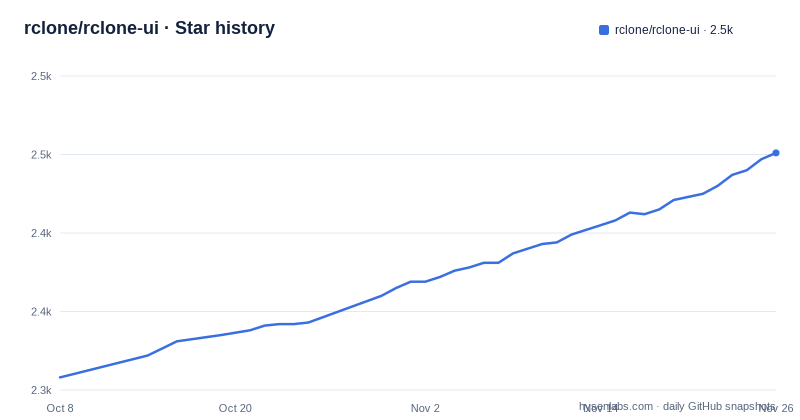
Star history
- rclone/rclone-ui2,447 ★ · +139
| Repository | 2026-10-08 | 2026-11-25 |
|---|---|---|
| rclone/rclone-ui | 2.3k | 2.4k |
139 Stars in the last 48 days, measured from the daily GitHub snapshot. Compare with other projects
Editorial analysis
Six of the eight install routes are one-line commands
The README opens with a Package Managers table rather than a feature list. Six rows carry a command, and each one is copyable as written:
flatpak install com.rcloneui.RcloneUI
brew install --cask rclone-ui
scoop bucket add extras && scoop install rclone-ui
choco install rclone-ui
winget install --id=RcloneUI.RcloneUI -e
npx rclone-ui
The last two rows are not commands. They are links to the Apple App Store and Google Play, each labelled with a tap-here line. So the project reaches iOS and Android through store listings, with no sideload instruction in the README.
The Scoop line needs the extras bucket added first, which is why it chains two commands. The `npx rclone-ui` route matches the `pub` script in package.json, `npm publish ./cli`, which publishes the `cli/` directory in the repository. The npm entry therefore comes from a separate folder from the desktop app.
Direct downloads split by operating system and chip family
A Downloads list gives short get.rcloneui.com links for each platform. Windows has an Arm build and an x64 build. macOS has Apple Silicon and Intel builds. Linux has an AppImage, a deb and an rpm, and a second Linux line repeats those three formats for Arm.
That is ten download links in four groups, and the grouping tells you what the build scripts are for. Anyone on a Linux distribution that uses neither deb nor rpm has the AppImage, or Flatpak from the package table. Anyone on Windows Arm has a dedicated download and does not need to run the x64 build under emulation.
The README does not say which of these links is signed or how to verify a download. The `.env.example` file hints at signing for macOS and Windows, covered below, but the README itself gives no checksum or verification step for any of the ten links.
Controlling a server or homelab goes through a separate guide
A short section titled Docker/Homelab/Server Usage promises control of a server, a homelab or "mom's PC" through what it calls the easiest solution to manage remote `rclone` instances. Nothing more is written in the README. There is no docker command, no port, no authentication note and no compose file.
The section ends in a single link, "Check out the guide for controlling remote instances", pointing at rcloneui.com/docs/ui/docker. For anyone who wants to run the GUI against an rclone on another machine, that page is the only documented route, and what it covers is outside what the README shows.
That gap has a consequence. If you plan to expose a remote rclone instance to your network, the security posture of that setup is not described in the repository text. Read the hosted guide before you open any port.
The shell is Tauri, so the repository mixes a TypeScript front end with src-tauri
The top-level layout shows a Vite and TypeScript front end next to a Rust shell. There are `src/`, `index.html`, `vite.config.ts`, `tailwind.config.js` and `postcss.config.js` for the web side, and a `src-tauri/` directory for the native one. A `snapcraft.yaml` sits at the root as well. Linting is handled by `biome.json`.
The package.json scripts show how they connect. `dev` runs `node scripts/buildExternal.js && vite`, and `build` runs the same external step, then `tsc`, then Vite with `--max-old-space-size=4096`. That memory flag tells you a production build is heavy enough to need a raised Node heap. The `tauri` script exposes the Tauri CLI directly, and `info` runs `tauri info`.
One script, `sources:cargo`, runs `node scripts/flatpak-cargo-generator.js`. That is the step that produces Cargo sources for the Flatpak package, which explains why Flatpak is the first row of the install table.
A script key in package.json says the targets below it do not work
Inside the scripts block there is a key literally named "below targets do not work", with the value `echo 'you heard me'`. It sits between the Windows x64 build and the Windows Arm build:
"build:windows": "tauri build --runner cargo-xwin --target x86_64-pc-windows-msvc",
"below targets do not work": "echo 'you heard me'",
"build:windows:arm": "tauri build --runner cargo-xwin --target aarch64-pc-windows-msvc",
"build:linux:arm": "tauri build --target aarch64-unknown-linux-gnu",
"build:wasm": "tauri build --target wasm32-unknown-unknown",
Read plainly, the Windows Arm, Linux Arm and WebAssembly scripts are flagged by the maintainers as broken from a local machine. Yet the README offers Windows Arm and Linux Arm downloads. The two facts fit together only if those builds come from a different pipeline than these local scripts, and the repository text does not say which pipeline that is.
If you want to build from source, the working set is the three macOS targets (`build:mac`, `build:mac:universal`, `build:mac:intel`) and `build:windows`, which uses `cargo-xwin` as its runner.
Signing credentials for Apple, Azure and the updater live in .env.example
The `.env.example` file lists what a release build wants. For macOS: `APPLE_SIGNING_IDENTITY`, `APPLE_ID`, `APPLE_PASSWORD` and `APPLE_TEAM_ID`. For Windows: `AZURE_CLIENT_ID`, `AZURE_CLIENT_SECRET` and `AZURE_TENANT_ID`. For updates: `TAURI_SIGNING_PRIVATE_KEY` and `TAURI_SIGNING_PRIVATE_KEY_PASSWORD`. A commented line marks `TAURI_DEV_HOST="0.0.0.0"` as needed on macOS.
What this means for a contributor: a local build runs without any of these, but a signed and notarized macOS build needs an Apple developer account, and a signed Windows build needs an Azure tenant. A fork that wants working auto-update has to generate its own Tauri signing key, since the updater key belongs to the upstream maintainers.
None of these values are in the repository, which is the correct state for an example file. The README does not walk through the signing setup, so you piece it together from the variable names.
Two release tag families, a contributor bounty and a React upgrade left open
The release list mixes two tag styles. `v3.7.5` was published on 2026-09-18. Two others come from a separate `cloud-` family: `cloud-v0.1.0` on 2026-09-21, and `cloud-latest`, titled "Rclone Cloud update pointer", the same day. The last push to `main` is 2026-09-21, and the repository is not archived. The README does not explain what Rclone Cloud is.
The Contributing section lists three starter tasks: fix an open issue, upgrade the repository to Vite 7 and React 19, and introduce React Compiler. Those two upgrades are named as work still to do, so the front end is on older versions of both. Merged pull requests receive a Lifetime License, which implies a paid tier exists, though the README says nothing more about licensing for the app itself. The repository code is Apache-2.0.
The Roadmap points to a V3 discussion in issue 18 and says finished items have moved to a Features section. That Features section is not in the README text, so the roadmap's own pointer leads nowhere inside the file. The README is also translated into Chinese, Japanese, Polish, German, Spanish, Romanian and a pirate version.
Editorial conclusion
Use rclone-ui if you want a graphical front end for rclone remotes and tasks on Windows, macOS or Linux, and you are comfortable installing it from a package manager or a signed download. Skip it if you need documented feature details from the README alone, since the README is mostly install links. Before choosing, read the guide for controlling remote instances at rcloneui.com/docs/ui/docker, because that is the only place the README sends you for server and homelab use.
Frequently asked questions
Is there an rclone GUI, and is rclone-ui one?
Yes. rclone-ui describes itself as the cross-platform GUI for rclone and S3, a light and transparent layer on top of rclone for managing remotes and tasks.
How do I use rclone-ui?
Install it with one of the package manager commands, such as `brew install --cask rclone-ui` or `flatpak install com.rcloneui.RcloneUI`, or download a build for Windows, macOS or Linux. For controlling remote rclone instances, the README links a separate guide.
What is rclone used for, according to the rclone-ui project?
The rclone-ui package lists cloud, storage, sync and backup among its keywords, and describes the GUI as managing rclone remotes and tasks. Its description also names S3.
Official sources
Add this badge to your README
If you maintain this project, the badge below links readers to this analysis and shows its maintenance status from the daily GitHub snapshot. Paste the markdown into your README; add ?metric=license or ?metric=stars to the image URL for a different field.

[](https://hysenlabs.com/projects/rclone-rclone-ui)Star history chart for your README
[](https://hysenlabs.com/projects/rclone-rclone-ui)Was this useful?