Realm JS: a monorepo with two release lines and a Node 20 floor
Realm is a mobile database: an alternative to SQLite & key-value stores
At a glance
- What is it?
- The Realm JavaScript SDK still runs as a local object database inside React Native, Node.js and Electron. The repository is a monorepo with two major release lines, a Babel plugin package, and a source build pinned to a CentOS 7 toolchain running Node 16.
- Who is it for?
- Adopt realm-js when your app needs a mobile database on React Native, Node.js or Electron. Do not adopt it when a Node 18 machine has to compile the SDK from source.
- Can I use it commercially?
- Yes. Apache-2.0 is a permissive licence: you can use, modify and sell software built on it, as long as you keep its copyright and licence notices.
- Is it still maintained?
- Yes. The repository last received commits 1 day ago.
- What is it written in?
- Mainly TypeScript, according to GitHub's language statistics.
Answers come from the project's GitHub data, last synced on November 13, 2026, and from our analysis. They are not legal advice.
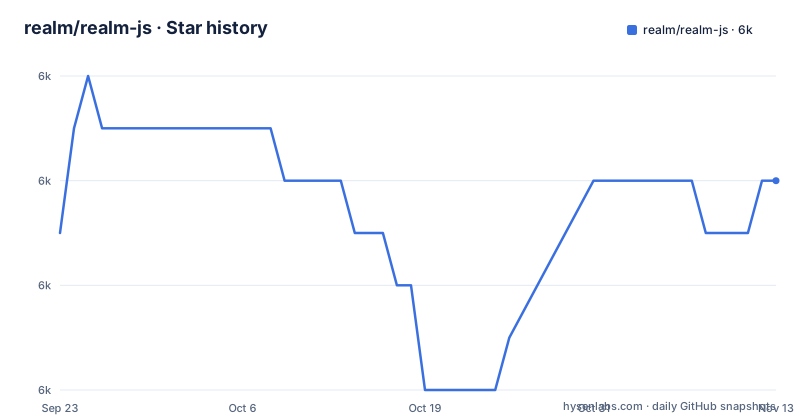
Star history
- realm/realm-js6,004 ★ · +1
| Repository | 2026-09-23 | 2026-11-13 |
|---|---|---|
| realm/realm-js | 6k | 6k |
1 Stars in the last 51 days, measured from the daily GitHub snapshot. Compare with other projects
Editorial analysis
The README opens with a sync deprecation and a community tag
The repository describes Realm as a mobile database and an alternative to SQLite and key-value stores, and it keeps a DEPRECATION.md file at the root beside its changelogs.
The code itself is not dormant. The last push landed on 2026-11-02, the licence is Apache-2.0, and MongoDB is named as the author in the root package.json. That does mean the source you would vendor is not abandoned.
Getting the package without sync: a clone, submodules, the community branch
The root package.json gives the MongoDB Realm documentation, https://www.mongodb.com/docs/realm/, as the project homepage.
A clone needs submodules, because realm-core sits at packages/realm/bindgen/vendor/realm-core/ in the workspace list and the repository ships a .gitmodules file:
git clone https://github.com/realm/realm-js.git
cd realm-js
git submodule update --recursive --init
Before running anything else, check the toolchain the repository declares for itself:
  "engines": {
    "node": ">=20",
    "npm": ">=10"
  },
To read code instead of writing it, the examples directory holds examples/rn-todo-list, examples/node-telemetry and examples/rn-multiple-realms, plus two projects named after the failure they demonstrate, examples/rn-connection-and-error and examples/node-connection-and-error.
A Task class only becomes a schema through @realm/babel-plugin
The workspace list includes packages/babel-plugin, and the root build and lint scripts both depend on its bundle step.
v20.2.0 and v12.15.0 shipped fifty-three minutes apart
The release history is the clearest signal of what happened here. On 2025-08-11, v12.15.0 was published at 16:24 UTC and v20.2.0 at 17:18 UTC, two major lines cut from the same afternoon. The React wrapper has a separate line again: realm-react-v0.20.0, published 2025-10-17, still on a 0.x version while the core package sits on v20 and v12.
Changelogs are kept per era rather than merged: CHANGELOG.md, CHANGELOG.v10.md, CHANGELOG.v11.md, CHANGELOG.legacy.md and CHANGELOG.header.md, with a DEPRECATION.md beside them. Reading those files is the only way to find out which line a given fix landed in.
For an adopting team the upgrade cost is that there is no single decision to make. `@realm/react` and the core package version independently, and choosing between the v12 and v20 lines is a choice about which deprecation notices bind you.
Node 18 for the SDK, Node 20 for the monorepo that builds it
The root package.json asks for `"node": ">=20"` and `"npm": ">=10"`, which is the floor for working inside the repository.
A contributor on Node 18 is below that floor. React Native adds its own axis, and the repository keeps a separate COMPATIBILITY.md at the root.
None of that is a reason to skip the project. It is a reason to read COMPATIBILITY.md before pinning anything.
The source build wants CentOS 7, Node 16 and CMake 3.23.2
The repository's own Dockerfile shows a build toolchain. It starts `FROM centos:7`, installs devtoolset-10, python27 and epel-release, pulls the nvm installer with curl and runs `nvm install 16`. CMake arrives as a named tarball, cmake-3.23.2-linux-x86_64.tar.gz, unpacked into /home/jenkins/cmake and put on PATH. The image also sets `NPM_CONFIG_UNSAFE_PERM true` and installs gtk3, alsa-lib and xorg-x11-server-Xvfb, the graphics stack a headless run needs.
Set that beside the `>=20` engines field and the mismatch is hard to miss: the pinned toolchain builds on Node 16 while the manifest declares Node 20 as the minimum, and the file installs no other Node version.
Two details matter to anyone wiring CI around it. The scripts go through wireit, so build depends on `./packages/realm:build:ts`, `./packages/babel-plugin:bundle`, `./packages/realm-react:bundle`, `./packages/realm-web:bundle` and `./packages/realm-tools:build` before `integration-tests/tests:build`, while lint runs `npm run lint --workspaces --if-present && trunk check --all`. The tree also carries Dockerfile.android and debian-multiarch-arm.Dockerfile next to the first file and a .dockerignore.
The legacy Chrome Debugger is the one debugging path that does not work
The workspace list includes packages/realm-react, which versions on its own release line: realm-react-v0.20.0 was published on 2025-10-17, while the core package sits on v20 and v12.
SQLite and key-value stores are the other side of the same trade
The project describes itself as an alternative to SQLite and key-value stores.
The difference in approach stands on its own. SQLite hands you tables, a query language and rows, and you normally put an ORM on top to get objects back. A key-value store gives you one blob per key and no query across values, which is a different shape of problem rather than a slower version of the same one.
The boundaries are equally concrete. The examples directory covers React Native, Node.js and Electron.
Editorial conclusion
Adopt realm-js when your app needs a mobile database on React Native, Node.js or Electron. Do not adopt it when a Node 18 machine has to compile the SDK from source. Check which of the v12 or v20 lines your lockfile resolves to, then confirm your React Native version appears in COMPATIBILITY.md.
Frequently asked questions
Is the Realm database deprecated?
The repository keeps a DEPRECATION.md file at its root. The repository itself is not archived, and the last push was on 2026-11-02.
What is Realm in software?
Realm is a mobile database, described as an alternative to SQLite and key-value stores, and realm-js is the JavaScript and TypeScript SDK for it, with examples for React Native, Node.js and Electron.
Which Node.js version does the Realm JavaScript SDK need?
The root package.json declares "node": ">=20" and "npm": ">=10" for working inside the repository, so a contributor on Node 18 sits below what the monorepo asks for.
Official sources
Add this badge to your README
If you maintain this project, the badge below links readers to this analysis and shows its maintenance status from the daily GitHub snapshot. Paste the markdown into your README; add ?metric=license or ?metric=stars to the image URL for a different field.

[](https://hysenlabs.com/projects/realm-realm-js)Star history chart for your README
[](https://hysenlabs.com/projects/realm-realm-js)Was this useful?