benjamn/recast: an AST transformer that keeps your formatting
JavaScript syntax tree transformer, nondestructive pretty-printer, and automatic source map generator
At a glance
- What is it?
- Recast parses JavaScript, lets you rewrite the syntax tree, and reprints only what you changed. It is a library for codemod authors and tooling engineers, not an application, and its guarantees come with real constraints.
- Who is it for?
- Adopt recast if you are writing codemods or refactoring tools that must leave untouched code byte-identical, and you can accept Esprima as the default parser plus extra parser packages for TypeScript or Flow. Do not adopt it if you want a general-purpose formatter, a CLI, or a tool that owns your whole build pipeline; it is a library with two main entry points and nothing else.
- Can I use it commercially?
- Yes. MIT is a permissive licence: you can use, modify and sell software built on it, as long as you keep its copyright and licence notices.
- Is it still maintained?
- Yes. The repository last received commits 13 days ago.
- What is it written in?
- Mainly TypeScript, according to GitHub's language statistics.
Answers come from the project's GitHub data, last synced on November 22, 2026, and from our analysis. They are not legal advice.
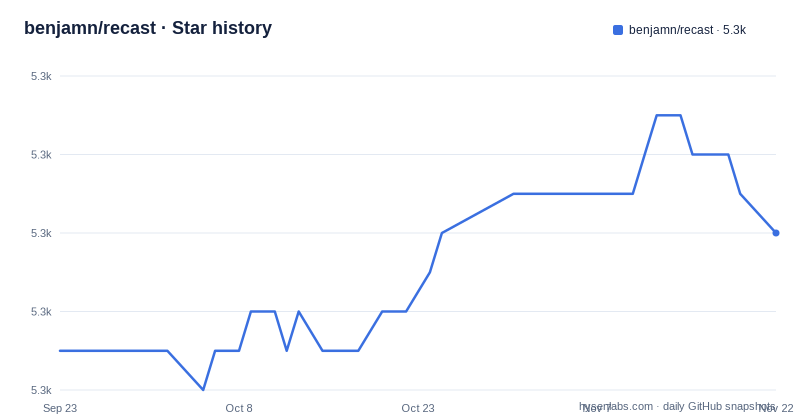
Star history
- benjamn/recast5,256 ★ · +3
| Repository | 2026-09-23 | 2026-11-22 |
|---|---|---|
| benjamn/recast | 5.3k | 5.3k |
3 Stars in the last 60 days, measured from the daily GitHub snapshot. Compare with other projects
Editorial analysis
What problem recast solves, and who actually needs it
Most code transformation tools parse source into an abstract syntax tree, mutate it, and print the result from scratch. The output is valid JavaScript but it is not your JavaScript: comments move, line breaks change, quote styles flip, and a one-line fix produces a diff that touches the whole file. That diff is the problem recast was built to avoid. It is a library for people who write codemods, migration scripts, lint autofixers, and refactoring tools, where the changed file has to look like a human edited it and not like a machine regenerated it.
The README states the central guarantee directly: recast.print(recast.parse(source)).code === source. If you parse and print without touching the tree, you get the original string back. When you do modify a node, recast reprints only that node and leaves the rest of the file alone. The README describes the fallback honestly: "Whenever Recast cannot reprint a modified node using the original source code, it falls back to using a generic pretty printer." So the worst case is local reformatting around your change, not a full-file rewrite. That is the whole pitch, and it is a narrow one. If you are not editing other people's source code programmatically, recast has little to offer you.
How recast tracks what you changed: the .original property
The mechanism is a shadow copy. When you call recast.parse, recast does not hand you the parser's tree. It makes a copy of the AST and gives every copied node a reference back to the original through a special .original property. That back-reference is what lets recast.print diff the tree you are holding against the tree that came out of the parser, and decide per node whether the original source text can be reused.
This has a direct consequence that the README calls out in bold terms: it is very important that you continue to call recast.parse rather than parsing the AST yourself with another parser. If you bypass recast.parse, the .original links never get created and the conservative printing has nothing to work from. The README also warns that if you transform the tree with Babel, you must pass cloneInputAst: false to transformFromAST, because cloning the input AST discards the .original property. Both of those are easy mistakes to make and they fail quietly: you get valid output, just reformatted output.
The default parser is Esprima, declared in package.json as esprima ~4.0.0. The README notes that Esprima supports almost all modern ECMAScript syntax, and that you swap parsers by passing a parser option to recast.parse. Any object with a parse(source) method works, and recast ships preconfigured parsers under the parsers/ directory. The README states that some of those parsers import packages recast does not depend on, so TypeScript, Flow, or Babel parsing may require installing @babel/parser, and the acorn parser requires installing acorn. Only Esprima is installed by default.
Installing recast and rewriting a function declaration
Install from npm. The package name is recast, and the README gives the command as npm install recast.
npm install recastTo parse TypeScript instead of plain JavaScript, the README shows passing one of the bundled parsers. Note the caveat above: the typescript parser pulls in @babel/parser, which recast does not install for you.
npm install @babel/parserThe README's own worked example turns a function declaration into a variable declaration. It parses a deliberately ugly function, replaces the first statement with a variable declaration built from recast.types.builders, and rotates the parameters to demonstrate that addition is commutative.
import * as recast from "recast";

const code = [
  "function add(a, b) {",
  "  return a +",
  "    // Weird formatting, huh?",
  "    b;",
  "}"
].join("\n");

const ast = recast.parse(code);
const add = ast.program.body[0];

const n = recast.types.namedTypes;
n.FunctionDeclaration.assert(add);

const b = recast.types.builders;
ast.program.body[0] = b.variableDeclaration("var", [
  b.variableDeclarator(add.id, b.functionExpression(
    null,
    add.params,
    add.body
  ))
]);

add.params.push(add.params.shift());
Calling recast.print(ast).code then produces a var declaration whose body still contains the original comment and the original line break before b. The README shows the exact output. If you want the comment gone and the formatting normalized, the README points at recast.prettyPrint(ast, { tabWidth: 2 }).code instead, which discards the original formatting entirely. Those are the two entry points: parse and print, with prettyPrint as the escape hatch.
Where recast stops being the right tool
Recast is not a formatter and it is not a codemod runner. There is no CLI in the repository layout: the top-level entries are main.ts, lib/, parsers/, types/, test/, example/, and configuration files. You write the driver yourself. If what you want is to reformat a codebase to a style guide, recast.prettyPrint is not the tool for that either, because its output is the generic printer's, not a configurable style. Prettier exists for that job and the repository itself uses prettier for its own formatting, per the format and format:check scripts.
The parser situation is the sharpest constraint. Esprima is the only parser installed by default, and the README is explicit that the TypeScript, Flow, and Babel parsers need packages you install separately. So a TypeScript codemod has a dependency you must remember, and if you forget it, you find out at runtime.
The .original requirement is a second failure mode. Any step that clones or serializes the AST between parse and print breaks the back-references. Babel's transformFromAST is the documented example, and it needs cloneInputAst: false. Other tools that deep-clone trees will have the same effect, and the symptom is reformatted output rather than an error, which makes it hard to diagnose.
Finally, the version picture is worth stating plainly. package.json declares version 0.24.0, while the most recent release tag listed is v0.21.1 from 2022-04-27. The last push to the default branch was 2026-10-18, so the repository is not archived and work continues, but the published version and the latest tagged release do not line up. If you pin by tag rather than by npm version, check which tree you are actually getting.
Recast against Babel's own transform pipeline
The obvious alternative is @babel/core with its plugin system. Babel parses, runs plugins over the AST, and generates output, and it already ships the parsers recast makes you install separately. The difference is what happens at generation time. Babel's generator prints the whole file from the tree. It preserves comments and some formatting through its own retainer logic, but it does not make the byte-identical round-trip guarantee that recast does, and it does not decide per node whether the original text can be reused.
Recast's answer is narrower and more literal: keep the original characters wherever the tree is unchanged. That is why recast.parse takes a parser option and why the README insists you call recast.parse even when you bring your own parser. It is also why the two tools are not really substitutes. Babel is a transformation framework with a plugin ecosystem and its own generator; recast is a parse-and-reprint pair you drive from your own script. The README even documents the seam between them, telling you to pass cloneInputAst: false when you feed a recast tree into Babel's transformFromAST, which is a sign that people do combine the two rather than pick one.
Licence, releases and what upgrades cost
Recast is MIT licensed, per both the LICENSE file in the repository root and the license field in package.json. MIT is permissive: it allows use, modification, and redistribution, including in closed-source products, provided the copyright notice and permission notice are kept. That is a description of the licence text, not legal advice; if your organisation has rules about bundled dependencies, run it past whoever handles that.
The dependency list is short and worth reading before you adopt: ast-types ^0.16.1, esprima ~4.0.0, source-map ~0.6.1, tiny-invariant ^1.3.3, and tslib ^2.0.1. ast-types is the same author's project and supplies the namedTypes and builders APIs used throughout the README example, so an upgrade of recast can move in step with ast-types and change the node definitions you are building against. The caret on ast-types and tiny-invariant means minor versions float; esprima and source-map are pinned to patch-level ranges within a minor.
Upgrade cost is dominated by the parser question rather than by recast itself. If you use the bundled TypeScript or Flow parsers, you own the @babel/parser version in your own dependency tree, and a Babel parser upgrade can change how your source parses independently of any recast release.
Editorial conclusion
Adopt recast if you are writing codemods or refactoring tools that must leave untouched code byte-identical, and you can accept Esprima as the default parser plus extra parser packages for TypeScript or Flow. Do not adopt it if you want a general-purpose formatter, a CLI, or a tool that owns your whole build pipeline; it is a library with two main entry points and nothing else. Before committing, verify that recast.print(recast.parse(source)).code === source holds for your own source files, confirm that the parser you need is installed alongside recast, and check package.json version 0.24.0 against the v0.21.1 release tag, because the published version and the latest tagged release do not match.
Frequently asked questions
How do I install benjamn/recast?
The README gives npm install recast as the npm command, and also documents cloning the repository into node_modules and running npm install . from inside it. Only Esprima is installed by default, so parsers such as the TypeScript or acorn ones need their packages added separately.
How do I set up benjamn/recast for a first transformation?
Import the named exports parse and print, call recast.parse on your source, mutate the returned AST, then read recast.print(ast).code. The README also shows import * as recast from "recast" and the CommonJS require form.
How do I use benjamn/recast with a different parser?
Pass a parser option to recast.parse, either an object exposing parse(source) or one of the preconfigured parsers under recast/parsers, such as recast/parsers/typescript. The README stresses that you must still call recast.parse rather than parsing the tree yourself, because that is what creates the .original back-references.
Official sources
Add this badge to your README
If you maintain this project, the badge below links readers to this analysis and shows its maintenance status from the daily GitHub snapshot. Paste the markdown into your README; add ?metric=license or ?metric=stars to the image URL for a different field.

[](https://hysenlabs.com/projects/benjamn-recast)Star history chart for your README
[](https://hysenlabs.com/projects/benjamn-recast)Was this useful?