trading-signals: streaming indicators, then a bot you drive from Telegram
Technical indicators to run technical analysis with JavaScript & TypeScript. 📈
At a glance
- What is it?
- The trading-signals monorepo is a TypeScript workspace that starts with streaming technical indicators and ends with a Telegram-controlled live trading bot, with a broker abstraction and a browser backtester in between. It suits a developer who wants typed indicators and a backtest loop, and it is a full stack rather than a single indicator library.
- Who is it for?
- Adopt the trading-signals package on its own if you want typed, streaming technical indicators in TypeScript, because the replace mode and lazy evaluation are designed for backtests and live feeds and the library has no framework around it. Do not adopt the whole monorepo as a starting point for a small indicator script, because the workspace brings Lerna, Drizzle, Zod schemas and a bot runtime with it.
- Can I use it commercially?
- Not without permission. GitHub finds no licence file in the repository, and without a licence all rights are reserved by default: you may read the code but not reuse it. Check the README, or ask the authors, before using it.
- Is it still maintained?
- Yes. The repository last received commits 2 days ago.
- What is it written in?
- Mainly TypeScript, according to GitHub's language statistics.
Answers come from the project's GitHub data, last synced on November 7, 2026, and from our analysis. They are not legal advice.
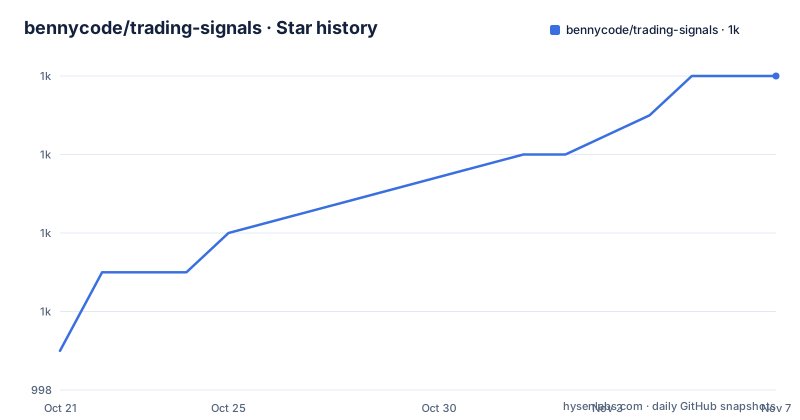
Star history
- bennycode/trading-signals1,006 ★ · +7
| Repository | 2026-10-21 | 2026-11-07 |
|---|---|---|
| bennycode/trading-signals | 999 | 1k |
7 Stars in the last 17 days, measured from the daily GitHub snapshot. Compare with other projects
Editorial analysis
Seven packages, each usable on its own
The trading-signals monorepo is described as a fully typed, modular toolkit for building algorithmic trading bots in TypeScript, from technical indicators up to a Telegram-controlled live bot, and the package table shows how it is cut.
The core is trading-signals, the popular npm library of technical indicators, SMA, EMA, RSI, MACD, Bollinger Bands and more, with streaming updates, replace mode, lazy evaluation and memory efficiency. It is described as battle-tested in production and trusted by hundreds of projects, and the topics attached to the repository confirm the range: dema, dma, ema, macd, roc, rsi, sma and smma all appear as indicator tags.
Next to it, trading-signals-cli gives terminal access to every indicator, so you can pipe candles or prices in and get the reading as JSON without writing a script.
trading-strategies combines indicators into actionable advice through a small Strategy interface that returns an OrderAdvice per candle, and ships a ProtectedStrategy base that wires stop-loss and take-profit kill switches into any subclass.
@typedtrader/exchange is the broker abstraction, with type-safe schemas through Zod, WebSocket streaming, paper and live trading environments behind one API, and Alpaca out of the box. @typedtrader/exchange-cli is the terminal counterpart for balances, instrument search, placing and cancelling orders, and streaming candles or fills as NDJSON so you can pipe into jq.
@typedtrader/messaging is the Telegram layer, with SQLite plus Drizzle for persistence. And trading-signals-docs is the documentation site and visual backtester, built with Vocs.
The README states the principle plainly: every piece is independently usable, so you can pick a package, drop it into your app, or run the whole stack.
Streaming first, with replace mode and lazy evaluation
The design decision that makes trading-signals different from a textbook indicator library is how it handles the data flow, and the README describes it as streaming-first with replace-mode and lazy evaluation for backtests and live use.
The distinction matters in a way that only shows up once you have used it. A conventional indicator function takes an array of candles and returns an array of values, so every new candle means recomputing over the whole history, and a backtest over ten thousand candles is ten thousand computations rather than one pass. A streaming indicator keeps its state and takes one new candle at a time.
Replace mode is the feature that handles the messy case. In a live feed or a backtest, the most recent candle is not final. It changes until the period closes. A streaming indicator that has already emitted a value for that candle has a problem, and replace mode is the mechanism for saying that the value for the current candle should be replaced rather than a new one appended. Lazy evaluation defers work until a value is actually read, which means an indicator you never look at costs nothing.
The strategies package builds on this, and the highlight list explains the division of labour. The Strategy interface is tiny, returning an OrderAdvice per candle, so you focus on signal logic while the framework owns session state, order placement, fills and broker quirks. The ProtectedStrategy base adds self-cleaning stop-loss and take-profit kill switches, which is the one piece of the framework that is clearly opinionated.
The tests are Vitest covered, and the repository carries a Stryker mutator setup with a Vitest runner in the dev dependencies, which is mutation testing, used to check that the test suite would notice a change in behaviour.
One strategy interface, two execution paths
The diagram of how the packages fit together is the clearest statement of the architecture, and it contains the design idea worth noticing.
At the bottom, trading-signals provides the indicators. Above it, trading-strategies turns them into advice. Two things consume the strategies, and they are deliberately parallel.
One is the TradingSession, described as online, which pairs a strategy with a broker. It sits behind @typedtrader/messaging, the chatbot. The other is the BacktestExecutor, described as offline, which replays historical candles, and it is reached from the website at typedtrader.com.
So the same Strategy object, with the same indicator calculations underneath, runs against a live broker and against a recorded history. That is the property that makes the backtester trustworthy, and it is why the visual backtester at typedtrader.com/backtest is described as letting you try any strategy against historical candles with interactive charts, trade markers and P&L statistics, tune parameters and see the results instantly with no setup.
The exchange layer is the other structural piece. @typedtrader/exchange abstracts away broker differences so strategies run against any supported exchange, with Alpaca shipping out of the box and the design open to additional brokers. The diagram names Alpaca and Trading 212, with an ellipsis for more.
The TypeScript layer is what makes the abstraction hold together rather than being a set of loosely typed adapters. Zod schemas validate the broker payloads, so a broker whose response shape drifts fails at the boundary with a schema error rather than producing undefined values deep inside a strategy.
Getting the workspace running
The quickstart is the standard monorepo sequence, and it is worth running the full test matrix before you change anything.
npm install

# Run the full test matrix across all packages
npm test

# Launch the documentation site (Vocs)
npm run start:docs

# Start the Telegram bot (requires TELEGRAM_BOT_TOKEN in your env)
npm run start:bot
The first command installs dependencies for every workspace package. The second runs the whole matrix, which as the root scripts show means the import check with knip, the TypeScript compile, and then the per-package tests with concurrency 8. That matters in a monorepo, because a broken import in one package can be invisible to that package's own tests.
The documentation site is the piece to start with. It is the visual backtester as well as the reference for the indicators, and it builds the trading-signals-docs package together with its dependencies before starting the dev server. Seeing the indicators run in the browser against real candles is a faster way to understand the library than reading its type definitions.
The bot is the last command and needs a TELEGRAM_BOT_TOKEN in the environment. It builds the messaging package and its dependencies, then starts it. There is also a start:bot:op variant that runs the same thing through op with a .env.op file, which is the pattern to follow if you would rather keep the token in a secrets manager than in a shell environment.
What the indicators are for, and what they are not
It is worth being clear about what a library of technical indicators does and does not give you, because the name invites more expectation than the contents justify.
What trading-signals provides is arithmetic. Given a series of candles, it gives you the smoothed average, the momentum oscillator, the band widths, the signal line and the histogram. The value it adds over writing those formulas yourself is typing, streaming behaviour and the replace mode, and the maturity of a library that has been in production and is used by hundreds of projects.
What it does not provide is a signal. An RSI reading of 70 says the recent moves have been strong, and nothing in the library decides whether that is a buy. That decision is the strategy layer, and even there the shape is deliberately thin: the Strategy interface takes a candle and returns an OrderAdvice, and the framework handles session state, order placement, fills and broker behaviour around it. The logic stays in your code.
The ProtectedStrategy base is the exception that proves the point, because it is where the library does have an opinion. It wires stop-loss and take-profit kill switches into any subclass, described as self-cleaning, which means the protection logic is provided rather than left for you to write correctly in every strategy.
So the honest way to evaluate this is as infrastructure rather than as a strategy. If your plan is to write your own entry and exit logic, the indicators and the backtester are the parts you will use most, and the Telegram bot and broker layer are optional depending on whether you intend to trade live from a phone. If your plan is to find a profitable strategy, nothing here shortens that path, and the visual backtester exists precisely because that path is where the work is.
The workspace tooling is the part that needs explaining
The root package.json shows a Lerna-managed workspace with independent versioning, and the scripts are worth reading because they show how the monorepo is actually maintained.
The test script is three things in sequence: test:imports, which runs knip to find unused exports and dependencies, then tsc -p tsconfig.json for a type check, then the per-package tests with lerna run, concurrency 8 and no-sort. A pretest runs lerna run dist first, so the packages are built before the tests run against them.
Linting is also three things: oxlint for code, fta packages with a config path for complexity, and oxfmt --list-different for formatting. The complexity lint is the unusual one, and it suggests the project treats complexity as a lintable property rather than a review comment.
Other scripts cover the release, which triggers a GitHub workflow with gh workflow run release.yml, and the two start targets. start:bot builds the messaging package with its dependencies and then starts it, and start:docs does the same for the documentation package. There is also a start:bot:op variant that runs through op with an environment file.
The repository layout shows the rest: a.claude/ directory and a CLAUDE.md, a.env.flags and a.env.op for environment configuration, a Procfile, a lefthook.yml for git hooks, a knip.json, an oxfmt config and an oxlint config, tsconfig files at several levels, a vitest.shared.ts, and a.nvmrc pinning the Node version.
The last push to the main branch was on 2026-10-19, and the releases are trading-strategies 0.4.5, trading-signals 8.3.0 and trading-signals-docs 2.2.0, all published on 2026-08-11, with independent versioning per package.
Editorial conclusion
Adopt the trading-signals package on its own if you want typed, streaming technical indicators in TypeScript, because the replace mode and lazy evaluation are designed for backtests and live feeds and the library has no framework around it. Do not adopt the whole monorepo as a starting point for a small indicator script, because the workspace brings Lerna, Drizzle, Zod schemas and a bot runtime with it. Before you build on the stack, backtest your strategy on the visual backtester at typedtrader.com, since the same Strategy interface drives both the offline BacktestExecutor and the live TradingSession, and remember that the exchange layer ships with Alpaca but is designed for other brokers to plug in.
Frequently asked questions
What does the trading-signals library provide?
It is a fully typed collection of technical indicators for TypeScript, including SMA, EMA, RSI, MACD and Bollinger Bands, with streaming updates, replace mode for a candle that is still changing, lazy evaluation and a focus on memory efficiency. A companion CLI gives terminal access to every indicator, so you can pipe candles or prices in and read the value as JSON.
How do I backtest a trading strategy with this project?
The visual backtester at typedtrader.com/backtest runs any strategy against historical candles with interactive charts, trade markers and P&L statistics, with no setup. Underneath, the same Strategy interface is used by the offline BacktestExecutor that replays historical candles and by the online TradingSession that pairs a strategy with a broker.
Which brokers does the @typedtrader/exchange package support?
Alpaca Trading ships out of the box, and the architecture diagram also names Trading 212, with the interface designed so additional brokers or exchanges can plug in. The exchange layer provides type-safe data transformation with Zod schemas, WebSocket candles and order updates, and paper and live trading environments behind a single API.
How do I control a trading bot with Telegram?
The @typedtrader/messaging package is the remote control layer, letting you add accounts, spin up strategies via conversational wizards, watch prices, schedule recurring reports and inspect live strategy state and configuration from chat, with persistence through SQLite and the Drizzle ORM. The bot is started with `npm run start:bot` and needs TELEGRAM_BOT_TOKEN in the environment.
Official sources
Add this badge to your README
If you maintain this project, the badge below links readers to this analysis and shows its maintenance status from the daily GitHub snapshot. Paste the markdown into your README; add ?metric=license or ?metric=stars to the image URL for a different field.

[](https://hysenlabs.com/projects/bennycode-trading-signals)Star history chart for your README
[](https://hysenlabs.com/projects/bennycode-trading-signals)Was this useful?