higgsfield-seedance2-jineng: 15 prompt skills for Seedance 2.0 video
Seedance 2.0 × Higgsfield 技能集 | 15 Claude prompt skills for AI video generation — cinematic, 3D CGI, anime, e-commerce ads, music videos & more. Each skill: 2-second hook framework, camera encyclopedia, 5+ production prompts. 含2秒钩子框架、摄像机百科、行业最佳实践提示词工程
At a glance
- What is it?
- This repository is a collection of 15 Claude skills that turn a plain description of a video into a long, paste-ready prompt for Seedance 2.0 on Higgsfield, with a two-second hook framework, a beat-by-beat timeline and a camera movement reference in each one. It is prompt text, not a model, and the copy step is manual.
- Who is it for?
- The skill collection is worth reading if you make short AI video and keep rewriting prompts from scratch, because the hook framework and the camera phrasing are reusable knowledge rather than model output, and the English and Chinese versions let a team work in either. It is the wrong choice if you want a tool that talks to Seedance for you, since nothing here calls the API, and the paste step is manual.
- Can I use it commercially?
- Not without permission. GitHub finds no licence file in the repository, and without a licence all rights are reserved by default: you may read the code but not reuse it. Check the README, or ask the authors, before using it.
- Is it still maintained?
- Activity is slowing. The repository last received commits 7 months ago.
- What is it written in?
- Mainly Shell, according to GitHub's language statistics.
Answers come from the project's GitHub data, last synced on November 7, 2026, and from our analysis. They are not legal advice.
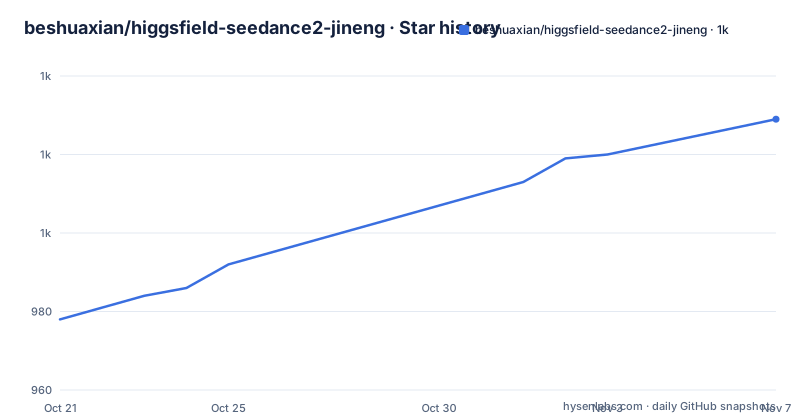
Star history
- beshuaxian/higgsfield-seedance2-jineng1,029 ★ · +51
| Repository | 2026-10-21 | 2026-11-07 |
|---|---|---|
| beshuaxian/higgsfield-seedance2-jineng | 978 | 1k |
51 Stars in the last 17 days, measured from the daily GitHub snapshot. Compare with other projects
Editorial analysis
Prompt text, packaged as Claude skills
What this repository contains is documentation in a form an assistant can read. It holds 15 Claude skills built for Seedance 2.0 on Higgsfield, and each one turns the assistant into a prompt engineer for a single video style, producing large, detailed, paste-ready prompts. The stated aim is a strong two-second hook that stops the scroll, and the workflow is four steps: copy the skill file into your Claude skills directory, describe the video you want, let Claude generate the production-ready prompt, then paste it into Seedance 2.0 on Higgsfield along with your reference material. The readme gives a worked example, where a request for a 15 second cinematic video of a lone samurai walking through foggy bamboo forest at dawn turns into a prompt of 25 lines or more, with a timeline, camera work, lighting, sound and the hook. Nothing in the repository calls Seedance. The output is a prompt you read, edit and paste, which makes this a reference and a template rather than a pipeline.
The eight parts every skill shares
The value of the collection is that every skill is built from the same eight components, so what you learn from one applies to all fifteen. The first is the 2-Second Hook Framework, which offers 10 to 12 attention-grabbing opener patterns, and it exists because a video that has not earned the first two seconds does not reach the rest. The second is timeline segmentation, a beat-by-beat breakdown of up to 15 seconds, which is the part that turns a description into a sequence a model can follow. The third is a camera movement encyclopedia with 15 to 20 or more techniques and the exact phrasing to use for each. The fourth is lighting and atmosphere, with setups that are chosen to communicate mood and quality rather than merely to be visible. The fifth is sound design, covering ambient sound, foley, music and silence. The sixth is a material reference strategy, which covers how to use the reference slots. The seventh is platform optimization, with adjustments for Douyin, TikTok, Instagram and YouTube. The eighth is five or more large example prompts, each 15 to 25 lines long and described as production quality, which is what you read to learn the house style.
Fifteen styles, and a numbering that skips
The catalogue is grouped three ways, and the grouping tells you how the author thinks about the problem. Creative styles come first: cinematic, 3D CGI, cartoon, comic to video, fight scenes and anime action. Commercial and marketing follow: motion design ad for software and SaaS launches, e-commerce ad for fashion, beauty, electronics and food, product 360 for turntable and material showcase, social hook for viral formats, and brand story for origin stories, mission and culture. Industry specific skills are last: music video for beat-synced performance and visualisers, fashion lookbook, food and beverage, and real estate for property tours and interior design. The directory numbering is worth noting because it is not contiguous in the table: the creative block runs 01, 02, 03, 04, 05 and then 08, the commercial block holds 06, 07, 09, 11 and 12, and the industry block holds 10, 13, 14 and 15. The gaps are historical rather than missing files, since the repository structure listing shows a directory for every number from 01 to 15.
The reference material rules are part of the skill
Seedance 2.0 accepts uploaded files alongside the prompt, and the skill set treats how you use those files as a craft in its own right. The material reference strategy section covers the reference slots, and the platform specs list the formats and limits. Images can be jpeg, png, webp, bmp, tiff or gif, with up to nine of them, each under 30MB. Video can be mp4 or mov, with up to three files, each under 50MB, and a combined duration between 2 and 15 seconds. Audio can be mp3 or wav, up to three files, each under 15MB, with a total duration of 15 seconds at most. Text is natural language. The combined limit is 12 files in total, and the output is a video of 4 to 15 seconds at 720p with sound. Inside a prompt, the materials are referenced by name, with the slots written as @image1, @video1 and @audio1. Knowing that the reference count is capped and the output length is short is what tells you the prompts have to be dense rather than decorative, which is consistent with the 15 to 25 line examples.
Two languages for every skill, and the repository layout
Each of the 15 skills ships twice: an English SKILL.md and a Simplified Chinese one under a zh-CN directory inside the same skill folder, so the collection is 30 SKILL.md files in total and 31,725 lines. The root readme goes further, with versions in Japanese, Korean, Spanish, German, French, Portuguese and Turkish alongside English and Simplified Chinese and a Traditional Chinese edition. The directory structure is deliberately flat so that a person can find a skill by its number:
higgsfield-seedance2-jineng/
├── README.md                          # 双语说明 Bilingual readme (this file)
├── LICENSE
├── logs.md                            # 构建日志 Build log
└── skills/
    ├── 01-cinematic/
    │   ├── SKILL.md                   # English
    │   └── zh-CN/SKILL.md            # 简体中文
    ├── 02-3d-cgi/
    ├── 03-cartoon/
    ├── 04-comic-to-video/
    ├── 05-fight-scenes/
    ├── 06-motion-design-ad/
    ├── 07-ecommerce-ad/
    ├── 08-anime-action/
    ├── 09-product-360/
    ├── 10-music-video/
    ├── 11-social-hook/
    ├── 12-brand-story/
    ├── 13-fashion-lookbook/
    ├── 14-food-beverage/
    └── 15-real-estate/
        ├── SKILL.md
        └── zh-CN/SKILL.md
The working files are plain markdown with YAML frontmatter, and the repository also holds a logs.md build log, a CHANGELOG.md, a SECURITY.md, a contributing guide, a code of conduct, a setup guide and two shell scripts, init-repo.sh and install.sh, which is why the repository's primary language is recorded as shell.
What contributing to the collection involves
The contributing rules are short and they describe the format every skill has to follow, which is a useful description of the artifact itself. Follow the SKILL.md format, with YAML frontmatter and content. Include the 2-Second Hook Framework. Include five or more large example prompts. Provide both an English and a Chinese version. Pull requests are welcome, and the point of the format rules is that a new skill is only useful if it matches the shape of the existing ones, since the whole value of the collection comes from the parts being interchangeable. A skill that skipped the hook section or shipped one example would be readable but would not be a drop-in for the workflow. The bilingual requirement is the strictest one in practice, because it doubles the writing work for every contribution, and it is also the reason the collection reads the same way in either language.
Where the collection stands
Two things are worth checking before you plan around this repository. The first is the licence, which is not declared. The repository has a LICENSE file at the root, but the licence is not identified, so if you intend to use these prompt texts inside a commercial campaign, read that file yourself rather than assuming a permissive grant. The second is the state of the tree. The last push was on 2026-04-09, and the repository publishes no GitHub releases. Pin a commit for a reproducible snapshot and consult CHANGELOG.md when updating. For a collection of prompt text, that matters less than it would for code, since the content is read and copied rather than executed, but the skills encode knowledge about how a specific model behaves, and that knowledge ages. A team that adopts this should expect to revise the skills as the model changes, which is another way of saying that the collection is a starting point for your own prompt library rather than a finished one.
Editorial conclusion
The skill collection is worth reading if you make short AI video and keep rewriting prompts from scratch, because the hook framework and the camera phrasing are reusable knowledge rather than model output, and the English and Chinese versions let a team work in either. It is the wrong choice if you want a tool that talks to Seedance for you, since nothing here calls the API, and the paste step is manual. Before you rely on it, check the Seedance input limits against your own footage, read one skill file end to end, and note that the last push was on 2026-04-09 with no tagged releases, so the collection may lag behind changes to the model.
Frequently asked questions
What is higgsfield-seedance2-jineng?
It is a collection of 15 Claude skills built for Seedance 2.0 on Higgsfield. Each skill turns Claude into a prompt engineer for one video style and produces a long, paste-ready prompt with a two-second hook, a beat-by-beat timeline, camera work, lighting, sound design and platform notes.
How do I use one of these skills?
Copy the SKILL.md file into your Claude skills directory, describe the video you want, let Claude generate the prompt with the skill, then paste the result into Seedance 2.0 on Higgsfield together with your reference material. Nothing in the repository calls the model for you.
What reference files can I pass to Seedance 2.0?
Up to nine images in jpeg, png, webp, bmp, tiff or gif format under 30MB each, up to three videos in mp4 or mov under 50MB each with a combined 2 to 15 second duration, and up to three audio files in mp3 or wav under 15MB each with 15 seconds total. Twelve files combined is the ceiling, and references are named @image1, @video1 and @audio1 in the prompt.
Which languages are the skills available in?
Every skill ships an English SKILL.md and a Simplified Chinese one in a zh-CN folder, 30 files and 31,725 lines in total, and the root readme is also published in Japanese, Korean, Spanish, German, French, Portuguese, Turkish and Traditional Chinese.
Official sources
Add this badge to your README
If you maintain this project, the badge below links readers to this analysis and shows its maintenance status from the daily GitHub snapshot. Paste the markdown into your README; add ?metric=license or ?metric=stars to the image URL for a different field.

[](https://hysenlabs.com/projects/beshuaxian-higgsfield-seedance2-jineng)Star history chart for your README
[](https://hysenlabs.com/projects/beshuaxian-higgsfield-seedance2-jineng)Was this useful?