Calva: Clojure and ClojureScript REPL development inside VS Code
Clojure & ClojureScript Interactive Programming for VS Code
At a glance
- What is it?
- Calva is a free VS Code extension that brings REPL-driven Clojure and ClojureScript development to VS Code, combining Jack-in, structural editing via Paredit, and static analysis via clojure-lsp. It covers six build tools through Jack-in, with Boot as a documented exception.
- Who is it for?
- Calva suits a VS Code user who wants to write Clojure without switching to Emacs. Jack-in, inline evaluation, Paredit, and bundled clj-kondo cover the daily Clojure workflow without requiring separate tooling.
- Can I use it commercially?
- Check first. The repository uses a licence we do not classify automatically, so read its LICENSE file before any commercial use.
- Is it still maintained?
- Yes. The repository received new commits within the last day.
- What is it written in?
- Mainly TypeScript, according to GitHub's language statistics.
Answers come from the project's GitHub data, last synced on October 23, 2026, and from our analysis. They are not legal advice.
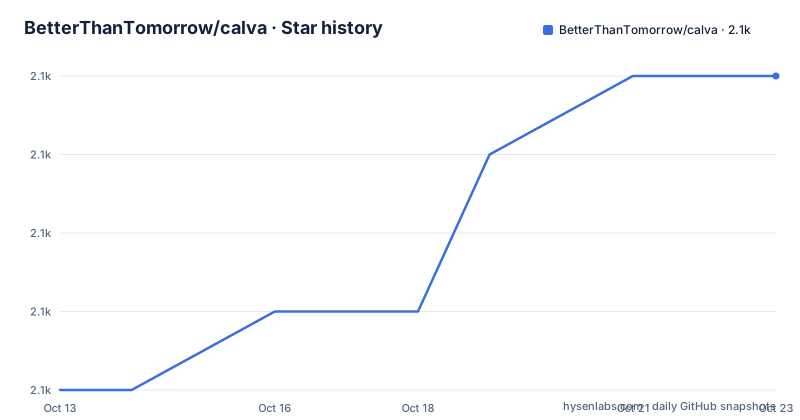
Star history
- BetterThanTomorrow/calva2,093 ★ · +4
| Repository | 2026-10-13 | 2026-10-23 |
|---|---|---|
| BetterThanTomorrow/calva | 2.1k | 2.1k |
4 Stars in the last 10 days, measured from the daily GitHub snapshot. Compare with other projects
Editorial analysis
Clojure development for VS Code users who do not want to switch to Emacs
Calva is a VS Code extension for Clojure and ClojureScript development. Its stated purpose is to give VS Code users a productive Clojure environment without requiring a move to Emacs, where CIDER has historically anchored the best tooling. Calva describes itself as distilled from CIDER, meaning it brings the same REPL-first philosophy into an editor that many working developers already use for other languages.
Published on the Visual Studio Code Marketplace under the identifier betterthantomorrow.calva, it is free and open source with a custom licence that GitHub cannot classify automatically. Reading the LICENSE file in the repository is necessary before redistribution.
Maintained by an organization called Better Than Tomorrow, with the author email [email protected] in the package.json, the project last pushed to its default branch on 2026-10-06 and published version 2.0.599 on 2026-09-23. Version 2.0.597 and 2.0.598 followed in August and early September respectively. A sponsorship page at calva.io/sponsors/ lists support options. Calva explicitly targets new Clojure learners as a primary audience, on the grounds that picking up a new language and a new editor at the same time is a real cost worth reducing.
Jack-in starts and connects the REPL without manual process management
Jack-in is the primary connection method. Documentation at calva.io/connect/ puts it first and says the short answer is to use it. It starts a Clojure process from inside VS Code and connects the REPL client to it in one step, removing the need to launch a process separately and then point the editor at it.
Six build tools are supported through Jack-in: Clojure tools/deps, Leiningen, shadow-cljs, Figwheel Main, lein-figwheel, and Clojurephant (Gradle). Detection of the build tool happens via the project's config files, and when more than one is present the extension asks for a selection. Built-in ClojureScript browser and node REPLs are also supported.
For ClojureScript, switching the REPL connection between different builds does not require a restart. When editing a .cljc file, a cljc/clj[s] indicator appears in the status bar; clicking it routes subsequent REPL commands to either the Clojure or the ClojureScript REPL. This matters when a function exists in both and you want to evaluate each side separately without changing files.
Custom connect sequences, documented at calva.io/connect-sequences/, handle cases where the built-in sequences do not fit, including fully customized ClojureScript REPLs.
Install from the Marketplace; VS Code 1.75.0 is the engine floor
Calva is not installed through a package manager. It is distributed through the VS Code Marketplace at the URL on the repository homepage: https://marketplace.visualstudio.com/items?itemName=betterthantomorrow.calva. Engine requirements in the package.json set VS Code 1.75.0 or newer and Node.js 22.0.0 or newer as the floor.
After installation, connecting to a project REPL is the next step, and documentation at calva.io/connect/ covers that. For a first run, Jack-in is the path the documentation leads with. No Clojure tooling is bundled with the extension itself; a working project with one of the six supported build tool config files already in place is a prerequisite.
Documentation is published at calva.io and is also built from the repository under docs/site. Contributing a fix or a new page goes through a pull request, which the README explicitly invites. CHANGELOG.md at the repository root tracks changes by version. Separate documentation pages exist for connection, Paredit, formatting, linting, the debugger, and the test runner.
clojure-lsp powers static navigation while cider-nrepl drives runtime evaluation
Two separate systems drive the editor experience, as named in the package.json description: cider-nrepl and clojure-lsp. Clojure-lsp handles the static analysis side, providing go-to-definition, find-all-references, rename symbol, change all occurrences, outline view, and the references code lens. None of those require a running REPL because they work from the source text alone. Integration details are at calva.io/clojure-lsp/.
Dynamic evaluation comes from cider-nrepl, which Jack-in starts. Inline evaluation, signature help while typing, doc string display on hover, and the test runner all require a live connection. Evaluation results appear inline next to the expression, so output is visible without switching windows.
clj-kondo is bundled with the extension and runs as part of the static analysis layer, flagging problems as you type. Documentation at calva.io/linting/ describes how Calva integrates it.
Intellisense draws from both layers, pulling from the static index that clojure-lsp maintains and from the live namespace state when a REPL is connected. Disconnected, you still get static completions; connected, those completions also reflect runtime state such as vars defined interactively during a session. Code formatting follows The Clojure Style Guide, the specific guide named in the features list.
Paredit acts on s-expressions, not on character boundaries
Structural editing in Calva is implemented through Paredit, which operates on Lisp forms rather than on individual characters. Deleting a closing parenthesis replaces it with a space rather than creating an unbalanced expression. Slurping a form expands the outer expression to include its neighbour. These operations matter when working with code structured as deeply nested s-expressions, since character-level editing creates imbalances that are time-consuming to diagnose.
Misplaced bracket highlighting is a step separate from Paredit, so syntax errors from bracket mismatches are visible before evaluation. Rainbow parentheses and rainbow indent guides make nesting depth visible at a glance, and an active indent guide highlights the current scope.
Two highlighting details are specific to Clojure's conventions. When a form is prefixed with #_ to comment it out without removing it, the extension dims that form to show it will not be evaluated. A (comment ...) block gets its own highlighting so that code inside remains readable as code rather than as comment text. Both of those are forms Clojure developers use for exploratory evaluation, and distinguishing them visually from production code reduces misreads.
Documentation at calva.io/paredit/ includes a visual guide for the available operations.
Boot projects connect but the Jack-in flow does not apply to them
Build tool support has one documented gap. Calva supports Jack-in for six build tools, but Boot is not among them. The README states that for Boot, only Connect scenarios work and there is no Jack-in. A Boot project developer has to start the REPL manually before attaching Calva, which is a different workflow from what the documentation leads with.
Custom Connect Sequences exist for cases like this, and documentation at calva.io/connect-sequences/ covers how to configure one. Whether a custom sequence covers all of what Jack-in provides for the six supported tools is something that documentation page would answer, since the README does not claim equivalence between the two paths.
Developers using Boot as a primary build tool should test the Connect path against their own project before adopting Calva. Quirks documentation at calva.io/quirks/ covers edge cases that the main README does not enumerate, including notes on behaviours that VS Code users coming from other extensions might find unexpected.
The hover-eval panel was removed because of memory costs, and the licence conflicts between files
One feature visible in demo material has since been removed. A richer display of evaluation results in the hover of the evaluated expression was replaced by peek definition, documented at calva.io/output/#peek-at-results. High memory usage from storing results is the stated reason for the removal.
Inline evaluation results still appear; what was removed is the hover panel where results could also be copied to the clipboard. A GitHub issue link, number 736, is included in the README for users who want this feature restored, which indicates the decision is open to revision.
Licence clarity requires a separate check. Repository metadata records the licence as a custom licence GitHub cannot classify. Package.json shows the licence field as MIT, which conflicts. Reading the LICENSE file at the repository root is the only way to resolve that discrepancy, and the gap is worth addressing before using Calva in a redistributed or commercial build.
Community support channels are two: a Zulip channel named #calva in the Clojurians workspace, and a Slack channel under the same name. Those are the two support routes the README links to for questions beyond what calva.io documents.
Editorial conclusion
Calva suits a VS Code user who wants to write Clojure without switching to Emacs. Jack-in, inline evaluation, Paredit, and bundled clj-kondo cover the daily Clojure workflow without requiring separate tooling. Skip it if your project uses Boot and you expect Jack-in, since only the Connect path works there. Before adopting it on a team, read calva.io/quirks/ first and confirm that your build tool is one of the six Jack-in supports. For licence clarity, package.json lists MIT but the repository metadata cannot classify the licence, so the LICENSE file at the repository root is what to read.
Frequently asked questions
What is Calva for VS Code?
Calva is a free VS Code extension for Clojure and ClojureScript development. It provides a REPL connection via Jack-in, inline code evaluation, structural editing through Paredit, linting via bundled clj-kondo, and static analysis through clojure-lsp.
How do I install Calva?
Calva is distributed through the VS Code Marketplace at https://marketplace.visualstudio.com/items?itemName=betterthantomorrow.calva. Engine requirements set VS Code 1.75.0 or newer and Node.js 22.0.0 or newer as the floor.
What build tools does Calva support with Jack-in?
Calva supports Jack-in for six build tools: Clojure tools/deps, Leiningen, shadow-cljs, Figwheel Main, lein-figwheel, and Clojurephant (Gradle). Boot projects can connect but do not support Jack-in; only the Connect path works for Boot.
Does Calva include a linter?
Yes. clj-kondo is bundled with the extension and runs as part of the static analysis layer. Documentation at calva.io/linting/ describes how Calva integrates it.
What is the difference between Calva and CIDER?
CIDER is the Clojure IDE for Emacs. Calva describes itself as distilled from CIDER and brings the same REPL-first approach to VS Code. Calva's stated goal is to give VS Code users a productive Clojure environment without switching editors.
Official sources
Add this badge to your README
If you maintain this project, the badge below links readers to this analysis and shows its maintenance status from the daily GitHub snapshot. Paste the markdown into your README; add ?metric=license or ?metric=stars to the image URL for a different field.

[](https://hysenlabs.com/projects/betterthantomorrow-calva)Star history chart for your README
[](https://hysenlabs.com/projects/betterthantomorrow-calva)Was this useful?