Hoppscotch: A Self-Hostable API Client That Runs in the Browser, on the Desktop, and in the CLI
Open-Source API Development Ecosystem • https://hoppscotch.io • Offline, On-Prem & Cloud • Web, Desktop & CLI • Open-Source Alternative to Postman, Insomnia
At a glance
- What is it?
- Hoppscotch is an open-source, MIT-licensed API development ecosystem that covers web, desktop, and CLI. It offers a lightweight, real-time request interface with support for WebSocket, SSE, Socket.IO, MQTT, and GraphQL, plus cloud sync and team features. The core judgement: it is a credible Postman alternative for teams that want control over hosting and data.
- Who is it for?
- Adopt Hoppscotch if you need a free, self-hostable API client with broad protocol support and a browser-first workflow, especially if data privacy or offline access matters. Do not adopt it if you need SSO without first checking the [^EE] marker next to it in the README.
- Can I use it commercially?
- Yes. MIT is a permissive licence: you can use, modify and sell software built on it, as long as you keep its copyright and licence notices.
- Is it still maintained?
- Yes. The repository last received commits 9 days ago.
- What is it written in?
- Mainly TypeScript, according to GitHub's language statistics.
Answers come from the project's GitHub data, last synced on November 13, 2026, and from our analysis. They are not legal advice.
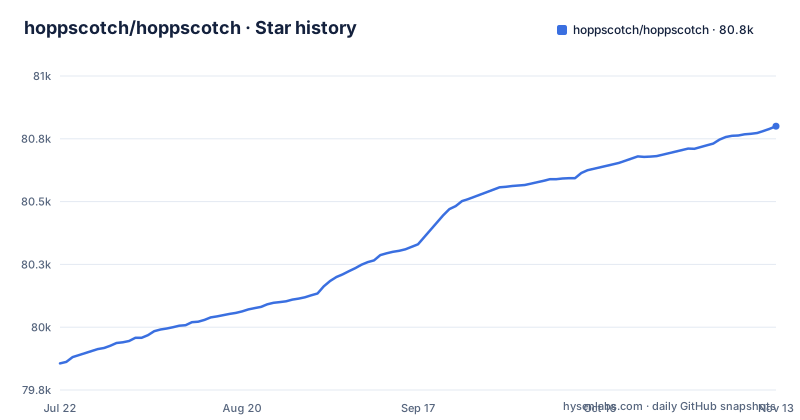
Star history
- hoppscotch/hoppscotch80,800 ★ · +944
| Repository | 2026-07-22 | 2026-11-13 |
|---|---|---|
| hoppscotch/hoppscotch | 79.9k | 80.8k |
944 Stars in the last 114 days, measured from the daily GitHub snapshot. Compare with other projects
Editorial analysis
What Hoppscotch Solves and Who It Is For
The repository layout shows a monorepo with packages like hoppscotch-common, which suggests a shared codebase for web and desktop. The README lists a long feature set, from basic HTTP methods to advanced protocols. That breadth indicates the project is targeting serious API work, not just simple GET requests. The inclusion of MQTT and Socket.IO points to users who deal with IoT or real-time backends, the README lists these protocols alongside HTTP. For those users, Hoppscotch offers a single tool for multiple protocols, which is a concrete advantage.
The Core Mechanism: Browser-First, PWA, and Real-Time Interaction
The auth and sync mechanism relies on cloud sessions. You sign in with GitHub, Google, Microsoft, or email, and your workspaces, history, and collections sync across devices. This is a real-time sync, as stated in the README, which means changes propagate immediately. Cloud sync implies a backend service, and the repository ships a docker-compose.yml with profiles (backend, app, admin, database and an all-in-one default that includes PostgreSQL) for self-hosting it.
Getting It Running: Commands and Configuration
The README does list features that affect configuration, such as theming and proxy settings. Those are user-facing settings, not deployment config. For a team, the key config is the authentication method: you can enable SSO, but that is marked as an Enterprise Edition feature, indicated by [^EE]. That means the open-source version may not include SSO, which is a consideration for enterprise adoption. For self-hosting, the repository's docker-compose.yml describes a default profile (all-in-one service, database and auto-migration) started with docker compose --profile default up.
Protocol Coverage and Scripting: Beyond Simple REST
Hoppscotch supports a wide range of protocols: HTTP methods including custom ones like LIST, WebSocket, Server-Sent Events, Socket.IO, MQTT, and GraphQL. For GraphQL, it allows you to set an endpoint, get the schema, and query it. This is a differentiator from basic API clients that only handle REST. The scripting features are also notable: pre-request scripts and post-request tests, both in JavaScript. Pre-request scripts can set environment variables, add timestamps to headers, or generate random strings. Post-request tests can check status codes, filter headers, and parse response data. The README mentions that these scripts can include any JavaScript functions, which gives flexibility. The presence of these features makes Hoppscotch a serious tool for automated testing, not just manual exploration. The ability to generate code snippets in 10+ languages is a practical feature for sharing requests with teammates who use different tools.
Limitations and Failure Modes: What the README Does Not Tell You
One clear limitation is the dependency on a proxy for non-HTTPS endpoints and CORS workarounds. If you do not want to use the official proxy, you must set up your own, which adds a deployment component. The README says 'Use your Proxy URL', and .env.example sets the default proxy URL offered to clients through PROXY_APP_URL (https://proxy.hoppscotch.io). Another limitation is the potential for vendor lock-in with cloud sync. If you rely on the hosted sync service, you are subject to Hoppscotch's infrastructure. Self-hosting the sync backend is possible through the repository's docker-compose.yml. The [^EE] marker for SSO suggests that some enterprise features are not in the open-source version, so teams that need SSO should check the docs for whether SSO is available in the edition they use. The project is under active development, with releases like 2026.10.0, so the codebase is evolving, but that also means potential breaking changes. The repository has a CHANGELOG.md at the root. A specific failure mode: if you rely on the browser version and the proxy is down, you cannot access blocked APIs. The proxy is a single point of failure unless you self-host it.
Alternatives: Postman and Insomnia, and How They Differ
Insomnia, being open-source, is a closer comparison. Source contains no feature-by-feature comparison with Insomnia or Postman, so check their current protocol support, desktop experience and extensibility against your needs. What the source does show is Hoppscotch's own protocol list (WebSocket, SSE, Socket.IO, MQTT, GraphQL), its web, desktop and CLI delivery, and self-hosting through docker-compose.yml.
Maintenance, Upgrade Cost, and License Implications
The project is under active development, with frequent releases like 2026.10.0, 2026.9.0 and 2026.8.2. That means regular updates, which is good for bug fixes but also implies a maintenance burden if you self-host. You must track releases and apply upgrades, which could involve database migrations or config changes. The repository has a CHANGELOG.md at the root and GitHub releases. The license is MIT, which is permissive: you can use, modify, and distribute the code, including for commercial purposes, with attribution. This is a low-risk license for adoption. However, the README marks SSO with an [^EE] footnote, so verify which features that covers before planning your deployment. The proxy component is a separate repository (hoppscotch/proxyscotch), but you need to maintain it if you self-host. The upgrade cost is not trivial if you run a full stack: frontend, backend, and proxy. The documentation is the key resource, and it is referenced but not included in the README, so you must invest time in reading it. The active release cadence is a positive sign for support, but it also means you cannot sit on an old version indefinitely without missing security patches.
Editorial conclusion
Adopt Hoppscotch if you need a free, self-hostable API client with broad protocol support and a browser-first workflow, especially if data privacy or offline access matters. Do not adopt it if you need SSO without first checking the [^EE] marker next to it in the README. Before committing, verify the current state of the team collaboration features, the exact self-hosting deployment steps in the official docs, and whether the proxy setup meets your security requirements.
Frequently asked questions
Is Hoppscotch better than Postman?
The repository description positions Hoppscotch as an open-source alternative to Postman and Insomnia, and the license is MIT. What that buys in practice is self-hosting: docker-compose.yml ships eight profiles, including a default profile that runs the all-in-one service together with a PostgreSQL container, so the whole client can run on your own hardware.
What does Hoppscotch do?
It is an API client that sends HTTP requests and covers WebSocket, Server-Sent Events, Socket.IO, MQTT and GraphQL in the same interface. A request carries a standard method or a custom method you type in, pre-request scripts run JavaScript before the send, and post-request tests check the status code, filter response headers and parse the response data.
Is Hoppscotch safe to use?
The code is MIT licensed, but two defaults decide how much traffic leaves your network. With Proxy Mode enabled, requests travel through the proxy server hosted by Hoppscotch, and .env.example points the default at https://proxy.hoppscotch.io. A self-hosted install also puts a 32-character DATA_ENCRYPTION_KEY in charge of everything stored encrypted, and the value shipped in .env.example is placeholder text.
how to use hoppscotch for localhost
WHITELISTED_ORIGINS in .env.example already lists http://localhost:3170, http://localhost:3000 and http://localhost:3100, which are the app, backend and development server ports, so a default local setup needs no change there. The two things to fix first are DATA_ENCRYPTION_KEY and the browser mixed-content rule, since Proxy Mode is what lets a page on https:// call an http:// endpoint.
how to install hoppscotch
For self-hosting, the repository ships docker-compose.yml with a default profile that runs the all-in-one service together with PostgreSQL and an auto-migration step. Building from source needs pnpm rather than npm: the root package.json sets packageManager to [email protected] and its preinstall script runs only-allow pnpm, which aborts any other installer.
Official sources
Where this project is recommended
Add this badge to your README
If you maintain this project, the badge below links readers to this analysis and shows its maintenance status from the daily GitHub snapshot. Paste the markdown into your README; add ?metric=license or ?metric=stars to the image URL for a different field.

[](https://hysenlabs.com/projects/hoppscotch-hoppscotch)Star history chart for your README
[](https://hysenlabs.com/projects/hoppscotch-hoppscotch)Was this useful?