Downloader: a multipart .NET downloader that reports progress for every chunk
Fast, cross-platform and reliable multipart downloader with asynchronous progress events for .NET applications.
At a glance
- What is it?
- Downloader is a .NET library for HTTP downloads that splits a file into chunks, downloads them in parallel and raises a progress event per chunk. It handles the unglamorous parts properly, including temporary files, pre-allocation, pause and resume, and speed limits, and the current v5 line targets .NET 8, 9 and 10.
- Who is it for?
- Adopt Downloader if you need large file downloads inside a .NET application with progress reporting, pause and resume, and the ability to serve the bytes into memory instead of to disk, and if you are on .NET 8 or later. Do not adopt it on .NET Framework or .NET Standard 2.1, because those are served by the older v3.x line, and do not adopt it for a server that does not support range requests, since the multipart behaviour depends on the server honouring them.
- Can I use it commercially?
- Yes. MIT is a permissive licence: you can use, modify and sell software built on it, as long as you keep its copyright and licence notices.
- Is it still maintained?
- Yes. The repository last received commits 2 days ago.
- What is it written in?
- Mainly C#, according to GitHub's language statistics.
Answers come from the project's GitHub data, last synced on November 6, 2026, and from our analysis. They are not legal advice.
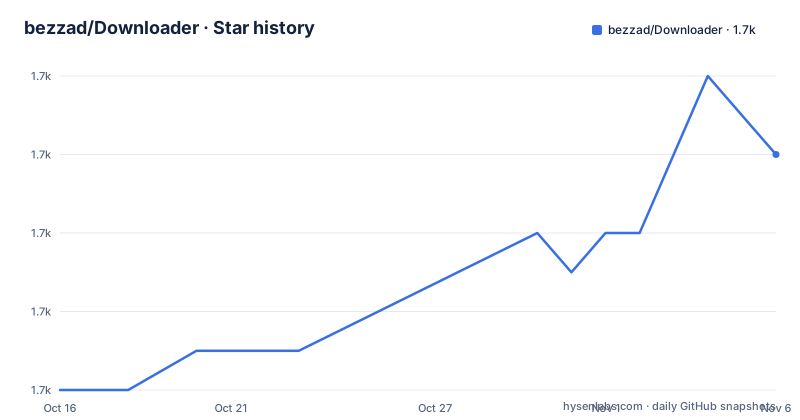
Star history
- bezzad/Downloader1,726 ★ · +6
| Repository | 2026-10-16 | 2026-11-06 |
|---|---|---|
| bezzad/Downloader | 1.7k | 1.7k |
6 Stars in the last 21 days, measured from the daily GitHub snapshot. Compare with other projects
Editorial analysis
Chunked downloads with a progress event per chunk
Downloader is described as a fast, cross-platform and reliable multipart downloader for .NET applications, built with testability in mind, and as a modern, fluent, asynchronous and portable library.
The mechanism is multipart downloading. A file is split into chunks, the chunks are fetched in parallel, and the library raises real-time progress updates for each download chunk rather than one event per file. The chunk count is configurable through the `ChunkCount` setting, which controls the download segmentation, and chunks can be kept in memory or written to disk.
That granularity is the difference from `HttpClient`. A single request with a progress stream gives you a byte count and a stream, and any parallelism, retry or resume is your problem. This library takes on the file-shaped problems: it pre-allocates the file size before the download begins, it saves chunks in parallel directly into the final file with no temporary files for the chunk data, and it always downloads to a temporary file with a configurable extension, `.download` by default, and renames it to the final name on completion.
The renaming detail is a real design choice rather than a detail. A partially written file under its final name is a broken file, and a file under a temporary name is obviously incomplete, so any consumer looking for the output can distinguish the two states without reading metadata.
The feature list also covers the practical cases: all file types, files of any size, resilience to client-side and server-side errors, real-time speed and progress data, asynchronous pause and resume, dynamic speed limits, and downloads to memory streams without saving to disk. Live streaming, such as music playback while downloading, is mentioned as well.
One package reference and a fluent builder
Installation is a single package reference:
dotnet add package DownloaderThe quick start is a fluent chain that ends in an awaited call:
await DownloadBuilder
    .New()
    .WithUrl(@"https://host.com/test-file.zip")
    .WithDirectory(@"C:\temp")
    .Build()
    .StartAsync();
The shape of that API is the shape of the library's design. `DownloadBuilder.New()` starts a configuration, `WithUrl` and `WithDirectory` describe the request and the destination, `Build()` produces a configured download, and `StartAsync()` runs it. The whole thing is awaitable, and the README describes the library as asynchronous and non-blocking throughout, with the download itself not tying up a thread.
The README points to a complete example in the repository, the `Downloader.Sample` console project under `src/Samples/Downloader.Sample/Program.cs`, and the repository includes an animated GIF of that sample running.
For people who want an application rather than a library, the README recommends a separate project: Downloader Desktop, a free open-source GUI download manager for Windows, Linux and macOS that uses this engine and adds multi-connection downloads, pause and resume, queues, a scheduler and speed limits, with no dependencies to install. That is worth knowing because it doubles as a working reference for the library's capabilities.
The README also has sections on using a custom `HttpClient` or `HttpMessageHandler`, on redirects, cookies and protected links, on serializing and deserializing the downloader package, and on building a Native AOT version.
The v5 and v3 lines split on the target framework
Version support is the first thing to check, because the current line dropped the older runtimes.
The v5.x line targets .NET 8, .NET 9 and .NET 10, and the badges in the README list support for .NET 8.0, 9.0, 10.0 and 11.0 alongside .NET Standard 2.1 on the older line. The note in the README is explicit: support for older versions of .NET was removed in Downloader v3.2.0, and from that version onwards only .NET 8.0 and higher are supported.
If you need .NET Standard 2.1 or older runtimes such as .NET Framework 4.6.1, the answer is the v3.x line, and specifically `v3.1.*` for the .NET Framework case. That is a fork in the road for anyone with an existing application on an older runtime: you either upgrade the application or you pin an old major version of the library, and the two have very different feature sets.
The release history shows the current line is actively worked on. The three most recent releases are v5.9.8 from 2026-09-22, v5.9.7 from 2026-09-21 and v5.9.6 from 2026-08-31, and the last push to the repository was on 2026-10-18. Two patch releases on consecutive days in September is the rhythm of a library that ships small and often.
The library is MIT licensed, published on NuGet as `Downloader`, and the repository carries a `CHANGELOG.md`, a `docs/` directory, an `appveyor.yml` for the Windows build, a `codecov.yml` for coverage, and separate CI workflows for Windows x64, Ubuntu x64 and macOS, with a CodeFactor badge in the README.
Pause, resume and the DownloadPackage object
Resume is the part of a downloader that usually gets bolted on, and this library treats it as a first-class feature with two documented routes.
The manual approach is to save and restore the `DownloadPackage` object, which holds the state of a download. The README has a separate section for how to stop and resume downloads this way, alongside one for pausing and resuming quickly, and one for the automatic approach.
The automatic approach is the more interesting one. When it is enabled, the download metadata is embedded inside the `.download` file, so no extra files and no manual serialization are needed. Since the library already downloads to a temporary file with a configurable extension and renames it on completion, embedding the metadata in that file means the resume state travels with the partial download itself. There is nothing else to keep in sync, and nothing to lose if the process dies.
That design also explains the temporary file convention. A `.download` file is not garbage, it is a resumable download, and the metadata that makes it resumable is inside it.
The README also lists dynamic speed limits among the features, which matters for a shared application: a background updater that saturates a link is a problem in a client application, and a limit can be applied while the download runs rather than being fixed at configuration time.
Where the multipart behaviour depends on the server
The table of contents includes a section with a pointed title: when does the Downloader fail to download in multiple chunks. That question is the practical limit of the whole approach, and the answer is a property of the server rather than of the library.
Multipart downloading requires the server to support range requests and to report the content length accurately. If a server ignores the range header and returns the whole file for every chunk request, the chunks overlap and the assembled file is wrong. If the server does not report a length, the library cannot pre-allocate the file, and the README is explicit that the file size is always pre-allocated before the download begins.
The same constraint shows up in a different form with redirects, cookies and protected links, which the README gives its own section. A download that needs a signed URL, a session cookie or a redirect chain is a download where a single request is not equivalent to a set of chunk requests, and the library has to reproduce the same request context for every chunk.
This is why the section exists in a library that otherwise makes multipart look like a solved problem. The client side is handled; the server side is a precondition.
The other requirement the README names is about the file system rather than the network. Since chunks are written in parallel directly into the final file, the destination has to support concurrent writes at different offsets, and the pre-allocation step has to be able to reserve the space up front.
Where Downloader is the wrong choice
The first wrong case is an older .NET runtime. If the application targets .NET Framework 4.6.1 or .NET Standard 2.1, the current v5 line will not load, and you are pinning `v3.1.*` with a feature set from a different era. The library solves the framework problem for you only if you are on .NET 8 or later.
The second is a server that does not honour range requests. The multipart path is the main feature, and it depends on the server. A simple file server that returns the whole body for every request will produce a corrupt result or an error, and the README's own section on the topic is the place to look before you point the library at an unusual origin.
The third is a need for a fully featured download manager. Downloader is a library, and the queueing, scheduling and user interface work belongs to Downloader Desktop, which is a separate project. If you need a desktop application, use that; if you need the downloader inside your own application, this is the right size.
The fourth is a codebase that has already solved this. Downloading a file with `HttpClient` and a progress stream is not hard, and the reasons to adopt a library are the multipart chunking, the resume support and the file handling, all of which are real but are also things you can build. The trade is the dependency plus the temporary file convention, which has to be reflected in whatever cleanup logic your application already has.
The fifth is a target where Native AOT matters and you need the pre-AOT behaviour. The README has a section on building a Native AOT version, which means there is a specific way to do it rather than a default that just works.
Editorial conclusion
Adopt Downloader if you need large file downloads inside a .NET application with progress reporting, pause and resume, and the ability to serve the bytes into memory instead of to disk, and if you are on .NET 8 or later. Do not adopt it on .NET Framework or .NET Standard 2.1, because those are served by the older v3.x line, and do not adopt it for a server that does not support range requests, since the multipart behaviour depends on the server honouring them. Before you rely on automatic resume, read how the metadata is stored inside the temporary .download file, and confirm that the server you target returns the content length and the byte ranges the chunking assumes.
Frequently asked questions
How do I install and use the Downloader .NET library?
Add the package with `dotnet add package Downloader`, then build a download with the fluent builder: `await DownloadBuilder.New().WithUrl(...).WithDirectory(...).Build().StartAsync()`. A complete console sample is in the Downloader.Sample project in the repository.
Which .NET versions does the current Downloader release support?
The v5.x line targets .NET 8, .NET 9 and .NET 10. Support for older .NET versions was removed in v3.2.0, and the README says to use the v3.x line, specifically v3.1.*, if you need .NET Standard 2.1 or .NET Framework 4.6.1.
How does Downloader handle resuming an interrupted download?
Manually, you save and restore the DownloadPackage object. Automatically, the download metadata is embedded inside the .download temporary file, so no extra files or manual serialization are needed, and the file is renamed to its final name when the download completes.
Does the Downloader library have a desktop application?
Not in this repository. The README points to Downloader Desktop, a separate free and open-source GUI download manager for Windows, Linux and macOS that uses this library as its engine.
Official sources
Add this badge to your README
If you maintain this project, the badge below links readers to this analysis and shows its maintenance status from the daily GitHub snapshot. Paste the markdown into your README; add ?metric=license or ?metric=stars to the image URL for a different field.

[](https://hysenlabs.com/projects/bezzad-downloader)Star history chart for your README
[](https://hysenlabs.com/projects/bezzad-downloader)Was this useful?