typescript-starter: A Scaffolding CLI That Puts Project Plumbing Before Code
GitHub describes it as Quickly create and configure a new library or Node.js project. The repository metadata lists TypeScript as its primary language. The metadata lists the MIT license. This article stays within the project description and details documented in the GitHub repository README.
At a glance
- What is it?
- typescript-starter is an interactive CLI that generates a pre-configured TypeScript library or Node.js project with tests, docs, linting, and release tooling. The real value is the opinionated workflow it encodes, but the default TypeScript config is deliberately loose and the project has not seen a recent release.
- Who is it for?
- Adopt typescript-starter if you are starting a new TypeScript library and want a working setup for AVA tests, nyc coverage, TypeDoc, ESLint, Prettier, and standard-version without writing config files yourself. Skip it if you need a strict tsconfig from the start, if you prefer a different test runner, or if you want a project that is actively maintained with recent releases.
- Can I use it commercially?
- Yes. MIT is a permissive licence: you can use, modify and sell software built on it, as long as you keep its copyright and licence notices.
- Is it still maintained?
- Probably not. The repository last received commits 44 months ago, on March 6, 2023.
- What is it written in?
- Mainly TypeScript, according to GitHub's language statistics.
Answers come from the project's GitHub data, last synced on October 22, 2026, and from our analysis. They are not legal advice.
Star history
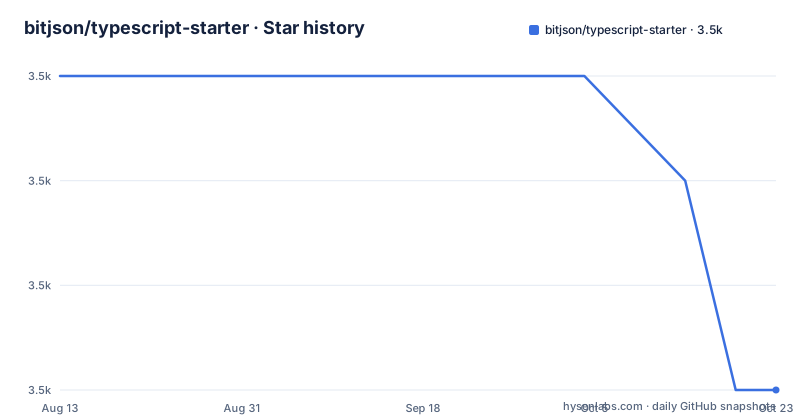
- bitjson/typescript-starter3,539 ★ · -3
| Repository | 2026-08-13 | 2026-10-22 |
|---|---|---|
| bitjson/typescript-starter | 3.5k | 3.5k |
-3 Stars in the last 70 days, measured from the daily GitHub snapshot. Compare with other projects
Editorial analysis
What This CLI Actually Sets Up
typescript-starter solves the problem of boilerplate for a TypeScript library or Node.js project. Instead of manually creating tsconfig.json, test configuration, coverage tooling, documentation generation, and linting rules, you run one interactive command and the CLI generates a project with all of that wired together. The README lists the pieces: ESNext features via TypeScript, module exports for tree-shaking, type declarations, CommonJS backwards compatibility, AVA for tests, nyc for coverage, TypeDoc for API docs, and typescript-eslint with Prettier for linting and formatting. The target user is someone who wants a production-ready foundation without spending a day assembling tools that already work well together. The CLI is the primary interface; you only fork or clone the repo if you want to contribute to the starter itself.
The Workflow It Encodes: Watch, Test, Fix, Doc, Release
The README describes a development loop built around two watch tasks. You run `npm run watch:build` in one terminal and `npm run watch:test` in another. The build watch compiles TypeScript, and the test watch runs AVA against the compiled output. Only changed files are rebuilt and retested, which keeps the loop fast for larger projects. This is a TDD-friendly setup: you write a failing test, then implement the feature, and the watcher picks up the change. For maintenance, `npm run fix` runs ESLint and Prettier auto-fixes. `npm run cov` generates a source-mapped HTML coverage report and opens it in the browser. `npm run doc` generates TypeDoc HTML, and `npm run doc:publish` pushes it to GitHub Pages. The release process is also scripted: `npm run version` bumps the version, updates CHANGELOG.md, and tags the release using standard-version. The whole thing is a coherent pipeline, which is more than most scaffolding tools offer.
Getting Started: One Command, Then Interactive Prompts
The README's start command is simple: `npx typescript-starter`. This requires Node v10 or later. The CLI is interactive, so it asks you questions about the project you want to create and then configures everything. There is no mention of a non-interactive mode or flags for automation, so you cannot script the generation in CI or in a batch. After generation, you get a project with the scripts mentioned above. The default tsconfig.json is described as 'very flexible,' meaning it has many options commented out. The README recommends reviewing commented-out lines for stricter type checking, especially for large or mission-critical projects. That is a notable design choice: the starter prioritizes getting you up and running without warnings, at the cost of weaker type safety by default.
The Flexible Default tsconfig Is a Double-Edged Sword
The default tsconfig.json is intentionally loose. The README says this is 'to make getting started easier' and to avoid many TypeScript warnings. That means a new project might not catch type errors that a stricter config would. The README explicitly recommends enabling additional type checking features for 'mission-critical or large projects,' but it does not list which options to enable. You have to read the commented-out lines yourself. This is a real limitation: the generated project is not type-safe out of the box. For a library, that could mean shipping type declarations that are less precise than they could be. The trade-off is understandable for a starter, but it shifts the responsibility onto the user to harden the config later. If you want strict mode from the first commit, you will need to edit tsconfig.json immediately.
Documentation Generation Without JSDoc Noise
TypeDoc generates API documentation from TypeScript source. The README notes that you do not need to maintain a mess of JSDoc tags, because TypeScript types are tracked by the compiler. This is a genuine advantage over tools that require extensive comment annotations. The `npm run doc` command produces HTML and opens it in a browser. There is also `npm run doc:json` for generating a JSON export, which you can feed into a custom theme or a documentation build pipeline. The `doc:publish` command pushes to GitHub Pages, giving you a public docs site with one command. The README references the project's own GitHub Pages as an example. For a library, this is a low-friction way to keep docs in sync with the code, as long as you remember to run it on each release.
Release Management and Commit Tooling
The README recommends installing commitizen globally with `npm install -g commitizen` and then using `git cz` for commits. This integrates with conventional changelog and standard-version. The `npm run version` script runs standard-version to bump the package version, update CHANGELOG.md, and create a git tag. This is a complete release pipeline, which is helpful for libraries that need semantic versioning. The README also mentions a tool called `wip` for managing work-in-progress commits, but it does not explain how to use it. The reliance on global installs for commitizen is a minor friction point; a local dev dependency would be more reproducible. Still, the release workflow is a concrete benefit: you get changelog generation and tagging without setting up a separate release tool.
Maintenance Status and the Wrong Tool Scenarios
The repository has no recent releases listed, and the last push date is unknown. The README itself is from an era when Node v10 was current, which suggests the project may not have kept up with the latest TypeScript or tooling versions. That is a significant concern for a scaffolding tool, because generated projects inherit dependency versions and config patterns. If the underlying tools (AVA, TypeDoc, ESLint) have moved on, the generated config might be outdated. This makes typescript-starter a poor choice if you need a setup that reflects current best practices or if you plan to use a non-AVA test runner. It is also not suitable for projects that require a strict tsconfig from the start, since the default is loose. For a monorepo or a project with complex build requirements, a more flexible tool like create-ts-lib or a manual setup would be better.
Alternatives and What to Verify Before You Run npx
A direct alternative is `create-ts-lib` (a different CLI), which also scaffolds a TypeScript library but typically generates a stricter tsconfig and uses a different test runner or build tool. The key difference is that create-ts-lib often defaults to strict mode and may not include the same integrated documentation and release pipeline. Another option is to use `tsdx`, which is a zero-config tool for libraries that uses Rollup for bundling and has its own test setup. The difference in approach is that tsdx focuses on the build output and bundling, while typescript-starter covers the entire development lifecycle including docs and releases. Before running `npx typescript-starter`, verify that the generated project's dependency versions are current, and inspect the tsconfig for the commented-out strict options. Also check whether the CLI supports a non-interactive mode if you need automation, since the README does not mention one.
Editorial conclusion
Adopt typescript-starter if you are starting a new TypeScript library and want a working setup for AVA tests, nyc coverage, TypeDoc, ESLint, Prettier, and standard-version without writing config files yourself. Skip it if you need a strict tsconfig from the start, if you prefer a different test runner, or if you want a project that is actively maintained with recent releases. Before adopting, verify the generated project's dependency versions and the state of the default tsconfig, since the flexible default may hide type errors that a stricter config would catch.
Frequently asked questions
What does typescript-starter do?
It provides an interactive command line generator that creates and configures a new library or Node project. You run it through the package runner with no arguments, and you only need to clone the repository if you intend to contribute to the generator itself.
What Node version does typescript-starter need?
The documentation asks for Node 10 or later to run the interactive generator. That floor is from the previous decade, and the repository's last commit in this snapshot is dated 2023-03-06, so the requirement has not been revisited.
Does typescript-starter generate TypeScript or JavaScript?
Standard future JavaScript using stable proposals, with TypeScript optional for tooling, linting and documentation. The package is exported both as a tree-shakable module and in a CommonJS-compatible form, with declaration files for downstream editors, and strict and relaxed compiler configurations are both provided.
What does the typescript-starter test command actually run?
It builds first, then lints the source, fails on any file the formatter would change, spell checks the readme, the workflow markdown files and the sources, and finally runs the unit tests under a coverage tool with source mapping.
How does typescript-starter test its own generator?
With five sample projects that it installs, builds and tests, alternating between two package managers, after first running the ordinary suite and diffing the expected integration output.
How do I generate API documentation with typescript-starter?
One command analyses the source folder and generates HTML documentation, which opens in a browser; another publishes it to GitHub Pages, and a third exports the documentation model as JSON so you can build your own site or supply your own theme.
Official sources
Add this badge to your README
If you maintain this project, the badge below links readers to this analysis and shows its maintenance status from the daily GitHub snapshot. Paste the markdown into your README; add ?metric=license or ?metric=stars to the image URL for a different field.

[](https://hysenlabs.com/projects/bitjson-typescript-starter)Star history chart for your README
[](https://hysenlabs.com/projects/bitjson-typescript-starter)