Bitwarden clients monorepo: one codebase, four delivery targets
Bitwarden client apps (web, browser extension, desktop, and cli).
At a glance
- What is it?
- The bitwarden/clients repository holds the web app, browser extension, desktop app, and CLI in a single TypeScript tree. It is the upstream source for four distinct products, which makes it powerful for contributors but heavy for anyone who only needs one client.
- Who is it for?
- Adopt bitwarden/clients if you plan to contribute to Bitwarden's desktop, web, browser, or CLI clients, or if you need to track upstream development across all of them. Do not adopt it if you only want a single client binary or a lightweight integration point; the official releases or the server repository will serve you better.
- Can I use it commercially?
- Check first. The repository uses a licence we do not classify automatically, so read its LICENSE file before any commercial use.
- Is it still maintained?
- Yes. The repository last received commits 1 day ago.
- What is it written in?
- Mainly TypeScript, according to GitHub's language statistics.
Answers come from the project's GitHub data, last synced on November 13, 2026, and from our analysis. They are not legal advice.
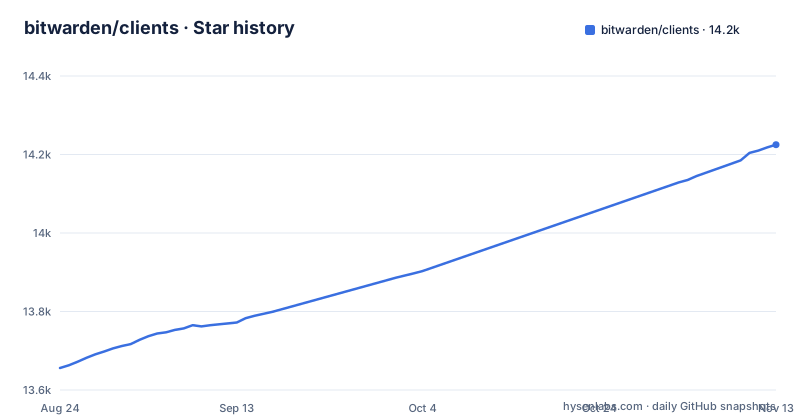
Star history
- bitwarden/clients14,225 ★ · +569
| Repository | 2026-08-24 | 2026-11-13 |
|---|---|---|
| bitwarden/clients | 13.7k | 14.2k |
569 Stars in the last 81 days, measured from the daily GitHub snapshot. Compare with other projects
Editorial analysis
What the repository actually contains
The bitwarden/clients repository is the home for every Bitwarden client application except the mobile apps. The README is explicit: it houses all client applications except iOS and Android, which live in separate repositories. That means the web vault, the browser extension, the desktop application, and the command-line interface all share this one TypeScript codebase. The repository is not a single application; it is a monorepo that produces four distinct deliverables. The description confirms this: web, browser extension, desktop, and cli. The recent releases show the pattern: desktop-v2026.10.3 and browser-v2026.10.2 were both tagged on 2026-11-02, after desktop-v2026.10.2 on 2026-10-29. Each app is tagged and versioned separately, under a shared year-and-month version scheme.
Who this is for and the problem it solves
The repository solves a coordination problem. If you maintain a password manager with multiple front ends, keeping them in sync is painful. Bitwarden chose to put the web app, browser extension, desktop app, and CLI in one tree so that shared logic can live in one place. The target audience is twofold. First, contributors who want to fix a bug or add a feature across several clients; they can do it in one pull request against the main branch. Second, developers who want to understand how Bitwarden's clients are built, since the entire client stack is visible here. It is not for end users. There are no binaries or installers in this repository. If you just want to use Bitwarden, you download the official releases from the homepage, not this source tree.
How the codebase is organized and built
The README points to the Contributing Documentation for build instructions, recommended tooling, and code style tips. That documentation lives outside the repository, at contributing.bitwarden.com. The repository itself contains the source, but the README does not list the exact commands to build each client. What is visible is the CI setup: the README links to GitHub Actions workflows for build-browser, build-cli, build-desktop, and build-web, all on the main branch. That tells you the build process is automated and per-client. The primary language is TypeScript, which is consistent with a shared codebase across web, browser, and desktop. The practical implication is that building any client requires the full monorepo checkout and the tooling described in the contributing docs. You cannot just clone and run a single command; you need to follow the documented setup.
The monorepo trade-off: shared code versus heavy checkout
A monorepo of this size has a real cost. Cloning bitwarden/clients pulls in the entire history and all four clients, even if you only care about the CLI. That is a heavy checkout for a small task. The README does not give repository size, but the structure implies it: four applications, plus shared modules, plus CI workflows. For a contributor who wants to fix a typo in the CLI help text, the overhead is significant. The alternative is to work from a single-client repository, but Bitwarden does not offer that for these four clients. The trade-off is deliberate: shared code means a fix to a crypto library applies everywhere at once, but it also means every build compiles code you do not need. This is a genuine limitation. If you are evaluating the repository for a small contribution, weigh the checkout time and build complexity against the benefit of one pull request.
How it relates to the server and mobile repositories
The README lists related projects, and the most important one is bitwarden/server, which is the core infrastructure backend: API, database, Docker, and so on. The clients repository is the front end; the server is the back end. They are separate repositories, which means a feature that touches both requires changes in two places. The README also points to the iOS and Android repositories, which are not part of this monorepo. That split is a notable design decision. Mobile clients are developed separately, so cross-platform features must be coordinated across three repositories: clients, ios, and android. For a contributor, that means a full-stack change is never a single pull request. The directory connector is another separate repository, for syncing directories like AD and LDAP. This fragmentation is worth knowing before you dive in.
Licensing and contribution constraints
The GitHub API reports the license as NOASSERTION. That is not a standard license identifier; it means GitHub could not match the repository to a single license. The repository root carries LICENSE.txt, LICENSE_GPL.txt and LICENSE_BITWARDEN.txt plus a bitwarden_license/ directory, and the root package.json declares GPL-3.0. The README does not mention licensing at all. The README does say code contributions are welcome and pull requests should go against the main branch. It also mentions a SECURITY.md file for security reports. If you plan to fork or redistribute the code, check those license files directly to see which terms cover the parts you use. For internal use, like building from source for your own deployment, the practical concern is lower, but the split between the GPL and Bitwarden license files still applies.
Maintenance and upgrade cost
The repository is actively maintained. The last push was November 2, 2026, and desktop and browser releases were both tagged that day. That suggests a steady release cadence, likely monthly based on the version pattern. The CI workflows on the main branch are visible in the README, so builds are automated. For a downstream user who builds from source, the upgrade cost is tied to the monorepo structure: every release brings changes across all clients, so you need to rebuild and retest everything, not just one component. That is a cost to plan for if you maintain a fork or a custom build. The contributing documentation is the place to find the exact upgrade steps, but the README does not summarize them.
Alternatives and when to look elsewhere
The most direct alternative is to use the official Bitwarden releases instead of building from this repository. The homepage, bitwarden.com, distributes the web vault, browser extension, desktop app, and CLI as prebuilt artifacts. That avoids the entire build process. Another alternative is the bitwarden/server repository if your goal is to run the backend; the clients are useless without a server, and the server is a separate codebase. For a developer who wants to extend Bitwarden, the clients monorepo is the only option for these four front ends, but if you only need one client, the mobile repositories are separate and the server is separate. The real difference in approach is that bitwarden/clients is a source-level integration point, while the official releases are a binary-level one. Choose the source if you need to modify behavior; choose the releases if you just need the software.
Editorial conclusion
Adopt bitwarden/clients if you plan to contribute to Bitwarden's desktop, web, browser, or CLI clients, or if you need to track upstream development across all of them. Do not adopt it if you only want a single client binary or a lightweight integration point; the official releases or the server repository will serve you better. Before relying on it, verify the current build instructions in the Contributing Documentation, confirm the license status for your use case, and check the release cadence on the main branch, since the repository is active and the last push was November 2026.
Frequently asked questions
Does the Bitwarden clients repository include the mobile apps?
No. It holds the web app, browser extension, desktop app, and CLI. The iOS and Android password manager and authenticator apps live in the separate bitwarden/ios and bitwarden/android repositories.
Where are the build instructions for the Bitwarden client apps?
The README points to the Clients section of the contributing documentation for build instructions, recommended tooling, and code style.
Which version of the Bitwarden clients does the repository describe?
The root package is @bitwarden/clients at version 0.0.0, a workspace placeholder. Shipped versions are tagged per app, and the recent release list shows Desktop v2026.10.3 and Browser v2026.10.2.
What runs the tests in the Bitwarden clients repository?
The root test script runs jest, with jest.config.js and jest.preset.js at the root of the repository. Separate scripts check types, check locales, and lint dependency ownership.
How should a sensitive security report be sent for Bitwarden clients?
Open an issue for a normal report, or email the project privately when the report is sensitive in nature. The security policy is in the SECURITY.md file at the repository root.
Official sources
Where developers are discussing it
Posts on Hacker News, dev.to and Lobsters that link to this repository, found by our scan of those communities. 0 in the last 30 days; newest first.
- Bitwarden licensing: store builds change, GPL continues on GitHubdev.to · Oct 11, 2026 · 2 points · 2 comments
Add this badge to your README
If you maintain this project, the badge below links readers to this analysis and shows its maintenance status from the daily GitHub snapshot. Paste the markdown into your README; add ?metric=license or ?metric=stars to the image URL for a different field.

[](https://hysenlabs.com/projects/bitwarden-clients)Star history chart for your README
[](https://hysenlabs.com/projects/bitwarden-clients)Was this useful?