ripgrep 15.2: The gitignore-aware search tool that outruns grep on real codebases
ripgrep recursively searches directories for a regex pattern from the command line, respecting gitignore rules and skipping hidden and binary files by default.
At a glance
- What is it?
- ripgrep is a line-oriented recursive search tool that respects gitignore rules, skips hidden and binary files, and uses Rust's regex engine for speed. This review covers its mechanisms, setup commands, performance trade-offs, and where it fits against alternatives like ugrep and git grep.
- Who is it for?
- Adopt ripgrep if you work in large codebases, value gitignore-aware defaults, and need fast recursive search with Unicode support. Skip it if you require full POSIX grep compatibility or need to search binary content by default, since ripgrep skips binaries and has a different regex syntax.
- Can I use it commercially?
- Yes. Unlicense is a permissive licence: you can use, modify and sell software built on it, as long as you keep its copyright and licence notices.
- Is it still maintained?
- Yes. The repository last received commits 4 days ago.
- What is it written in?
- Mainly Rust, according to GitHub's language statistics.
Answers come from the project's GitHub data, last synced on November 13, 2026, and from our analysis. They are not legal advice.
Star history
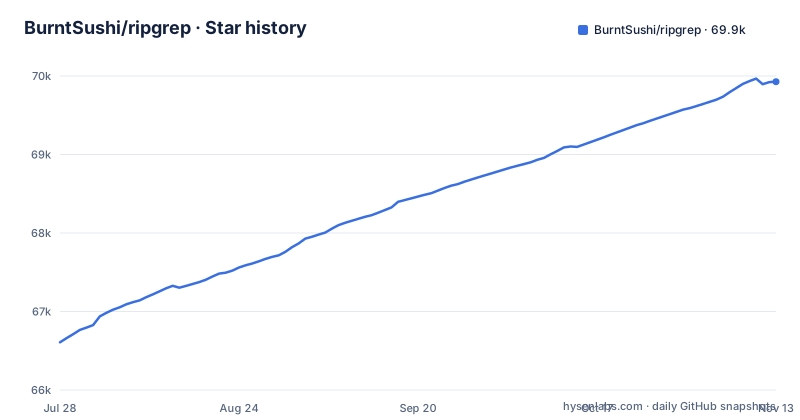
- BurntSushi/ripgrep69,928 ★ · +3,320
| Repository | 2026-07-28 | 2026-11-13 |
|---|---|---|
| BurntSushi/ripgrep | 66.6k | 69.9k |
3,320 Stars in the last 108 days, measured from the daily GitHub snapshot. Compare with other projects
Editorial analysis
What problem ripgrep solves and who it is for
ripgrep solves the problem of searching source code and large text files quickly while respecting the filtering rules developers already have in place. The README positions it as a line-oriented search tool that recursively searches the current directory for a regex pattern. Its default behavior skips hidden files, binary files, and anything matched by .gitignore, .ignore, or .rgignore. That means a typical search does not return vendored dependencies, build artifacts, or minified binaries, which are common noise in code search. The intended audience is developers who work in repositories with many files, especially those who have used The Silver Searcher, ack, or plain grep and found them too slow or too noisy. It is also aimed at users who want a single tool that works consistently on Windows, macOS, and Linux, since the README states first class support for all three platforms with binary downloads for every release.
The mechanics: regex engine, filtering, and parallelism
ripgrep's speed comes from several design choices visible in the README and repository layout. It uses Rust's regex engine and benefits from literal optimizations. The README's benchmarks show that patterns with literal substrings, like 'Sherlock', are much faster than patterns without any literals, such as '[A-Za-z]{30}'. This indicates the engine's optimization strategy relies on finding literal candidate matches before running the full regex. The README says ripgrep respects gitignore rules and skips hidden and binary files by default. The README mentions that automatic filtering can be disabled with 'rg -uuu'. The tool also supports file type filtering via flags like '-tpy' for Python and '-Tjs' to exclude JavaScript, which suggests a built-in mapping of extensions to type names.
Getting it running: installation and basic commands
The README points to binary downloads for every release on GitHub, which is the simplest path for most users. For package managers, the README links to repology.org, which tracks ripgrep packages across distributions, so you can install via apt, brew, or similar. If you prefer to build from source, the README links to a 'Building' section in the README itself. The basic usage is straightforward: run 'rg' followed by a pattern, and it searches the current directory recursively. The README gives an example: 'rg -n -w '[A-Z]+_SUSPEND'' to search for uppercase words ending in SUSPEND with line numbers and word boundaries. To search specific file types, you use '-tpy foo' to limit to Python files and '-Tjs foo' to exclude JavaScript. Configuration files are documented in the GUIDE.md and shell completions in the FAQ.
Performance: what the benchmarks show and what they hide
The README includes several benchmarks on the Linux kernel source tree and a 13GB decompressed file. On the kernel tree, ripgrep took 0.082 seconds for a Unicode search with word boundaries, while git grep took 0.273 seconds and The Silver Searcher took 0.443 seconds. On the single large file, ripgrep was 1.042 seconds versus ugrep's 1.339 seconds and GNU grep's 6.577 seconds. These numbers are specific to the hardware and corpus, and the README itself warns that a single benchmark is never enough. The author also points out performance cliffs: the pattern '[A-Z]\w+ Sherlock [A-Z]\w+' caused ugrep to take 28.973 seconds while ripgrep took 1.053 seconds. The most revealing benchmark is the one with no literal optimizations: '[A-Za-z]{30}' took 15.569 seconds for ripgrep, which is still faster than ugrep and GNU grep but shows that ripgrep is not magic. High match counts also flatten differences, as shown by the 'rg the' benchmark where all tools were within roughly a factor of 2.2. The caveat is that these benchmarks are self-reported by the author, so you should treat them as indicative, not as a guarantee for your own files.
A real limitation: binary file skipping and regex syntax differences
ripgrep's default behavior of skipping binary files is a feature for code search but a limitation if you need to search binary formats or log files with null bytes. The README says it automatically skips binary files, and to disable all filtering you need 'rg -uuu', which is a non-obvious flag. If you forget this, you might miss matches in binary files without realizing it. Another limitation is the regex syntax. The README links to the Rust regex crate's syntax documentation, which is not identical to GNU grep's extended regex. The FAQ linked in the README discusses whether ripgrep can truly replace grep, and the title suggests there are caveats. For example, backreferences and lookaround are not supported in the default regex engine, which can break patterns that work in Perl-compatible regex tools. The README also shows that the number of matches can differ: in the kernel benchmark, ack found 2677 lines while ripgrep found 536, which highlights that you cannot assume identical results across tools.
Alternatives: ugrep and git grep take different approaches
The most direct alternative is ugrep, which is also a recursive search tool with gitignore support. The README benchmarks show ugrep is consistently slower than ripgrep. Another alternative is git grep, which is built into Git and works only within a Git repository. git grep respects the index and tracked files, so it does not search untracked files unless you pass flags. For users who only need to search tracked files, git grep may be sufficient. GNU grep is another alternative for single-file searches, but it does not do recursive search by default and has no gitignore awareness. The README's benchmarks show GNU grep is much slower on Unicode patterns, especially with the UTF-8 locale, which can be a deciding factor for international text.
Maintenance and licensing: what the repository tells us
The repository is actively maintained, with the latest release 15.2.0 pushed on 2026-07-15, about nine months after 15.1.0 and 15.0.0 in October 2025. The project is dual-licensed under MIT or the Unlicense, which is permissive and places minimal restrictions on use. This means you can incorporate ripgrep into proprietary tools without legal friction, though you should still review the license text if you distribute binaries. The README links to a CHANGELOG.md for release history, which is the place to look for breaking changes when upgrading. The project has a user guide and FAQ, which are maintained resources for learning about new flags and behavior changes. The maintenance cost for users is low: since it is a command-line tool, you only need to update the binary when a new release comes out. There is no indication of a plugin ecosystem, so the upgrade cost is minimal.
Editorial conclusion
Adopt ripgrep if you work in large codebases, value gitignore-aware defaults, and need fast recursive search with Unicode support. Skip it if you require full POSIX grep compatibility or need to search binary content by default, since ripgrep skips binaries and has a different regex syntax. Before adopting, verify your team's regex patterns against ripgrep's syntax, especially if you rely on backreferences or lookaround, and test the -uuu flag if you need to search hidden or ignored files. The 15.2 release is actively maintained, and the dual MIT/Unlicense licensing removes most legal friction, so the main cost is learning the flag differences from grep.
Frequently asked questions
What is ripgrep used for?
It is a line-oriented search tool that recursively searches the current directory for a regex pattern. By default it respects gitignore rules and automatically skips hidden files, hidden directories and binary files, so it is aimed at searching source trees rather than arbitrary file systems.
Is ripgrep better than grep?
It depends on the corpus and the pattern, and the README's own tables show both directions. On a kernel source tree it leads the field, while on a pattern with no literal optimisation GNU grep in a UTF-8 locale takes 8m30s against 15.569s. The project also keeps a FAQ entry on whether ripgrep can truly replace grep, which is the question to read before scripting it as a POSIX substitute.
Why is ripgrep so fast?
Two mechanisms are visible in the documentation: the automatic filtering means much less text is read at all, and the project notes that performance drops when a pattern has no opportunities for literal optimisations, which implies literal prefiltering is part of the matcher.
How do I use ripgrep?
Pass a pattern and it searches recursively from the current directory, honouring .gitignore, .ignore and .rgignore. File types are selectable with a -t flag such as rg -tpy foo to limit to Python files, and excluded with -T, as in rg -Tjs foo. Shell completions are covered in the FAQ file.
How do I install ripgrep?
The README states that binary downloads are available for every release, with first class support on Windows, macOS and Linux, and links the release page plus crates.io and repology. A HomebrewFormula is also committed at the repository root.
Official sources
Where developers are discussing it
Posts on Hacker News, dev.to and Lobsters that link to this repository, found by our scan of those communities. 2 in the last 30 days; newest first.
- How Much Memory Does a CI Build Need? Five Real Builds at 2, 4 and 8 GBdev.to · Nov 2, 2026 · 5 points · 0 comments
- Help Your Coding Assistant Find the Right Code in Large Reposdev.to · Oct 16, 2026 · 15 points · 4 comments
Add this badge to your README
If you maintain this project, the badge below links readers to this analysis and shows its maintenance status from the daily GitHub snapshot. Paste the markdown into your README; add ?metric=license or ?metric=stars to the image URL for a different field.

[](https://hysenlabs.com/projects/burntsushi-ripgrep)Star history chart for your README
[](https://hysenlabs.com/projects/burntsushi-ripgrep)Was this useful?