FamiStudio: an NES music editor whose feature bar is set on four platforms
FamiStudio NES Music Editor
At a glance
- What is it?
- FamiStudio is a C# tracker and arranger for NES music that targets .NET 8.0 and ships on Windows, macOS, Linux and Android. Its contributor rules are the strictest part: every feature must land on all four platforms and reach every export format at once.
- Who is it for?
- Adopt FamiStudio if you are composing for the NES and want an editor that understands the hardware's limits rather than treating them as an export preset, and take the prebuilt binaries rather than the source unless you have a reason to compile.
- Can I use it commercially?
- Yes. MIT is a permissive licence: you can use, modify and sell software built on it, as long as you keep its copyright and licence notices.
- Is it still maintained?
- Yes. The repository last received commits 90 days ago.
- What is it written in?
- Mainly C#, according to GitHub's language statistics.
Answers come from the project's GitHub data, last synced on November 6, 2026, and from our analysis. They are not legal advice.
Star history
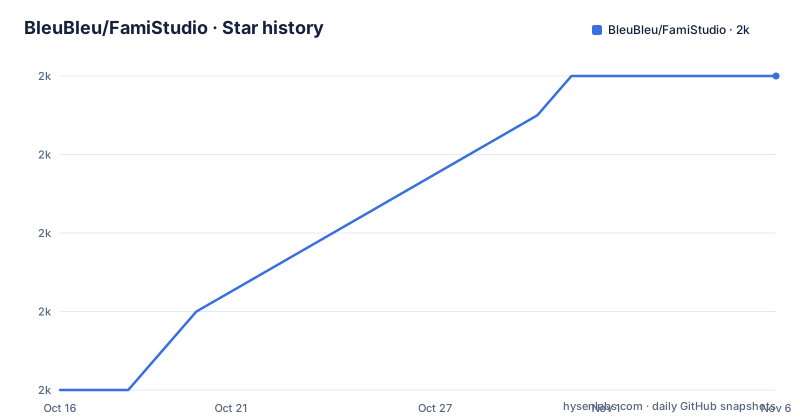
- BleuBleu/FamiStudio1,968 ★ · +8
| Repository | 2026-10-16 | 2026-11-06 |
|---|---|---|
| BleuBleu/FamiStudio | 2k | 2k |
8 Stars in the last 21 days, measured from the daily GitHub snapshot. Compare with other projects
Editorial analysis
The repository is not where you install it
FamiStudio's GitHub page starts by redirecting. The README says the page is intended for people wanting to view or download the source code, or to report bug fixes, and it directs anyone simply interested in installing FamiStudio to famistudio.org or to the itch.io page.
That split matters when you judge the project. The repository is a source and bug-reporting location, not the distribution channel. Windows users are pointed at the Releases section and told to download the .MSI installer, which places a shortcut in the Start menu.
So the first question for an adopter is not whether the code is good but whether the build you need exists as a compiled artifact. For Windows, it does. For the other platforms, the README describes how to compile from source instead, which is a very different proposition.
Contact routes are also split by purpose. A direct email address is given for questions, and the maintainer is reachable on the NESDEV Forums as BleuBleu, on Twitter, on YouTube, on itch.io, and in the FamiStudio Discord.
A C# application wrapped around five C++ binaries
The project is composed of a few pieces, and the README names them. The main FamiStudio application is written in C# and targets .NET 8.0 on all platforms.
Around it sit five native pieces: NesSndEmu, NotSoFatso, ShineMp3, Vorbis and GifDec. The first two are emulator libraries, which is what makes previewing the actual NES sound hardware possible inside the editor. The README says these C++ DLLs and binaries are provided prebuilt because they rarely change.
That split has a direct consequence for anyone building the source: you can usually avoid touching C++ at all. On macOS, `build_macos.sh` compiles the DLLs and the README notes there is no fancy makefile, just a shell script in each folder. On Linux, `build_linux.sh` does the same job. On Windows, Visual Studio 2022 is used for development, and C++ support has to be installed in Visual Studio if you intend to recompile the DLLs.
PortAudio and RtMidi are the audio output and MIDI input dependencies on macOS, pre-compiled through Homebrew. On Linux, OpenAL Soft arrives as a precompiled AMD64 binary with ALSA support, and RtMidi as `librtmidi.so`. Both are native dependencies you inherit rather than choose.
The repository layout reflects the split: `FamiStudio/` for the application, `SoundEngine/` for the emulation layer, `ThirdParty/` for vendored code, `Setup/` for the Windows installer project, and separate solution files per platform.
No makefile, and a bundle you update by hand
Two build facts should decide whether you plan to compile this yourself.
The first is that no makefile is provided. On Linux the README says plainly that none is provided at the moment, and on macOS it says the same in different words. You get a shell script per DLL folder and nothing else. For a project with a C++ layer, that is an unusually thin build story.
The second is that on macOS the application bundle is updated manually at each release. There is no automation for it. Anyone producing a macOS build from source is assembling the bundle themselves.
Linux has its own sharp edge, and it is worth spelling out because it will bite anyone on a non-x86 machine or anyone who recompiles OpenAL. The precompiled OpenAL Soft binary is AMD64. If you build your own, you must either replace `libopenal32.so` or edit the dllmap referenced in `FamiStudio.exe.config` to point at the correct library. That Mono-style P/Invoke remapping is a manual configuration step with no build-time check.
Android is the heaviest case by some distance. The target is API level 33, Android 13.0, with a minimum of API level 26, Android 8.0 Oreo, and the C++ DLLs must be compiled manually for all three architectures, x64, ARM and ARM64, every time they change. The README also warns to test features across the version range in between.
For a musician who wants the tool, none of this matters. For an engineer planning to patch it, it is the bulk of the work.
The contribution bar is four platforms and every export format
The README's contributing section is short and unusually specific, and it starts with a request rather than an invitation. The maintainer is hesitant to take unsolicited pull requests and asks that you get in touch first so a plan can be agreed on, explicitly to avoid wasting both sides' time.
What follows is a checklist for any agreed feature. It must be implemented and tested on all four platforms: Windows, macOS, Linux and Android. Testing must cover Hi-DPI scaling on Windows at 150 and 200 percent, Retina on macOS, and 100 and 200 percent scaling on Linux, because these are described as known to break often.
Then the compatibility requirements. Any feature that impacts the music must be integrated into all import and export formats, with FamiTracker, NSF and FTI named as examples. Any new feature must be added to the NSF driver, including its multi-expansion chip variant, and must be toggleable if it has a cost in RAM or CPU cycles. That last point is a hardware constraint turned into a design rule: an NES feature that eats cycles is acceptable, one that hides the cost is not.
Integration with the relevant unit tests is also required, across three suites covering sound engine code similarity, NSF import and export, and sound emulation. Documentation has to be updated alongside the code.
This is a small project with a high bar per feature, and the bar is a direct consequence of the target: the output has to run on real hardware with a fixed set of sound chips.
Where FamiStudio is the wrong tool
The limitation is not a missing feature, it is the platform. This is an NES music editor, and everything in the project is oriented around that console's sound hardware: the emulator DLLs, the NSF driver with its multi-expansion chip variant, the FamiTracker and FTI formats.
If your target is a different console or a modern audio engine, none of that infrastructure transfers. There is no general tracker here.
A second boundary is the source path itself. If you need a reproducible macOS or Linux build in CI, you are dealing with shell scripts with no makefile, a manually assembled application bundle on macOS, and an AMD64-only precompiled OpenAL binary on Linux that you must remap by hand. That is workable for a hobbyist at a desk and awkward for a build pipeline.
The alternative worth naming is a general-purpose tracker with console support bolted on. The difference in approach is that a general tracker treats the console as an export target that converts a finished arrangement, while FamiStudio models the console's channels and cycle budget during composition, which is why every new feature has to touch the NSF driver and be toggleable by cost. You give up generality and a large instrument and effect library in exchange for writing music that fits the hardware as you go.
Version state is current enough to rely on. Releases 4.5.1, 4.5.2 and 4.5.3 landed on 2026-05-12, 2026-07-26 and 2026-08-10, and the last push was on 2026-08-10.
Editorial conclusion
Adopt FamiStudio if you are composing for the NES and want an editor that understands the hardware's limits rather than treating them as an export preset, and take the prebuilt binaries rather than the source unless you have a reason to compile. Do not fork it expecting normal open source collaboration: the README states the maintainer is hesitant to take unsolicited pull requests and asks contributors to email first, which makes the contribution path a conversation rather than a merge. Verify three things before committing to it: that your target export formats among FamiTracker, NSF and FTI are covered by the features you need, since the README requires any music-affecting feature to be integrated into all of them; that your platform is one of the four supported, since the C++ DLLs must be compiled for x64, ARM and ARM64 on Android and the macOS application bundle is updated manually at each release; and that the OpenAL Soft binary matches your Linux architecture, since replacing `libopenal32.so` or editing the dllmap in `FamiStudio.exe.config` is on you if you recompile it. The code is MIT licensed, releases are on GitHub as compiled installers, and the last push was on 2026-08-10 with 4.5.3 published the same day.
Frequently asked questions
How do I install FamiStudio?
The README redirects installation questions to famistudio.org and to the itch.io page, since the GitHub repository is for source code and bug reports. On Windows, compiled installers are in the GitHub Releases section and installing the .MSI places a shortcut in the Start menu.
What does FamiStudio need to build from source?
The main application is C# targeting .NET 8.0. Visual Studio 2022 is used on Windows, VS Code on macOS and Linux, and shell scripts named build_macos.sh and build_linux.sh compile the C++ DLLs, with no makefile provided.
Which C++ components does FamiStudio depend on?
NesSndEmu, NotSoFatso, ShineMp3, Vorbis and GifDec, shipped as prebuilt C++ DLLs and binaries because they rarely change. Audio output uses PortAudio on macOS and OpenAL Soft on Linux, and MIDI input uses RtMidi.
Can I send a pull request to FamiStudio?
The maintainer says he is hesitant to take unsolicited pull requests and asks contributors to contact him first to agree on a plan. Once agreed, the feature must work on Windows, macOS, Linux and Android, and integrate with all import and export formats and the NSF driver.
Does FamiStudio run on Android?
Yes. The Android project targets API level 33 with a minimum of API level 26, and the C++ DLLs must be compiled manually for x64, ARM and ARM64 whenever they change.
What license is FamiStudio released under?
MIT, with the LICENSE file at the repository root. The repository's default branch is master and the primary language is C#.
Official sources
Add this badge to your README
If you maintain this project, the badge below links readers to this analysis and shows its maintenance status from the daily GitHub snapshot. Paste the markdown into your README; add ?metric=license or ?metric=stars to the image URL for a different field.

[](https://hysenlabs.com/projects/bleubleu-famistudio)Star history chart for your README
[](https://hysenlabs.com/projects/bleubleu-famistudio)Was this useful?