music-metadata ships two entry points and Node 22 as a floor
Metadata parser for audio and video media files. Supports file and stream inputs in Node.js and browser environments, extracting format, tag, and duration information.
At a glance
- What is it?
- music-metadata is a metadata parser for audio and video files that runs in Node and in the browser, covering formats from MP3 and FLAC through Matroska and DSD. The packaging detail that matters is the conditional export map: Node gets the full index, everything else gets a smaller core build, which is how one package serves a server and a browser bundle.
- Who is it for?
- Adopt music-metadata if you need format, tag and duration information from media files or streams in a JavaScript application, and you accept a Node 22 minimum. Do not adopt it as an audio decoder, since it extracts metadata rather than decoding samples.
- Can I use it commercially?
- Yes. MIT is a permissive licence: you can use, modify and sell software built on it, as long as you keep its copyright and licence notices.
- Is it still maintained?
- Yes. The repository received new commits within the last day.
- What is it written in?
- Mainly TypeScript, according to GitHub's language statistics.
Answers come from the project's GitHub data, last synced on November 7, 2026, and from our analysis. They are not legal advice.
Star history
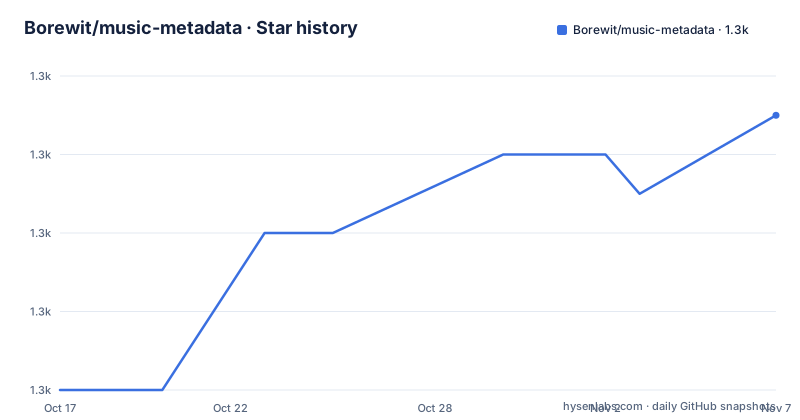
- Borewit/music-metadata1,337 ★ · +7
| Repository | 2026-10-17 | 2026-11-07 |
|---|---|---|
| Borewit/music-metadata | 1.3k | 1.3k |
7 Stars in the last 21 days, measured from the daily GitHub snapshot. Compare with other projects
Editorial analysis
What it parses, and what it does not
The module description is a metadata parser for audio and video media files, supporting file and stream inputs in Node.js and browser environments, extracting format, tag and duration information.
The word metadata matters. This is not a decoder. You get the container and codec identification, the tags, the duration, and the structural details such as chapters, and you do not get audio samples. That is the correct scope for a library used to build a media library index, generate a player UI or validate a file before upload. Streaming support also helps it handle large audio files.
Format support is broad and specific. The table covers AIFF and AIFF-C, AAC in ADTS, Monkey's Audio APE, ASF, Broadcast Wave Format, Apple's Core Audio File Format, DSDIFF and Sony's DSF, FLAC, MP2, Matroska including mka and mkv, MP3, and Musepack SV7, among others.
Tag support spans ID3v1, ID3v2, APE, Vorbis and iTunes/MP4 tags. The keyword list in package.json is more revealing about intent than the README, listing MusicBrainz, Picard, Discogs, chapters, lyrics and ID3v2 chapters, which describes a library aimed at people building serious tagging pipelines rather than reading an MP3 title.
Streaming support is what makes large files practical, and the promise-based API is what makes it usable in an async application without callbacks.
The export map splits Node from the browser
The packaging is where the design shows, because the `exports` field in package.json is not a flat entry point:
"exports": {
  "node": {
    "import": "./lib/index.js",
    "types": "./lib/index.d.ts"
  },
  "default": {
    "import": "./lib/core.js",
    "types": "./lib/core.d.ts"
  }
}
Under Node's own condition the package resolves to `lib/index.js`, the full entry point. Under the default condition, which is what a bundler sees when it is not resolving for Node, it resolves to `lib/core.js` instead.
That is a deliberate split between the Node build and a smaller browser build, and it is why the README stresses that the module works in a browser environment when bundled with a module bundler such as Webpack or Rollup. Browser bundlers should resolve the appropriate export conditions.
The rest of the packaging is tidy. `type` is `module`, `sideEffects` is false so the whole thing tree-shakes, and `files` ships only `lib/**/*.js` and `lib/**/*.d.ts`, so nothing but compiled JavaScript and declarations reaches consumers. That is a small package for something this capable, and it is a consequence of parsing bytes rather than wrapping a native decoder.
There is also a compiled-JavaScript test configuration at `.mocharc.compiled.json` alongside the source one, which indicates the test suite runs both against the TypeScript source and against the built output.
ESM since version 8, and a Node 22 floor
Compatibility is stated in one paragraph and it is worth reading twice. Module version 8 migrated from CommonJS to pure ECMAScript Module, and the distributed JavaScript targets ECMAScript 2023, the 14th edition. The module requires a Node.js engine of 22 or later.
Node 22 as a floor is a real constraint for server applications, and it is the kind of thing that shows up as an install failure rather than a runtime error, which is at least a clear failure.
The CommonJS note is referenced as its own section in the README, which means the project treats backward compatibility as something that has to be explained rather than assumed. A pure ESM migration in a widely used parser affects every consumer that used `require`, and the section exists to tell those users what changed.
Note that the migrations and the current version are different facts. The ESM break happened at version 8; the current release is 12.2.1, with v12.2.0 on 2026-10-12, v12.1.1 on 2026-10-11 and v12.2.1 on 2026-10-14, and the last push was on 2026-10-15. That is a release cadence of several patches a week in the 12.2 line, which is what a parser maintaining many format implementations looks like as each format edge case turns up.
The default branch is master, the repository is not archived, and the licence is MIT with a LICENSE.txt at the root.
Tooling tells you how the project is run
The badges and configuration files describe a project with more tooling layers than most libraries of this size.
Formatting and linting is handled by `biome.jsonc`, which is a single tool replacing the prettier plus eslint pairing that most projects of this vintage would use. Test coverage is `.c8rc.json` and codecov, with a separate `codecov.yml` as well as `.codecov.yml`. The test runner is Mocha, with `.mocharc.json` for the source run and `.mocharc.compiled.json` for the build.
Static analysis and security tooling is unusually broad for a parsing library: CodeQL analysis in the workflow, a Codacy configuration and badge, a Snyk known-vulnerabilities badge targeting package.json, and a DeepScan grade. `.coderabbit.yaml` adds automated review, and there is a SECURITY.md and a CODE_OF_CONDUCT.md at the root.
`appveyor.yml` remains for Windows CI, alongside the GitHub Actions workflows.
The dependency manager is Yarn, with a `yarn.lock` and a `.yarnrc.yml`. The build scripts show the compiled JavaScript being deleted and rebuilt from TypeScript rather than committed through a separate release job, and there is a `doc-gen/` directory plus `doc/` for generated API documentation.
That much tooling around a zero-dependency parser is a reasonable trade. The failure mode of a media parser is a malformed input crashing a server, and the security scanning and CodeQL configuration are aimed squarely at that.
Editorial conclusion
Adopt music-metadata if you need format, tag and duration information from media files or streams in a JavaScript application, and you accept a Node 22 minimum. Do not adopt it as an audio decoder, since it extracts metadata rather than decoding samples. Verify first which of your formats are in the support table, check the CommonJS backward compatibility notes since the module went pure ESM at version 8, and confirm your bundler honours the default export condition so browsers do not pull the Node build.
Frequently asked questions
What Node.js version does music-metadata require?
Node.js 22 or later. The distributed JavaScript also targets ECMAScript 2023, and the module migrated from CommonJS to pure ESM at version 8.
Does music-metadata decode audio, or only read metadata?
It extracts metadata only: format, tag and duration information, plus structural details like chapters. It is not a decoder and does not return audio samples.
Can music-metadata be used in a browser?
Yes, when bundled with a module bundler such as Webpack or Rollup. The export map resolves the node condition to the full entry point and the default condition to a smaller core build, so your bundler needs to honour those conditions.
Which tag formats are supported?
ID3v1, ID3v2, APE, Vorbis and iTunes/MP4 tags. The README also lists format support including MP3, FLAC, Matroska, AIFF, CAF, DSF, DSDIFF, ASF, MP2 and Musepack, with the package keywords naming MusicBrainz, Picard, chapters and lyrics.
Official sources
Add this badge to your README
If you maintain this project, the badge below links readers to this analysis and shows its maintenance status from the daily GitHub snapshot. Paste the markdown into your README; add ?metric=license or ?metric=stars to the image URL for a different field.

[](https://hysenlabs.com/projects/borewit-music-metadata)Star history chart for your README
[](https://hysenlabs.com/projects/borewit-music-metadata)Was this useful?