Squad: A File-Based AI Agent Team That Lives in Your Repo
Squad: AI agent teams for any project. For the best Squad experience, use the [GitHub Copilot CLI].
At a glance
- What is it?
- Squad turns GitHub Copilot into a human-led team of specialized agents that persist as files in your project. It is alpha software with a clear governance model, but you must verify its current state before adopting it.
- Who is it for?
- Adopt Squad if you are a developer or small team already using GitHub Copilot and want a structured, inspectable way to delegate coding tasks to specialized agents that persist across sessions. Do not adopt it if you need a stable API, if you cannot tolerate breaking changes, or if you expect it to replace human review.
- Can I use it commercially?
- Yes. MIT is a permissive licence: you can use, modify and sell software built on it, as long as you keep its copyright and licence notices.
- Is it still maintained?
- Yes. The repository last received commits 8 days ago.
- What is it written in?
- Mainly TypeScript, according to GitHub's language statistics.
Answers come from the project's GitHub data, last synced on November 15, 2026, and from our analysis. They are not legal advice.
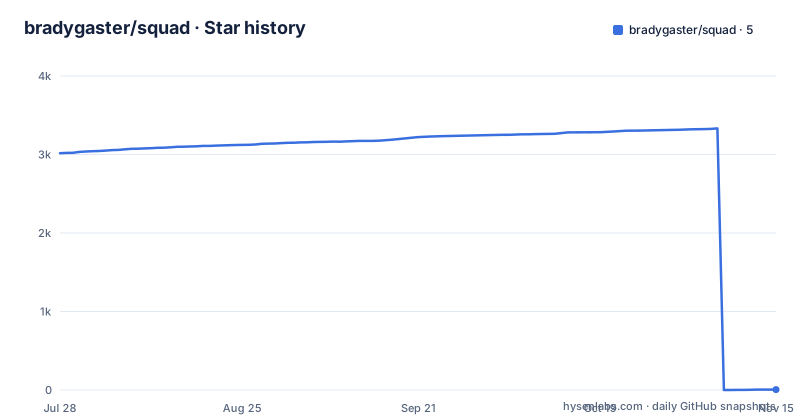
Star history
- bradygaster/squad5 ★ · -3,011
| Repository | 2026-07-28 | 2026-11-15 |
|---|---|---|
| bradygaster/squad | 3k | 5 |
-3,011 Stars in the last 110 days, measured from the daily GitHub snapshot. Compare with other projects
Editorial analysis
What Squad Actually Solves
Squad addresses a specific pain: coordinating multiple AI agents on a single codebase without losing oversight. The README describes it as a human-directed AI development team that lives in your repo as files. Each agent has its own context, reads only its own knowledge, and writes back what it learned. That design makes the work inspectable. The target user is a developer who already uses GitHub Copilot and wants to delegate coordination, repetition, and parallel execution while staying accountable for priorities and approvals. It is explicitly not a replacement for engineers or reviewers. If you are looking for an autonomous swarm that makes decisions for you, this is the wrong tool.
The File-Based Architecture
Squad's core mechanism is persistence through files. When you run `squad init`, it creates a `.squad/team.md` file in your project. That file is the team's state. Agents are named from a persistent thematic cast, and they write decisions and history back to that directory. The README stresses that each team member runs in its own context and only reads its own knowledge, which is a deliberate contrast to a chatbot that pretends to have different personas. The state survives across sessions because it is on disk. There is also an `externalize` command that moves `.squad/` outside the working tree, which survives branch switches. That is a practical answer to a real problem: git branches can wipe out uncommitted state. The architecture is simple, but it is the simplicity that makes it auditable.
Getting It Running: Commands and Config
The quick start is straightforward. You create a project with `git init`, then install the CLI globally with `npm install -g @bradygaster/squad-cli`. Run `squad init` to scaffold the team. The default interactive setup walks you through choices; `squad init --preset default` skips the prompts and gives you a fully configured squad with members, charters, and routing rules. After that, authenticate with GitHub using `gh auth login` so Squad can access Issues and PRs. Then you invoke the agent through Copilot: `copilot --agent squad --yolo`. The `--yolo` flag is required because Squad makes many tool calls in a typical session, and without it Copilot prompts for approval on each one. The README warns that this bypasses per-call approval, so you are trading oversight for speed. In VS Code, you select the Squad agent in Copilot Chat instead. The setup is genuinely minimal, but the `--yolo` trade-off deserves attention.
The Triage Watch Mode and Its Constraints
One of the more distinctive commands is `squad triage`, also aliased as `watch` or `loop`. It polls for issues and auto-triages them to the team. You can set the polling interval with `--interval <minutes>`, defaulting to 10. With `--execute`, it dispatches Copilot agents to work on those issues. That is a significant automation step. The README does not specify what happens when an agent fails or when an issue requires human judgment. The constraint is implied: this is watch mode, not autonomous decision-making. It still routes issues to agents, but the human remains responsible for approvals. The `--health` flag shows watch status, and `--log-file` gives diagnostics. If you plan to run this in CI, the `--json` output of `squad update-check` is useful, but the absence of documented failure handling in the README is a gap you should investigate before relying on it.
Limitations and Wrong-Use Cases
Squad is alpha software. The README says so explicitly: APIs and CLI commands may change between releases. That is the first limitation. The second is that it depends entirely on GitHub Copilot. If you do not have Copilot, or if your organization restricts its use, Squad is useless. The third is the `--yolo` flag. The README tells you to use it because otherwise you will be approving tool calls constantly, but that means you lose per-call oversight. For a tool that claims to keep humans in the loop, that is a tension. Also, the .NET integration is a preview package targeting early `0.1.0-preview` consumers, so do not build production systems on it. The wrong use case is any environment where you need stable interfaces or where AI-generated code must go through strict review before touching the codebase. Squad is not a replacement for that review process; it is a way to generate more work for reviewers.
Alternatives and How They Differ
The obvious alternative is to use GitHub Copilot directly without Squad. That gives you a single assistant with a shared context, no persistent team files, and no routing rules. The difference is architectural: Squad splits the context into isolated agent contexts and persists decisions to disk, while plain Copilot keeps a single session that forgets everything when it ends. Another alternative is a multi-agent framework like AutoGen or CrewAI, which orchestrate agents in code, often with a central coordinator. Those tools are typically framework-heavy and require you to write orchestration logic. Squad, by contrast, is a CLI that generates files and relies on Copilot as the execution engine. The trade-off is that you get less control over the orchestration logic, but you also write no code to set it up. If you want to script agent interactions programmatically, Squad's file-based model may feel limiting.
Maintenance, Upgrades, and Licensing
Upgrading Squad is a two-step process that the README documents clearly. First, update the CLI binary with `npm install -g @bradygaster/squad-cli@latest`. Second, run `squad upgrade` inside your project to update Squad-owned files like `squad.agent.md`, templates, and GitHub workflows. The command never touches your `.squad/` team state, so your agents, decisions, and history are preserved. There is a `--force` flag to re-apply updates even if the version matches. There is also `squad upgrade --self` to update the CLI package itself, with an `--insider` flag for prerelease builds. The project is MIT licensed, which means you can use it freely, but the alpha status means you should expect breaking changes. The changelog is the place to check before each upgrade. The maintenance cost is low in terms of commands, but the real cost is the time you spend re-verifying behavior after each release.
Editorial conclusion
Adopt Squad if you are a developer or small team already using GitHub Copilot and want a structured, inspectable way to delegate coding tasks to specialized agents that persist across sessions. Do not adopt it if you need a stable API, if you cannot tolerate breaking changes, or if you expect it to replace human review. Before adopting, verify the current version's changelog for breaking changes, test `squad init` in a disposable repository, and confirm that the `--yolo` flag's approval bypass matches your risk tolerance. Squad is a promising experiment, not a production tool.
Frequently asked questions
What is the Squad agent runtime?
A programmatic multi-agent runtime for a third-party command line assistant. It scaffolds a team of specialist members in your repository as files, each running in its own context and reading only its own knowledge, writing back what it learned so the work stays inspectable. It ships seventeen commands, a preset for a fully configured team, and a sample directory covering sixteen integrations.
How do I install Squad?
Four documented routes, all installing the same command line tool: a global package install needing a recent JavaScript runtime, a cask on macOS, a package manager entry on Windows, and a standalone installer that vendors the runtime itself so neither the runtime nor the registry access is required. Direct archives for three platforms are also published on the releases page, and preview and insider builds exist for two of the routes.
What does squad upgrade overwrite?
The files the project owns: an agent definition file, the templates, and the workflow definitions. It states that it never touches your team state directory, so members, decisions and history are preserved. Workflow files you have edited by hand fall inside the overwritten set, and the only documented override is a flag that re-applies the update when the installed version already matches.
Does the Squad container image send telemetry?
It can. The image definition lists telemetry export as part of the documented container contract, and explains that the code path lives in optional observability packages which are deliberately included because the watch command spawns an external binary. The file gives that as the reason the optional dependencies cannot be dropped from the image.
Official sources
Where developers are discussing it
Posts on Hacker News, dev.to and Lobsters that link to this repository, found by our scan of those communities. 0 in the last 30 days; newest first.
- What LangGraph Actually Builds: Runnables, Channels, Bubble-Up, Agents and Deep Agentsdev.to · Oct 11, 2026 · 2 points · 4 comments
Add this badge to your README
If you maintain this project, the badge below links readers to this analysis and shows its maintenance status from the daily GitHub snapshot. Paste the markdown into your README; add ?metric=license or ?metric=stars to the image URL for a different field.

[](https://hysenlabs.com/projects/bradygaster-squad)Star history chart for your README
[](https://hysenlabs.com/projects/bradygaster-squad)Was this useful?