Promptfoo is now part of OpenAI, and its examples are mostly model comparisons
Test your prompts, agents, and RAGs. Red teaming/pentesting/vulnerability scanning for AI. Compare performance of GPT, Claude, Gemini, DeepSeek, and more. Simple declarative configs with command line and CI/CD integration. Used by OpenAI and Anthropic.
At a glance
- What is it?
- A CLI and library for evaluating and red-teaming applications built on language models, distributed through npm, Homebrew and the Python package index, with a Dockerfile in the repository. The first line of the README announces the acquisition and asserts the project stays open source. The second thing worth knowing is that the example corpus is dominated by side-by-side model comparisons, which tells you what people actually use it for.
- Who is it for?
- Promptfoo fits a team choosing between models or prompt variants and wanting a number rather than an opinion, with the eval running on a machine you control. It does not fit a team that needs a vendor-neutral evaluation story and is uneasy about who owns the tool, which is a reasonable position now that the ownership is stated on the first line.
- Can I use it commercially?
- Yes. MIT is a permissive licence: you can use, modify and sell software built on it, as long as you keep its copyright and licence notices.
- Is it still maintained?
- Yes. The repository received new commits within the last day.
- What is it written in?
- Mainly TypeScript, according to GitHub's language statistics.
Answers come from the project's GitHub data, last synced on November 13, 2026, and from our analysis. They are not legal advice.
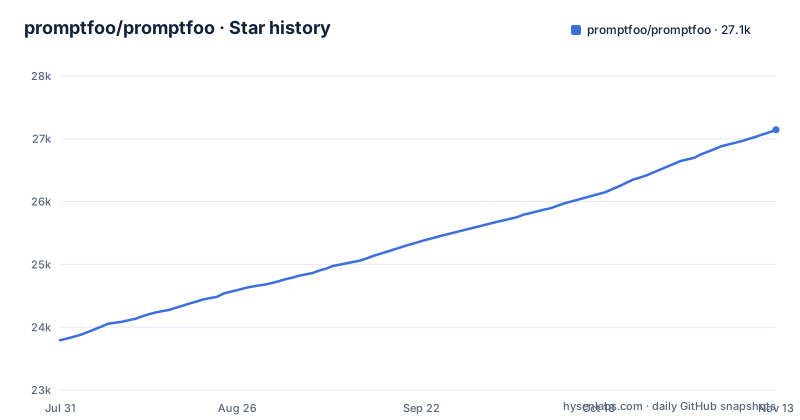
Star history
- promptfoo/promptfoo27,143 ★ · +3,350
| Repository | 2026-07-31 | 2026-11-13 |
|---|---|---|
| promptfoo/promptfoo | 23.8k | 27.1k |
3,350 Stars in the last 105 days, measured from the daily GitHub snapshot. Compare with other projects
Editorial analysis
The first line of the README is the acquisition
The most consequential sentence in this repository is not in the features or the quick start. It is a single note above everything else.
Promptfoo is now part of OpenAI. The note goes on to say that promptfoo remains open source and MIT licensed, and links to a company update on the project website.
That is an unusually clean statement, and it is worth taking at face value for the licensing while being clear-eyed about what else follows from it. The licence is unchanged and the repository, the issue tracker and the contribution process are all still here. What has changed is that a tool used to compare models now belongs to one of the model providers.
For a team choosing a model, that is a fact to weigh rather than a reason to stop. If your evaluation is a spreadsheet you will present to a group that also pays one of those providers, running the evaluation with a tool that provider owns is a conversation you may have to have. The pragmatic mitigation is the one the project already gives you: the evaluations are configuration files, and the tool runs them on your machine. Configs are portable even when the runner is not.
The rest of the governance is unchanged and conventional: a licence file, a security policy, a code of conduct, a contributing guide, a changelog, a citation file, and an explicit invitation to the contributor community.
The acquisition notice sits directly above the quick start, and the quick start is two lines:
npm install -g promptfoo
promptfoo init --example getting-started
Thirteen of the examples compare one model against another
The examples directory is the most honest description of what this tool is for, and counting it is worth doing.
The list runs to several dozen entries and the shape of them is unmistakable. There are comparisons of one assistant against another, and of three at once. There is a comparison of two reasoning-capable models against each other. There are comparisons by reasoning effort, by temperature, and by model tier measured on a specific benchmark. There is a comparison of open-source models, and another of two specific open-source models, and another of a third. There is a Claude-versus-GPT image comparison. And there is a comparison of two agent SDKs rather than two models.
Set against that, the examples that are about prompts rather than models are a minority: a custom prompt function, dynamic variables, and metadata supplied in a spreadsheet.
So the tool described as being for testing prompts is, in its own examples, mostly a harness for choosing a model. That is a more useful and more achievable thing to be, because comparing two models is mechanical once the harness exists, while judging whether a prompt is good is a conversation you have to have anyway. The prompt-testing framing is not wrong, but the example corpus is where the real priorities show.
It is also good news for a new user, because a model comparison is a small self-contained project you can run this afternoon and learn the whole configuration language from.
Your prompts stay local, so put that claim next to the vendor claim
Two claims in this README sit next to each other and are worth reading in the same breath.
The first is privacy, stated in strong terms: evaluations run one hundred percent locally, and your prompts never leave your machine. That is a specific and checkable claim, and the design supports it, because an evaluation is a configuration file naming a model provider, and the only thing that leaves your machine is the prompt text going to the provider you configured. The tool is the thing running locally.
The second is that applications built with this are serving very large numbers of users in production, and the repository description says it is used by two of the largest model providers.
Both can be true, and they are probably both true. A company with a large deployment can run internal evaluations on employees' laptops with its own prompts and its own credentials, and that is exactly the privacy-preserving case.
The thing to be clear about when you read the privacy claim is its boundary. It is a claim about your prompts and your evaluation data. It is not a claim that the tool contacts nobody, because running an evaluation against a hosted model necessarily sends your prompts to that provider, and a provider that owns the evaluation tool is not a neutral party with respect to which model you choose. If your concern is that prompts containing unreleased feature detail reach a third party, the local execution claim does not address it, and you should check what the provider's own data terms say.
For an evaluation harness whose output is a decision you make, that boundary is the one that matters.
The published package contains no source maps, tests or mocks
The files array in the manifest uses negation patterns, and they tell you what a consumer of the installed tool does and does not get.
The package publishes its build output and then excludes four things from it: the test directory, a mocks directory, every source map, and every incremental build info file.
The first two are obvious and correct. The third one is the interesting one. There are no source maps in the published package, which means if the command line tool throws while running in your continuous integration job, the stack trace points into the built output without anything to map it back to TypeScript source. You will be reading generated code.
Whether that matters depends on where the failure is. If the tool is doing its job, it is calling model providers and reading configuration, and the failure will be a provider error or a configuration error that the tool reports in its own words. If the failure is inside the tool, a contributor with a checkout can reproduce it with maps, and a user running the installed package cannot.
The fourth exclusion, the build info files, is just keeping compiler state out of a published tarball, which is unremarkable.
The whole pattern is a project that has thought about what belongs in a distribution and has optimised for size. It is consistent with a tool meant to run in a pipeline rather than to be read.
The container installs Python on purpose and leaves its version unpinned on purpose
The container file contains a comment that is worth reading in full, because it documents a specific failure that already happened.
Python is installed into a Node image, and the reason given is that Python is needed for Python providers, for prompts, and for assertions. So the image is Node, Python, and a compatibility library for the C runtime, with a non-root user created for the application.
Then the comment on the version argument. It is empty by default so the package manager installs whatever Python the base image ships. Pinning a specific minor makes the install unsatisfiable when the base image advances, and the comment names the actual incident: the base moving two versions broke the release build. So the argument is empty on purpose, and there is a documented escape hatch for anyone who needs reproducibility for their own build.
That is a good artefact to find in a repository. It tells you the maintainers hit a real failure, diagnosed it to a specific cause, and encoded the fix as a comment explaining why the obvious-looking alternative is wrong.
The build environment also disables telemetry at compile time, and the builder has a step whose comment says it blocks dependency lifecycle scripts during install, with a link explaining why the C runtime compatibility library might be needed. So the supply-chain posture is deliberate rather than incidental, which is a reasonable thing to look for in a tool that reads your prompts and your credentials.
The Node floor has a patch number, and there are two command names
Two small manifest details that each cost somebody an afternoon.
The Node requirement is not a major version, it is a specific patch of a specific major. That means a machine on the same major line but an earlier patch is not supported, which is unusual and stricter than most tools ask for. The container pins a specific Node release on Alpine, node:24.22.2, which sits above the >=22.22.0 floor on a different major line.
The second detail is that there are two names for the same executable, a full one and a two-letter short form, and both point at the same entry file. That is a small kindness, and it is also a packaging hazard in one specific case: if another tool in your image or your continuous integration job already installs a command with the short name, you get a collision that manifests as whichever binary happens to be earlier on the path.
Neither of these is a problem in isolation. Both are the kind of thing to check before wiring a new tool into a shared build image, where the short name is the thing that collides and the Node patch floor is the thing that silently fails on an older image you did not rebuild.
An architecture baseline, four test configurations and a database
The top level of this repository is a much larger operation than a command line tool, and a few of the files explain the shape of it.
There is an architecture directory and two scripts behind it, one that regenerates a baseline and one that checks boundaries against it, wired to two named commands. That is the pattern of a project that has fixed rules about which module may import which, with an escape hatch that has to be taken deliberately by regenerating a file. For a codebase with a web app, a documentation site and a plugin system, that is the difference between a boundary that holds and one that erodes.
There are four test configurations rather than one: a unit configuration, an integration configuration, a smoke configuration, and a shared setup file. Splitting unit from integration from smoke is what lets the fast suite run on every change while the slower ones run on a schedule or before a release.
There is a database object-relational mapper with its own configuration, which means evaluation runs write somewhere durable. That is a real operational fact for anyone planning where results live and how long they persist, and it is not mentioned in the README.
Alongside those there is an unused-code detector configured, a formatter, a linter, a commit-message hook, a changelog automation with its own manifest, a dependency update bot, a Kubernetes chart, a documentation site that is its own workspace, and a citation file. The workspaces array in the manifest lists the application and the site, so the two are installed and built separately while sharing a root lockfile.
It ships a pull request scanner, a chart and an editor plugin
The last group of things is the integrations, and together they say what the project expects its users to build around.
The first is a code scanning action. One of the documented capabilities is reviewing pull requests for language-model-related security and compliance issues, and there is a directory in the repository for it. So this is not only a tool you run on your own prompts: it is a continuous integration component that runs red-team style checks on somebody else's changes before they merge. That is a much larger blast radius than an evaluation, and it is the integration to think hardest about, because a scanning action on a pull request can execute model calls and reach whatever providers the configuration names.
The second is a Helm chart, which means there is a supported way to run the hosted side on a cluster. Combined with the local execution claim, the architecture is that the same tool is both a desktop command and a deployed service, and which one you are running determines where your evaluation results live.
The third is a plugin directory for an editor's agent format, so the project ships a plugin for at least one coding assistant alongside its own configuration for several.
These three are the shape of an evaluation platform rather than a utility, and the code scanning integration is the one that would make me read the security documentation before installing anything.
Editorial conclusion
Promptfoo fits a team choosing between models or prompt variants and wanting a number rather than an opinion, with the eval running on a machine you control. It does not fit a team that needs a vendor-neutral evaluation story and is uneasy about who owns the tool, which is a reasonable position now that the ownership is stated on the first line. Verify first whether your prompts can stay local for the runs that matter, then read the security scanning documentation, because the same tool that grades your prompts also ships a scanner for other people's pull requests.
Frequently asked questions
What is Promptfoo used for?
It is a command line tool and library for evaluating and red-teaming applications built on language models. That covers running automated evaluations of prompts and model outputs, comparing models side by side, checking changes in continuous integration, and generating security vulnerability reports for those applications. It is also installable with pip and brew alongside the npm distribution, and the repository includes a Dockerfile.
Is Promptfoo free?
Yes, and the licence is MIT. The project states in the first line of its readme that it is now part of OpenAI, and in the same note that it remains open source and MIT licensed. The tool costs nothing to install; the model providers you evaluate against charge for their own inference, which is where the money goes.
Is Promptfoo open source?
Yes, MIT licensed, with the usual open source apparatus alongside it: a licence file, a security policy, a code of conduct, a contributing guide, a changelog, a citation file, and an invitation to contributors. The README also states explicitly that the project remains open source after becoming part of OpenAI.
how to install promptfoo
There are four documented routes. A global npm install of the package, a package manager formula, a Python package index install, or running any command through the on-demand runner without installing at all. The quick start then initialises a project from a named example, after which you export a provider API key as an environment variable.
how to run promptfoo
After initialising, you change into the generated project directory, run the eval command, then run the view command to see results. Configuration is declarative: a file naming the prompts, the providers and the assertions, so the same file is what a person edits and what continuous integration runs. A built-in Node requirement with a specific patch version applies, and the Dockerfile pins Node 24.22.2, above that floor.
Official sources
Where this project is recommended
Where developers are discussing it
Posts on Hacker News, dev.to and Lobsters that link to this repository, found by our scan of those communities. 0 in the last 30 days; newest first.
- 17,600 actions, no human at the wheel: how to start red teaming AI agents in 2026dev.to · Oct 14, 2026 · 5 points · 1 comments
Add this badge to your README
If you maintain this project, the badge below links readers to this analysis and shows its maintenance status from the daily GitHub snapshot. Paste the markdown into your README; add ?metric=license or ?metric=stars to the image URL for a different field.

[](https://hysenlabs.com/projects/promptfoo-promptfoo)Star history chart for your README
[](https://hysenlabs.com/projects/promptfoo-promptfoo)Was this useful?