Brave Core: the build system behind the Brave browser
Core engine for the Brave browser for mobile and desktop. For issues https://github.com/brave/brave-browser/issues
At a glance
- What is it?
- Brave Core is the Chromium fork layer that produces Brave for desktop, Android and iOS. It is a build and patch repository, not an app you install, and its cost is measured in disk space and compile hours.
- Who is it for?
- Adopt brave-core if you are modifying Chromium behaviour and can afford the disk, RAM and multi-hour compile cycles, or if you are building a downstream product on Brave's patch set. Do not adopt it if you want the Brave browser itself: the README points to brave.com/download for that, and to brave-browser for issues and releases.
- Can I use it commercially?
- Yes, with conditions. MPL-2.0 is a weak copyleft licence: you can use it inside commercial and closed-source software, but if you distribute changes to its own files, you must publish those changes under the same licence.
- Is it still maintained?
- Yes. The repository received new commits within the last day.
- What is it written in?
- Mainly C++, according to GitHub's language statistics.
Answers come from the project's GitHub data, last synced on November 13, 2026, and from our analysis. They are not legal advice.
Star history
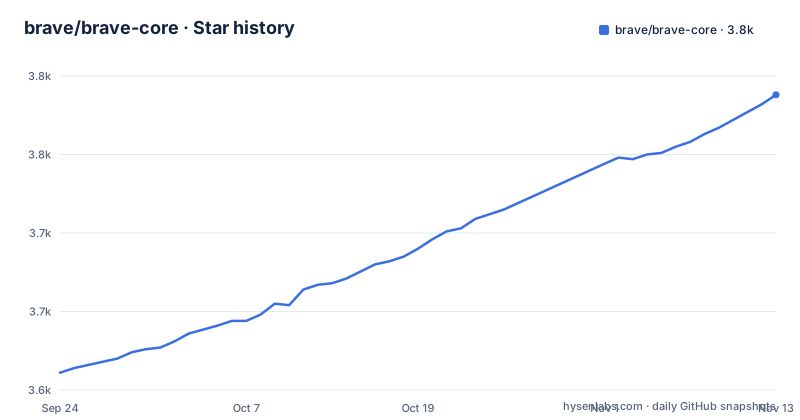
- brave/brave-core3,788 ★ · +177
| Repository | 2026-09-24 | 2026-11-13 |
|---|---|---|
| brave/brave-core | 3.6k | 3.8k |
177 Stars in the last 50 days, measured from the daily GitHub snapshot. Compare with other projects
Editorial analysis
What brave-core actually is, and who ends up using it
Brave Core is not the Brave browser. The README describes it as "a set of changes, APIs, and scripts used for customizing Chromium to make the Brave browser." The repository holds the build tools for the desktop browser across platforms, and it fetches and syncs code from the projects listed in package.json and src/brave/DEPS.
The audience is narrow. You are in the right place if you are adding or changing browser behaviour that lives in the Chromium layer: ad blocking, the Shields UI, wallet or rewards integration, or a downstream product that starts from Brave's patch set rather than from upstream Chromium. You are in the wrong place if you want to use the browser. The README sends end users to brave.com/download, and it sends bug reports and release artifacts to the separate brave/brave-browser repository, which "only holds the issues, releases and the wiki."
That split is the first thing to internalise. The code lives here; the conversation and the shipped binaries live elsewhere. A search for a Brave GitHub release will land you on brave-browser, not on this repository, and that is by design rather than an oversight.
How the Chromium sync and patch layers fit together
The mechanism is a three-layer checkout. First, Chromium itself, fetched via depot_tools, with the branch pinned in the repository (the README gives 65.0.3325.181 as an example of the form that pin takes). Second, brave-core, which is mounted at src/brave inside that Chromium tree and maintains patches against third-party Chromium code. Third, adblock-rust, Brave's adblock engine, linked through components/adblock_rust_ffi.
Because brave-core is mounted into a Chromium tree rather than standing alone, the checkout path is not a preference. The README states that brave-core "must be checked out into ./src/brave within a pre-existing project folder." Clone it anywhere else and the build scripts have nothing to attach to.
The patch directory in the repository root is where the third-party modifications live, and the sync script is what keeps them applied. That is the part that breaks most often in a fork like this: a Chromium ref moves, a patch no longer applies cleanly, and the fix is manual. The README acknowledges the risk in its own way by warning that sync "will attempt to stash your local changes in brave-core, but it's safer to commit local changes before running this."
Prerequisites, init and a first build
Install the platform prerequisites first. The README links separate wiki pages for Android, Linux, iOS, macOS and Windows development environments; there is no single cross-platform prerequisite list, and skipping the right one is the most common reason init fails.
With prerequisites in place, clone into the required path and initialise. The init step downloads the Chromium source, which the README describes as having a large history of tens of gigabytes, and warns it "might take a really long time to finish depending on internet speed."
git clone [email protected]:brave/brave-core.git path-to-your-project-folder/src/brave
cd path-to-your-project-folder/src/brave
pnpm run init
Mobile targets take extra arguments at init time. Android needs both an OS and an architecture, and the README's example uses arm; iOS needs only the OS.
pnpm run init --target_os=android --target_arch=arm
pnpm run init --target_os=ios
The default build type is component, so the bare command is the fast iteration loop. A release build is a separate invocation, and the README warns it "can be very slow and use a lot of RAM, especially on Linux with the Gold LLVM plugin."
pnpm run build
pnpm run build Release
pnpm start
Expect the first build to take hours; the README says that depending on processor and memory it "could potentially take a few hours." iOS is the exception to the pnpm flow: builds go through the Xcode project in ios/brave-ios/App, which you can open directly or launch with pnpm run ios_bootstrap --open_xcodeproj.
Keeping a fork current: what pnpm run sync does and where it fails
Staying current is the ongoing cost of this repository. pnpm run sync performs four steps, in the README's own numbering: update sub-projects (chromium, brave-core) to the latest commit of a git ref such as a tag or branch, apply patches, update gclient DEPS dependencies, and run hooks.
The flag table is where the real behaviour lives. With no flags, sync updates Chromium if needed and re-applies patches; if the Chromium version did not change, it only re-applies patches that have changed, and it updates child dependencies "only if any project needed updating during this script run." That is the intended steady state: keep up to date without manually pulling or switching branches. The --force flag is the escape hatch, updating both Chromium and brave-core to the latest remote commit for the current brave-core branch and the Chromium ref specified in brave-core.
The failure mode is a patch conflict after a Chromium bump. The README does not document a rollback path for a sync that leaves the tree in a bad state, and the only stated protection is the stash of local changes plus the advice to commit before syncing. If you are carrying local modifications on top of the fork, treat a Chromium ref change as a merge event with a real review, not as a routine update. The repository also ships update_patches and apply_patches as separate scripts, which is where you go when the automatic pass does not land.
When brave-core is the wrong tool
The clearest wrong use is building the browser to use it. Compiling Chromium to get a browser you can download as a signed binary is hours of machine time for no benefit, and the README itself routes users to brave.com/download.
The second wrong use is a small UI change. If what you want can be expressed as a browser extension, the extension APIs are a far cheaper surface than a Chromium fork, because you avoid the tens-of-gigabytes checkout, the depot_tools bootstrap and the patch maintenance entirely.
The third is a one-off build on a laptop. The README's own warnings about release builds consuming a lot of RAM on Linux and builds taking hours are a signal about the class of machine this expects. A machine that cannot hold a Chromium checkout plus a build tree will spend more time swapping than compiling.
A fourth, subtler case: if you need upstream Chromium behaviour with no Brave-specific features, starting from brave-core means inheriting the patch set and the sync burden for changes you did not ask for. Start from Chromium and add what you need.
Alternatives and the real difference in approach
The direct alternative is building Chromium itself. Same depot_tools bootstrap, same GN and Ninja build, but no src/brave mount, no third-party patch directory and no sync script re-applying patches on every ref change. You get upstream behaviour and you own every modification you make. The trade is that everything Brave provides, including the adblock-rust engine linked through components/adblock_rust_ffi, is work you would have to do yourself.
A second alternative is the extension route. Brave's own features sit in the browser layer, but a large share of what people want from a browser fork (content filtering, UI tweaks, custom new-tab behaviour) is reachable through extension APIs. The difference in approach is maintenance: an extension tracks the browser's release cadence, while a fork tracks Chromium's refs and re-applies patches at each one. That is the entire cost difference, and it is large.
A third option is to consume a downstream project's build instead of building. The README points to brave-browser for releases, which is the practical route for anyone who needs a Brave build rather than a Brave build system.
Licence, upgrade cost and what the repository does not tell you
The repository is licensed MPL-2.0, with both LICENSE and LICENSE.html at the root. That is the licence of brave-core itself, and it is separate from the licences of the projects the build fetches. Chromium and the other dependencies carry their own terms, and a build pulls them in from their own sources. If you plan to redistribute a build, the licence obligations you need to satisfy are the union of those, not just MPL-2.0. This is not legal advice; read the licences of every fetched project before shipping.
The upgrade cost is the sync cycle described above. Each Chromium ref change means re-applying patches, resolving conflicts and re-running hooks. The README documents the flags for doing this but not a rollback procedure, and it does not state a supported Chromium version range beyond the pin in the repository. The repository has no published GitHub releases, so there is no published changelog here to read for upgrade guidance; the README points to brave-browser for releases.
One more gap worth naming: the README gives no version compatibility matrix between brave-core and a given Chromium ref. The pin in the repository is the source of truth, and the sync script is what moves it.
Editorial conclusion
Adopt brave-core if you are modifying Chromium behaviour and can afford the disk, RAM and multi-hour compile cycles, or if you are building a downstream product on Brave's patch set. Do not adopt it if you want the Brave browser itself: the README points to brave.com/download for that, and to brave-browser for issues and releases. Before committing, verify three things: that your machine meets the platform prerequisites linked from the README, that you have room for a Chromium checkout described as tens of gigabytes, and that your build target matches an actual script name, since iOS builds go through the Xcode project in ios/brave-ios/App rather than through pnpm run build alone.
Frequently asked questions
What is Brave Core?
Brave Core is the set of changes, APIs and scripts used to customize Chromium into the Brave browser, and it holds the build tools for the desktop browser across platforms. It is not the browser itself; the README sends users to brave.com/download for that.
What is brave core, in one sentence?
It is the repository that fetches and syncs Chromium, mounts brave-core at src/brave, maintains patches for third-party Chromium code, and links the adblock-rust engine through components/adblock_rust_ffi.
Is the Brave browser really safe?
This repository does not answer that question. It ships a SECURITY.md and points to a security policy, and its README covers the build system, dependencies and contributing guidelines rather than an audit of the shipped browser.
Is the Brave browser a Chinese app?
This repository does not address that question. Its README covers the build system, the Chromium and adblock-rust dependencies, and the contributing and security policies, and it points to community.brave.app for support questions.
Official sources
Add this badge to your README
If you maintain this project, the badge below links readers to this analysis and shows its maintenance status from the daily GitHub snapshot. Paste the markdown into your README; add ?metric=license or ?metric=stars to the image URL for a different field.

[](https://hysenlabs.com/projects/brave-brave-core)Star history chart for your README
[](https://hysenlabs.com/projects/brave-brave-core)Was this useful?