FckSignups, a tools.json directory of browser utilities that skip registration
A list of tools that are open-source, in-browser, and require no-signups!
At a glance
- What is it?
- The FckSignups repository, now presented as NoSignups, is a React and TypeScript directory that links to open-source browser tools which run without an account. The interesting engineering is in the curation rules and the entry schema, not in the front end.
- Who is it for?
- Adopt FckSignups if you want a self-hosted link directory with a written curation rule and a machine-readable index you can diff in a pull request. Do not adopt it if you need the tools themselves, because it ships none of them and hosts none of them, or if you need an account system: the no-login rule applies to the listed tools, not to the directory.
- Can I use it commercially?
- Yes, with conditions. GPL-3.0 is a copyleft licence: if you distribute software that includes it, you must release that software's source code under the same licence. Running it internally without distributing it does not trigger that obligation.
- Is it still maintained?
- Yes. The repository last received commits 24 days ago.
- What is it written in?
- Mainly TypeScript, according to GitHub's language statistics.
Answers come from the project's GitHub data, last synced on November 15, 2026, and from our analysis. They are not legal advice.
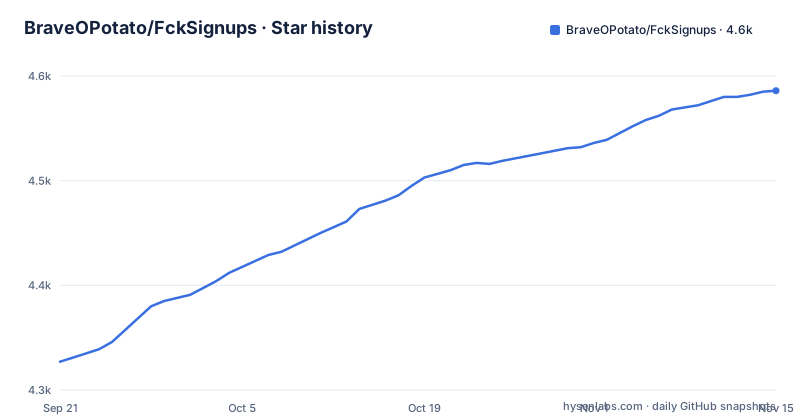
Star history
- BraveOPotato/FckSignups4,586 ★ · +259
| Repository | 2026-09-21 | 2026-11-15 |
|---|---|---|
| BraveOPotato/FckSignups | 4.3k | 4.6k |
259 Stars in the last 55 days, measured from the daily GitHub snapshot. Compare with other projects
Editorial analysis
The repository ships a link index, not the tools it lists
Nothing in this codebase converts a PDF or edits an image. FckSignups is a directory: a React front end that reads a catalogue and hands you a link. The audience is someone tired of the email-and-password dialog that opens in front of a tool they wanted once, and the pitch on the landing page is direct, with no accounts, no emails and no tracking. The catalogue lives in tools.json at the repository root, which means the entire state of the site is a file you can diff, review in a pull request, or replace with your own list. That single fact decides how you should treat the project. If your problem is finding a working tool, this is a starting index. If your problem is owning a tool, it does nothing for you. The distinction matters because the repository name reads like automation and the code contains none: there is no signup logic, no form filling, no headless browser, nothing that touches a third-party service.
Every entry is a validated record in tools.json
Each catalogue row carries a fixed set of fields, and the shape is what keeps the front end simple. Five are mandatory: id, name, description, url, category. The id is a URL-friendly unique identifier, and the category must match an existing category id rather than a free-text label. Everything past those five is optional and mostly cosmetic. tags is an array of searchable keywords, github links to the source repository, one optional field holds an SPDX identifier, stars carries a GitHub star count for display, featured is a boolean that pins an entry to the top, and notRecommendedReason records why an entry is listed but not endorsed. That last field is the one a skim misses. The directory can hold a tool and warn you about it in the same record, which keeps editorial judgement inside the data instead of in prose that goes stale.
Ten fixed categories decide where a tool can land
A tool cannot be filed anywhere the front end does not already know about, because category has to match a category id. The defaults are all, productivity, design, development, writing, privacy, utilities, data, media and education, each with an icon assigned in the table the project publishes. The all bucket sits alongside the nine real ones, which reads oddly until you see it as the unfiltered view for the search box. Contributing rules tighten the record further: descriptions stay under 140 characters, each tool gets three to five tags, and a submission has to work without creating an account. That last rule is the one that decides inclusion, and it is stated as a hard requirement rather than a preference.
Featured is a diversity flag, not a quality claim
With 200 or more tools in the list and a lot of overlap between them, the maintainer pins selected entries to the top and explains why in blunt terms: the flag is biased, and uniqueness is defined simply as being different from the other entries. Outstanding quality is one route into that judgement, an unusual idea is another, and the README does not pretend the two are separable. Practically, a featured boolean buys a listing tool a slot above its category peers, so if you fork this directory, expect the ordering to shift the first time you set featured on your own entries.
Cloning and starting the Vite dev server
The README gives a single chained command that clones the repository, installs dependencies and starts the development server. The directory it creates is still named FckSignups, which matches the clone URL rather than the NoSignups title shown at the top of the README:
git clone https://github.com/BraveOPotato/FckSignups.git && \
cd FckSignups && \
npm install && \
npm run dev
The dev script in package.json runs vite, the build script runs tsc and then vite build, and preview serves the built output. Deployment goes through Cloudflare: the deploy script calls npx wrangler deploy, and the repository carries both wrangler.toml and a cloudflare-worker directory. If you fork this, you are taking the wrangler configuration with it and will want to read wrangler.toml before running that script against your own account.
The name changed, the package name and clone URL did not
The project presents itself as NoSignups and notes it was formerly FckSignups. The package.json still says fcksignups at version 1.0.0 with private set to true, requires react ^19.2.8 and react-router-dom ^7.18.4, the clone URL still points at BraveOPotato/FckSignups, and the community links still send you to reddit.com/r/fucksignups. So the rename is a presentation layer change, and anyone automating against this repository has to keep the old identifiers. A second oddity sits in the dependency list: npm-check-updates is installed as a runtime dependency of what is otherwise a static directory, which reads like a maintenance script left behind rather than something the site calls. Neither point is a defect on its own, but both mean you should read package.json before assuming the dependency tree matches what the page does.
A directory is only as current as its links, and nothing checks them
The failure mode here is silent. A catalogue of external URLs rots from the outside: a tool changes its domain, adds a login wall, or disappears, and the entry keeps its id, its description and its star count, and the README documents nothing that revalidates them. The README does not document a link checker, a staleness policy or a rollback path. No GitHub releases exist, so there is no published version to pin to, and the last push was on 2026-10-22. A dead entry looks exactly like a live one until someone clicks it. The alternative approach is the obvious one: the browser history file you already keep, or a search engine with its own freshness signals. Both carry links they discovered themselves. FckSignups carries links a person chose, filtered by a written rule, and that difference is the whole value proposition, right up until an entry goes dead.
Licensing splits between the directory and the tools inside it
The directory code is released under GPL-3.0, and the project states plainly that it claims no ownership of the third-party projects it lists. That split has a practical consequence for anyone running a fork: the catalogue page is covered, the software reached through the url field is not. The optional github and license fields exist so each entry can carry its own provenance. Star counts are display data and the project does not use them as a quality signal. Read them when you copy an entry out of tools.json into anything of your own.
Editorial conclusion
Adopt FckSignups if you want a self-hosted link directory with a written curation rule and a machine-readable index you can diff in a pull request. Do not adopt it if you need the tools themselves, because it ships none of them and hosts none of them, or if you need an account system: the no-login rule applies to the listed tools, not to the directory. Before anything else, open tools.json and resolve twenty of the url values by hand, since the README documents nothing that revalidates them and a dead entry looks exactly like a live one until someone clicks it.
Frequently asked questions
What is FckSignups and what does it actually do?
It is a React and TypeScript directory of open-source browser tools that work without an account. It links to those tools rather than bundling or running them.
How do I run FckSignups locally?
Clone the repository, install dependencies and run the dev script, which starts vite. The build script runs tsc and vite build, and deployment uses npx wrangler deploy.
What is the difference between the NoSignups name and the FckSignups name?
The project was formerly FckSignups and now presents itself as NoSignups, though package.json still uses fcksignups and the clone URL still points at BraveOPotato/FckSignups.
How do I add a tool to FckSignups?
Open an issue using the request-to-add-a-tool template, or use the submit a tool button on the site. The tool must work without creating an account, with a description under 140 characters and three to five tags.
Can I use NoSignups for tools that need a login?
The contribution guideline requires that a listed tool work without creating an account. The notRecommendedReason field exists for entries that are listed but flagged, so a login-dependent tool would not meet the stated rule.
Official sources
Add this badge to your README
If you maintain this project, the badge below links readers to this analysis and shows its maintenance status from the daily GitHub snapshot. Paste the markdown into your README; add ?metric=license or ?metric=stars to the image URL for a different field.

[](https://hysenlabs.com/projects/braveopotato-fcksignups)Star history chart for your README
[](https://hysenlabs.com/projects/braveopotato-fcksignups)Was this useful?