The dual database problem inside brocoders/nestjs-boilerplate
NestJS boilerplate. Auth, TypeORM, Mongoose, Postgres, MongoDB, Mailing, I18N, Docker.
At a glance
- What is it?
- brocoders/nestjs-boilerplate ships one NestJS service twice over, once on TypeORM and once on Mongoose, with hygen generators for each track. That duplication is the point and also the cost.
- Who is it for?
- Adopt brocoders/nestjs-boilerplate if you are starting a NestJS service that will sit on Postgres or MongoDB for years and you want email auth, social sign in, Admin and User roles, Swagger and a Docker stack already wired together. Skip it if your schema changes every week, if you want one ORM abstraction instead of two parallel tracks, or if you would rather assemble config, mail and i18n yourself and own every line at code review.
- Can I use it commercially?
- Yes. MIT is a permissive licence: you can use, modify and sell software built on it, as long as you keep its copyright and licence notices.
- Is it still maintained?
- Yes. The repository last received commits 1 day ago.
- What is it written in?
- Mainly TypeScript, according to GitHub's language statistics.
Answers come from the project's GitHub data, last synced on November 21, 2026, and from our analysis. They are not legal advice.
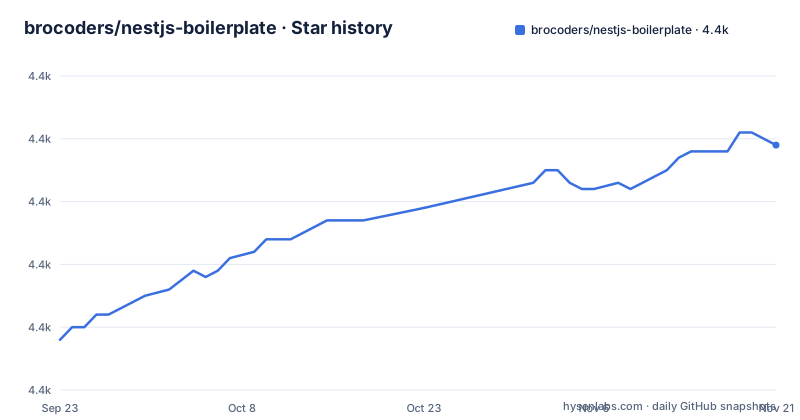
Star history
- brocoders/nestjs-boilerplate4,429 ★ · +31
| Repository | 2026-09-23 | 2026-11-21 |
|---|---|---|
| brocoders/nestjs-boilerplate | 4.4k | 4.4k |
31 Stars in the last 59 days, measured from the daily GitHub snapshot. Compare with other projects
Editorial analysis
Every feature is checked twice, once per database track
The README sells a service. The repository ships two. package.json carries parallel script names for the relational side and the document side: `seed:create:relational` runs `hygen seeds create-relational`, `seed:create:document` runs `hygen seeds create-document`, and the same split runs through `generate:resource:relational`, `generate:resource:document` and `generate:resource:all-db`. Property changes follow the pattern with `add:property:to-all-db`, `add:property:to-document` and `add:property:to-relational`. The audience for this is a team that already knows whether it is on Postgres or MongoDB and wants a scaffold that matches that choice rather than a lowest common denominator. Migrations exist only for the relational track, through `migration:generate`, `migration:run` and `migration:revert`, all pointed at `src/database/data-source.ts`. If your document schema drifts, there is no revert command. That asymmetry is the first thing to understand about this repository.
Hygen writes the code you would otherwise write by hand
The generators are the mechanism that makes the dual track affordable. A `.hygen.js` file and a `.hygen/` directory sit at the repository root, and running a generator produces a new resource or seed file, then the paired `post` hook runs `npm run lint -- --fix` on the result. Every generator in package.json has that post hook: `postseed:create:relational`, `postgenerate:resource:document` and `postadd:property:to-all-db` all end the same way. So the output arrives already formatted to `.prettierrc`. Whether it passes `eslint.config.mjs` is a separate question, and that config is at the repository root rather than inside a template, so a new generated file is linted against the project rules rather than a subset. For a team generating twenty resources, that saved formatting pass is the difference between a template that survives and one that rots within a month.
The compose file boots Postgres, maildev and adminer before your code
The quickest first run is the Docker path, and the compose file is where the moving parts become visible. Postgres, maildev and adminer all start alongside the api service:
services:
  postgres:
    image: postgres:17.9-alpine
    ports:
      - ${DATABASE_PORT}:5432
    volumes:
      - boilerplate-db:/var/lib/postgresql/data
The port is not hardcoded, it comes from `DATABASE_PORT` in your environment file, and the same pattern applies to `MAIL_CLIENT_PORT` and `MAIL_PORT` for maildev and `APP_PORT` for the api service. adminer is the exception, mapped straight to 8080. maildev matters more than it looks: email sign in and sign up are in the feature list, nodemailer is the mailer, and maildev is how you read those messages locally instead of sending real ones. Without it, the auth flow ends in a void.
  postgres:
    image: postgres:17.9-alpine
    ports:
      - ${DATABASE_PORT}:5432
That block is the whole database half of the local stack.
The image copies one startup script and one env example, so document mode needs its own files
The Dockerfile is short and its choices are load bearing. It pins `node:24.14.1-alpine`, installs `@nestjs/cli`, then copies package files to /tmp and runs `npm install` before copying the source, so dependency installation stays cached across source edits. These lines decide which track you get:
COPY ./startup.relational.dev.sh /opt/startup.relational.dev.sh
RUN chmod +x /opt/startup.relational.dev.sh
RUN if [ ! -f .env ]; then cp env-example-relational .env; fi
RUN npm run build
Only the relational startup script and the relational env example are baked in. The repository also holds `startup.document.dev.sh`, `document.Dockerfile`, `document.test.Dockerfile`, `document.e2e.Dockerfile`, `env-example-document` and three `docker-compose.document.test.yaml` style compose files. A skim reads the Dockerfile as the way to run the project. It is the way to run the relational track. Document mode has a parallel set of files you have to select yourself.
Redis is in the compose file, commented out
A detail a skim misses sits in the compose file, commented out and labelled:
  # Uncomment to use redis
  # redis:
  #   image: redis:7-alpine
Redis is not in the README feature list. It ships disabled, with no environment variable and no client package wired to it in the scripts. So the template gives you a cache slot that costs one compose edit, but you still need to add the client, the config key and the invalidation logic yourself. Treat it as a placeholder rather than a capability. The same caution applies to the Heroku demo and the S3 driver: both appear in the README, and neither is exercised by the default local stack.
Six Dockerfiles, one per test and CI combination
Testing is where the duplication costs the most, because the build matrix has one Dockerfile per combination. The root holds `document.Dockerfile`, `document.test.Dockerfile`, `document.e2e.Dockerfile` plus `relational.test.Dockerfile` and `relational.e2e.Dockerfile`, with the plain `Dockerfile` serving the relational track for local runs, and each track has three compose files: one general, one for tests, one for CI. Alongside them sit `startup.document.dev.sh`, `startup.document.test.sh`, `startup.document.ci.sh` and the same trio for relational, and `wait-for-it.sh` is copied in so the API can wait for Postgres to accept connections before seeding. Change a dependency and you are editing that matrix by hand. A `husky` directory and `commitlint.config.js` guard the commit side, and Renovate in `renovate.json` proposes the bumps, but nothing automates the six images. This is the answer to the question people ask about boilerplates: they cut your day one cost and raise your day one hundred cost. package.json marks the package private at version 1.2.0, the last push was on 2026-10-31 and the repository is not archived.
Where the boilerplate stops paying off
The failure mode is drift, and it has two shapes. First, you pick one track on day one and your schema changes weekly. Every later change means running the matching hygen generator, reading its output and deleting whatever the template hardcoded for the demo module. Generators cut down keystrokes, not decisions. Second, you outgrow the layout. Nest, in practice, splits by feature with its own module system, and this template keeps document and relational variants of its Docker, startup and env files at the root, so build changes land in both halves. The real alternative approach is to start from an empty Nest project and add the pieces you need: `@nestjs/config`, nodemailer, `nestjs-i18n`, Swagger, one ORM and nothing else. You write more, and every line is one you can explain at code review. Choose the boilerplate when the demo auth, roles and seeding are what you would have written anyway, and skip it when they are not.
Editorial conclusion
Adopt brocoders/nestjs-boilerplate if you are starting a NestJS service that will sit on Postgres or MongoDB for years and you want email auth, social sign in, Admin and User roles, Swagger and a Docker stack already wired together. Skip it if your schema changes every week, if you want one ORM abstraction instead of two parallel tracks, or if you would rather assemble config, mail and i18n yourself and own every line at code review. The licence is MIT and you can modify and redistribute it freely. Before cloning anything, open package.json and count the scripts and Dockerfile variants you would delete, then check that the missing `migration:revert` on the document side does not block you.
Frequently asked questions
Which ORM does brocoders/nestjs-boilerplate support?
Both TypeORM and Mongoose, with separate generator and seed scripts for each. Migrations are wired only to the relational side through `src/database/data-source.ts`.
How do you run brocoders/nestjs-boilerplate locally?
The repository ships a docker-compose.yaml with postgres, maildev, adminer and api services, and a Dockerfile that copies env-example-relational to .env when none exists. The README itself gives no install command.
Does brocoders/nestjs-boilerplate include Redis?
Only as a disabled service. The redis block in docker-compose.yaml is commented out, and it is not in the README feature list.
How do you create a new resource in brocoders/nestjs-boilerplate?
Through hygen generators, with `generate:resource:relational` and `generate:resource:document` among the scripts in package.json. Each is followed by a post hook that runs lint with --fix on the generated files.
What does brocoders/nestjs-boilerplate ship for authentication?
Sign in and sign up by email, social sign in through Apple, Facebook and Google, and Admin and User roles. Mailing goes out through nodemailer.
Is brocoders/nestjs-boilerplate actively maintained?
The repository is not archived and the last push was on 2026-10-31. There are no GitHub releases, and package.json is marked private at version 1.2.0.
Official sources
Add this badge to your README
If you maintain this project, the badge below links readers to this analysis and shows its maintenance status from the daily GitHub snapshot. Paste the markdown into your README; add ?metric=license or ?metric=stars to the image URL for a different field.

[](https://hysenlabs.com/projects/brocoders-nestjs-boilerplate)Star history chart for your README
[](https://hysenlabs.com/projects/brocoders-nestjs-boilerplate)Was this useful?