gitlab-ci-local: run GitLab CI pipelines on your own machine
Tired of pushing to test your .gitlab-ci.yml?
At a glance
- What is it?
- gitlab-ci-local executes .gitlab-ci.yml jobs locally with a shell or Docker executor, so you can iterate before pushing. Here is how it installs, how the executors differ, and where it stops matching GitLab.
- Who is it for?
- Adopt gitlab-ci-local if you edit .gitlab-ci.yml often and want fast feedback before a push, and you accept that it is a reimplementation rather than the GitLab runner itself. Do not adopt it as a substitute for testing on real GitLab runners, and do not expect it to cover GitLab features the README does not list.
- Can I use it commercially?
- Yes. MIT is a permissive licence: you can use, modify and sell software built on it, as long as you keep its copyright and licence notices.
- Is it still maintained?
- Yes. The repository last received commits 2 days ago.
- What is it written in?
- Mainly TypeScript, according to GitHub's language statistics.
Answers come from the project's GitHub data, last synced on November 21, 2026, and from our analysis. They are not legal advice.
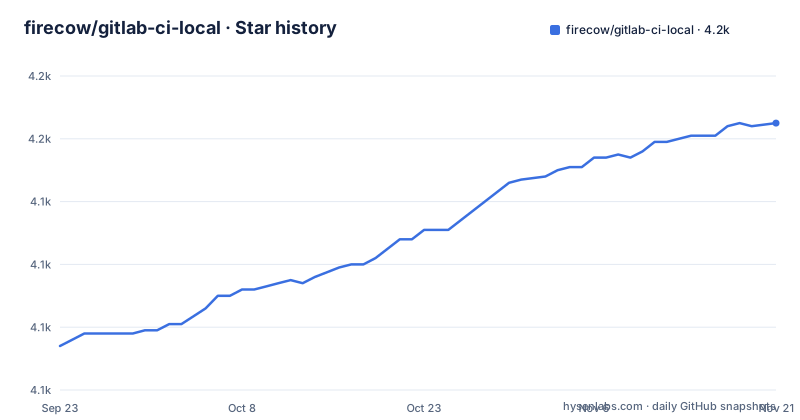
Star history
- firecow/gitlab-ci-local4,165 ★ · +71
| Repository | 2026-09-23 | 2026-11-21 |
|---|---|---|
| firecow/gitlab-ci-local | 4.1k | 4.2k |
71 Stars in the last 59 days, measured from the daily GitHub snapshot. Compare with other projects
Editorial analysis
The push-and-wait loop that gitlab-ci-local removes
The README opens with the problem in one line: "Tired of pushing to test your .gitlab-ci.yml?" That is the whole pitch. On GitLab, a pipeline change is only exercised after a commit reaches the server, which means every typo in a YAML key, every wrong image tag and every bad script line costs a round trip through the remote runner. gitlab-ci-local targets the people who pay that cost most often: the person who owns the pipeline file, and anyone maintaining shell scripts or makefiles purely to reproduce what CI already does. The README frames the second group explicitly, suggesting the tool lets you "get rid of all those dev specific shell scripts and make files". The intended user is a developer with a local checkout, a .gitlab-ci.yml, and either a shell or a container runtime available. It is a developer tool, not a CI server. Nothing in the README suggests it replaces GitLab for shared pipelines or for anything that depends on GitLab-side state.
Shell executor versus docker executor, and what each one actually runs
The README describes two execution modes: shell executor and docker executor. In shell mode, job scripts run directly on your machine, which means they inherit your installed toolchain and your PATH. That is fast and needs no container runtime, but it also means a job that passes locally can fail on GitLab because the images differ. Docker mode runs jobs in containers, which is closer to what GitLab does, and the repository ships examples for the harder container cases: docker-compose-nodejs, docker-swarm-php, docker-in-docker-build, and docker-in-docker-build-with-local-registry. Those example directories are the honest signal about scope. Docker-in-Docker and a local registry are configurations people need real recipes for, and the project provides them rather than leaving them to the reader. The Dockerfile in the repository is minimal, a Debian bullseye slim base with rsync installed, which tells you the container path expects rsync to be present. The tool is written in TypeScript and built with Bun into standalone binaries, per package.json build scripts, with a Node build target as well. Configuration is resolved from several places, and the README is direct about which one most users want: a note above the CLI options section says "Most likely home-file-variables or project-file-variables is what you're looking for instead" of raw CLI flags. That ordering matters when you debug why a variable is not what you expected.
Installing gitlab-ci-local and running your first pipeline
There are several install paths, and the right one depends on your platform. On Debian-based Linux, the README prefers the Deb822 format, fetched and installed with apt.
sudo wget -O /etc/apt/sources.list.d/gitlab-ci-local.sources https://gitlab-ci-local-ppa.firecow.dk/gitlab-ci-local.sources
sudo apt-get update
sudo apt-get install gitlab-ci-local
On Arch Linux the package is on the AUR, and the README shows paru as the helper.
paru -S gitlab-ci-localWith Node or Bun installed, a global package install is the shortest route. macOS users get a Homebrew formula instead, and the README warns that bash there must be version 4.x.x or above.
npm install -g gitlab-ci-localbrew install gitlab-ci-localOn Windows the README assumes Git bash plus rsync, with the binary dropped into the Git mingw64 bin directory.
curl -L https://github.com/firecow/gitlab-ci-local/releases/latest/download/gitlab-ci-local-windows-amd64.zip -o gcl.zip && unzip -o gcl.zip -d /c/Program\ Files/Git/mingw64/bin && rm gcl.zipOnce installed, run it from the directory that holds your .gitlab-ci.yml. The README's development scripts show the shape of a run, pointing the tool at an example directory with --cwd.
gitlab-ci-local --cwd examples/docker-compose-nodejsWhat you should see is job output in your terminal rather than a pipeline page. The README also documents listing pipeline jobs before execution, which is the cheapest way to confirm the tool parsed your file the way you expect. Two conveniences are worth setting up immediately: a bash alias, and tab completion appended to your shell config.
echo "alias gcl='gitlab-ci-local'" >> ~/.bashrcgitlab-ci-local --completion >> ~/.bashrcOption defaults can come from GCL_-prefixed environment variables or from an env file, and the README shows both forms side by side.
export GCL_NEEDS=true
export GCL_FILE='.gitlab-ci-local.yml'NEEDS=true
FILE=doctor-strange.ymlWhere gitlab-ci-local diverges from GitLab
The README has a section literally titled Quirks, which is the first place to look before trusting a green local run. That section covers tracked files, a "local only" mode, home file variables, remote file variables, project file variables, decorators, CI/CD inputs, includes, artifacts, and self-hosted custom ports. The existence of a tracked-files quirk is the important one for day-to-day work: the tool has to decide what the pipeline sees relative to your working tree, and untracked or uncommitted files are exactly the state you are in while iterating. Local only mode exists as a deliberate deviation, which means behaviour can differ from the server by design. Artifacts are listed as a quirk rather than a headline feature, so do not assume artifact handling matches GitLab byte for byte. The broader limitation is structural: this is a reimplementation of GitLab CI semantics in TypeScript, not the GitLab runner. Anything GitLab does server-side, such as triggering downstream pipelines through the API, environment-specific protected variables, or runner-level features, falls outside what a local executor can reproduce. If your pipeline's correctness depends on GitLab-side state, a local pass proves less than it appears to.
Running GitLab CI locally compared with the GitLab runner
The obvious alternative is the official GitLab Runner installed on your own machine, registered against your project, running in shell or docker executor. The difference in approach is where the pipeline definition comes from and who owns the semantics. The GitLab Runner fetches jobs from a GitLab instance and executes them with GitLab's own logic, so behaviour matches production by construction, but you need a GitLab instance, a registration token and network access, and job startup goes through the coordinator. gitlab-ci-local reads your .gitlab-ci.yml from the working directory and interprets it itself, so it works offline against a checkout, but every semantic it implements is the project's own. That trade is the entire decision. If you want fidelity, use the runner. If you want a fast loop with no server, use gitlab-ci-local. A second alternative for people who only need to run commands in containers is to skip CI emulation entirely and use docker compose or a task runner, which is what many of the shell scripts and makefiles the README mentions were doing before.
Maintenance, licensing and upgrade cost
The repository is MIT licensed, which permits commercial and private use and modification, with the usual requirement to keep the licence and copyright notice. That is a permissive licence, and nothing in the README adds restrictions on top of it. This is not legal advice; check the LICENSE file in the repository for the exact terms. On maintenance, the last push was on 2026-09-22, and the most recent release listed is 4.75.1 on 2026-08-25, with 4.75.0 and 4.74.0 before it. The release cadence is frequent and versioned in a way that signals incremental change rather than long-lived branches. The upgrade cost comes from the same place the value does: because the tool reimplements GitLab CI semantics, a GitLab feature you rely on may land in gitlab-ci-local later or with different behaviour. Renovate is enabled according to the README badge, so dependency updates are automated on the project side. Your own cost is re-reading the Quirks section when you upgrade, particularly around includes, variables and artifacts, since those are the areas where a change in the tool can change what your pipeline does locally.
Reading the CLI options and environment variables without surprises
Defaults for CLI options can be set two ways, and the README shows both. Environment variables use a GCL_ prefix, so --needs becomes GCL_NEEDS and --file becomes GCL_FILE. A file-based route uses either .gitlab-ci-local-env in the current working directory or $HOME/.gitlab-ci-local/.env, with bare keys and no prefix. The README's own example mixes them, showing GCL_NEEDS=true and GCL_FILE='.gitlab-ci-local.yml' as exports, then NEEDS=true and FILE=doctor-strange.yml in the env file. Getting the prefix wrong is a silent failure: the option simply keeps its default. There are also logging controls worth knowing before you file a bug about noisy output: GCL_TIMESTAMPS adds timestamps, GCL_MAX_JOB_NAME_PADDING limits padding around the job name, and GCL_QUIET suppresses all job output. The README also documents a bash alias for gcl and a --completion flag that appends tab completion to your shell config. None of these change execution, but they change how much you can see when a job misbehaves, and quiet mode is the wrong default while you are debugging a new pipeline.
Editorial conclusion
Adopt gitlab-ci-local if you edit .gitlab-ci.yml often and want fast feedback before a push, and you accept that it is a reimplementation rather than the GitLab runner itself. Do not adopt it as a substitute for testing on real GitLab runners, and do not expect it to cover GitLab features the README does not list. Before rolling it out to a team, verify three things in your own repository: that your includes resolve, that your variables come from the file locations you expect, and that your jobs behave the same under the docker executor as they do on GitLab.
Frequently asked questions
Can GitLab CI be run locally?
Yes, with a separate tool. gitlab-ci-local runs your .gitlab-ci.yml locally using either a shell executor or a docker executor, so the pipeline is interpreted on your machine instead of by a GitLab server. It is a reimplementation of GitLab CI semantics, not the GitLab runner itself.
How do I install gitlab-ci-local?
The README lists several routes: an apt repository for Debian-based Linux, the AUR for Arch, Homebrew for macOS, a global npm or Bun install, and a Windows binary placed in the Git bash mingw64 bin directory. Pick the one matching your platform and package manager.
How do I use gitlab-ci-local?
Run it from the directory holding your .gitlab-ci.yml. Jobs execute with the shell executor or the docker executor, and you can set option defaults through GCL_-prefixed environment variables or an env file such as .gitlab-ci-local-env. The README's Quirks section documents where behaviour differs from GitLab.
Can I install gitlab-ci-local on Ubuntu?
Yes. The README gives apt commands for Debian-based distributions, preferring the Deb822 format with a sources file under /etc/apt/sources.list.d/, and provides an older signed-by variant for distributions that do not support that format.
What is gitlab-ci-local?
It is a TypeScript tool, distributed under the MIT licence, that runs GitLab pipelines locally as a shell executor or docker executor. The README positions it as a way to test .gitlab-ci.yml without pushing and to drop dev-specific shell scripts and makefiles.
Official sources
Add this badge to your README
If you maintain this project, the badge below links readers to this analysis and shows its maintenance status from the daily GitHub snapshot. Paste the markdown into your README; add ?metric=license or ?metric=stars to the image URL for a different field.

[](https://hysenlabs.com/projects/firecow-gitlab-ci-local)Star history chart for your README
[](https://hysenlabs.com/projects/firecow-gitlab-ci-local)Was this useful?