Zeus: A Go-based Rails boot checker that trades auto-reload for speed
GitHub describes it as Boot any rails app in under a second.. The repository metadata lists Go as its primary language. The metadata lists the MIT license. This article stays within the project description and details documented in the GitHub repository README.
At a glance
- What is it?
- Zeus preloads a Rails app in a master process and forks fast commands from it. It targets Rails 3.2 through 6.x on macOS and Linux, with a restart mechanism aimed at AI agents and automated tooling.
- Who is it for?
- Adopt Zeus if you work daily with Rails 3.2 through 6.x on a local FSEvents or inotify filesystem and want sub-second console, server, generate, and test commands. Skip it if you use NFS, CIFS, Samba, or shared VM folders, or if you rely on frequent changes to FactoryBot factories or RSpec support files, which require manual restarts.
- Can I use it commercially?
- Yes. MIT is a permissive licence: you can use, modify and sell software built on it, as long as you keep its copyright and licence notices.
- Is it still maintained?
- Yes. The repository last received commits 16 days ago.
- What is it written in?
- Mainly Go, according to GitHub's language statistics.
Answers come from the project's GitHub data, last synced on October 21, 2026, and from our analysis. They are not legal advice.
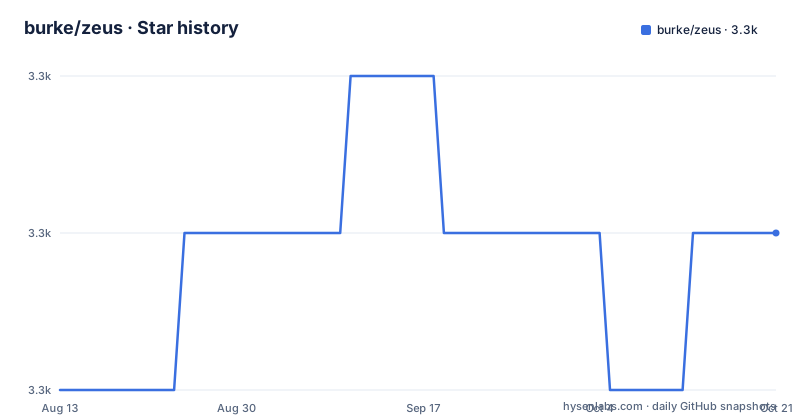
Star history
- burke/zeus3,320 ★ · +1
| Repository | 2026-08-13 | 2026-10-21 |
|---|---|---|
| burke/zeus | 3.3k | 3.3k |
1 Stars in the last 69 days, measured from the daily GitHub snapshot. Compare with other projects
Editorial analysis
The problem: Rails boot time is a tax on every command
Rails developers run console, server, generate, and tests dozens of times a day. Each invocation pays the full cost of loading the framework, initializers, and gems. Zeus attacks that overhead by preloading the application once and forking from the resulting state. The README's claim is that normal development tasks take less than one second. That is the whole pitch, and it is a specific one. This is not a general-purpose task runner. It is a checkpointer for non-multithreaded applications, with Ruby as the only implemented target. The intended user is a Rails developer on a local machine who is tired of watching a spinner while a test file boots for the tenth time.
How Zeus actually works: master process, forks, and signals
Zeus runs a master process that boots the Rails environment once. When you type `zeus console` or `zeus test spec/widget_spec.rb`, the master forks a slave process from that preloaded state. The fork inherits the loaded classes and connections, so the command starts almost immediately. The master also monitors the filesystem using FSEvents on macOS or inotify on Linux, so it can detect changes that require re-preloading. The restart mechanism is the most revealing part of the design: `zeus restart` sends SIGUSR1 to the master, which tears down all slaves, the client socket, and file monitors, then rebuilds everything from scratch. You can also signal it directly with `kill -USR1 $(cat .zeus.pid)`. That direct signal path is explicitly aimed at AI agents and automated tooling that cannot easily stop and restart a foreground process. This is a pragmatic design for scripted environments, not just human terminals.
Getting it running: gem install, init, and the bundler trap
Installation is a single gem command: `gem install zeus`. The README is blunt about the Gemfile question: you can put it there, but running `bundle exec zeus` adds precious seconds, which defeats the purpose. Zeus is built to run outside Bundler. After installation, run `zeus init` inside your Rails app. That creates two files: `custom_plan.rb` and `zeus.json`. You also need to force the test environment by changing `ENV['RAILS_ENV'] ||= 'test'` to `ENV['RAILS_ENV'] = 'test'` in `test/test_helper.rb` or `spec/spec_helper.rb`. Then start the server with `zeus start`, which prints the available commands. In another shell you run `zeus console`, `zeus server`, `zeus test`, `zeus generate`, `zeus rake -T`, or `zeus runner`. The setup is minimal, but the test environment change is mandatory, and the README warns that tests often run twice if you leave `require 'rspec/autotest'`, `require 'rspec/autorun'`, or `require 'minitest/autorun'` in place.
The filesystem constraint that kills shared folders
Zeus requires a filesystem that supports FSEvents or inotify. The README lists NFS, CIFS, Samba, and VBox/VMWare shared folders as incompatible. That is a hard constraint, not a soft warning. If your project lives on a network mount or a VM shared folder, Zeus will not work reliably because it cannot detect file changes. This rules out a large chunk of remote-development workflows and Docker volume setups that rely on those mounts. For developers on native macOS or Linux with local disks, this is fine. But it is worth checking your actual mount type before adopting Zeus. The constraint is not hidden in a footnote; it sits in the Requirements section, which suggests the maintainers know it is a common failure point.
Known failure modes: pg crashes and stale initializers
Two specific issues stand out. On macOS, the pg gem has a known issue that can cause an opaque crash when starting Zeus. The workaround is to set `export PGGSSENCMODE="disable"`. That is a real, documented failure mode, and it is opaque enough that you might waste an hour without the hint. The second limitation is more fundamental: you must restart Zeus after changing certain initialization files, including FactoryBot factories and RSpec support files. The README gives no automatic detection for these. That means Zeus is wrong for workflows where you edit factories or support files frequently and expect the next test run to pick them up. The restart command exists precisely because this happens often. The trade-off is clear: speed comes at the cost of knowing when the preloaded state is stale.
Alternatives: Spring, Spork, and the difference in approach
The README itself names three related gems. Spring is the closest competitor: pure Ruby, totally automatic, and included in Rails 4.1+. Spring watches your files and restarts itself when the environment changes, so you do not think about it. Zeus requires an explicit `zeus restart` after branch switches or Gemfile.lock changes. Spork is older: it forks before each run to ensure a clean testing state, but it is tied to a DRb server and is less integrated with Rails. The real difference is automation. Spring handles reloading for you; Zeus gives you control and speed but demands you manage the lifecycle. If you want zero-friction, Spring is the safer choice. If you want raw speed and are willing to signal the master process, Zeus is the more explicit tool.
Maintenance, licensing, and the Rails version ceiling
Zeus is MIT licensed, which is permissive and familiar. The repository is not archived and had a release in February 2026, so it is actively maintained. However, the supported Rails versions stop at 6.x. There is no mention of Rails 7 or later in the README. That is a real ceiling. If you are on Rails 7+, Zeus may not work out of the box. The default plan also only supports Rails 3.x and 4.x; Rails 2.3 support lives in a separate, unmaintained project. Ruby 1.9.3 and below are officially unsupported since February 2015, and the last release tested with them is 0.15.4. The upgrade cost is low for the gem itself, but the real cost is the manual restart discipline. You must remember to restart after Gemfile.lock changes or Ruby version switches, or you will run stale code. The README says restarting rebuilds everything from scratch, so the cost is a few seconds, but it is a step Spring handles automatically.
Editorial conclusion
Adopt Zeus if you work daily with Rails 3.2 through 6.x on a local FSEvents or inotify filesystem and want sub-second console, server, generate, and test commands. Skip it if you use NFS, CIFS, Samba, or shared VM folders, or if you rely on frequent changes to FactoryBot factories or RSpec support files, which require manual restarts. Before committing, verify your Ruby version (2.7+ or 3.x), disable autorun in your test helper, and check whether the pg gem's PGGSSENCMODE workaround applies to your stack. Zeus is not a drop-in for Spring's automatic reloading; it is a deliberate trade of convenience for speed.
Frequently asked questions
How do you install Zeus?
With the gem, by running gem install zeus. The file explicitly advises against adding it to your Gemfile, saying that running bundle exec zeus instead of zeus adds seconds to commands that are otherwise fast, and that Zeus was built to be run from outside of bundler.
Which platforms does Zeus support?
macOS 13 or later, or Linux 2.6.13 or later, and only on a file system providing FSEvents or inotify, which rules out NFS, CIFS, Samba and VBox or VMware shared folders. For Rails it lists 3.2, 4.x, 5.x and 6.x, with Ruby 2.7 and up including 3.x, plus Rubinius.
How do you restart Zeus without stopping it?
Run zeus restart, or send the signal yourself with kill -USR1 $(cat .zeus.pid). SIGUSR1 reaches the running master process, which tears down the slave processes, the client socket and the file monitors, then rebuilds everything from scratch.
When do you have to restart Zeus?
Whenever you change an initialization file. The file names FactoryBot factories and RSpec support files as examples. Setup also requires changing the RAILS_ENV line in your test helper from a conditional assignment to an unconditional one, so the preloaded process runs in the test environment.
Official sources
Add this badge to your README
If you maintain this project, the badge below links readers to this analysis and shows its maintenance status from the daily GitHub snapshot. Paste the markdown into your README; add ?metric=license or ?metric=stars to the image URL for a different field.

[](https://hysenlabs.com/projects/burke-zeus)Star history chart for your README
[](https://hysenlabs.com/projects/burke-zeus)