rust-csv hands you a Result per record and lets you decide what to do with it
A CSV parser for Rust, with Serde support.
At a glance
- What is it?
- The csv crate is a Rust CSV reader and writer with Serde support, dual licensed under MIT and the Unlicense, and split across three workspace crates. Its design puts error handling in the iteration loop rather than behind a panic, which is the right default for files that come from other people.
- Who is it for?
- csv is the default choice for Rust programs that read tabular text, because it handles headers, optional fields and per-record errors without forcing a choice between speed and correctness. It is the wrong crate when your input is not really CSV, for example a fixed-width or log-formatted file where the delimiter assumptions do not hold.
- Can I use it commercially?
- Yes. Unlicense is a permissive licence: you can use, modify and sell software built on it, as long as you keep its copyright and licence notices.
- Is it still maintained?
- Yes. The repository last received commits 80 days ago.
- What is it written in?
- Mainly Rust, according to GitHub's language statistics.
Answers come from the project's GitHub data, last synced on October 23, 2026, and from our analysis. They are not legal advice.
Star history
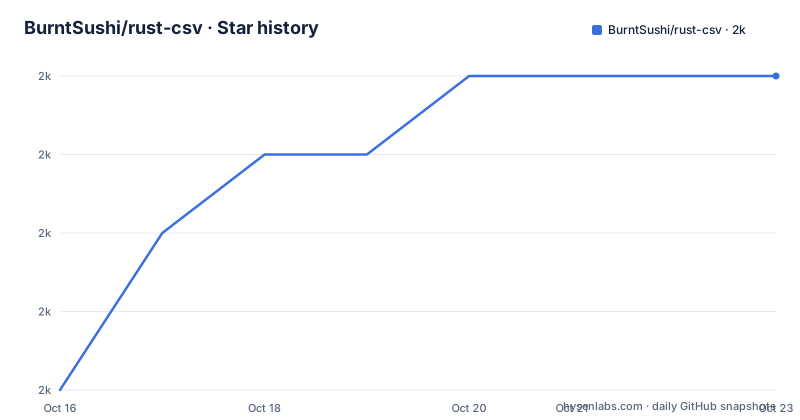
- BurntSushi/rust-csv1,966 ★ · +4
| Repository | 2026-10-16 | 2026-10-23 |
|---|---|---|
| BurntSushi/rust-csv | 2k | 2k |
4 Stars in the last 7 days, measured from the daily GitHub snapshot. Compare with other projects
Editorial analysis
Errors arrive per record, not as one panic
The README's first example builds a reader over stdin and iterates over records, and the shape of the loop is the point:
let mut rdr = csv::Reader::from_reader(io::stdin());
for result in rdr.records() {
    let record = result?;
    println!("{:?}", record);
}
The comment in the source says it plainly: the iterator yields Result<StringRecord, Error>, so the error is checked there. A row with a wrong field count or a broken quote yields an error that the loop can handle without panicking directly. You decide whether to skip the row, collect the errors, or bail with the question mark operator.
That is a deliberate difference from the many CSV readers that panic on malformed input, and it matters most for exactly the files that are hardest to control: exports from third parties, files assembled by hand, anything a colleague will eventually edit in a spreadsheet.
A working copy of this example ships in the repository as examples/cookbook-read-basic.rs and runs against a bundled data file:
$ cargo run --example cookbook-read-basic < examples/data/smallpop.csvSerde deserialization needs an explicit type hint
The second example reads into a struct. The struct derives Deserialize and declares four fields, with population typed as Option<u64>, which is how an absent or empty column is tolerated rather than treated as a parse failure:
#[derive(Debug, serde::Deserialize)]
struct Record {
    city: String,
    region: String,
    country: String,
    population: Option<u64>,
}
The loop is nearly identical to the first one, with one line carrying a comment that explains why it is written the way it is:
for result in rdr.deserialize() {
    let record: Record = result?;
    println!("{:?}", record);
}
A type hint is required for automatic deserialization. Without the annotation on the binding, the compiler has nothing to infer the shape of the record from, because deserialize is generic over any Serde target. This is the one rough edge in an otherwise frictionless API, and it is easy to miss if you copy the loop without the annotation.
By default, member names of the struct are matched against the values in the header record. The example file is run the same way:
$ cargo run --example cookbook-read-serde < examples/data/smallpop.csvThe cookbook files show which dialects the crate actually handles
The examples directory is the closest thing the crate has to a feature list, and the file names describe real dialect problems. There is cookbook-read-colon.rs for files whose delimiter is a colon rather than a comma, cookbook-read-no-headers.rs for input with no header row at all, and cookbook-write-basic.rs and cookbook-write-serde.rs for the writing side.
The tutorial files are more revealing about intent. There are four of them named tutorial-error-01 through tutorial-error-04, so error handling is taught as a sequence of four exercises rather than one. Then performance: tutorial-perf-alloc-01 through 03, tutorial-perf-core-01, and three serde performance files, tutorial-perf-serde-01 through 03. Pipeline files cover population counting and searching. Reading files cover the basics, an explicit delimiter and headers in two variants.
That layout tells you the crate is taught in three passes: make it work, make errors explicit, make it fast. A reader who wants only the first pass can stop at examples/tutorial-read-01.rs.
More examples live in the cookbook on docs.rs, and newcomers to Rust are pointed at the tutorial module there rather than at the README.
Three workspace crates, four dependencies, a floor of Rust 1.73
Cargo.toml shows a workspace with csv-core and csv-index as members, so the parser core is a separate crate from the reader and writer that most users import. csv-core is a path dependency pinned at version 0.1.11, and it is the only nontrivial one: itoa and ryu for number formatting, and serde_core at 1.0.221 for the Serde support.
The dev-dependencies tell you what the tests and examples reach for: bstr with the alloc and serde features, and serde with derive.
Two fields matter for adoption. edition is 2021 and rust-version is 1.73, so the crate will not build on anything older, and that constraint is declared rather than implied. The other is license, given as Unlicense/MIT, with LICENSE-MIT and UNLICENSE both present at the top level of the repository.
The release profile has debug = true, and so does the bench profile, which tells you the maintainer intends profiling data to be available from release builds. There is a benches/ directory and a [lib] section that sets bench = false, so the library itself is not compiled with the benchmark harness enabled.
Dual MIT and Unlicense, which is a rarer choice than it looks
The README puts it as one line: dual licensed under MIT or the UNLICENSE. In practice you pick whichever suits you, and the Unlicense is essentially a public domain dedication.
This is not legal advice, and the practical point is narrow: there is no obligation to comply with the MIT notice if you take the Unlicense option, and the two files sit side by side in the repository so you can read the one you are relying on.
The crate is maintained by Andrew Gallant, who is listed as the sole author in Cargo.toml, and the repository is not archived. The last push was on 2026-08-04, and the README points documentation at docs.rs/csv rather than hosting it in the repository.
Version tracking lives in Cargo.toml, not in release tags
The repository has no GitHub releases at all. That is not an oversight to worry about, but it does change where you look to answer "which version am I on". The number lives in Cargo.toml, currently 1.4.0, on a line carrying an inline comment marker, #:version, which tells you it is checked by something in the scripts or CI.
Practical consequence: when you read a bug report or an issue that mentions a version, the Cargo.toml line is the authority, and there is no signed tag list to diff against. The same applies to the docs.rs URLs the README uses, which end in csv/1.*/ to mean the current 1.x line.
For a dependency this small and this widely used, that arrangement is workable. For teams that gate upgrades on a changelog, note that the repository's own release history is not published as releases here, so track crates.io version bumps in your lockfile instead.
Editorial conclusion
csv is the default choice for Rust programs that read tabular text, because it handles headers, optional fields and per-record errors without forcing a choice between speed and correctness. It is the wrong crate when your input is not really CSV, for example a fixed-width or log-formatted file where the delimiter assumptions do not hold. Before depending on it, check that your toolchain meets the declared rust-version of 1.73, and read the error variant you plan to surface, since the crate version is only recorded in Cargo.toml as 1.4.0 and the repository publishes no GitHub releases.
Frequently asked questions
How do I add the csv crate to a Rust project?
The README says to either add csv to your Cargo.toml or run `cargo add csv`. The crate declares edition 2021 and a rust-version of 1.73.
How does rust-csv handle a malformed CSV row?
The records iterator yields Result values, so each record is checked inside the loop and an error is returned rather than panicking. The tutorial ships four exercises named tutorial-error-01 through tutorial-error-04 covering this.
Why does deserialize need a type annotation in rust-csv?
The README's Serde example notes that a type hint is needed for automatic deserialization, so the binding carries an explicit type such as `let record: Record = result?;`. Without it the compiler has no target type to deserialize into.
What licence does rust-csv use?
It is dual licensed under MIT or the Unlicense. Cargo.toml records the licence as Unlicense/MIT and both LICENSE-MIT and UNLICENSE are present in the repository.
Official sources
Add this badge to your README
If you maintain this project, the badge below links readers to this analysis and shows its maintenance status from the daily GitHub snapshot. Paste the markdown into your README; add ?metric=license or ?metric=stars to the image URL for a different field.

[](https://hysenlabs.com/projects/burntsushi-rust-csv)Star history chart for your README
[](https://hysenlabs.com/projects/burntsushi-rust-csv)Was this useful?