DBHub: A Token-Conscious MCP Server That Keeps Your Context Window Open
Token conscious database MCP server for Postgres, MySQL, SQL Server, MariaDB, SQLite.
At a glance
- What is it?
- DBHub is a minimal MCP server for PostgreSQL, MySQL, SQL Server, MariaDB, and SQLite that loads only two tools by default at 1.4k tokens. It trades feature breadth for context efficiency, with opt-in extras and a built-in web workbench.
- Who is it for?
- Adopt DBHub if you want a single MCP gateway for multiple databases and your main constraint is context window size; it is a strong fit for Claude Code, Cursor, and similar clients where every token matters. Skip it if you need deep database administration tools or if your team relies on a rich set of prebuilt MCP operations, since the default toolset is deliberately thin and advanced features like explain_sql and health_check are opt-in.
- Can I use it commercially?
- Yes. MIT is a permissive licence: you can use, modify and sell software built on it, as long as you keep its copyright and licence notices.
- Is it still maintained?
- Yes. The repository last received commits 1 day ago.
- What is it written in?
- Mainly TypeScript, according to GitHub's language statistics.
Answers come from the project's GitHub data, last synced on November 15, 2026, and from our analysis. They are not legal advice.
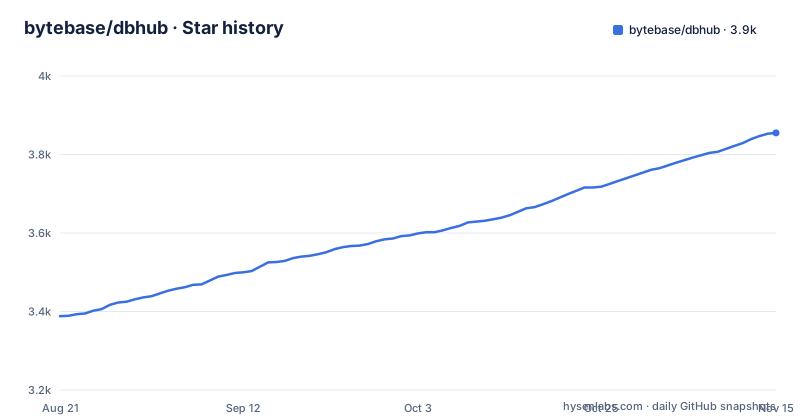
Star history
- bytebase/dbhub3,855 ★ · +467
| Repository | 2026-08-21 | 2026-11-15 |
|---|---|---|
| bytebase/dbhub | 3.4k | 3.9k |
467 Stars in the last 86 days, measured from the daily GitHub snapshot. Compare with other projects
Editorial analysis
The Problem: MCP Servers That Eat Your Context Window
Model Context Protocol servers are useful, but many of them ship with a dozen or more tools loaded at startup. Each tool definition consumes tokens from the model's context window, leaving less room for the actual conversation and query results. DBHub addresses this directly by loading just two tools by default: execute_sql and search_objects. The README claims a default config of 1.4k tokens, which is 13 to 14 times fewer than alternatives like MCP Toolbox (19.0k tokens, 28 tools) or Supabase MCP (19.3k tokens). For engineers who work with long database schemas or complex queries, that saved space can be the difference between a usable session and one that hits the limit halfway through. The project targets local development, read-only access for non-technical staff, multi-database consolidation, and production troubleshooting. It is not a general-purpose database client; it is a focused gateway for MCP clients.
How DBHub Works: Two Core Tools and Progressive Disclosure
DBHub is a TypeScript server that speaks MCP over stdio or HTTP. The two default tools are execute_sql, which runs queries with transaction support and safety controls, and search_objects, which explores schemas, tables, columns, indexes, and procedures. The search tool uses progressive disclosure: instead of dumping the entire schema, it returns results in layers, so the model only fetches details when needed. That design is the core token-saving mechanism. The README shows a diagram where Claude Desktop, Claude Code, and Cursor all connect to DBHub, which then connects to PostgreSQL, SQL Server, and other databases. The server itself is zero-dependency, meaning no external npm packages at runtime. It uses Node's built-in node:sqlite module for SQLite support, which is why it requires Node.js 22.5.0 or later. For other databases, it presumably uses drivers, but the README does not specify which ones. The architecture is a single process that can hold multiple connections, configured via a TOML file.
Getting It Running: Commands and Configuration Options
The quickest start is via npx. The README gives this example: npx @bytebase/dbhub@latest --transport http --port 8080 --dsn "postgres://user:password@localhost:5432/dbname?sslmode=disable". That launches the server over HTTP on port 8080 with a single connection string. For stdio transport, which is what many MCP clients expect, the development section shows pnpm build && pnpm start --transport stdio --dsn "postgres://user:password@localhost:5432/dbname". For multiple databases, you use a TOML configuration file, which the README links to as dbhub.toml. That file also lets you define custom tools: reusable, parameterized SQL operations that appear as additional MCP tools. The opt-in tools are explain_sql, which shows an execution plan without running the query, and health_check, which reports connection pool state and buffer cache hit ratio. There is also a built-in web workbench for executing queries and viewing request traces, which is handy if you do not want to attach a full MCP client. Docker images and a one-click read-only MCP bundle are available, but the README does not give the exact Docker command.
Guardrails: Read-Only Mode, Row Limits, and Query Timeouts
DBHub ships with safety features that are important for production use. The README lists read-only mode, row limiting, and query timeout as built-in guardrails. These are meant to prevent runaway operations, which is a real risk when an LLM is generating SQL. The exact configuration keys are not in the README, but they are implied by the command-line options and TOML config pages. The one-click MCP bundle is described as read-only, which suggests that the read-only mode is a separate distribution or a config flag. For a tool that lets non-technical staff query databases through Claude Desktop, having these guardrails is not optional. However, the README does not state whether these are enabled by default. If you run the npx command above, you get no row limit or timeout unless you add flags. That is a gap worth checking before you point it at a production database. The documentation likely covers it, but the README alone leaves it ambiguous.
A Genuine Limitation: Thin Defaults and Node Version Constraint
The token efficiency comes at a cost. With only two default tools, you cannot do much beyond raw SQL and schema search. If you need to list databases, inspect grants, or perform routine admin tasks, you must either use custom tools defined in dbhub.toml or opt into the extra tools. The opt-in tools are limited to explain_sql and health_check, so there is no built-in tool for data masking, schema diffing, or query history. Another constraint is the Node.js version. DBHub requires Node.js 22.5.0 or later because it relies on node:sqlite. If you are on an older LTS, you cannot run it without upgrading. That is a hard dependency, not a suggestion. For teams with locked runtime versions, this could block adoption. Also, the README does not mention authentication for the HTTP transport. If you expose port 8080 on a network, you need to handle access control yourself, because the server itself appears to have no auth layer. That makes it a wrong tool for any deployment where the port is reachable by untrusted parties.
Alternative Approaches: MCP Toolbox and Supabase MCP
The README itself compares DBHub to two alternatives. MCP Toolbox loads 28 tools by default and consumes 19.0k tokens. That is a very different trade-off: you get a broad set of operations out of the box, but you lose a large chunk of context. Supabase MCP also loads all tools by default and sits at 19.3k tokens, and it is tied to the Supabase platform. DBHub's approach is to minimize the default surface and let you opt in or define custom tools. If you need many prebuilt operations, DBHub will feel restrictive. If you are already on Supabase, the Supabase MCP server integrates with its auth and storage features, which DBHub does not. The real difference is philosophical: DBHub bets that most database work can be done with a generic SQL tool and a schema search tool, while the alternatives bet that you want specific tools for specific tasks. For a quick query or schema exploration, the two-tool model is enough. For complex workflows, you will spend time writing custom tools in TOML, which is an extra maintenance burden.
Maintenance, License, and Upgrade Cost
DBHub is licensed under MIT, which means you can use, modify, and embed it without restrictive obligations. The project is actively maintained, with releases v1.1.0, v1.2.0, and v1.2.1 all pushed in July and August 2026. The repository is not archived and the default branch is main. Maintenance cost is low because the server is zero-dependency, so you do not need to track a large dependency tree for security updates. However, you do need to keep up with Node.js releases, since the built-in sqlite module is tied to the runtime. Upgrade cost depends on how many custom tools you define in dbhub.toml. Those are your own SQL, so they are portable, but the MCP tool definitions and the server's command-line interface could change between versions. The README does not include a changelog or migration guide, so you should check the release notes before upgrading. The workbench is a web interface, which adds a surface for potential security issues, but it is optional and likely disabled in headless setups.
Editorial conclusion
Adopt DBHub if you want a single MCP gateway for multiple databases and your main constraint is context window size; it is a strong fit for Claude Code, Cursor, and similar clients where every token matters. Skip it if you need deep database administration tools or if your team relies on a rich set of prebuilt MCP operations, since the default toolset is deliberately thin and advanced features like explain_sql and health_check are opt-in. Before deploying, verify that your Node.js version is 22.5.0 or higher, that your database drivers work over the transport you choose (stdio vs HTTP), and that the read-only guardrails are enabled in your configuration, because the default setup does not enforce them unless you set them.
Frequently asked questions
what is dbhub
It is a deliberately minimal Model Context Protocol server for databases, MIT licensed and published as a package, an image, a bundle and an editor plugin. It exposes two tools by default, one to execute SQL with transaction support and safety controls and one to search schemas, tables, columns, indexes and procedures, with three more available on request. It connects to PostgreSQL, MySQL, MariaDB, SQL Server, Oracle and SQLite through one interface and to several at once through a TOML configuration.
dbhub alternative
The README names one directly, in a note at the very top: the commercial product from the same organisation, for teams that need an approval flow, access control, data masking and audit logging, which this project does not have. Its comparison table names two free servers instead, listing one at nineteen thousand tokens and twenty-eight tools and the other at nineteen point three thousand, and it says two tools at one and a half thousand tokens is thirteen to fourteen times fewer.
Does DBHub need authentication?
Not for HTTP clients, and the example environment file says so in a comment: the server does not authenticate HTTP clients, the bind address defaults to all interfaces, and for production you should bind it to loopback and put a reverse proxy or a firewall in front. The defences it does ship are a loopback bind and an allowlist of host header values described as protection against DNS rebinding. Over the standard input and output transport there is no HTTP surface at all.
How many databases does DBHub support?
Six, according to the feature list, the supported-databases section, the package manifest's description and the example environment file: PostgreSQL, MySQL, MariaDB, SQL Server, Oracle and SQLite. The repository's own description names five of them and omits one, and the architecture diagram at the top of the readme shows three before it is cut off.
How do I install and run DBHub?
With one command that runs the published package, passing the transport, the port and a connection string; or from the published image; or as a bundle advertised as a one-click read-only install; or as an editor plugin. Running from source needs a recent Node.js release, with the readme giving an exact floor and explaining that the project uses the runtime's built-in SQLite module. Development uses a package-manager workspace with a script that runs the backend and the web interface together.
What tools does DBHub expose beyond the two defaults?
Three more, all on request: one that shows a query's execution plan without running it, one that reports connection pool state and buffer cache hit ratio, and a mechanism for defining reusable, parameterised SQL operations in the TOML configuration file. There is also a built-in web interface for running queries and viewing request traces without an MCP client at all.
Official sources
Add this badge to your README
If you maintain this project, the badge below links readers to this analysis and shows its maintenance status from the daily GitHub snapshot. Paste the markdown into your README; add ?metric=license or ?metric=stars to the image URL for a different field.

[](https://hysenlabs.com/projects/bytebase-dbhub)Star history chart for your README
[](https://hysenlabs.com/projects/bytebase-dbhub)Was this useful?