bytecode77/r77-rootkit: a fileless ring 3 rootkit with a $77 prefix convention
Fileless ring 3 rootkit with installer and persistence that hides processes, files, network connections, etc.
At a glance
- What is it?
- A C project that hides files, processes, services and network connections by name prefix, ships a registry-backed configuration key any process can write, and documents its AMSI and unhooking evasion in the open.
- Who is it for?
- r77 is unusual among rootkits in that the interesting decisions are written down rather than left to a reader with a disassembler. The prefix convention, the writable registry configuration key, the shellcode installer and the two named evasion techniques are all stated plainly in the README, and the tree is organized by the actual stages of that process.
- Can I use it commercially?
- Yes. MIT is a permissive licence: you can use, modify and sell software built on it, as long as you keep its copyright and licence notices.
- Is it still maintained?
- Yes. The repository last received commits 86 days ago.
- What is it written in?
- Mainly C, according to GitHub's language statistics.
Answers come from the project's GitHub data, last synced on October 23, 2026, and from our analysis. They are not legal advice.
Star history
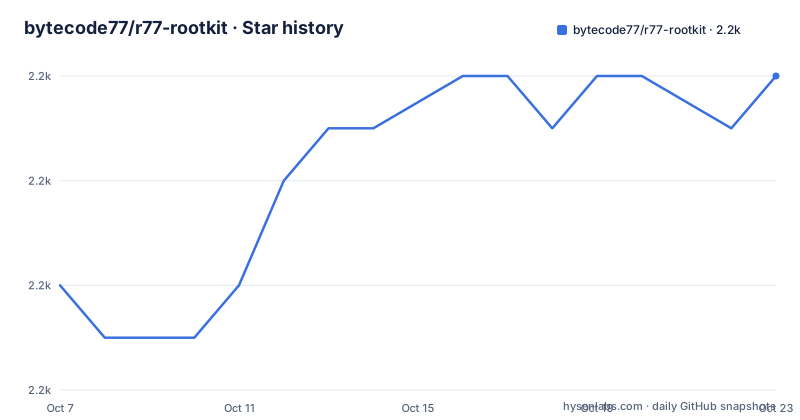
- bytecode77/r77-rootkit2,204 ★ · +4
| Repository | 2026-10-07 | 2026-10-23 |
|---|---|---|
| bytecode77/r77-rootkit | 2.2k | 2.2k |
4 Stars in the last 16 days, measured from the daily GitHub snapshot. Compare with other projects
Editorial analysis
Hiding by a name prefix rather than a per-object list
The README opens with a claim that is easy to skim and hard to implement well: r77 is a ring 3 rootkit that hides everything. The list underneath is the scope. Files and directories. Processes and their CPU and GPU usage. Registry keys and values. Services. TCP and UDP connections. Junctions, named pipes and scheduled tasks.
The mechanism for all of that is a single convention. Everything that starts with `"$77"` is hidden. That is the whole rule, and it is a far simpler design than maintaining a populated list of names to conceal. If your implant is named `$77something`, it disappears from every enumeration the rootkit intercepts, without anyone adding it to a table.
The breadth of the list is where the engineering is. Hiding a process is one interception, but hiding CPU and GPU usage for that process means intercepting the counters that report it. Hiding a named pipe or a junction is a filesystem namespace operation rather than a process list operation. Scheduled tasks are a scheduler query, not a service query. Each of those is a separate surface that a ring 3 rootkit has to hook, and the fact that they are all claimed in one list is the substantive technical claim in the README.
Ring 3 is the other load-bearing word. It means the rootkit runs in user mode inside ordinary processes rather than in a kernel driver, which rules out the kernel-mode hooking approaches that earlier rootkits relied on and puts the whole burden on intercepting the user-mode APIs those tools enumerate through.
A registry key any process can write
The configuration system is the second thing to understand, and it is the design decision with the most security consequences.
The configuration lives at `HKEY_LOCAL_MACHINE\SOFTWARE\$77config`. The README states plainly that the DACL of this key is set to grant full access to any user, and that it is writable by any process without elevated privileges. It also notes that the `$77config` key is itself hidden by the rootkit, following the same prefix rule as everything else.
Put those three facts together and you have a control channel. Any process on the machine, at any integrity level, can read the rootkit's configuration and change it, and the key they use to do so does not appear when they enumerate the registry. Hiding processes by PID, processes by name, filesystem items by full path, and TCP or UDP connections by port are all listed as things this mechanism controls, which means the hiding behaviour is not compiled in but read at runtime.
That cuts both ways, and the README does not pretend otherwise. It is a coherent design for the operator, who does not want to recompile and redeploy to adjust what is concealed. It is also a single well-known location that any sufficiently privileged analysis can check for, whether or not the rootkit is currently running.
One file to deploy, or no file at all
Deployment is described as requiring only one file, `Install.exe`. Executing it persists the rootkit on the system and injects all running processes. `Uninstall.exe` is the counterpart and is said to remove r77 completely and gracefully, which is a detail worth noting because clean removal is rare in this category.
The more interesting artifact is `Install.shellcode`, described as the shellcode equivalent of the installer, offered so that installation can be integrated without dropping `Install.exe`. The README shows the intended loading pattern directly, and it is three steps: load the shellcode, make the buffer executable, then cast it to a function pointer and call it.
int main()
{
	// 1. Load Install.shellcode from resources or from a BYTE[]
	LPBYTE shellCode = ...

	// 2. Make the shellcode RWX.
	DWORD oldProtect;
	VirtualProtect(shellCode, shellCodeSize, PAGE_EXECUTE_READWRITE, &oldProtect);

	// 3. Cast the buffer to a function pointer and execute it.
	((void(*)())shellCode)();

	return 0;
}
The comment on the first step suggests encrypting the file and decrypting it at load time to avoid scantime detection, and the closing comment frames the whole thing as the fileless equivalent of executing `Install.exe`. This is the same reasoning behind the project name: the rootkit resides in system memory and does not write files to disk.
The README states that filelessness is achieved in multiple stages and points to an execution flow diagram running from the installer down to the rootkit DLL running in every process. That diagram is the clearest statement of the architecture on the page, and it is an image, which means the narrative around it lives in the documentation rather than in the text.
AMSI bypass and ntdll unhooking, named directly
The evasion section is short and specific, which is what makes it credible. Two techniques are named.
The first is an AMSI bypass implemented as a PowerShell inline script that patches `amsi.dll!AmsiScanBuffer` to always return `AMSI_RESULT_CLEAN`. The README adds that polymorphism is used to evade signature detection of the bypass itself, which is the second layer: not only neutralize the scanner, but vary the patch so the patch is not a fixed signature.
The second is DLL unhooking, and the reasoning given is specific about the threat model. EDR solutions monitor API calls by hooking `ntdll.dll`, so those hooks have to be removed, and the method described is loading a fresh copy of `ntdll.dll` from disk and restoring the original section. Without that step, process injection would be detected.
This pairing is the interesting part. Unhooking ntdll is what makes the rest of the rootkit viable at all, since every other interception it performs would otherwise be visible to a monitoring agent. It also explains the ring 3 choice: a user-mode rootkit that works by patching its own process image is doing the same class of work as the EDR it is trying to avoid, one layer up.
Both techniques are described rather than merely implied, which is consistent with the rest of this README. The Technical Documentation PDF is where each stage is covered in depth.
What the directory names say about the lifecycle
The repository tree is organized by stage rather than by module type, and reading the directory names tells you more about the design than the prose does.
`Install/` and `InstallShellcode/` are the two deployment paths. `Stager/` is the component that gets code into a process. `ReflectiveDllMain/` is the reflective loader mechanism, which is how a DLL can be mapped without going through the normal loader. `Service/`, `Service32/` and `Service64/` indicate an architecture-split component, and the same 32 and 64 split appears in `Helper/` and `Uninstall64/`. `Unhook/` corresponds directly to the unhooking technique in the evasion section.
Two entries are prefixed with the hiding convention itself: `$Docs/` and `$Examples/`. It is a small thing, but it means the repository applies its own naming rule to its own content, which is a neat confirmation that the prefix is a naming discipline rather than a runtime-only filter.
The `Example/` directory holds a Visual Studio project with `Example.cpp`, `CpuUsage.cpp`, an `.ico`, an `app.manifest` and a resource header. A CPU usage display next to a rootkit that claims to hide CPU usage is a deliberate demonstration, and its files carry no `$77` prefix, so it is the visible counter-example.
The top level also has `BuildTask/`, `SlnBin/`, `r77/`, `r77api/`, `Global/`, `TestConsole/`, `TestConsoleLauncher/`, and a `r77.slnx` solution file. `r77/` and `r77api/` are the core library and its exported surface; `Global/` holds the shared configuration and state that the writable registry key feeds.
Downloads, versions and who this is for
The Downloads section offers `r77 Rootkit 1.8.2.zip` with the password `bytecode77` published alongside it, plus a PDF icon linking the Technical Documentation at docs.bytecode77.com. So there is a concrete version number, 1.8.2, even though the repository publishes no formal releases, and the download is a prepared archive rather than something you build.
The metadata around it: 2,204 stars, 460 forks, 10 open issues, MIT licensed, written in C, on the `master` branch, not archived, with the last push on 2026-07-28. The fork ratio, roughly a fifth of stars, is higher than a typical library and closer to what you see for a tool people vendor and modify.
The Test Console is described as a useful tool to inject r77 into individual processes and to test drive the configuration system, which narrows the intended audience more than any other line on the page. This is a research and testing artifact rather than something meant to be deployed widely, and the Test Console is the piece that makes that possible without a full installer run.
What the README does not do is explain any individual interception. It names surfaces, it names a configuration mechanism, it names two evasion techniques, and it links a PDF for the rest. The result is a repository that reads more like an index into a technical document than a standalone manual, which is a defensible choice for a project whose audience is people who already know what they are looking at.
Editorial conclusion
r77 is unusual among rootkits in that the interesting decisions are written down rather than left to a reader with a disassembler. The prefix convention, the writable registry configuration key, the shellcode installer and the two named evasion techniques are all stated plainly in the README, and the tree is organized by the actual stages of that process. What the README does not do is explain any single stage in detail, so the Technical Documentation PDF linked from the project is where the substance lives, and the repository is the map rather than the manual. For a reader evaluating the code, start with the `r77/` and `r77api/` directories for the core and its exported surface, then `Stager/`, `Unhook/` and `InstallShellcode/` for the lifecycle, and read the config section above against `Global/` to see how the writable key is consumed. The test console is the practical entry point for anyone who wants to see the behaviour without a full deployment.
Frequently asked questions
What does the $77 prefix do in r77-rootkit?
The prefix is the hiding rule itself. The README states that everything starting with `"$77"` is hidden, which covers files, directories, processes, registry keys, services, and TCP and UDP connections. Because it is a naming convention rather than a populated list, an object is concealed by being named accordingly.
Where does r77-rootkit keep its configuration and who can change it?
The configuration lives at `HKEY_LOCAL_MACHINE\SOFTWARE\$77config`. The README says its DACL grants full access to any user and that it is writable by any process without elevated privileges, and that the key is itself hidden by the rootkit. Hiding can be driven by PID, process name, full path, and connection port.
Which evasion techniques does r77-rootkit document?
Two are named. The first is an AMSI bypass that patches `amsi.dll!AmsiScanBuffer` to return `AMSI_RESULT_CLEAN`, with polymorphism used to avoid a fixed signature for the patch. The second is ntdll unhooking, loading a fresh copy of `ntdll.dll` from disk to remove the hooks EDR products install.
Official sources
Add this badge to your README
If you maintain this project, the badge below links readers to this analysis and shows its maintenance status from the daily GitHub snapshot. Paste the markdown into your README; add ?metric=license or ?metric=stars to the image URL for a different field.

[](https://hysenlabs.com/projects/bytecode77-r77-rootkit)Star history chart for your README
[](https://hysenlabs.com/projects/bytecode77-r77-rootkit)Was this useful?