hcxdumptool: the small WiFi auditing tool that refuses to crack anything
Small tool to capture packets from wlan devices.
At a glance
- What is it?
- A small C program that captures WLAN packets and runs layer 2 attacks against WPA, then hands everything downstream to hcxpcapngtool, Hashcat, or John the Ripper.
- Who is it for?
- hcxdumptool occupies a narrow, deliberate gap in the wireless auditing world. It gathers material and refuses to act on it, which is exactly why its output feeds cleanly into the hcxtools pipeline instead of competing with it.
- Can I use it commercially?
- Yes. MIT is a permissive licence: you can use, modify and sell software built on it, as long as you keep its copyright and licence notices.
- Is it still maintained?
- Yes. The repository last received commits 5 days ago.
- What is it written in?
- Mainly C, according to GitHub's language statistics.
Answers come from the project's GitHub data, last synced on October 23, 2026, and from our analysis. They are not legal advice.
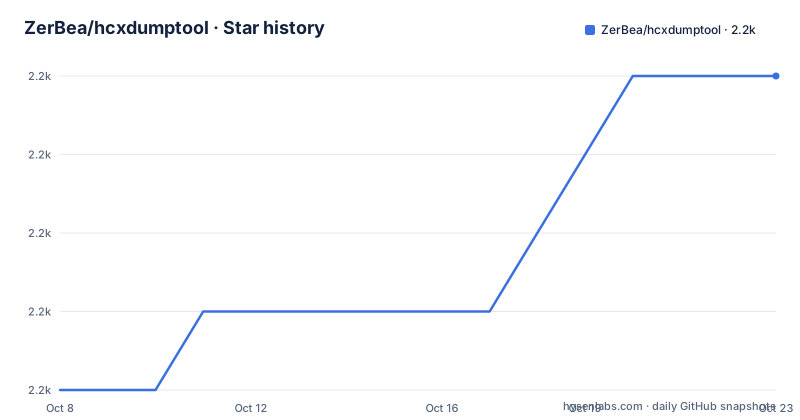
Star history
- ZerBea/hcxdumptool2,216 ★ · +4
| Repository | 2026-10-08 | 2026-10-23 |
|---|---|---|
| ZerBea/hcxdumptool | 2.2k | 2.2k |
4 Stars in the last 15 days, measured from the daily GitHub snapshot. Compare with other projects
Editorial analysis
A capture tool that draws its line before the cracking step
hcxdumptool is described in its own README as a tool to capture packets from WLAN devices and to discover potential weak points within own WiFi networks by running layer 2 attacks against the WPA protocol. The repository description shortens this to a small tool to capture packets from wlan devices. What it does not do takes up more of the documentation than what it does.
The README runs a section headed What Doesn't hcxdumptool Do? and the list is long. It does not crack WPA PSK related hashes, pointing you to Hashcat or JtR instead. It does not crack WEP, and it points to the aircrack-ng suite for that. It does not crack WPS, and it points to Reaver or Bully. It does not decrypt encrypted traffic, it does not record all traffic captured on the WLAN device, and it does not perform Evil Twin attacks. It also does not provide a beautiful status display and it is not a honey pot. A bolded note restates the boundary: hcxdumptool does not perform conversion or cracking.
That refusal is the design, not an omission. The README describes the tool as running layer 2 attacks against WPA, which is where handshake and message integrity material that a cracking tool can later work on is collected. The work of turning that material into a password guess happens somewhere else, under your own judgement about whether to run it.
Why a Raspberry Pi Zero is the design target and not an afterthought
The README says the tool is designed to run (mostly headless) on small systems like a Raspberry Pi Zero, and the requirements section backs that up rather than treating it as a throwaway line. It lists Raspberry Pi A, B, A+, B+, and Zero (WH), while noting that notebooks and desktops will work as well, and recommending Zero or A+ specifically because of very low power consumption. It even recommends a GPIO hardware mod with a push button and LED on Raspberry Pi, which tells you the intended operator is standing near the device with a finger on a button rather than sitting in front of a monitor.
The headless orientation has a direct consequence in the build. The Makefile sets DEFS to include -DHCXSTATUSOUT under a comment reading comment to disable STATUS display (headless operation), and the README carries a matching tip: on headless operation, remove -DSTATUSOUT from the Makefile before compiling, so the status display is not compiled, which the tip says saves CPU cycles and prevents ERRORs from occurring. If you are building for a Pi Zero with no attached display, that is the one line you probably want to comment out.
The Makefile also builds a second binary, hcxnmealog, listed under TOOLS alongside hcxdumptool. Its own README entry describes it as a tool to handle NMEA 0183 sentences from GPS devices, designed to run mostly headless on small systems too. The two tools share a build system and a target form factor, which is a fair signal of where the author's own setups live.
Building from source is the documented path, and the docs argue against the packages
The install guide is short and the compiler requirements are strict. You need gcc >= 16 recommended, with deprecated versions not supported, plus make and libpcap and libpcap-dev if the internal BPF compiler has been enabled. Linux is the only supported operating system, at the latest longterm or stable kernel, with a mandatory floor of >= 5.15. Arch Linux is recommended for notebooks and desktops, OpenWRT for small systems like Raspberry Pi and WiFi router.
The clone and build sequence is exactly three commands:
git clone https://github.com/ZerBea/hcxdumptool.git
cd hcxdumptool
make -j $(nproc)
Installation to /usr/bin is `make install` as super user, or `make install PREFIX=/usr/local` as super user for /usr/local/bin. The Makefile defaults PREFIX to /usr and derives BINDIR from it.
Here is the tension worth naming. The README states that hcxdumptool and hcxtools are available through the package manager on most distributions, and in the same breath calls those packages usually very old and outdated, so cloning and building is recommended. The guidance for an actual installation is therefore: a package exists, and you should probably ignore it. The same section warns that packages mentioned in the requirements section sometimes come under different names in a package manager, and that header files and dependencies must be installed before attempting to compile.
A second tension sits in the same document. The tip says it is theoretically possible to compile hcxdumptool for other systems such as Android, other distributions such as KALI, and other operating systems such as BSD, and then immediately says there is no plan to support them and feature requests will be rejected. The bolded unsupported line names Windows OS, macOS, Android, emulators or wrappers. So Android is simultaneously described as theoretically compilable and as unsupported. Search interest for an install path on Kali Linux runs well ahead of what this README endorses: Kali is not in the recommended distribution list, and the project would rather you compiled from source on Arch or OpenWRT. If you want Kali packages, note that the combination of a supported-sounding distribution and an officially unsupported build is a risk you take on yourself, and that author is telling you so.
Where the capture file goes next in the hcxtools chain
The workflow is written out as a single line: hcxdumptool, then hcxpcapngtool, then hcxhashtool with hcxpsktool and hcxeiutool as optional additions, then Hashcat or JtR. Each stage has a defined job, and the table in the README assigns them. hcxpcapngtool converts raw PCAPNG files to Hashcat and JtR readable formats. hcxhashtool filters hashes from HC22000 files based on user input. hcxpsktool gets weak PSK candidates from HC22000 files. hcxeiutool calculates wordlists based off ESSIDs gathered. Hashcat or JtR are third party tools used to infer PSK from HC22000 hash files.
The output format choice matters more than it first appears. hcxdumptool uses the modern pcapng format, allowing for use with wireshark or tshark. That gives you two parallel options for the same run: feed the capture through the hcxtools conversion path, or open it in a packet analyser. The README's list of what the tool does not do names tshark or Wireshark twice, once for decrypting encrypted traffic and once for recording all traffic captured on the WLAN device. So the practical shape is that hcxdumptool watches for the frames that matter, and a general purpose analyser handles everything else. Running both in parallel is the arrangement the documentation describes.
Version coupling is the last constraint in this chain. The requirements list closes with a line that is easy to skim past: make sure that the version of hcxdumptool always fits to the version of hcxpcapngtool. The capture and the converter are separate projects by the same author, and the README treats a mismatch as something to avoid rather than debug.
Chipset, driver, and regulatory limits decide whether any of this runs
The adapters section carries a warning that deserves to be read as a precondition rather than advice. Do not expect flawless drivers on brand new hardware. The driver must support monitor mode and full packet injection. PRISM devices are not supported. WIRELESS EXTENSIONS are deprecated and no longer supported.
The requirements section states the same requirement in the positive form: the WLAN device chipset must be able to run in monitor mode, and the driver must support monitor and full frame injection mode. Those are two separate gates, and a chipset that passes one while failing the other is common enough that the note about manufacturers changing chipsets without changing model numbers exists.
There is a frequency-domain gate too. To allow 5/6/7GHz packet injection, the README says it is mandatory to uncomment a regulatory domain that supports this in /etc/conf.d/wireless-regdom. If you skip that, injection in the upper bands simply does not happen, and the failure can look like a driver problem rather than a configuration one.
The knowledge bar is set explicitly. The README says you might expect a recommendation that everyone should use hcxdumptool and hcxtools, then declines to make it, saying the tools are NOT recommended to be used by inexperienced users or newbies. The listed prerequisites are knowledge of radio technology, of electromagnetic-wave engineering, of the 802.11 protocol, of key derivation functions, of NMEA 0183, of Linux, of filter procedures such as Berkeley Packet Filter and capture and display filters, and of Boolean operators. This is an unusually candid prerequisites list, and it is also a fair description of the learning curve.
What the release cadence and build flags suggest about the codebase
Three releases are visible in the repository history. Version 7.1.2, published in February 2026, is described as a bug fix release. Version 7.1.0, published a week earlier, lists new options, improved docs with a pointer to example.md, several improvements, and several bug fixes, with a note to see the changelog. Version 7.0.1 from September 2025 fixed a proberesponsetx error. A 7.0.x point release fixing a specific message-handling bug, followed by a 7.1.0 that adds options and expands the documentation, is the shape of a tool being actively sharpened rather than abandoned. The repository was last pushed in September 2026, holds around 2,200 stars and 420 forks, carries the MIT license, and is not archived.
The build configuration says something about the code itself. CFLAGS default to -O3 with -Wall, -Wextra, -Wpedantic, -Wstrict-prototypes, and -Wunused-function, then add -std=gnu99. Strict prototypes and a pedantic warning set on an offensive security tool suggest an author who cares about interface hygiene. DEFS includes -DVERSION_TAG and -DVERSION_YEAR alongside -DHCXSTATUSOUT and -DHCXWANTLIBPCAP, and LDFLAGS adds -lpcap, which lines up with the libpcap requirement in the README. Debug symbols and AddressSanitizer are present as commented-out options, along with an -DHCXDEBUG log flag.
The version stamping is worth noting for anyone tracking releases. The Makefile hardcodes PRODUCTION_VERSION as 7.1.2 and PRODUCTION_YEAR as 2026, and when PRODUCTION is not set to 1 it falls back to git describe for the tag. Both hcxdumptool and hcxnmealog come out of one small templated build rule that applies the same flags and definitions to each, which is a sensible way to keep two related binaries from drifting apart.
Editorial conclusion
hcxdumptool occupies a narrow, deliberate gap in the wireless auditing world. It gathers material and refuses to act on it, which is exactly why its output feeds cleanly into the hcxtools pipeline instead of competing with it. The practical starting point is a Raspberry Pi Zero or an OpenWRT box with a chipset whose driver really does support monitor mode and full frame injection, a gcc new enough to satisfy the stated requirement, and a build from source rather than a stale distribution package. Get those three things right and the rest is a short configuration problem. Get them wrong and no amount of option tweaking will help.
Frequently asked questions
How do I install hcxdumptool?
The README recommends cloning and building rather than using distribution packages, which it describes as usually very old and outdated. Clone the repository, run make -j $(nproc), then make install as super user, or make install PREFIX=/usr/local for /usr/local/bin. You need gcc >= 16, make, libpcap, and a Linux kernel of at least 5.15.
Does hcxdumptool crack WPA passwords?
No. The README is explicit that it does not crack WPA PSK related hashes, and hands that job to Hashcat or John the Ripper. It collects material through layer 2 attacks against WPA, then passes a pcapng file down to hcxpcapngtool and the rest of the hcxtools chain.
Which WiFi adapters work with hcxdumptool?
The chipset must run in monitor mode and the driver must support both monitor mode and full frame injection. PRISM devices are not supported, WIRELESS EXTENSIONS are deprecated and no longer supported, and the docs warn against expecting flawless drivers on brand new hardware.
Can hcxdumptool run on Kali Linux?
The README says compiling for distributions such as KALI is theoretically possible, and in the same paragraph says there is no plan to support them and feature requests will be rejected. Recommended distributions are Arch Linux for desktops and OpenWRT for small systems, with Linux and a kernel of 5.15 or newer as the hard requirement.
What should I do for a headless Raspberry Pi build?
Remove -DSTATUSOUT from the Makefile before compiling, which stops the status display being compiled in and, per the README, saves CPU cycles and avoids errors. The Raspberry Pi Zero and A+ are recommended for their low power consumption, and a GPIO push button with an LED is suggested as a useful hardware mod.
What does hcxnmealog do?
It is a tool to handle NMEA 0183 sentences from GPS devices, built from the same Makefile as hcxdumptool and also designed to run mostly headless on small systems. hcxdumptool itself performs no conversion, so NMEA handling lives entirely in this companion binary.
Official sources
Add this badge to your README
If you maintain this project, the badge below links readers to this analysis and shows its maintenance status from the daily GitHub snapshot. Paste the markdown into your README; add ?metric=license or ?metric=stars to the image URL for a different field.

[](https://hysenlabs.com/projects/zerbea-hcxdumptool)Star history chart for your README
[](https://hysenlabs.com/projects/zerbea-hcxdumptool)Was this useful?