bevy_lunex: a retained layout engine for the Bevy ECS
Blazingly fast retained layout engine for Bevy ECS.
At a glance
- What is it?
- bevy_lunex gives Bevy projects a user interface that is laid out like a document tree rather than drawn every frame. That makes it a different kind of tool from an immediate mode GUI library, and the difference is the interesting part, because the layout is computed, stored, and only recomputed when something it depends on actually changes.
- Who is it for?
- bevy_lunex suits a Bevy project whose interface is mostly static or changes occasionally, because a retained layout is cheaper than recomputing one every frame, and it suits a team that wants the user interface to be ordinary entities and systems rather than a separate widget hierarchy.
- Can I use it commercially?
- Yes. Apache-2.0 is a permissive licence: you can use, modify and sell software built on it, as long as you keep its copyright and licence notices.
- Is it still maintained?
- Yes. The repository last received commits 29 days ago.
- What is it written in?
- Mainly Rust, according to GitHub's language statistics.
Answers come from the project's GitHub data, last synced on November 7, 2026, and from our analysis. They are not legal advice.
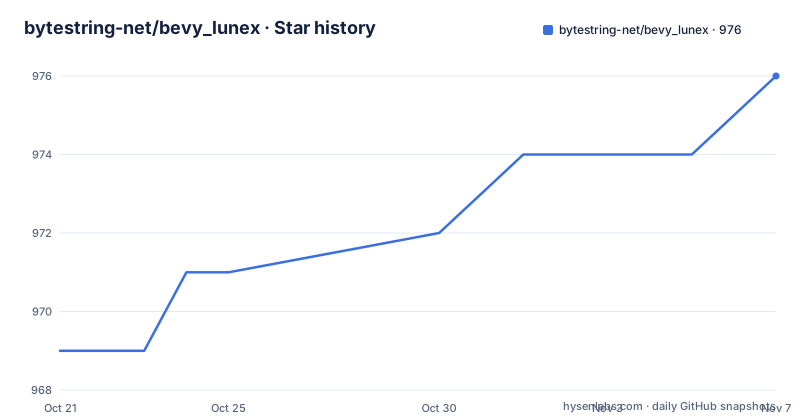
Star history
- bytestring-net/bevy_lunex976 ★ · +7
| Repository | 2026-10-21 | 2026-11-07 |
|---|---|---|
| bytestring-net/bevy_lunex | 969 | 976 |
7 Stars in the last 17 days, measured from the daily GitHub snapshot. Compare with other projects
Editorial analysis
Retained rather than immediate, and why that matters
The name of the project is the type of layout it is. Lunex is a retained layout engine for Bevy entities, built around the vanilla Bevy entity component system, and the readme says it gives you the ability to make your own user interface using regular ECS like every other part of your application.
The contrast it draws is with immediate mode GUI systems, and the claim is that because the layout is calculated and stored, there is less need for constant recalculation, with potential performance benefits especially for static or infrequently updated interfaces.
That is the central design decision and everything else follows from it. In an immediate mode system, your interface is a function that runs every frame and returns a description of what should be on screen, so the cost is paid every frame whether anything changed or not. In a retained system, the description is a set of entities and components, the layout is solved when something changes, and the result is stored on the entities.
The consequence for the programmer is that the interface is data. A button is an entity with a layout component and a colour component, a hover state is a component, and clicking is an observer reacting to an event. The readme makes this explicit: the interactivity is done by regular systems and events, and because it is built with ECS you can extend or customise the behaviour of your user interface by simply adding or modifying components.
That is a bigger deal than a rendering choice. It means the user interface is inspectable, queryable, and testable in the same way as the rest of a Bevy application, and it means a designer can add a component without touching a layout library.
Layout as a set of rules rather than coordinates
The layout model is the part you will spend the most time learning, and the readme describes it in terms of a flow layout that is inspired by an existing library.
The flow model is described as flexbox-like, and it gives you content hugging, space filling, relative sizing and text wrapping. Each of those four is a way of expressing a relationship rather than a position. Content hugging means a node is as large as its content. Space filling means it takes what is left. Relative sizing means a fraction of the parent. And text wrapping is the case where a node's content determines a dimension that then has to be measured.
Alongside the flow model there is a window layout, which is the explicit one. The example in the readme places a button with a position given as a relative offset, a size given as a fixed pair, and a call that packs the node. So the two models are complementary, and a real interface will use both, with flow for the parts that should adapt and window for the parts that are placed.
The other headline capability is aspect ratio independence. The readme says Lunex is designed to support all window sizes out of the box without deforming, and that the built-in layout types react nicely and intuitively to aspect ratio changes. For a game, where the window can be any shape the player drags, that is not a nicety.
And the last one is worldspace interface support, using the transform component of the engine, which means elements can live in two dimensions or in three. The readme is direct about why that matters: diegetic interface is no problem, so an interface element can sit in the world rather than on a flat overlay.
The syntax is components per functionality
The readme's example is a clickable button built from scratch with the provided components, and the framing is that thanks to the entity component system the syntax is highly modular with a strong emphasis on components per functionality, and that it is no different from vanilla Bevy.
Looking at the example, that claim holds up. The interface is created by spawning a root with a layout component for two dimensions and a component that synchronises it with the camera viewport, and then a child for the button with a layout, and a child of that for the visual with a background.
The interesting parts are the state machinery. A layout can be defined for multiple states, so the default state fills the parent and the hover state grows to a percentage of the parent anchored to the centre. A colour component is defined the same way, with a colour per state. And the hover component carries the speeds at which the transition runs in each direction, which is a detail most layout libraries do not expose and which matters for the feel of an interface.
        UiLayout::window().pos(Rl((50.0, 50.0))).size((200.0, 50.0)).pack(),
        OnHoverSetCursor::new(SystemCursorIcon::Pointer),
The interactivity is attached with observers rather than with conditionals. One observer enables the hover state when the pointer goes over, another disables it when the pointer goes out, and a third prints a message on a click. The readme's comment on that last one is the right summary of the model: you can query anything there.
Two smaller choices are worth noticing. A component sets the cursor icon when hovered, and a pickability setting stops a node from covering the bounding zone of its parent, which is the sort of detail that otherwise turns into a bug where a transparent child swallows the clicks of the one behind it.
The examples show the range of the engine
The examples directory is the best evidence of what the layout engine can do, because the names describe different problems rather than different widgets.
There is a colour example in two dimensions, and a mesh example in two dimensions, which is the case where the user interface is drawn with geometry rather than with sprites. There are sprite examples in two and three dimensions, and a text example in three dimensions, which is a worldspace label rather than an overlay. There is a heads-up display example. There are two camera examples, one ordinary and one pixelated dual camera, which is the case where the interface has to be drawn twice with different pixel densities. And there is a flow example with a separate flow showcase, which is the reference for the flexbox-like model.
The dual camera example is worth pausing on, because it is the kind of requirement that is trivial in an overlay interface and awkward in a spatial one. A heads-up display example is the other end, the traditional overlay, and having both in the same repository is a sign the engine is not specialised for one rendering approach.
The readme also points at a live WebAssembly demo hosted on an itch.io page, with an honest caveat that the performance and stutter are limited because it runs on a single thread, and that compiling the project natively gives the best experience. A layout engine that runs in a browser is a good demonstration that the layout code is not entangled with the renderer, and the single-thread caveat is the kind of thing the author could have left out.
The workspace, and the coupling to a Bevy version
The build configuration tells you about the project's relationship with the engine it extends.
It is a Cargo workspace whose members are the library crate and every example, with the resolver set to version 2 and the package edition at 2024. The shared package metadata names the license as MIT or Apache-2.0, and the categories are game development, graphical user interface and mathematics.
The dependency list is a list of Bevy sub-crates, each pinned to the same engine version, and each pulled in with default features turned off. That is deliberate: the engine is a large dependency, and a user interface library should not drag in the whole of it, so the application enables what it needs. The library itself is published separately and the examples depend on it through the workspace.
The release profile is tuned for size and speed, with link time optimisation set to thin, a single codegen unit, optimisation level 3, panics aborting, and symbols stripped. The development profile keeps dependencies optimised even in a debug build, which is a sensible choice for a project where you spend your time in an example rather than in the library.
The coupling to a specific engine version is the thing to weigh. A layout crate that depends on a dozen engine sub-crates has to track the engine's release cadence, and a project pinned to a different engine version cannot use it without a fork. The readme's badges show the engine version the crate is built against, which is the first thing to check.
Documentation, licensing and the project state
The documentation is arranged in three places and the readme treats them as equally important.
There is the Lunex Book, which is the narrative documentation and the thing to start with. There is the source documentation on the documentation site for the crate, which is described as highly documented. And there is the Bevypunk example, a separate repository described as a highly documented production-ready example, and the difference in the wording is the point: the examples in this repository show a feature, the Bevypunk repository shows an application.
The licensing is worth spelling out because it is unusually generous. The project is released under both the Apache licence and the MIT licence, and you pick the one that suits you. The contribution policy is stated in a sentence: any contribution submitted will be dual licensed as mentioned, without any additional terms or conditions, and if you need to discuss that you can contact the author.
The release history shows a project on a 0.x line with a steady cadence: version 0.4.1 in April 2025, 0.5.0 in October 2025 and 0.7.0 at the end of August 2026, with the last push on 2026-10-09 and the repository not archived. The manifest carries version 0.8.0, so there is a release newer than the last tag in the list.
The project is a hobby project in one respect, since the author is a single person publishing under their own name with both licences offered. For an evaluator, the readme is unusually direct about what the library is for, and the book is where the real evaluation should happen.
Editorial conclusion
bevy_lunex suits a Bevy project whose interface is mostly static or changes occasionally, because a retained layout is cheaper than recomputing one every frame, and it suits a team that wants the user interface to be ordinary entities and systems rather than a separate widget hierarchy. It is a poor fit for an interface that genuinely changes every frame, where an immediate mode system would be simpler, and a poor fit if you are not prepared to follow the Bevy version it is built against, since it pins a specific release of the engine. Before you adopt it, read the flow layout section of the book, because the layout model is the part you will spend the most time learning, and check which Bevy version your project is on.
Frequently asked questions
What is bevy_lunex?
A retained layout engine for Bevy entities built around the vanilla Bevy entity component system, letting you build your own user interface with regular entities and systems. The layout is calculated and stored rather than recomputed every frame, which is the main difference from an immediate mode GUI system.
What layout models does bevy_lunex support?
A flexbox-like flow layout inspired by the clay library, giving content hugging, space filling, relative sizing and text wrapping, and a window layout for explicit positioning and sizing. The flow layout is used to build menus, sidebars and toolbars that react to their content and to the window size.
Can bevy_lunex render user interfaces in 3D?
Yes. It supports both two-dimensional and three-dimensional interface elements by using the transform component of the engine, so elements can live in the world rather than on a flat overlay, which the readme calls diegetic user interface.
What licence is bevy_lunex released under?
Both the Apache licence and the MIT licence, and you pick the one that suits you. The contribution policy states that any contribution submitted will be dual licensed in the same way, without additional terms or conditions.
Official sources
Add this badge to your README
If you maintain this project, the badge below links readers to this analysis and shows its maintenance status from the daily GitHub snapshot. Paste the markdown into your README; add ?metric=license or ?metric=stars to the image URL for a different field.

[](https://hysenlabs.com/projects/bytestring-net-bevy-lunex)Star history chart for your README
[](https://hysenlabs.com/projects/bytestring-net-bevy-lunex)Was this useful?