FilmCraft puts a Premiere-style timeline on codecs written from spec
An open-source, clean-room reimplementation of Adobe Premiere Pro built in pure Rust.
At a glance
- What is it?
- FilmCraft rebuilds the Adobe Premiere Pro workflow in Rust, from the timeline's integer tick math down to hand-written H.264, HEVC, ProRes and AAC codecs, for editors who want the familiar panels without a subscription. Panels and workspaces arrive first; codec breadth and export coverage are the open question behind its own young and moving fast status badge.
- Who is it for?
- FilmCraft fits an editor who wants the Premiere layout on Linux or in a browser and who accepts owning the decoders, and it fits badly as a drop-in for an established Premiere project file. Nobody on a fixed delivery schedule should adopt it yet, because the tree moved three times in three days between 2026-10-03 and 2026-10-06.
- Can I use it commercially?
- Yes. Apache-2.0 is a permissive licence: you can use, modify and sell software built on it, as long as you keep its copyright and licence notices.
- Is it still maintained?
- Yes. The repository received new commits within the last day.
- What is it written in?
- Mainly Rust, according to GitHub's language statistics.
Answers come from the project's GitHub data, last synced on October 23, 2026, and from our analysis. They are not legal advice.
Star history
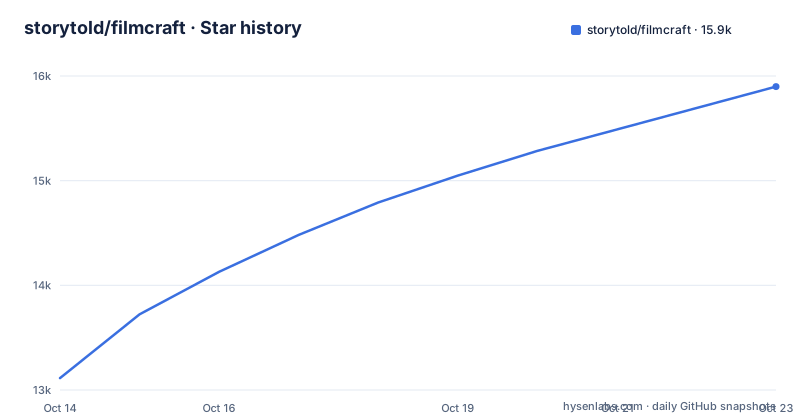
- storytold/filmcraft15,899 ★ · +2,785
| Repository | 2026-10-14 | 2026-10-23 |
|---|---|---|
| storytold/filmcraft | 13.1k | 15.9k |
2,785 Stars in the last 9 days, measured from the daily GitHub snapshot. Compare with other projects
Editorial analysis
A Premiere clone written from the specifications
FilmCraft sets out to rebuild Adobe Premiere Pro without using Premiere's code, and that clean-room claim is the whole pitch: same panels, same workspaces, same tools and shortcuts, different implementation underneath. The editors it targets already know where things are, and want that layout on macOS, Windows, Linux or in the browser through WebAssembly rather than on a subscription seat.
What sits under the interface is a set of workspace crates you can read rather than trust. `filmcraft-time` holds the timebase, `filmcraft-edit` the timeline model, `filmcraft-project` the project format, `filmcraft-render` the export path, and `filmcraft-codecs` sits above the individual bitstream crates. At the root, `.mcp.json`, `AGENTS.md` and `CLAUDE.md` sit next to ROADMAP.md and ATTRIBUTION.md, and the README navigation reserves a section of its own for agents, which tells you the maintainers expect a machine client to drive the same commands a person drives from the keyboard.
254,016,000,000 ticks per second, no floating point
Frame math is where the project makes its most concrete claim. Every edit is computed on integer ticks, 254,016,000,000 of them to the second, and that figure was picked because it divides evenly by the common frame rates and by audio sample rates. The payoff, spelled out in the README: 23.976, 29.97 drop-frame and 59.94 are exact rather than approximate, so a long timeline does not collect the rounding drift a float timebase picks up edit after edit.
That matters more here than in most editors, because a compositor working in linear light and a set of keyframe-driven Lumetri controls keep asking one question: is this value still the one set three edits ago? Ticks turn it into arithmetic. Ripple, roll, slip, slide, rate stretch and razor all operate on the same units, and nudging an edit point with ⌥← and ⌥→ moves it by a whole count of them.
Codec crates, container crates, one encoder
Media handling is the deepest layer and the most auditable one. Every format sits at a path inside the workspace rather than arriving as a version from a registry:
filmcraft-h264 = { path = "crates/h264" }
filmcraft-hevc = { path = "crates/hevc" }
filmcraft-prores = { path = "crates/prores" }
filmcraft-aac = { path = "crates/aac" }
filmcraft-h264enc = { path = "crates/h264enc" }
The manifest separates container crates from codec crates by name alone. `filmcraft-isobmff`, `filmcraft-matroska`, `filmcraft-mxf`, `filmcraft-cfb`, `filmcraft-mpegts` and `filmcraft-ogg` carry the containers; `filmcraft-mpeg2v`, `filmcraft-ac3`, `filmcraft-vp9`, `filmcraft-dnx`, `filmcraft-av1` and `filmcraft-opus` carry the remaining formats, with `filmcraft-audio-dsp` underneath the audio side and `filmcraft-frame` and `filmcraft-media` between the codecs and the application.
One detail a skim misses: across that whole list, exactly one crate carries enc in its name. Decoding spans video and audio broadly; encoding, judged by crate names, is H.264 alone. Any plan that ends in a delivered master file rests on what sits behind `filmcraft-h264enc` and `filmcraft-render`.
Trim tools and the live loop on J, K and L
The editing verbs are complete enough to work without a manual. Three-point editing starts in the Source monitor: mark In and Out, then insert with the comma key or overwrite with the period key onto the patched tracks, and take a range back out with semicolon to lift or the apostrophe key to extract. Add edit sits on ⌘K and applies to one track or to all of them.
Trim mode selects edit points as ripple, roll or trim, switches between the three with ⌃T, stretches an edit out to the playhead with E, and nudges a frame at a time with ⌥← and ⌥→, five frames at a time with ⇧ held. Q and W ripple-trim straight to the playhead instead, and a dedicated Trim Monitor shows both sides of the cut at once.
Dynamic trimming closes the loop: L runs the edit forward while it plays, J drags it back, and K stops and commits the whole gesture as one undo step. That last part is the decision worth noticing. A live trim is a gesture with an end, and folding it into a single History entry means undo does not strand you halfway through a move.
Atomic saves and a journal written a second later
Data loss is what an editor judges a new editor on, and this one answers in three layers. Saves are atomic. Auto-save keeps a rolling set of versions rather than overwriting a single file. A crash-recovery journal is written about a second after each edit, and it brings unsaved changes back after a crash or a power cut.
The rest of the safety net is conventional and fairly complete: sync locks and linked selection for multi-track work, patch and target buttons so an insert lands where you aimed, markers with colours and names and durations, nesting, copy and paste and paste insert, ripple delete and close gap, snapping, and unlimited undo behind the History panel. The Keyboard Shortcuts editor on ⌥⌘K draws the layout, flags conflicts and ships presets for FilmCraft, Premiere Pro, Final Cut Pro and Avid key bindings, which is the fastest route to feeling at home for anyone migrating.
Building the workspace: edition 2024, rust-version 1.95
There is no installer in the repository and no shell script to copy. The root holds Cargo.toml, Cargo.lock, crates/, apps/, xtask/, packaging/, assets/ and docs/, beside .cargo/, clippy.toml, rustfmt.toml and CI under .github/. The application itself is reached through the project's own page at getartcraft.com/apps/filmcraft, which is where the README header sends anyone looking for a build.
For anyone compiling from source, the workspace manifest is the entire story:
[workspace]
resolver = "3"

[workspace.package]
version = "0.2.1"
edition = "2024"
rust-version = "1.95"
Edition 2024 and a 1.95 toolchain floor stop an older default Rust at the manifest before any source is parsed. Members are `crates/*`, `apps/*` and `xtask`, and the same three globs are repeated as default-members, so one build in a fresh clone covers libraries, applications and the automation crate together. Because every internal dependency resolves by path, no external crate is fetched for the media layer, which also means a system decoder cannot be swapped in later without editing the manifest first.
Linear-light compositing, Lumetri and the scopes crate
The colour and audio half shows the clean-room approach most clearly. Compositing runs on the GPU in linear light instead of on a gamma-encoded desktop surface, with `filmcraft-gpu` and `filmcraft-color` carrying the work and `filmcraft-scopes` feeding the readouts. The Lumetri Color panel and Effect Controls take keyframes, scale keys included, and the scopes give waveform and vectorscope views beside the Program monitor. Loudness meters on the right of the timeline report momentary, short-term, integrated and true-peak values together, and a ducked music bed can sit under mission audio on its own track.
This is also where the honest comparison with a mature editor lives. A Premiere install leans on decoders supplied by the operating system or by third-party codec packs, so an odd camera file usually opens anyway. FilmCraft decodes with code inside the repository, so support is precisely what the crate list says and nothing past it. The exchange cuts both ways: one machine, one behaviour, no external shared library to audit, and no fallback standing between a missing format and an error message.
Why one repository carries two grant readings
Two facts about the project itself deserve pinning down before anyone builds on it. The header of the repository page reads Apache-2.0, while the README badge, the `license` field in the manifest and the pair of LICENSE-APACHE and LICENSE-MIT files at the root, with a NOTICE file beside them, all describe a dual MIT OR Apache-2.0 grant. The other is cadence: the last push was on 2026-10-06, with v0.2.1 on the same day, v0.2.0 on 2026-10-05 and v0.1.1 on 2026-10-03.
What that cadence buys is motion rather than stability. Three version numbers in three days means the workspace layout, the keymap and panel behaviour are all still shifting, which suits an editor who intends to follow the project and does not suit a studio that needs the same build on every machine for the next year. The status badge on the project's own README reads young and moving fast, and a badge is not a compatibility promise.
Editorial conclusion
FilmCraft fits an editor who wants the Premiere layout on Linux or in a browser and who accepts owning the decoders, and it fits badly as a drop-in for an established Premiere project file. Nobody on a fixed delivery schedule should adopt it yet, because the tree moved three times in three days between 2026-10-03 and 2026-10-06. Verify two things first: read crates/h264 and crates/aac to see how deep each decoder goes against your own footage, then read apps/* to learn which export path you would depend on and what it still refuses to write.
Frequently asked questions
What is FilmCraft and who is it for?
FilmCraft is a clean-room reimplementation of Adobe Premiere Pro written in Rust, aiming at editors who already know Premiere's panels, workspaces and shortcuts. It targets macOS, Windows and Linux natively, and the browser through WebAssembly.
Which codecs does FilmCraft write itself?
H.264, HEVC, ProRes and AAC codecs are written in Rust from the public specifications, with separate crates named for VP9, AV1, DNx, Opus, AC3 and MPEG-2 video. `filmcraft-h264enc` is the only encoder-named crate in the workspace dependency list.
Can FilmCraft run in a browser?
Yes. The project describes a native application for macOS, Windows and Linux, plus a browser build through WebAssembly.
What happens to unsaved work if the editor crashes?
Saves are atomic, auto-save keeps a rolling set of versions, and a crash-recovery journal written about a second after each edit brings unsaved changes back after a crash or a power cut.
How do I build FilmCraft from source?
The workspace manifest sets edition 2024 with a rust-version of 1.95, and members are `crates/*`, `apps/*` and `xtask`, so an older default toolchain stops at the manifest. The application itself is reached through the project's own page at getartcraft.com/apps/filmcraft.
Official sources
Add this badge to your README
If you maintain this project, the badge below links readers to this analysis and shows its maintenance status from the daily GitHub snapshot. Paste the markdown into your README; add ?metric=license or ?metric=stars to the image URL for a different field.

[](https://hysenlabs.com/projects/storytold-filmcraft)Star history chart for your README
[](https://hysenlabs.com/projects/storytold-filmcraft)Was this useful?