xcaddy: the build wrapper Caddy plugin authors argue with on purpose
Build Caddy with plugins
At a glance
- What is it?
- xcaddy compiles a Caddy binary with plugins compiled in, using a syntax that mirrors go get: --with adds a module, --replace only writes a replace directive, --embed bakes a directory into the executable. Its README suggests building Caddy by hand when a custom or proprietary build process is difficult.
- Who is it for?
- xcaddy is the right tool when you need plugins compiled into a single Caddy binary, whether you are publishing a Caddy build or iterating on a plugin, because the --with syntax, the CADDY_VERSION pin and the GOOS, GOARCH and GOARM passthrough make cross-compiled plugin builds one command.
- Can I use it commercially?
- Yes. Apache-2.0 is a permissive licence: you can use, modify and sell software built on it, as long as you keep its copyright and licence notices.
- Is it still maintained?
- Yes. The repository last received commits 67 days ago.
- What is it written in?
- Mainly Go, according to GitHub's language statistics.
Answers come from the project's GitHub data, last synced on October 23, 2026, and from our analysis. They are not legal advice.
Star history
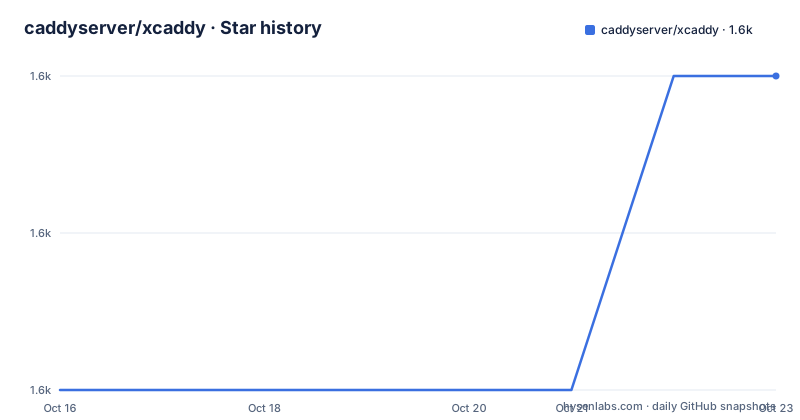
- caddyserver/xcaddy1,555 ★ · +2
| Repository | 2026-10-16 | 2026-10-23 |
|---|---|---|
| caddyserver/xcaddy | 1.6k | 1.6k |
2 Stars in the last 7 days, measured from the daily GitHub snapshot. Compare with other projects
Editorial analysis
Two jobs: ship a binary, or replace go run while developing
The README states the command has two primary uses. The first is compiling custom caddy binaries. The second is acting as a replacement for go run while developing a Caddy plugin, which is the use most plugin authors care about, because it removes the module juggling from the edit and run loop. The stated audience is Caddy plugin developers, who use it heavily, and anyone else who wants a custom caddy binary with or without plugins. The tool is a command line program plus an associated Go package, so the build logic is available for scripting rather than locked inside the binary.
Install with go install, a release binary, or the Cloudsmith apt repo
The only requirement is Go installed. From source it is one command:
go install github.com/caddyserver/xcaddy/cmd/xcaddy@latestPrecompiled binaries for your platform are on the releases tab. Debian, Ubuntu and Raspbian have a package from the project's Cloudsmith repository, which needs the keyring prerequisites and the repository list file before the install:
sudo apt install xcaddyThat repository route is the one to prefer on a build machine, since the go install path ties your build tool version to whatever Go you happen to have and fetches from the latest tag. The releases are frequent and small: v0.4.7, v0.4.6 and v0.4.5 in the recent history, with the newest published on 2026-08-17 and the last push on the same date.
The flag set is a rephrasing of Go module operations
The build subcommand takes a version, an output and four modifiers:
xcaddy build [<caddy_version>]
    [--output <file>]
    [--with <module[@version][=replacement]>...]
    [--replace <module[@version]=replacement>...]
    [--embed <[alias]:path/to/dir>...]
    [--pgo <file>]
The version argument is more flexible than it looks. It defaults to the CADDY_VERSION environment variable or the latest release, and it accepts latest for the newest stable tag, or any git ref, including a tag like v2.0.1, a branch like master, or a full commit hash. --with is the important one: it can be repeated and takes a module name with an optional version and an optional local replacement, similar to go get, and it adds a blank import for the module. The examples cover the cases you actually hit, a bare module, a pinned version, a fork with a local path, and a fork with a version plus a local path.
When --with fails, --replace is the answer
The README explains the difference between two flags in a way that saves an hour of guessing. --replace is like --with but does not add a blank import to the code; it only writes a replace directive to go.mod, which is useful when developing on Caddy's own dependencies, the ones that are not Caddy modules. The trigger for reaching for it is a specific error: if --with produces cannot find module providing package, that is the signal to try --replace instead. The distinction matters because plugins are Caddy modules with an import, while a dependency of a plugin is just a library, and forcing a blank import on a library is what produces the error in the first place.
You can replace Caddy core itself
The README does not limit --with to third party plugins. You can even replace Caddy core using the flag, pointing at a local checkout or at a fork on another branch:
xcaddy build \
    --with github.com/caddyserver/caddy/v2=../../my-caddy-fork

$ xcaddy build \
    --with github.com/caddyserver/caddy/v2=github.com/my-user/caddy/v2@some-branch
The stated consequence is that you can hack on Caddy core, and optionally plug in extra modules at the same time, with relative ease. For a Caddy contributor this turns the server from something you run into something you build, which is the fastest path from bug report to patch. For everyone else it is a reminder that the core version is just another module in the graph, so a custom build can diverge from upstream as easily as it can track it.
Embedding directories, with aliases for two sites from one binary
The --embed flag bakes the contents of a directory into the executable, and can be passed multiple times. Without an alias prefix, contents go into the root of the embedded filesystem and multiple unaliased directories merge together. With an alias and a colon, each directory lands in its own subdirectory, which the README demonstrates by serving two sites from two directories out of a single binary. The Caddyfile side is not free: you have to declare a custom filesystem using the embedded module, give it an arbitrary identifier that is also passed to fs directives, and point root and file_server at it:
xcaddy build --embed foo:./sites/foo --embed bar:./sites/barThat pairing of build flag and configuration block is the part to copy when you want a single self contained binary serving several static sites.
Environment variables pass through, and vendor/ is ignored
Three behaviours affect a build pipeline. The default core version comes from CADDY_VERSION, so you can pin it for all invocations in an environment rather than on each command line. As usual with the go command, GOOS, GOARCH and GOARM are passed through, which is how cross-compilation works: set the target variables and the same command produces a binary for that platform. The third is a constraint rather than a feature: xcaddy will ignore the vendor/ folder because it runs with -mod=readonly. If your organisation vendors dependencies for reproducible builds, this tool will not honour that, and that is a real argument for the manual route below. The --pgo flag for profile guided optimisation is also there, picking up a default.pgo file from the current directory automatically, but the README labels it experimental.
The README tells you when to stop using xcaddy
There is a Pro tip section, and it is the most useful part of the page. If you find yourself fighting xcaddy in relation to a custom or proprietary build or development process, it might be easier to just build Caddy manually. The mechanism is documented in Caddy's own main.go, whose comments explain how to build Caddy essentially the same way xcaddy does it. The manual procedure is short: copy that main.go into a new folder, initialise a Go module, add an import for each plugin, and run go build, editing go.mod as you like for dependency versions and replacements. Using the go command directly gives more control over the whole process, and xcaddy is a convenience layer on top of exactly that. The right default is therefore: reach for xcaddy when the plugin set is simple, and drop to the manual build the moment your process needs something the wrapper does not model.
Editorial conclusion
xcaddy is the right tool when you need plugins compiled into a single Caddy binary, whether you are publishing a Caddy build or iterating on a plugin, because the --with syntax, the CADDY_VERSION pin and the GOOS, GOARCH and GOARM passthrough make cross-compiled plugin builds one command. Skip it when your build process is customised enough that the README says it might be easier to just build Caddy manually, since copying Caddy's main.go into a module and adding blank imports is fewer moving parts. Before adopting, pin the core version rather than accepting latest, since the default resolves to the newest Caddy release and an unpinned plugin build is a build that changes under you, and remember that xcaddy ignores the vendor/ folder because it runs with -mod=readonly. The newest release is v0.4.7 from 2026-08-17 and the licence is Apache-2.0.
Frequently asked questions
How do I install xcaddy?
The only requirement is Go. You can run go install github.com/caddyserver/xcaddy/cmd/xcaddy@latest, download a precompiled binary from the releases tab, or install the Debian, Ubuntu or Raspbian package from the project's Cloudsmith repository with sudo apt install xcaddy.
What is the difference between --with and --replace in xcaddy build?
--with adds a module and writes a blank import for it, taking a module name with an optional version and local replacement. --replace does not add a blank import and only writes a replace directive to go.mod, which the README recommends when you hit a cannot find module providing package error while working on Caddy's dependencies.
How do I pin the Caddy version xcaddy builds?
Pass the version as the first argument to xcaddy build, using latest, a tag such as v2.0.1, a branch such as master or a commit hash, or set the CADDY_VERSION environment variable to change the default for all invocations. GOOS, GOARCH and GOARM are passed through for cross-compilation.
Official sources
Add this badge to your README
If you maintain this project, the badge below links readers to this analysis and shows its maintenance status from the daily GitHub snapshot. Paste the markdown into your README; add ?metric=license or ?metric=stars to the image URL for a different field.

[](https://hysenlabs.com/projects/caddyserver-xcaddy)Star history chart for your README
[](https://hysenlabs.com/projects/caddyserver-xcaddy)Was this useful?