yamlfmt is a single Go binary that formats YAML and admits one maintainer runs it
An extensible command line tool or library to format yaml files.
At a glance
- What is it?
- yamlfmt formats YAML files from a .yamlfmt config, ships as one static binary or a container, and can be used as a library or as a pre-commit hook. The README states plainly that it is not officially supported by Google and is maintained by one person in spare time.
- Who is it for?
- Adopt yamlfmt if you want a formatter that matches the formatting of the large existing YAML estate you have to live with, since a config file and a formatter that preserves comments make that achievable, and if you can run a pre-commit hook or a container step. Do not adopt it expecting a vendor backed project, because the README states it is not officially supported by Google and is maintained by one person in spare time.
- Can I use it commercially?
- Yes. Apache-2.0 is a permissive licence: you can use, modify and sell software built on it, as long as you keep its copyright and licence notices.
- Is it still maintained?
- Yes. The repository last received commits 10 days ago.
- What is it written in?
- Mainly Go, according to GitHub's language statistics.
Answers come from the project's GitHub data, last synced on October 23, 2026, and from our analysis. They are not legal advice.
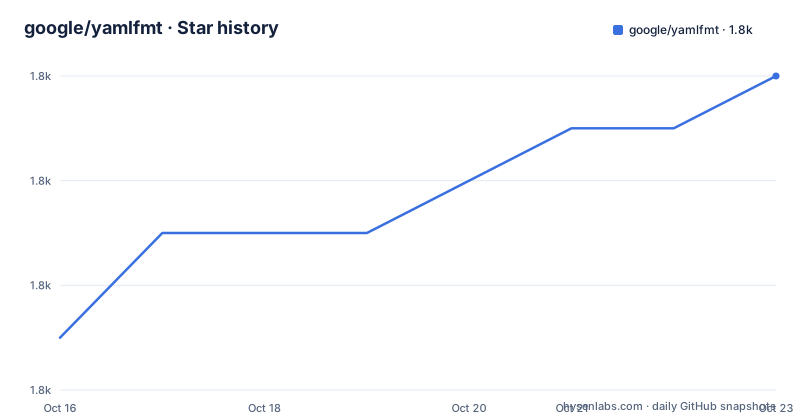
Star history
- google/yamlfmt1,844 ★ · +5
| Repository | 2026-10-16 | 2026-10-23 |
|---|---|---|
| google/yamlfmt | 1.8k | 1.8k |
5 Stars in the last 7 days, measured from the daily GitHub snapshot. Compare with other projects
Editorial analysis
A Google-named repo with an unofficial status
The Maintainers section is the most important thing in the README:
> This tool is not yet officially supported by Google. It is currently maintained solely by @braydonk, and unless something changes primarily in spare time.
That sits above the installation instructions, which is where you want it. The repository lives under the `google/` GitHub organisation and the licence is Apache 2.0 with Google LLC named in the source headers, but the project states plainly that it has no official backing.
This does not mean it is abandoned. The last push was on 2026-10-13. What it means is that the governance is one person, and the pace reflects someone doing this in their own hours. The README even links a discussion titled yamlfmt's recent slow development, so the maintainer considers the pace a fair topic for public discussion rather than hiding it.
There is a second linked discussion, on issues related to the yaml.v3 library.
The three goals stated at the top are narrow and worth repeating because they explain the design. Make a command line YAML formatting tool that is easy to distribute as a single binary. Make it simple to extend with new custom formatters. Enable alternative use as a library, providing a foundation for users to create a tool that meets specific needs.
So this is built as a binary first and a library second, and the extension point is a formatter you add yourself.
Two install routes and a version floor that moves
Installing the command with the Go toolchain is one line:
go install github.com/google/yamlfmt/cmd/yamlfmt@latestThe README states this currently requires Go version 1.21 or greater. Note the floor in the README and the one in the source disagree slightly: go.mod declares `go 1.22` with `toolchain go1.27.1`, and there is a `.go-version` file at the top level. If you are on Go 1.21 exactly, expect the README to be optimistic.
The alternative is downloading a release binary. The README states the binary is self-sufficient with no dependencies and can simply be put somewhere on your PATH and run with the command `yamlfmt`. That is the right choice for CI images and for machines where you do not want a Go toolchain at all.
The distribution is GoReleaser, configured in `.goreleaser.yaml`, and the Makefile stamps the binary with version and commit through ldflags:
VERSION  := $(shell git describe --abbrev=0 --tags | tr -d v)
COMMIT := $(shell git rev-parse --short HEAD)
There is a third route that a formatter should have. A `.pre-commit-hooks.yaml` file at the top level means it can be installed as a pre-commit hook, with the instructions in `docs/pre-commit.md`.
For containers, the Dockerfile is a two stage build that produces an alpine image whose entrypoint is the binary itself, with `/project` as the working directory. The README's GitLab CI example uses the image with `-lint .`, and the docker invocation mounts the current directory as a volume:
yamllint:
  image: ghcr.io/google/yamlfmt:latest
  script:
- yamlfmt -lint .docker run -v "$(pwd):/project" ghcr.io/google/yamlfmt:latest <yamlfmt args>Because the entrypoint is the binary, arguments after the image name pass straight through, which is why the lint example reads as one command.
Paths, globs and the lint mode that does not write
The basic usage is a path argument, and as many as you like:
yamlfmt x.yaml y.yaml <...>A directory is searched recursively for files with the `.yaml` or `.yml` extension, which is the form you will actually use on a repository:
yamlfmt .For finer selection there is a `-dstar` flag that searches paths with doublestar globs instead of walking the tree:
yamlfmt -dstar **/*.{yaml,yml}The doublestar behaviour is the upstream package's, and the README links it rather than restating it.
The `-lint` flag is the one to understand before you install a hook. In the CI example it is used as the whole script, which means the run reports violations and fails without rewriting files. That is what belongs in a pipeline. The bare command without it is the formatting run, which rewrites files in place.
Getting this backwards in a pre-commit hook means you commit unrelated formatting changes to every file you touch rather than failing cleanly, so the distinction is worth being deliberate about.
The full flag set is not in the README. It is in `docs/command-usage.md`, which the README links as the in depth source, including an operation flags section referenced again for the config file path.
The path handling is implemented in `path_collector.go` with its own test file, and the Makefile has integration test targets that build the binary and exercise the command under the `integration_test` build tag, including a `-update` mode and a `command_test_case` target that scaffolds a new case with `integrationtest/command/new_test_case.sh`.
Configuration lives in .yamlfmt and is validated against a JSON schema
The tool is configured through a YAML file called `.yamlfmt`. The README states it can live in your working directory, at a path given through a CLI flag, or at the standard global config path on your system.
That resolution order is the part to plan for. A repository committed config beats a machine global, which means a developer with a stale personal config may still get different output if they run from a directory with no `.yamlfmt`, and a CI container has no home directory config at all. Pinning the file per repository and passing its path explicitly in CI removes the ambiguity.
In depth configuration documentation is in `docs/config-file.md`, and the README does not summarise the keys. What the repository does show is that the configuration is validated: `schema.json` sits at the top level, and go.mod pulls in `github.com/santhosh-tekuri/jsonschema/v6`. So a malformed config is rejected rather than silently ignored, which is the right behaviour for a tool whose output becomes a diff.
Where the formatter engine lives and what it can extend
The repository layout shows the architecture more clearly than the README does, and it explains the library story.
At the top level sit `engine.go`, `formatter.go`, `feature.go`, `content_analyzer.go`, `linebreak.go`, `metadata.go` and `path_collector.go`, each with a corresponding test file where applicable. Then there are directories for the pieces: `engine/` for the formatting pipeline, `formatters/` for the built in formatters, `command/` for the CLI implementation, `cmd/` for the entry point, `pkg/` for reusable packages including `pkg/yaml` and `pkg/yaml/formattest`, and `internal/` for private code.
The Makefile treats `pkg/yaml` as special, excluding it from the ordinary verbose test and vet runs and running `pkg/yaml/formattest` separately. That pattern suggests the YAML layer is treated as its own component with its own test strategy, which is consistent with the maintainer's linked discussion about yaml.v3 issues. The YAML libraries in go.mod are `sigs.k8s.io/yaml` as a direct dependency with `gopkg.in/yaml.v3` and `go.yaml.in/yaml/v3` as indirect ones.
Content analysis as a named concept is worth noticing. A separate `content_analyzer.go` implies the formatter inspects what is in a file before deciding what to do with it, which is how a formatter can preserve regions it should not touch, such as content inside literal block scalars or embedded documents. That is the difference between a formatter that is safe to run on an existing repository and one that is not.
The features file at the top level suggests behaviour is gated behind named feature flags, which is a common way to let a formatter introduce behaviour incrementally.
Licence is Apache 2.0, which carries no copyleft obligation and is appropriate for a tool run in your build pipeline.
Verify the binary, or do not verify it
The README documents artifact verification in detail, which is unusual and worth using if you download binaries rather than installing with Go.
Support for verification with cosign is present from v0.14.0 onward. Checksums are applied to all released artifacts, and the checksum file is signed with cosign. The steps are to download three files from the release, `checksums.txt`, `checksums.txt.pem` and `checksums.txt.sig`, then verify the signature:
cosign verify-blob checksums.txt \
   --certificate checksums.txt.pem \
   --signature checksums.txt.sig \
   --certificate-identity-regexp 'https://github\.com/google/yamlfmt/\.github/workflows/.+' \
   --certificate-oidc-issuer "https://token.actions.githubusercontent.com"
The certificate identity regexp limits the certificate identity to workflows under the project's GitHub workflows directory, and the OIDC issuer is pinned to GitHub Actions. After that, download the archive and check the checksum:
curl -sfLO https://github.com/google/yamlfmt/releases/download/vA.B.C/yamlfmt_A.B.C_Linux_x86_64.tar.gz
sha256sum --ignore-missing -c checksums.txt
then extract and run it. The README numbers these steps with a repeated 3, which is a small sign of how quickly the section was last edited.
The alternative is to skip all of it by installing with `go install`, which verifies the module through the Go module system and requires Go 1.21 or newer on the machine. That is the stronger argument for the toolchain route in CI where a Go image already exists.
One caveat on the images and the `@latest` tag in the install command: both track moving references. If you need a reproducible pipeline, pin the yamlfmt version and pin the container image by digest.
Editorial conclusion
Adopt yamlfmt if you want a formatter that matches the formatting of the large existing YAML estate you have to live with, since a config file and a formatter that preserves comments make that achievable, and if you can run a pre-commit hook or a container step. Do not adopt it expecting a vendor backed project, because the README states it is not officially supported by Google and is maintained by one person in spare time. Verify first how much of your existing formatting it reproduces, by running it in lint mode on a directory before enabling it as a blocking hook, since the tool rewrites files in place.
Frequently asked questions
How do I install yamlfmt?
Run go install github.com/google/yamlfmt/cmd/yamlfmt@latest, which the README says requires Go 1.21 or greater. You can also download a self contained release binary and put it on your PATH, install it as a pre-commit hook, or run it from the ghcr.io/google/yamlfmt container image.
Is yamlfmt officially supported by Google?
No. The README states the tool is not yet officially supported by Google and is currently maintained solely by @braydonk, primarily in spare time, although the repository is not archived and the last push was on 2026-10-13.
How do I use yamlfmt in CI without rewriting files?
Use the -lint flag, as in the GitLab CI example in the README where the script is yamlfmt -lint . against the ghcr.io/google/yamlfmt:latest image. Running yamlfmt without -lint rewrites files in place.
Where does the yamlfmt configuration file go?
The configuration is a YAML file named .yamlfmt, which can live in your working directory, at a path given through a CLI flag, or at the standard global config path on your system. In depth documentation is in docs/config-file.md and the repo carries a schema.json.
How do I verify a downloaded yamlfmt binary?
Since v0.14.0 the checksums file is signed with cosign. Download checksums.txt, checksums.txt.pem and checksums.txt.sig, run cosign verify-blob with the certificate identity regexp for the project's GitHub workflows workflow, then check the archive with sha256sum --ignore-missing -c checksums.txt.
Official sources
Add this badge to your README
If you maintain this project, the badge below links readers to this analysis and shows its maintenance status from the daily GitHub snapshot. Paste the markdown into your README; add ?metric=license or ?metric=stars to the image URL for a different field.

[](https://hysenlabs.com/projects/google-yamlfmt)Star history chart for your README
[](https://hysenlabs.com/projects/google-yamlfmt)Was this useful?