Ascii-Motion: a browser editor for drawing and animating ASCII art
A modern web application for creating and animating ASCII art
At a glance
- What is it?
- Ascii-Motion is a React and TypeScript web app for making ASCII and ANSI art on a grid, with layers, keyframes and export to images, video and terminal components. The drawing core is MIT licensed, while login, cloud storage and the marketing site sit in a proprietary package.
- Who is it for?
- Ascii-Motion fits an animator who wants a grid based ASCII canvas with real keyframe interpolation in a browser tab, and fits a developer who wants to ship ASCII output into a React app or an Ink, OpenTUI or BubbleTea terminal program.
- Can I use it commercially?
- Yes. MIT is a permissive licence: you can use, modify and sell software built on it, as long as you keep its copyright and licence notices.
- Is it still maintained?
- Yes. The repository last received commits 5 days ago.
- What is it written in?
- Mainly TypeScript, according to GitHub's language statistics.
Answers come from the project's GitHub data, last synced on November 7, 2026, and from our analysis. They are not legal advice.
Star history
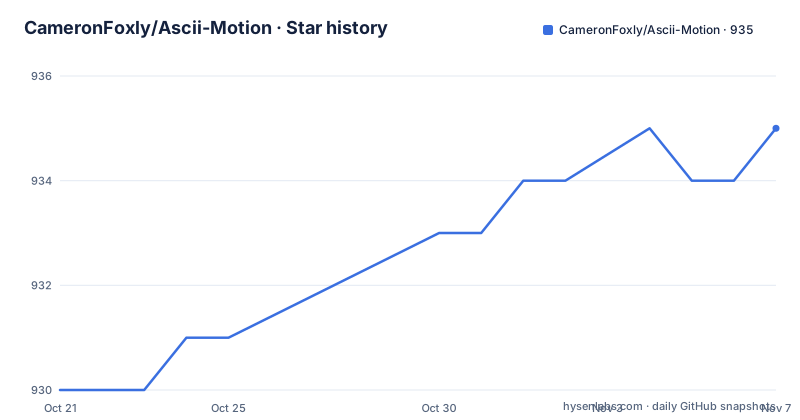
- CameronFoxly/Ascii-Motion935 ★ · +5
| Repository | 2026-10-21 | 2026-11-07 |
|---|---|---|
| CameronFoxly/Ascii-Motion | 930 | 935 |
5 Stars in the last 17 days, measured from the daily GitHub snapshot. Compare with other projects
Editorial analysis
A grid canvas with drawing tools rather than a text editor
Ascii-Motion describes itself as a web app for creating and animating ASCII and ANSI art, and the deployed editor lives at ascii-motion.app. The drawing surface is grid based, and the toolset covers pencil, eraser, fill, rectangle, ellipse, a bezier pen, text and gradient work. Colour is not incidental either: the project supports custom character and colour palettes with presets plus import and export.
That grid model is the point of difference from a plain text editor. Cells hold characters and colours, so selection, fills and shapes operate on a canvas rather than on a string buffer. Files are not the primary unit of work, frames and layers are, and the timeline UI at the top of the screen drives everything else.
Assets can arrive as pictures or video and be converted into ASCII, with rendering controls the user can tune and frame rate matching for motion sources. The same pipeline also runs the other way: filters and effects can be applied to an existing animation, and procedural animation tools generate motion without hand keying every cell. So the tool covers drawing, importing and generating, which is a wide surface for a single browser tab.
The deployed instance also carries a community gallery for publishing work and a documentation site at docs.ascii-motion.com, plus a landing page at ascii-motion.com.
timelineStore.ts holds layers, frames and keyframes
The src/ tree gives a clear picture of how the editor is wired. Four Zustand stores sit under src/stores: timelineStore.ts, described in the project structure as the primary store holding layers, content frames, keyframes and groups; canvasStore.ts, which keeps the working canvas buffer for the active layer; animationStore.ts, which is labelled a legacy compatibility adapter; and toolStore.ts, which owns tools, settings and undo and redo history.
That split matters. Having a legacy adapter rather than deleting the old animation path suggests the timeline model replaced an earlier one without breaking saved work, and src/utils/sessionMigration.ts exists specifically for v1 to v2 format migration. Sessions saved by an older build are therefore not orphaned, though users of old files will be migrated rather than reading them natively.
Keyframes are stored per property rather than per frame, with types for Layer, ContentFrame, Keyframe and PropertyTrack defined in src/types/timeline.ts. The animation system interpolates position, scale, rotation and anchor point, with easing handled by a cubic bezier interpolation engine in src/types/easing.ts and a matching easing editor with presets in the UI. Multi-layer compositing happens in src/utils/layerCompositing.ts, and src/utils/layerTransformUtils.ts handles screen to local coordinate conversion so transforms behave predictably when layers are nested.
A testing setup exists alongside this. The tech stack names Vitest, and the package scripts expose test, test:run and test:coverage entries, plus a dedicated test:mcp run scoped to src/__tests__/mcp.
Cloning the monorepo and starting the dev server
The prerequisites are modest: Node.js 18 or newer, and npm or yarn. The install is a standard clone and install.
git clone https://github.com/cameronfoxly/Ascii-Motion.git
cd Ascii-Motion
npm install
From there the development server is one command:
npm run devThe production build runs package builds first, then the TypeScript project build, then the Vite build:
npm run buildBecause the repository is a monorepo with npm workspaces, install pulls in packages/core, packages/premium and the two web packages rather than a single app. The build script for the workspace deliberately tolerates a missing premium build, running the premium build with errors suppressed, so the MIT core can compile even when the proprietary package is absent. That is the mechanism behind the open source mode described in the environment template, where leaving .env.local unset or empty keeps the app on local storage only.
Other scripts point at the AI tooling and versioning. npm run test:mcp runs the MCP test directory, and npm run mcp:contract regenerates or checks a contract file from scripts/generate-mcp-contract.ts. Version bumps are scripted separately from deployment, with patch, minor and major commands that call node scripts/version-bump.js.
MIT core, proprietary premium, and what that split costs you
The licence field on the repository says MIT, and the top level carries two licence files, LICENSE-MIT and LICENSE-PREMIUM. The project structure section is explicit that this is a monorepo with dual licensing and separate deployment targets.
The MIT package is packages/core, holding the open source core features: the canvas editor, the drawing tools, the animation system, export features across PNG, SVG, GIF and MP4, and all UI components and utilities. The proprietary package is packages/premium, holding user authentication with email based login, cloud project storage on Supabase, and payment integration marked as future work. The marketing site at packages/web/marketing and the docs site at packages/web/docs-site are also proprietary, each with its own package.json and Vercel project.
So the answer to can I self-host this depends on which half you mean. The editor, the timeline and the exporters are available under MIT. Accounts and synced projects are not, and they are not merely unbuilt: the premium package is a real directory with its own build script, and the deploy pipeline has a predeploy check that requires packages/premium/src/index.ts to exist before publishing.
The environment template makes the boundary concrete. Two Supabase variables, VITE_SUPABASE_URL and VITE_SUPABASE_ANON_KEY, enable authentication and cloud storage, and the template states that the anon key is safe to expose in client side code while the service role key must never be placed in frontend code. Stripe keys are present but commented out as not yet implemented.
This is a licensing arrangement worth reading closely rather than assuming the MIT badge covers the deployed product, and it is not legal advice.
Export targets that reach past images into your terminal
The export list is broader than the usual PNG and GIF pair. Images can be written as PNG, JPEG and SVG, and videos as MP4 and WebM. Alongside those sit React Components, CLI Components for Ink, OpenTUI and BubbleTea, plain Text, HTML, and session files.
Those last two categories matter for adoption decisions. A React component export means the ASCII output can be embedded in an existing web application rather than screenshotted, and the CLI component targets mean an ASCII animation can be rendered inside a terminal program built with Ink, OpenTUI or BubbleTea. For a team whose medium is the terminal, that is the actual integration path.
The terminal output is also where the project's editor format meets the runtime constraint of a character grid. Grid dimensions, frame rate and character choices all have to line up for the result to look right in a monospace display.
There is a machine interface as well. The feature list names an MCP Server, published to npm as ascii-motion-mcp, described as a tool for AI assisted animation creation. The package scripts back this with an mcp:contract command that generates a contract from scripts/generate-mcp-contract.ts and a check mode that verifies it, plus a test:mcp run. A published MCP server means an assistant can drive the editor rather than a human clicking through the UI, which is an unusual entry point for a creative tool.
Session files are the save format, and the presence of a v1 to v2 migration utility implies the format changed once already.
Deploying the editor: three Vercel projects and scripted version bumps
The monorepo contains three separate deployable apps, each with its own Vercel project: the main app on ascii-motion.app deployed from the root, the marketing site on ascii-motion.com deployed from packages/web/marketing, and the docs site on docs.ascii-motion.com deployed from packages/web/docs-site. The marketing and docs sites are deployed with the Vercel CLI from inside their package directories.
cd packages/web/marketing
npx vercel --prod
The main app has automated versioning wired into the deploy command. A patch deploy bumps the version, a major deploy bumps the minor version, and a preview deploy increments nothing. The intent is clear from the table: patch for bug fixes and small updates, minor for new features, preview for testing deployments and preview branches. Separate version commands exist for the same three increments without deploying.
The patch deploy command runs a predeploy check first, which updates git submodules recursively and asserts that packages/premium/src/index.ts exists. That check means a deployment fails early if the proprietary submodule is missing, rather than publishing a broken editor.
What is absent is as informative as what is present. The repository has no GitHub releases, so there is no tag history, no changelog on the releases page and no published artefact to pin against. The package version in package.json reads 2.2.8 and the README carries a matching version badge, so version state lives in the source tree rather than in release tags.
One maintainer, no release tags, and a stated vibe-coding workflow
The project is candid about how it is built. The development status section states that it is maintained entirely by one person, an animator and brand designer with next to no prior experience building tools, and that it has been vibe-coded over the last year or so, starting with GitHub Copilot in VS Code and Claude Opus 4.6, with more recent work using auto model mode in the GitHub Copilot App. The author asks readers to forgive messy or unusual structure and vibe-code artifacts.
That disclosure is unusually direct, and it cuts both ways. It explains the uneven quality of some structures, and it also means architectural decisions may reflect what an assistant produced rather than a long review by an experienced maintainer. The documentation is organised to compensate: COPILOT_INSTRUCTIONS.md holds an architecture overview and development guidelines, CONTRIBUTING.md covers how to contribute, and docs/MONOREPO_SETUP_GUIDE.md explains the dual licence structure.
On maintenance timing, the last push was on 2026-10-20, so the tree is being worked on. The absence of GitHub releases means there is no version history to plan upgrades against, and the scripted version bump commands show versioning is a release-time action rather than a per-commit one.
The stated maintenance model is the single biggest consideration for anyone planning to depend on this project. One person, an assistant-driven workflow and no tagged releases describe a tool with a fast feature rate and an unpredictable upgrade path, whatever the editor's output quality.
Editorial conclusion
Ascii-Motion fits an animator who wants a grid based ASCII canvas with real keyframe interpolation in a browser tab, and fits a developer who wants to ship ASCII output into a React app or an Ink, OpenTUI or BubbleTea terminal program. It does not fit someone who needs cloud sync and accounts out of the box, because those live in the proprietary package rather than the MIT core, and it does not fit a team that needs a stable release channel, since the repository has no tagged releases and the last push was on 2026-10-20. Before adopting it, check the licence split between packages/core and packages/premium, confirm your Node.js version is 18 or newer, and decide whether a single-maintainer project with a stated vibe-coding workflow fits your risk tolerance.
Frequently asked questions
How do I install and run Ascii-Motion locally?
Clone the repository, run npm install, then npm run dev to start the Vite dev server, with Node.js 18 or newer required. For a production bundle use npm run build, which builds the workspace packages, runs the TypeScript project build and then the Vite build.
Can I use Ascii-Motion without creating a Supabase account?
Yes. The environment template states that leaving .env.local absent or its variables empty puts the app in open source mode, working with local storage only. VITE_SUPABASE_URL and VITE_SUPABASE_ANON_KEY are only needed for the premium authentication and cloud storage features.
What licence applies to Ascii-Motion?
The repository carries two licence files, LICENSE-MIT and LICENSE-PREMIUM. The licence field on the repository says MIT, and packages/core with the canvas editor, drawing tools, animation system and export features is the MIT licensed part, while packages/premium, the marketing site and the docs site are proprietary.
Can Ascii-Motion export an animation for a terminal program?
The export list includes CLI Components for Ink, OpenTUI and BubbleTea, along with React Components, MP4, WebM, PNG, JPEG, SVG, Text, HTML and session files. The project also publishes an MCP server, ascii-motion-mcp on npm, for AI assisted animation creation.
Official sources
Add this badge to your README
If you maintain this project, the badge below links readers to this analysis and shows its maintenance status from the daily GitHub snapshot. Paste the markdown into your README; add ?metric=license or ?metric=stars to the image URL for a different field.

[](https://hysenlabs.com/projects/cameronfoxly-ascii-motion)Star history chart for your README
[](https://hysenlabs.com/projects/cameronfoxly-ascii-motion)Was this useful?