boss-agent-cli: a terminal and MCP front end for BOSS Zhipin that keeps agents on a short leash
Local-assist BOSS Zhipin CLI for AI agents, search, welfare filtering, shortlist, JSON-envelope output; low-risk & compliant by default.
At a glance
- What is it?
- boss-agent-cli wraps BOSS Zhipin (and, partially, Zhilian) into a schema-driven CLI with welfare filtering, a local shortlist, and a JSON envelope. It is built for both humans and AI agents, but its compliance story is the part worth reading closely.
- Who is it for?
- Adopt boss-agent-cli if you are a developer or an AI agent operator who needs a scriptable, local-first interface to BOSS Zhipin job search and candidate management, especially if you value welfare filtering and a typed schema. Do not adopt it if you need full Zhilian recruiter automation today, since that path is still browser/CDP based and limited.
- Can I use it commercially?
- Yes. MIT is a permissive licence: you can use, modify and sell software built on it, as long as you keep its copyright and licence notices.
- Is it still maintained?
- Yes. The repository received new commits within the last day.
- What is it written in?
- Mainly Python, according to GitHub's language statistics.
Answers come from the project's GitHub data, last synced on November 14, 2026, and from our analysis. They are not legal advice.
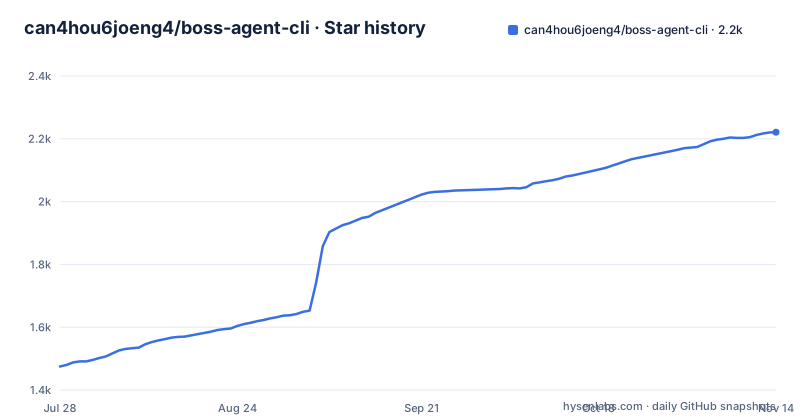
Star history
- can4hou6joeng4/boss-agent-cli2,221 ★ · +746
| Repository | 2026-07-28 | 2026-11-14 |
|---|---|---|
| can4hou6joeng4/boss-agent-cli | 1.5k | 2.2k |
746 Stars in the last 109 days, measured from the daily GitHub snapshot. Compare with other projects
Editorial analysis
What it actually solves
boss-agent-cli targets a specific pain: job platforms like BOSS Zhipin have no official public API, so any automation must reverse engineer the web interface. The project packages that reverse engineering into a single Python CLI that both a human in a terminal and an AI agent can drive. The README positions it as a local-assist tool, meaning it runs on your machine and keeps your session state in a local data directory. The core problem it solves is repeatable, structured access to job search, welfare filtering, and recruiter actions without opening a browser every time. It is for two audiences: a real person who wants a terminal wizard, and an AI agent that needs a predictable JSON interface. The dual-role design, job seeker and recruiter, is the main architectural bet.
The JSON envelope and schema as the source of truth
The most distinctive mechanism is the JSON envelope. Every command writes to stdout a single JSON object with the shape `{ok, data, pagination, error, hints}`. That is a deliberate contract for machine consumption. The README states that `boss schema` is the capability source of truth, and it exposes 39 top-level commands plus 9 recruiter subcommands. Schema export supports `--format openai-tools` and `--format anthropic-tools`, which means an agent can pull the tool definitions directly and know exactly what is callable. This is a meaningful design choice: instead of documenting commands in prose, the project makes the schema the single reference. The envelope also includes `pagination`, which matters for search results that span pages. For an agent, this removes the need to parse human oriented output. For a human, it is a bit verbose, but the wizard mode exists for that.
Welfare filtering is the real differentiator
The README calls welfare filtering the core differentiator. The command `boss search "Golang" --city 广州 --welfare "双休,五险一金"` does more than a keyword filter. It automatically flips through pages to collect results, then applies AND logic to match the welfare items against each job. You can also sort by a local match score with `--sort score`. This is genuinely useful because platform search often ignores welfare terms or only shows a subset. The local matching means the CLI computes the score on your machine, not on the server. The trade-off is that it requires fetching extra pages, which increases request volume and time. The documentation does not specify how many pages it will pull by default, but the crawl command has explicit budget limits, so the search path likely has similar constraints.
Getting it running: install, login, and the browser caveat
Installation is via uv: `uv tool install boss-agent-cli`, then `patchright install chromium`. The browser is only used for user initiated login and local export, not for normal operation. That is a deliberate separation. You run `boss` to enter the wizard, or `boss doctor` to check the environment, `boss login` to authenticate, and `boss status` to verify the session. The data directory is `~/.boss-agent` by default, and the Docker setup mounts that directory into a container that deliberately excludes the browser kernel. For agent integration, the MCP server is the recommended path: a JSON config for Claude Desktop or Cursor that runs `boss-mcp` via `uvx`. There is also a Python embedding option with `py.typed`, so you can import `BossClient` and call `search_jobs` directly. The practical note is that login is interactive and browser based, so a fully headless setup still needs one manual step.
Compliance boundaries and the assisted mode shift
The README has a section called running boundaries that is worth reading twice. Older configurations used `operating_mode=assisted|research`, and those still work, but the project says both modes can now call all implemented capabilities, so there is no more mode level `COMPLIANCE_BLOCKED`. That is a notable change: the compliance gate moved from a mode switch to per call checks. Unimplemented platform features still return `NOT_SUPPORTED`, and authentication failures, account risks, and network errors return structured errors with recovery actions. Long running workflows are bounded by timeout, retry, budget, checkpoint, and stop controls. This is not a guarantee of safety. It is a design that makes the limits explicit. If you expect the tool to refuse risky actions, you have to read the error envelope every time.
Multi-platform support is uneven, and that is a real limitation
The platform abstraction uses two registries, `Platform` and `RecruiterPlatform`, with `--platform zhipin|zhilian|qiancheng`. But the reality is uneven. BOSS Zhipin is the default and supports both job seeker and recruiter roles. Zhilian supports job seeker read only plus local assisted matching, and its recruiter side is a browser/CDP automation V1, accessed through `boss --platform zhilian --role recruiter agent ...`. Qiancheng (51job) is a registered placeholder that always returns `NOT_SUPPORTED`. So if you need cross platform recruiter automation today, this tool will not give it to you. The README is honest about this, but it means the multi-platform claim is aspirational for two of the three platforms. For a production agent, that is a hard constraint.
Alternative approaches and what they change
The obvious alternative is writing your own scraper or using a browser automation framework like Playwright directly against the BOSS Zhipin site. That gives you full control over selectors and logic, but you lose the schema, the welfare matching, the local shortlist, and the JSON envelope. Another alternative is using an official API if the platform ever provides one, but the README implies none exists. A third approach is a hosted service that abstracts the platform, but that introduces a trust and data privacy question. boss-agent-cli keeps everything local, including your session and shortlist, which is a meaningful difference. The trade-off is that you are responsible for keeping the scraper working when the site changes, and the project's release cadence (v1.19.1 in August 2026) suggests active maintenance, but that is not a guarantee.
Maintenance, licensing, and what to verify
The project is MIT licensed, which is permissive, and it is actively released with recent versions in 2026. The README references CI and code coverage badges, but I cannot verify those numbers. The maintenance cost for you comes from the browser dependency for login, the need to update when the platform changes, and the fact that the crawler requires an extra install (`uv sync --extra crawl`) and uses a separate Chrome profile. The license has no obvious copyleft trap, but you should check the full LICENSE file before embedding it in a commercial product. The documentation points to a troubleshooting guide and a roadmap. Before adoption, run `boss schema` to see the actual command surface, and test `boss doctor` on your machine to confirm the environment passes.
Editorial conclusion
Adopt boss-agent-cli if you are a developer or an AI agent operator who needs a scriptable, local-first interface to BOSS Zhipin job search and candidate management, especially if you value welfare filtering and a typed schema. Do not adopt it if you need full Zhilian recruiter automation today, since that path is still browser/CDP based and limited. Before relying on it, verify that the platform endpoints you depend on are still supported, check the current `boss schema` output for the exact command set, and confirm that your login flow works with the browser kernel installed via `patchright install chromium`. The project is MIT licensed and actively released, but the compliance model is a boundary, not a guarantee.
Frequently asked questions
What is boss-agent-cli?
It is a terminal client for a Chinese recruitment platform, aimed at both people and agents. A person runs the wizard; an agent calls the same workflows through a schema command, structured JSON output, a protocol server, or the packaged Python API. It covers job discovery, benefit filtering, a local shortlist, resume and AI helpers, messaging, and a recruiter-side path.
Do the operating modes in boss-agent-cli still restrict anything?
No, and the page says so. The two historical mode settings are still accepted for compatibility, but both can now call every implemented capability and no longer produce a mode-level compliance block. Unimplemented capabilities still return an accurate not-supported result, and long runs remain bounded by timeouts, retries, budgets and checkpoints.
How does an agent discover what boss-agent-cli can do?
A schema command is the source of truth for capabilities, exposing the top-level commands and recruiter subcommands grouped by workflow, and it can export tool definitions in the formats specific assistants expect. Every command prints one fixed JSON envelope with a success flag, data, pagination, errors and hints, and exits zero or one.
What changed in boss-agent-cli version 3?
The browser bridge daemon, the browser extension and the bridge install extra were removed. The page notes that upgrading the CLI does not stop an old daemon and does not uninstall the extension, so stopping the daemon and disabling or removing the extension are manual steps, as is taking the extra out of your install command.
How do bulk collection runs in boss-agent-cli stay bounded?
By four fixed budgets: a maximum request count, a maximum detail count, wall-clock seconds and retries. A run executes sequentially, checkpoints into a database, writes incremental output in three formats, uses its own browser profile rather than your everyday one, and can be stopped at the next safe point or resumed from a run identifier.
Official sources
Add this badge to your README
If you maintain this project, the badge below links readers to this analysis and shows its maintenance status from the daily GitHub snapshot. Paste the markdown into your README; add ?metric=license or ?metric=stars to the image URL for a different field.

[](https://hysenlabs.com/projects/can4hou6joeng4-boss-agent-cli)Star history chart for your README
[](https://hysenlabs.com/projects/can4hou6joeng4-boss-agent-cli)Was this useful?