Taipy Review: A Python-Only Path from Data Pipeline to Web App
Turns Data and AI algorithms into production-ready web applications in no time.
At a glance
- What is it?
- Taipy is a Python framework that wraps UI generation, pipeline orchestration, and scenario management into one library. This review covers its architecture, setup, limitations, and where it fits for data teams.
- Who is it for?
- Adopt Taipy if you are a data scientist or ML engineer who wants to ship a web interface around your Python algorithms without learning a separate frontend stack. Skip it if your team already has a strong web framework or if you need fine-grained control over UI components and deployment topology.
- Can I use it commercially?
- Yes. Apache-2.0 is a permissive licence: you can use, modify and sell software built on it, as long as you keep its copyright and licence notices.
- Is it still maintained?
- Yes. The repository last received commits 96 days ago.
- What is it written in?
- Mainly Python, according to GitHub's language statistics.
Answers come from the project's GitHub data, last synced on November 14, 2026, and from our analysis. They are not legal advice.
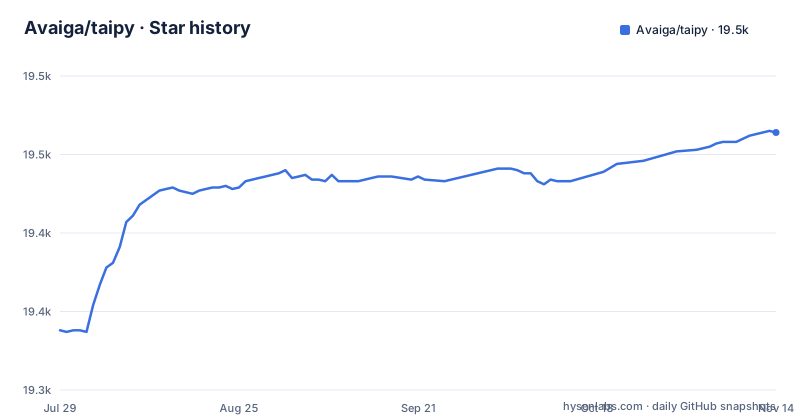
Star history
- Avaiga/taipy19,464 ★ · +126
| Repository | 2026-07-29 | 2026-11-14 |
|---|---|---|
| Avaiga/taipy | 19.3k | 19.5k |
126 Stars in the last 108 days, measured from the daily GitHub snapshot. Compare with other projects
Editorial analysis
What Taipy Actually Solves
Taipy targets a specific pain: data scientists and machine learning engineers who build working models but struggle to turn them into applications that non-technical users can operate. The README states the goal plainly: 'Build Python Data & AI web applications' and 'from simple pilots to production-ready web applications in no time.' The pitch is that you do not need to learn JavaScript, HTML, or a separate backend framework. Taipy bundles user interface generation, data integration, pipeline orchestration, what-if analysis, scenario management, authentication, and cron jobs into one Python library. That is a wide net. The intended user is someone whose primary skill is Python and whose job is data and AI, not web development. For that person, Taipy removes the boundary between a Jupyter notebook and a deployable app.
The Mechanism: One Library, Many Moving Parts
Taipy is not a single tool but a collection of modules that work together. The README lists the core pieces: UI generation, data integration, pipeline orchestration, scenario management, authentication, and scheduling. The architecture appears to be that you define your data pipeline and scenarios in Python, and Taipy provides the web interface and execution layer around them. The 'what-if analysis and scenario management' feature suggests a mechanism where you can parameterize runs, compare outcomes, and manage multiple versions of a pipeline. This is different from a plain web framework like Flask or FastAPI, where you would build the UI and the execution logic yourself. Taipy wants to own the whole flow. The trade-off is that you buy into its abstractions. If your pipeline does not fit its scenario model, you may fight the framework.
Getting Taipy Running
The quickstart is minimal. The README gives one command for the stable release: 'pip install taipy'. That is the entry point. From there, the documentation is the next step, with tutorials, user manuals, API references, and galleries linked. The recent release list shows 4.1.2-gui, 4.2.0.dev9 and 4.2.0.dev9-templates. Optional extras declared in pyproject.toml are ngrok, image, rdp, arrow, mssql and test. The README does not show a minimal code example; the tutorials cover that. The command line interface is mentioned as part of the production operations materials, but no specific commands are listed in the README.
The Production Story: What the README Claims and Omits
The README makes strong claims about production readiness. It says Taipy simplifies 'hosting, deployments, maintenance, etc.' and comes with a CLI, deployment scripts, version management, data migration, and telemetry. That is a lot of operational tooling for a Python library. The claim is that you can go from pilot to production 'in no time.' But the README does not show how these tools work. There are no commands, no config file examples, no deployment target details. The README does not specify whether deployment is to a single server, Kubernetes, or a cloud platform. That omission matters. If you are evaluating Taipy for a production system, you need to know whether its deployment scripts fit your infrastructure. The release names with 'dev' tags also raise a question: the stable release is what you should install, but the newest features are in development builds. That is normal, but it means the production story may be more mature in the stable branch than in the dev releases.
Limitations and Wrong Use Cases
Taipy's biggest limitation is its all-in-one nature. If you already have a frontend team or a preferred web framework, Taipy will likely get in the way. The README says you do not need to learn new languages, which is a benefit, but it also means you are limited to what Taipy's UI layer can express. Another limitation is that the README does not describe the performance envelope. There is no mention of how Taipy handles high concurrency, large datasets, or real-time updates. For a data app that needs to stream results or serve thousands of users, you would need to verify those capabilities elsewhere. Also, the 'what-if analysis' feature is powerful, but it implies a scenario management model that may not fit every pipeline. If your work is a simple script, Taipy is overkill. If your work is a complex, event-driven system, Taipy's abstractions may be too rigid.
Comparing Taipy to the Alternative: Streamlit and Dash
Taipy is not the only Python framework for data apps. Streamlit and Dash are the two most common alternatives. Streamlit takes a script-based approach: you write a Python script, and it renders a UI with widgets that rerun the script on interaction. Dash is more component-based, built on Flask and React, and gives you more control over layout and callbacks. Taipy differs by adding pipeline orchestration and scenario management on top of the UI layer. Streamlit and Dash focus on the frontend; you still need to manage your data pipeline and execution logic separately. Taipy wants to be the whole stack. That is the actual difference in approach. If you only need to display data and collect inputs, Streamlit is simpler. If you need complex, stateful applications with custom components, Dash gives you more flexibility. Taipy sits in between, offering a higher-level abstraction that includes backend logic. The trade-off is that you trade flexibility for convenience.
Licence, Maintenance, and Upgrade Cost
Taipy is licensed under Apache-2.0, which is permissive and allows commercial use, modification, and distribution without requiring you to open-source your own code. The copyright is held by Avaiga Private Limited, and the license text is standard. For maintenance, the last push was on 2026-08-10, and the most recent releases are 4.1.2-gui (2026-04-29) and the 4.2.0.dev9 builds (2026-04-30), so a 4.2.0 development cycle is under way. That has implications for upgrade cost: you may need to track changes between dev releases if you want the latest features. The README mentions version management as part of the production materials, but it does not explain how it works. You would need to check the documentation to understand how to handle upgrades and data migration. The project also has a contributing guide and a code of conduct, which suggests a community-driven process, but the README does not provide statistics on contributor activity.
Editorial conclusion
Adopt Taipy if you are a data scientist or ML engineer who wants to ship a web interface around your Python algorithms without learning a separate frontend stack. Skip it if your team already has a strong web framework or if you need fine-grained control over UI components and deployment topology. Before committing, verify that the current stable release, not the 4.2.0 dev builds, covers your authentication and scheduling needs, and check the docs for the exact CLI commands and deployment scripts. Taipy is a serious option, but its breadth of features means you must validate each one against your production requirements.
Frequently asked questions
what is taipy
Taipy is an Apache-2.0 Python platform for building data and AI driven web applications, aimed at data scientists and machine learning engineers. Its library covers user interface generation, data integration, pipeline orchestration, what-if analysis and scenario management, authentication with roles, and cron jobs and scheduling.
taipy alternatives
The repository does not list alternatives or compare itself to other tools. It names only its own ecosystem, which includes Taipy Designer, Taipy Studio, predefined templates, and data platform integration, alongside a set of production materials covering a CLI, deployment scripts, version management, data migration, and telemetry.
Does Taipy support Python 3.13?
No. pyproject.toml declares requires-python as >=3.9,<3.13, and the trove classifiers list only Python 3.9 through 3.12, so an environment on 3.13 falls outside the declared range at install time.
What does installing Taipy pull in as dependencies?
The install list is not written in pyproject.toml, which marks dependencies as dynamic. setup.py builds install_requires by scanning every setup.requirements.txt under tools/packages, merging the lines into a set, and removing entries that start with taipy. Optional integrations are separate extras: ngrok, image, rdp, arrow, mssql, and test.
Official sources
Add this badge to your README
If you maintain this project, the badge below links readers to this analysis and shows its maintenance status from the daily GitHub snapshot. Paste the markdown into your README; add ?metric=license or ?metric=stars to the image URL for a different field.

[](https://hysenlabs.com/projects/avaiga-taipy)Star history chart for your README
[](https://hysenlabs.com/projects/avaiga-taipy)Was this useful?