AgentEval: a transparent HTTP proxy that grades your agent's LLM traffic
The agent responsible for conducting the agent evaluation
At a glance
- What is it?
- AgentEval sits between an agent and its upstream LLM API, records every request, splits sessions automatically, then scores, diagnoses and probes the agent's own configuration. It is a Rust binary with a built-in dashboard, and it is opinionated about what a session boundary is.
- Who is it for?
- Adopt AgentEval if your agent already talks to an OpenAI- or Anthropic-shaped HTTP API and you want per-session scores without writing an eval harness: point BASE_URL at the proxy, set the AGENTEVAL_JUDGE_* variables, and read logs/{session}.grade.json. Do not adopt it if your agent uses a non-HTTP transport, if you cannot route traffic through a local proxy, or if you need deterministic, reproducible scores rather than a judge model's opinion.
- Can I use it commercially?
- The repository metadata does not identify a licence. Check the project’s published terms and any component-specific licences before reuse.
- Is it still maintained?
- Yes. The repository last received commits 100 days ago.
- What is it written in?
- Mainly Rust, according to GitHub's language statistics.
Answers come from the project's GitHub data, last synced on November 25, 2026, and from our analysis. They are not legal advice.
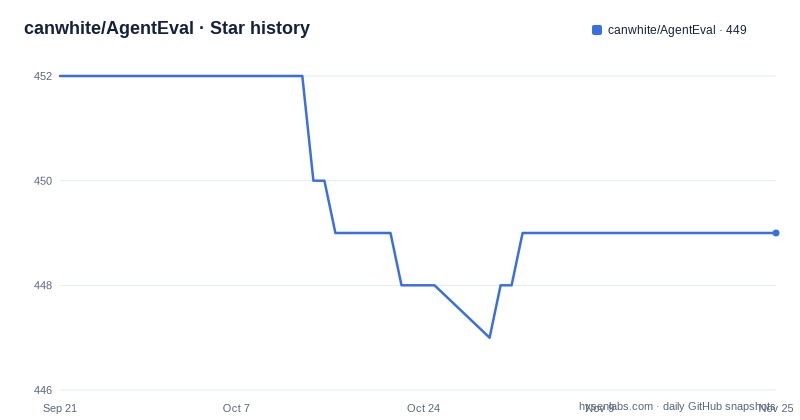
Star history
- canwhite/AgentEval449 ★ · -3
| Repository | 2026-09-21 | 2026-11-25 |
|---|---|---|
| canwhite/AgentEval | 452 | 449 |
-3 Stars in the last 65 days, measured from the daily GitHub snapshot. Compare with other projects
Editorial analysis
The problem AgentEval solves: grading an agent you cannot easily replay
Most agent evaluation happens either in a synthetic harness or not at all. A harness gives you reproducible cases but only covers the paths you thought to write down. Production traffic covers everything else, and it is usually the only place where retry loops, orphaned tool call IDs and oversized prompts show up.
AgentEval takes the second route. It is a local HTTP proxy that sits between an agent and its upstream LLM API, records the traffic, and turns it into graded artifacts. The README describes it as a "transparent HTTP proxy that captures Agent ↔ LLM API traffic" and lists five outputs: raw traffic, session views, grades, diagnoses and probes. The intended user is someone running an agent against a real API who wants numbers per session rather than a pass/fail suite.
The design bet is that a proxy is the least invasive place to observe an agent. You do not import a library, you do not wrap your client, and you do not change the agent's code. You change one environment variable. That is also the design's main constraint, which I cover below.
How the proxy, session splitting and the five log artifacts fit together
The README's architecture diagram lays out a single pipeline. The proxy listens on 127.0.0.1:57633, forwards requests to the upstream API, and writes each exchange to logs/{stem}.jsonl. From that raw stream it derives four more artifacts: logs/{session}.view.json for the structured conversation, logs/{session}.grade.json for the scores, logs/{session}.diagnose.json for rule-based behavioral findings, and logs/{session}.probe.json for the configuration review.
Session splitting is the part worth understanding before you trust any score. The README states that normal conversations grow their message array turn by turn, while a new conversation "shrinks" back to just the system prompt plus the new question. The detection rule is explicit: when common_prefix_len <= 1, the proxy treats it as a new session. Two other triggers seal a session: a two-minute idle timeout, and proxy shutdown, which flushes the last session with a synchronous grade.
That heuristic is cheap and works for chat-style agents that resend the full history on every call. It will misbehave for agents that manage their own context window, summarize old turns, or send only the latest message. If your agent trims history, common_prefix_len can drop below the threshold mid-conversation and you will get a session split in the middle of a task, which then produces a low task_completion score for reasons that have nothing to do with the agent.
The grading itself combines two sources. task_completion (weight 0.35) and response_quality (0.20) come from an LLM judge; tool_efficiency (0.30) and performance (0.15) are rule-based, measuring tool errors, duplicate calls, token efficiency, latency and turn count. The README states that grading falls back to rule-based estimates when the LLM is unavailable. That fallback is worth knowing about, because a score produced without a judge is not comparable to one produced with it, and nothing in the artifact description says the two are marked differently.
Installing AgentEval and running a first graded session
AgentEval is a Rust crate with no published release in the repository metadata, so the documented path is to build it from source with cargo. Start by creating your .env from the example. The repository's .env.example sets the upstream API address, the proxy port, and an optional log directory and verbose flag.
AGENTEVAL_UPSTREAM=https://api.deepseek.com
AGENTEVAL_PORT=57633
# AGENTEVAL_LOG_DIR=/path/to/logs
# AGENTEVAL_VERBOSE=1
The README's Quick Start adds the judge configuration, which is what makes LLM grading and the diagnosis summary work. Without AGENTEVAL_JUDGE_API_KEY the README says the diagnosis summary is skipped and grading falls back to rules. PROBE_SOURCE_PROJECT_DIR points at the agent project the probe should read.
AGENTEVAL_JUDGE_API_BASE=https://api.deepseek.com
AGENTEVAL_JUDGE_MODEL=deepseek-chat
AGENTEVAL_JUDGE_API_KEY=sk-xxx
PROBE_SOURCE_PROJECT_DIR=/path/to/your/agent/project
Then start the proxy. The README shows the expected console output, including the listening address and the dashboard URL.
cargo run
# listening http://127.0.0.1:57633 -> https://api.edgefn.net
# dashboard http://127.0.0.1:57633/dashboard/
Point your agent at the proxy. The README gives three environment variables depending on the client; note that the OpenAI and generic forms include the /v1 suffix while the Anthropic form does not.
export ANTHROPIC_BASE_URL=http://127.0.0.1:57633
export OPENAI_BASE_URL=http://127.0.0.1:57633/v1
MODEL_BASE_URL=http://127.0.0.1:57633/v1 your-agent-command
Run one task, then open http://127.0.0.1:57633/dashboard/. The session list shows ungraded sessions with an inline [Grade] button, and the README states the list defaults to low scores first, so a fresh session with no score is not at the top. From the command line you can run the same steps against a session ID.
cargo run -- diagnose <session_id> [--format terminal|json]
cargo run -- probe <session_id>
The README notes that probe requires a prior diagnosis on that session, so run diagnose first. A first run should leave logs/{session}.view.json, .grade.json and .diagnose.json in your log directory.
The probe reads your agent's source, and that is a real boundary
The probe is the most unusual part of the tool and the one that deserves the most scrutiny. The README describes it as an LLM agent with four read-only file tools that enters PROBE_SOURCE_PROJECT_DIR, reviews configuration files (CLAUDE.md, skills, prompts, tools), and identifies a root cause for each diagnose issue. The README is explicit that all recommendations are written to the report and "never auto-applied".
Two things follow. First, the probe only works if your agent's configuration is on disk in a form an LLM can read. An agent whose behavior is defined by code, a database, or a remote service gives the probe little to work with, and the findings will be generic. Second, pointing a tool at a source directory is a data-handling decision, not just a technical one. The README does not document what the four tools can read beyond the listed configuration file types, and the table of tools and their safety limits is truncated in the README, so the exact read scope is not something you can confirm from the documentation alone. Read the probe tool implementation in src/ before pointing it at a repository containing secrets or customer data.
Diagnosis is rule-based, and the rules are the honest part
The diagnose stage runs ten rules across four categories and, per the README, is a pure rule engine that does not depend on an LLM. The LLM only writes a two- or three-sentence summary afterward, and that step is skipped when no API key is configured. This is the most predictable part of the pipeline.
The rules are concrete: four tool rules (result_missing, result_error, duplicate_3plus, result_empty) catch broken tool chains and retry loops; two prompt rules (bloat, context_overflow) catch overlong system prompts and orphan tool call IDs; three token rules (empty_response, waste, excessive_input) catch empty responses and oversized input; and one view rule (mismatch) checks data integrity by comparing turn count against jsonl entries.
The mismatch rule is the one to watch. It compares the structured view against the raw log, so it is a self-check on AgentEval's own parsing rather than a property of your agent. If mismatch fires often on your traffic, the session-splitting heuristic or the view builder is misreading your request shapes, and every score derived from those sessions is suspect. Treat mismatch as a signal to stop trusting the grade, not as an agent defect.
Where AgentEval is the wrong tool
The proxy approach fails cleanly in several cases. If your agent does not speak HTTP to an LLM API, or if it uses a transport AgentEval does not proxy, there is nothing to capture. If your agent runs behind a corporate proxy or in an environment where you cannot redirect BASE_URL, the setup does not apply.
A subtler failure is determinism. Two of the four grading dimensions come from an LLM judge, so the same session graded twice can produce different scores. That makes AgentEval a poor fit for CI gates that need a stable pass/fail threshold. The README does not describe score caching or judge-version pinning, so reproducibility across judge model upgrades is not something the documentation addresses.
There is also a privacy cost the README does not discuss. The proxy writes request bodies to logs/{stem}.jsonl, and AGENTEVAL_VERBOSE=1 additionally prints request bodies. If your agent handles user data, that log directory becomes a copy of it. The README does not document a redaction step, a retention policy, or an encryption option for the log directory.
Finally, the licence is not stated in the repository metadata, and there is no LICENSE file in the top-level entries. That is a blocker for any commercial adoption until you confirm terms with the author.
How this differs from harness-based agent eval tools
The related searches around this project point at a different family of tools: AutoGen, DeepEval, and LangChain's agent evaluation utilities. The difference in approach is worth stating plainly because it determines which one you should reach for.
Harness-style evaluators define test cases in code, run the agent against them, and compare outputs against expected results or a judge. You get reproducibility and a fixed dataset, and you get it only for scenarios you wrote. AgentEval inverts this: it observes whatever traffic actually flows, so coverage is limited by what your users do, and reproducibility is limited by the judge.
The two are complementary rather than competing. A harness tells you whether a change broke a known case; AgentEval tells you what happened in sessions you never thought to write a case for. If you already have a harness and a stable regression suite, AgentEval's main addition is the diagnose rules and the probe, not the grading. If you have no harness at all, starting with a proxy means you get numbers on day one without authoring test cases, at the cost of those numbers being non-deterministic.
Editorial conclusion
Adopt AgentEval if your agent already talks to an OpenAI- or Anthropic-shaped HTTP API and you want per-session scores without writing an eval harness: point BASE_URL at the proxy, set the AGENTEVAL_JUDGE_* variables, and read logs/{session}.grade.json. Do not adopt it if your agent uses a non-HTTP transport, if you cannot route traffic through a local proxy, or if you need deterministic, reproducible scores rather than a judge model's opinion. Before you commit, verify three things: that the session-splitting heuristic (common_prefix_len <= 1) matches how your agent actually builds message arrays, that the licence file exists, and that the proxy's logging of full request bodies is acceptable for the data your agent sends.
Frequently asked questions
How do I do agent evals with AgentEval?
Point your agent's BASE_URL at the proxy, run a task, then open the dashboard at http://127.0.0.1:57633/dashboard/ or run cargo run -- diagnose <session_id> from the command line. Grading combines rule metrics with an LLM judge across four weighted dimensions.
What is agent eval in the context of AgentEval?
AgentEval treats evaluation as observing live agent to LLM traffic through an HTTP proxy, then producing per-session grades, rule-based diagnoses and configuration probes. The README frames it as capturing and grading traffic rather than running predefined test cases.
How does AgentEval decide where one session ends and the next begins?
It compares the message array of consecutive requests. When the common prefix length is 1 or less, meaning the messages shrank back to roughly the system prompt plus a new question, it seals the old session and starts a new one. A two-minute idle timeout and proxy shutdown also seal the current session.
Does AgentEval need an LLM API key to work?
It runs without one, but with reduced output. The README states that grading falls back to rule-based estimates when the LLM is unavailable, and the diagnosis summary is skipped when no API key is set. The ten diagnose rules themselves are a pure rule engine and do not depend on an LLM.
Does the AgentEval probe modify my agent's code?
No. The README states that all probe recommendations are written to the report and never auto-applied. The probe uses four read-only file tools against the directory set in PROBE_SOURCE_PROJECT_DIR.
Official sources
Add this badge to your README
If you maintain this project, the badge below links readers to this analysis and shows its maintenance status from the daily GitHub snapshot. Paste the markdown into your README; add ?metric=license or ?metric=stars to the image URL for a different field.

[](https://hysenlabs.com/projects/canwhite-agenteval)Star history chart for your README
[](https://hysenlabs.com/projects/canwhite-agenteval)Was this useful?