Patina: a local-first Windows time tracker built on Tauri and SQLite
A beautiful Windows desktop time tracking app built with Tauri & React.
At a glance
- What is it?
- Patina records foreground app usage on Windows 10/11, keeps all data local, and handles idle, lock, and sleep boundaries. This review covers its mechanism, setup, limitations, and a real alternative.
- Who is it for?
- Adopt Patina if you want automatic, local-only time tracking on a single Windows machine, value privacy over cloud convenience, and can accept the lack of sync and team features. Do not adopt it if you need multi-platform support, cloud backups, or collaborative reporting.
- Can I use it commercially?
- Yes. MIT is a permissive licence: you can use, modify and sell software built on it, as long as you keep its copyright and licence notices.
- Is it still maintained?
- Yes. The repository last received commits 3 days ago.
- What is it written in?
- Mainly TypeScript, according to GitHub's language statistics.
Answers come from the project's GitHub data, last synced on November 15, 2026, and from our analysis. They are not legal advice.
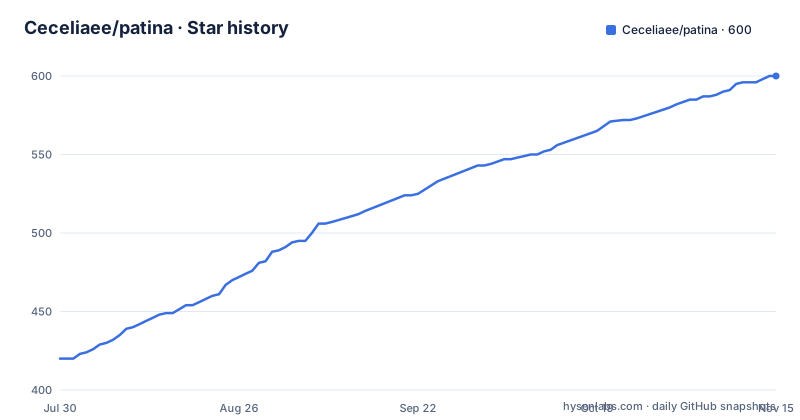
Star history
- Ceceliaee/patina600 ★ · +180
| Repository | 2026-07-30 | 2026-11-15 |
|---|---|---|
| Ceceliaee/patina | 420 | 600 |
180 Stars in the last 108 days, measured from the daily GitHub snapshot. Compare with other projects
Editorial analysis
What Patina actually does
Patina solves a narrow problem: recording which desktop app you are actually using, without asking you to start or stop a timer. It targets Windows 10/11 desktop users who want a personal, local record of their time. The README is explicit about the scope: no team collaboration, no account system, no cloud sync, no multi-platform sync, and no heavy AI insights. That is a deliberate boundary. If your need is simply to know where your hours go on one Windows machine, Patina fits. If you expect to sync across devices or share data with a team, it is the wrong tool.
How the tracking mechanism works
The core mechanism is foreground app recognition. Patina records the window and app that are actually in the foreground, which the README says reduces temporary-window and system noise. It then handles state boundaries: idle time does not count as effective activity, and lock, sleep, resume, long-away periods, and abnormal exits are handled as separate boundaries. This matters because a naive tracker would merge a 10-minute coffee break into a 3-hour coding session. The README also mentions reducing missed activity in low-interaction scenarios like videos, meetings, courses, and livestreams. That suggests it uses some heuristic to keep counting when you are not actively clicking. The data model is SQLite via the @tauri-apps/plugin-sql, so all records stay local. Window title capture can be disabled per app, which is a privacy control that reduces sensitive information retention.
Getting it running: build commands and configuration
The README gives a straightforward build path. You need Rust and Node.js 18 or newer. Clone the repository, then run npm install. For development, use npm run tauri dev. To build an installer, use npm run tauri build. The installer lands in src-tauri/target/release/bundle/. There is no mention of configuration files or environment variables in the README. The settings live in the app UI: you can rename apps, adjust categories, colors, and statistics rules, exclude apps from stats, and disable title capture per app. The tech stack is Tauri v2 for the shell, Rust for the backend, React with Vite and TypeScript for the frontend, Tailwind CSS for styling, Framer Motion for animation, and Recharts for charts. That is a modern stack, but it also means the project carries a Node toolchain plus a Rust toolchain, so the build is not trivial for a non-developer.
A genuine limitation: no sync and no team features
The biggest limitation is the explicit lack of sync and collaboration. The README states that Patina is not aimed at team collaboration, account systems, cloud sync, multi-platform sync, or heavy AI insights. That means if you use two machines, you have no built-in way to merge records. If you want to share time reports with a manager, you have to export backups manually and send them. The data stays on one disk. For a personal tool that is a feature, not a bug, but it is a hard boundary. Another limitation is that the README does not describe how the idle detection distinguishes between a real idle state and a long-running video. The claim that it reduces missed activity in low-interaction scenarios suggests some heuristic. That lack of transparency could be a problem for users who need to trust the exact boundaries.
The alternative: manual timers and cloud trackers
The obvious alternative is a manual timer like Toggl Track or Clockify, which require you to start and stop timers yourself. The difference in approach is fundamental: Patina removes the manual step entirely, at the cost of relying on foreground detection. Manual timers give you precise control over what counts as work, but they depend on your discipline to click start and stop. Cloud trackers also offer cross-platform sync and team reporting, which Patina does not. If you need to bill clients by project, a manual timer with project tags is likely more accurate. If you want a passive, low-intervention record of your day, Patina is the better fit. The README does not position Patina against these tools, but the feature list makes the trade-off clear.
Maintenance and license considerations
Patina is licensed under MIT, which is permissive: you can use, modify, and distribute it, even in commercial products, as long as you preserve the copyright notice. That is a low-friction license for personal use and for developers who want to fork it. The repository shows recent activity: the last push was 2026-08-13, with releases v1.9.4, v1.9.3, and v1.9.2 in August 2026. That suggests active maintenance. The README mentions a Patina Web Sync companion for browser activity, available as extensions for Chrome, Firefox, and Edge, but it is optional. The core app stores data in SQLite, so backup and restore are user-initiated. There is no mention of automatic database migration or upgrade paths beyond the release notes. If you plan to rely on this for long-term records, you should verify that the backup format is stable across versions.
Who should skip Patina
Developers who need cross-platform tracking should skip it. The README is clear that it is Windows-only. Mac and Linux users have no path here. Teams that need shared reports or project billing will also be disappointed, because there is no server component. Users who want cloud sync for redundancy should look elsewhere. If you need to track time on a work laptop and a personal desktop and merge the data, Patina will not help. Also, if you dislike the idea of a background process watching your foreground window, even locally, this app is not for you. The privacy model is local-first, but the app still records which apps you use and when, so it is not a privacy tool in the absolute sense.
Editorial conclusion
Adopt Patina if you want automatic, local-only time tracking on a single Windows machine, value privacy over cloud convenience, and can accept the lack of sync and team features. Do not adopt it if you need multi-platform support, cloud backups, or collaborative reporting. Before committing, verify that the idle and lock detection behaves correctly on your hardware and that the SQLite storage meets your long-term data needs. The project explicitly excludes cloud sync and account systems, so treat it as a personal tool, not an enterprise solution.
Frequently asked questions
What does Patina track on Windows?
It records the foreground app automatically, with no timers to start or stop, and it stops crediting idle time. Lock, sleep, resume, long-away periods, and abnormal exits all create record boundaries. Rankings, distributions, and totals use effective activity time rather than open spans.
Does Patina send my data anywhere?
Core data stays local by default, with no account, no cloud sync, and no server dependency, and backups, restores, and history cleanup are user-initiated. Anonymous statistics can be enabled per app to record time with no identity or window titles, and title capture can be disabled per app without stopping time tracking.
How do I build Patina from source?
Install Rust, Node.js at the version in .node-version, and pnpm at the version in the packageManager field. Then run git clone, cd patina, and pnpm install --frozen-lockfile. Use pnpm run tauri dev for development and pnpm run tauri build for installers, which land under src-tauri/target/release/bundle.
Can Patina record which webpage I was on?
Not from the desktop app. A separate extension, Ceceliaee/patina-web-sync, adds specific webpage details to browser activity and is installed from the Chrome Web Store, Firefox add-ons, or the Edge add-ons catalogue.
Does Patina support teams or cloud sync?
No, and the project says so plainly. Current scope is Windows 10 and 11 desktop use, personal local storage and control, automatic tracking, review, classification, backup or restore, and lightweight local tools. Team collaboration, account systems, cloud sync, multi-platform sync, and heavy AI insights are all explicitly out of scope.
Official sources
Add this badge to your README
If you maintain this project, the badge below links readers to this analysis and shows its maintenance status from the daily GitHub snapshot. Paste the markdown into your README; add ?metric=license or ?metric=stars to the image URL for a different field.

[](https://hysenlabs.com/projects/ceceliaee-patina)Star history chart for your README
[](https://hysenlabs.com/projects/ceceliaee-patina)Was this useful?