Tabby: A Cross-Platform Terminal That Puts SSH and Serial First
Tabby is a cross-platform terminal with SSH connections, serial support, profiles, themes, and configurable shortcuts.
At a glance
- What is it?
- Tabby (formerly Terminus) is a TypeScript-based terminal emulator for Windows, macOS, and Linux that bundles SSH, Telnet, and serial clients into one configurable app. It is not lightweight, but it is feature-dense.
- Who is it for?
- Adopt Tabby if you are a Windows user who wants a single tool for SSH, serial, and local shells, or if you value deep theming and plugin extensibility. Avoid it if you are memory-constrained or need a minimal terminal; the README explicitly says it is not lightweight.
- Can I use it commercially?
- Yes. MIT is a permissive licence: you can use, modify and sell software built on it, as long as you keep its copyright and licence notices.
- Is it still maintained?
- Yes. The repository last received commits 1 day ago.
- What is it written in?
- Mainly TypeScript, according to GitHub's language statistics.
Answers come from the project's GitHub data, last synced on November 13, 2026, and from our analysis. They are not legal advice.
Star history
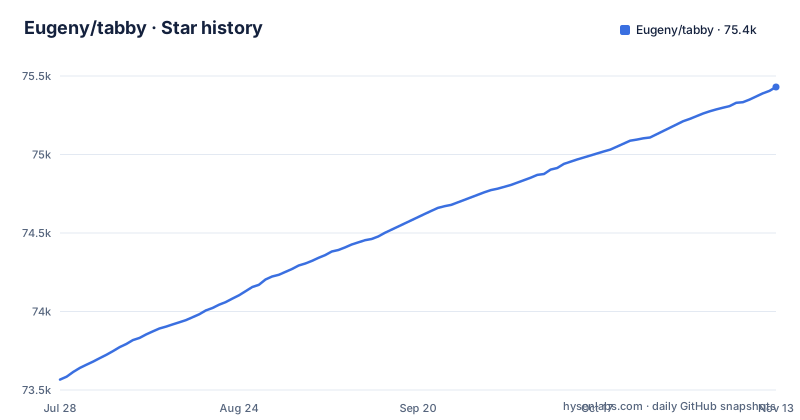
- Eugeny/tabby75,430 ★ · +1,864
| Repository | 2026-07-28 | 2026-11-13 |
|---|---|---|
| Eugeny/tabby | 73.6k | 75.4k |
1,864 Stars in the last 108 days, measured from the daily GitHub snapshot. Compare with other projects
Editorial analysis
What Tabby Actually Solves
Tabby solves the problem of juggling multiple terminal tools. On Windows, you might use conhost for local shells, PuTTY for SSH, and a separate serial client. Tabby replaces all three with one application. It is an alternative to Windows' standard terminal (conhost), PowerShell ISE, PuTTY, macOS Terminal.app, and iTerm, according to the README. The target user is someone who manages remote environments, especially over SSH, and wants a consistent interface across operating systems. The README also points to Warpgate, a bastion server by the same author, suggesting the intended workflow is managing multiple remote hosts securely. Tabby is not a shell replacement; it does not provide a Unix-like environment on Windows. It is a front-end that runs whatever shell you configure, including PowerShell, WSL, Git-Bash, Cygwin, MSYS2, Cmder, and CMD.
The Architecture: A Terminal Emulator with Built-in Clients
Tabby is written in TypeScript, and the repository's package.json and electron-builder.yml point to an Electron-based app. The core is a VT220 terminal emulator with extensions. On top of that, Tabby ships integrated SSH2, serial, and Telnet clients, so the connection manager, jump host handling, and forwarding are part of the same application. The SSH client supports X11 forwarding, port forwarding, automatic jump host management, agent forwarding (including Pageant and Windows native OpenSSH Agent), and login scripts. The serial terminal supports saved connections, readline input, optional hex byte-by-byte input, hexdump output, newline conversion, and automatic reconnection. The integration is the key: you can have a local PowerShell tab, an SSH session to a Linux server, and a serial console to a microcontroller, all in the same window with the same theming and shortcuts.
Getting It Running: Install, Portable Mode, and Configuration
You download the latest release from the GitHub releases page. For Debian/Ubuntu and RPM-based systems, there are packagecloud repositories with installation scripts. The README links to packagecloud.io/eugeny/tabby for those. There is also a nightly build available via nightly.link. On Windows, you can run Tabby as a portable app by creating a `data` folder in the same directory as `Tabby.exe`. Configuration happens through the Settings view inside the app. There you can set themes, color schemes, and shortcuts. Notably, shortcuts can be multi-chord, meaning you can bind a sequence like Ctrl+K then Ctrl+T to a single action.
Terminal Features That Go Beyond the Basics
The terminal itself has features that matter for daily use. Split panes can be nested multiple times, which is more flexible than simple horizontal or vertical splits. Tabs can be placed on any side of the window, not just the top. There is an optional dockable window with a global spawn hotkey, commonly called a Quake console. Progress detection and notification on process completion are built in, so you can start a long build and get a notification when it finishes. Font ligatures are supported, which is a must for developers who use Fira Code or similar. The README also mentions full Unicode support including double-width characters, which is important for CJK text. It claims the terminal does not choke on fast-flowing outputs, a common problem with less robust emulators. Bracketed paste and multiline paste warnings help prevent accidental command execution when pasting multi-line text.
The Plugin and Theme Ecosystem
Plugins and themes install from the Settings view, which lowers the barrier to extension. The README lists several plugins, but most are third-party. For example, `sftp-tab` adds an SFTP tab for SSH connections, similar to SecureCRT. That is a significant feature, yet it is not built into the core, so you depend on a plugin maintained by someone else. `sync-config` syncs configuration to Gist or Gitee, which is useful but raises security questions since SSH secrets are stored in an encrypted container. The `ssh-keymap` plugin lets SSH profiles reference private keys by name instead of absolute paths, with a local mapping file that is never synced. That is a clever workaround for syncing configs across machines. However, the plugin list includes `clippy`, an example plugin that annoys you, which suggests the ecosystem is partly experimental. Themes range from Hyper-inspired `hype` to `catppuccin`. The breadth is good, but you should check whether a plugin you need is actively maintained before relying on it.
Where Tabby Falls Short
The README is blunt: Tabby is not lightweight. If RAM usage is a concern, the author points to Conemu or Alacritty. That is a real limitation for users on low-spec machines or those who prefer minimal terminals. The README does not give specific memory numbers, but the admission is enough. Another limitation is that Tabby is not a shell or a MinGW/Cygwin replacement. On Windows, you still need to install and configure WSL, Git-Bash, or similar to get a Unix-like environment. That adds setup complexity. The reliance on third-party plugins for features like SFTP tabs and output saving means core functionality can break if a plugin is abandoned. Finally, the web app version, available at tabby.sh/app, is separate and self-hostable, but the README does not detail its feature parity with the desktop app.
Comparing Tabby to Alternatives
The README explicitly names Conemu and Alacritty as lighter alternatives. Alacritty is a terminal emulator, so you would pair it with a separate SSH client. Tabby's advantage is integration: it bundles SSH, serial, and SFTP (via plugin) into one app. The trade-off is resource usage and complexity. The README also names iTerm and macOS Terminal.app as things Tabby can replace. Tabby's cross-platform nature is a differentiator, but if you only use one OS, a native tool might be more efficient.
Maintenance and License Considerations
Tabby is licensed under MIT, which is permissive and allows commercial use, modification, and redistribution with attribution. The project is actively maintained; the latest release v1.0.238 was published on 2026-10-07, with v1.0.237 on 2026-09-25 and v1.0.236 on 2026-09-23. The repository is not archived. However, the README's promotion of Warpgate, the author's other project, suggests that the author's focus may be split. The plugin ecosystem is community-driven, so maintenance varies per plugin. Upgrading Tabby is straightforward: download the new release or use the package repository. The portable mode means you can replace the executable and keep your `data` folder. The encrypted container for SSH secrets is a positive for security, but you should verify that it meets your threat model, especially if you sync configs via plugins.
Editorial conclusion
Adopt Tabby if you are a Windows user who wants a single tool for SSH, serial, and local shells, or if you value deep theming and plugin extensibility. Avoid it if you are memory-constrained or need a minimal terminal; the README explicitly says it is not lightweight. Before committing, verify that your required SSH features (jump hosts, agent forwarding) work with your specific OpenSSH version, and check the plugin ecosystem for any missing functionality, since core features like SFTP tabs come from third-party plugins. If you rely on serial work, test the hexdump and reconnection features on your actual hardware first. The project is actively maintained, with releases in September and October 2026, so upgrade risk is moderate but ongoing.
Frequently asked questions
How do I install the tabby terminal?
The project page offers three routes: the latest release from its GitHub releases page, Debian and Ubuntu based plus RPM based repositories on packagecloud, and a nightly build published through nightly.link. There is no package manager command given on the page itself. The application runs on Windows, macOS and Linux, and a Windows portable mode works by creating a `data` folder next to `Tabby.exe`.
How do you use tabby once it is installed?
It is a terminal emulator with an integrated SSH2 client and connection manager, an integrated Telnet client, and an integrated serial terminal with saved connections, readline input, optional hex input and hexdump output, newline conversion and automatic reconnection. The SSH side adds X11 and port forwarding, automatic jump host management, agent forwarding including Pageant, login scripts, and direct file transfer over Zmodem.
How do you use tabby in a store?
That question is not about this project. The name tabby here belongs to a terminal emulator, SSH and serial client for Windows, macOS and Linux, formerly called Terminus, and the project page documents nothing about a card, a store or a payment. If a store search sent you here, you want a different product.
How do I install the tabby card?
There is no card to install from this project, which is a terminal application rather than a payment product. If you meant the terminal, the project page offers a GitHub release, packagecloud repositories for Debian and Ubuntu based and RPM based systems, and a nightly build, plus a Windows portable mode that works by creating a `data` folder beside `Tabby.exe`.
Official sources
Add this badge to your README
If you maintain this project, the badge below links readers to this analysis and shows its maintenance status from the daily GitHub snapshot. Paste the markdown into your README; add ?metric=license or ?metric=stars to the image URL for a different field.

[](https://hysenlabs.com/projects/eugeny-tabby)Star history chart for your README
[](https://hysenlabs.com/projects/eugeny-tabby)Was this useful?