SmolVM: a persistent microVM runtime for AI agents
Secure and persistent computer for AI agents -- built for long-running agents, build your own Grokbot, and Muse.
At a glance
- What is it?
- SmolVM packages Firecracker-backed microVMs behind a Python API and a CLI so agents can run code, drive a browser, and keep state across turns. The design is sound for Linux hosts; the Windows guest path and the macOS preview are narrower than the README implies.
- Who is it for?
- Adopt SmolVM if you are running untrusted, agent-generated code on a Linux host and need state to survive between turns. Do not adopt it if your fleet is Windows or your agents only need a process-level sandbox, since the Windows guest path is Linux-host-only and the macOS desktop sandbox is labelled preview.
- Can I use it commercially?
- Yes. Apache-2.0 is a permissive licence: you can use, modify and sell software built on it, as long as you keep its copyright and licence notices.
- Is it still maintained?
- Yes. The repository last received commits 1 day ago.
- What is it written in?
- Mainly Python, according to GitHub's language statistics.
Answers come from the project's GitHub data, last synced on November 22, 2026, and from our analysis. They are not legal advice.
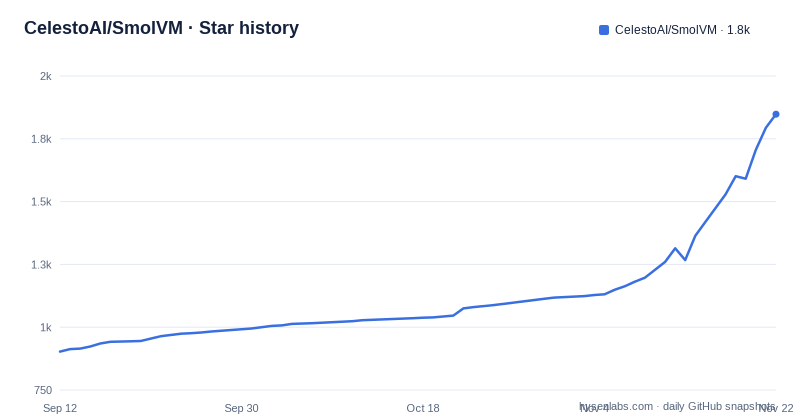
Star history
- CelestoAI/SmolVM1,848 ★ · +945
| Repository | 2026-09-12 | 2026-11-22 |
|---|---|---|
| CelestoAI/SmolVM | 903 | 1.8k |
945 Stars in the last 71 days, measured from the daily GitHub snapshot. Compare with other projects
Editorial analysis
The gap SmolVM fills between a container and a full VM
An agent that writes and executes code needs an execution surface that is both cheap enough to create per task and strong enough that a bad generation cannot reach the host. A container is cheap but shares the kernel, so a kernel-level escape is a host compromise. A conventional VM is isolated but slow to provision and awkward to keep alive across a multi-step workflow. SmolVM positions itself in that gap: the README describes each sandbox as running in its own virtual machine with hardware-level separation, booting in roughly 500 ms so that, per the project's wording, your agent has a running VM before the API call returns. The stated audience is people building long-running agents: the description names browser agents, computer-use agents, and the OpenClaw and browser-use topics. If your agent's loop is a single tool call that formats a string, this is the wrong layer. If your agent needs to install a package, open a page, and come back to the same filesystem two turns later, the persistence guarantee is the actual product.
How a sandbox is created, persisted, and snapshotted
The Python surface is deliberately small. You import SmolVM, construct it, call run with a shell string, and call stop. The README's example is a single echo, which tells you the API is a remote-execution wrapper rather than an agent framework. The CLI exposes the same lifecycle with more visibility: sandbox create takes a name, sandbox list reports NAME, PRESET, STATUS and PID, and sandbox stop tears it down. Persistence is the differentiator the project leans on hardest. The README states that snapshots pause a sandbox and resume it later with memory, disk, and running processes intact, which is a stronger claim than filesystem-only checkpointing because it implies process state survives. File sharing is the second persistence mechanism: host directories can be mounted read-only or writable so the agent works on the real codebase instead of a copy. Network controls are described as turning outbound access off or restricting it to specific IP addresses, and the README attaches that capability specifically to Linux Firecracker, which is a scoping detail worth noticing rather than a footnote.
Installation paths and the commands you actually type
The one-line installer is curl -sSL https://celesto.ai/install.sh | bash, which the README says installs Python, configures the machine, and verifies the setup. Piping a remote script into a shell is a supply-chain decision, and the project offers a manual path for people who decline it: pip install smolvm, then smolvm setup, then smolvm doctor. On supported Linux and macOS systems the pip install also pulls a matching smolvm-core wheel, so Rust is not required for the default path. Linux may prompt for sudo so setup can install host dependencies and configure runtime permissions; that is a real privilege boundary and you should know what it touches. Day-to-day commands are smolvm sandbox create --name my-sandbox, smolvm sandbox shell my-sandbox for an interactive shell, smolvm sandbox ssh my-sandbox when you specifically need SSH, and smolvm sandbox exec my-sandbox -- python --version to run one command from a script. Add --start to exec if the sandbox is stopped. When something fails, smolvm sandbox logs my-sandbox reads the logs and --follow tails them. Tab completion is installed once with smolvm completion bash --install, or zsh or fish.
Where the isolation story gets thinner than the pitch
Hardware isolation via microVM is the right default for untrusted code, but the README's own scoping undercuts a uniform security story. Network controls are tied to Linux Firecracker, so on other backends the outbound restrictions may not apply in the same way, and the README does not spell out the fallback behaviour. The Windows 11 guest is described as Linux-host-only for now, which means the Windows sandbox is a capability you cannot use from a macOS or Windows workstation. The macOS desktop sandbox is explicitly labelled preview and, per the README, downloads macOS from Apple on first run to prepare a reusable local image, so the first boot is not the sub-second experience advertised for the Linux path. Version numbers are also worth reading literally: v0.0.33 shipped on the same day as the last push to main, and a 0.0.x line is telling you the API is not frozen. If your integration depends on snapshot semantics or on a specific preset, pin the version and expect churn.
Preinstalled coding agents and the credential question
One command launches a sandbox with Claude Code, Codex, or Pi pre-installed and git credentials forwarded, according to the README. That is convenient and it is also the highest-risk configuration in the project. Forwarding git credentials into a sandbox that an agent controls means the agent's blast radius includes whatever those credentials authorize. SmolVM gives you the tools to bound that: mount the working directory read-only rather than writable, and restrict outbound network access to specific addresses on the Firecracker path. The README does not document a credential-scoping model beyond the forwarding behaviour, so the burden of deciding what to hand over sits with you. Treat the coding-agent preset as a starting point to be narrowed, not a safe default to be adopted as-is.
How SmolVM differs from plain Docker or a hosted code-execution API
The obvious comparison is Docker with a seccomp profile. Docker starts faster and has a larger ecosystem, but it shares the host kernel, so isolation depends on the kernel's correctness rather than on a hypervisor boundary. SmolVM's answer is a microVM per sandbox with a Python client and a state model that includes snapshots of running processes. The other comparison is a hosted execution API from a cloud provider: those remove the host dependency entirely, but they typically execute a function and return, and they do not give you a persistent machine with a mounted local directory and a browser you can watch. SmolVM's trade is the inverse. You keep the sandbox on infrastructure you control and you accept the host requirements: Firecracker on Linux, sudo during setup, and a Windows guest path that only works when the host is Linux. If your workload is short-lived and stateless, the hosted option is simpler and you should take it.
Licence, maintenance, and what 0.0.x costs you
The repository is Apache-2.0, which permits commercial use and modification and includes a patent grant, but the README does not discuss trademark terms or how the project handles contributions, and this is not legal advice. Operationally, the release cadence is fast: v0.0.31, v0.0.32, and v0.0.33 all landed within four days in September 2026, with the last push to main on the same day as v0.0.33. Fast releases on a 0.0.x line mean upgrade cost is real. Pin smolvm and smolvm-core to matching versions, because the README says the core wheel is pulled automatically to match, and read the release notes before moving. The README also points to docs/installation.md for golden-AMI builds, two-stage deploys, and pinning the Firecracker version, which is the material you will need if you run this on your own hosts rather than a developer laptop.
Editorial conclusion
Adopt SmolVM if you are running untrusted, agent-generated code on a Linux host and need state to survive between turns. Do not adopt it if your fleet is Windows or your agents only need a process-level sandbox, since the Windows guest path is Linux-host-only and the macOS desktop sandbox is labelled preview. Before committing, run smolvm doctor on your target host, check whether your kernel supports the Firecracker path or whether you will fall back to Docker, and confirm the snapshot and network-control features behave as documented in your environment rather than only in the docs.
Frequently asked questions
What is SmolVM, the repository for Celesto?
A sandbox that gives an AI agent its own computer. Each sandbox is a lightweight virtual machine that starts in about 500 ms and keeps files and state between sessions, and it runs locally through the CLI and Python SDK or in Celesto Cloud. The repository is SmolVM while the package, CLI and docs are all named celesto.
How do I install the Celesto sandbox?
On Linux or macOS, `curl -fsSL https://celesto.ai/install.sh | bash` installs the CLI and SDK, prepares the machine and checks it. Manually, install with Python 3.11 or newer using `pip install celesto`, then run `celesto setup` and `celesto doctor`. On macOS setup installs QEMU through Homebrew, and on Linux it may ask for sudo.
Which hypervisors does the Celesto sandbox support?
Firecracker, QEMU and libkrun, behind one API. The local provider needs a virtualization setup on your machine, while the cloud provider needs only the Python package and a CELESTO_API_KEY, since cloud sandboxes do not require virtualization software locally.
Can the sandbox run Windows or a macOS desktop?
Both are listed as runtimes. A Windows computer is created with `Celesto(os="windows", ...)` and a `--os windows` flag that also takes a local image path. A macOS desktop, for app and installer tests on Apple silicon, is CLI only: `celesto computer create --os macos`, with no Python API entry in the runtime table.
Does the Celesto CLI send telemetry?
Local CLI and Python SDK usage does, after a notice is displayed, and it sends limited installation and feature counts, with PostHog potentially inferring approximate location from the request IP. Turn it off with `celesto config telemetry off` or by setting CELESTO_NO_TELEMETRY=1.
What does the JSON output from a Celesto command contain?
Every JSON response includes ok, command, exit_code, data and error. Commands return a nonzero exit code on failure, and JSON errors include a recovery command when Celesto can provide one, so a script cannot assume that field is always present.
Official sources
Add this badge to your README
If you maintain this project, the badge below links readers to this analysis and shows its maintenance status from the daily GitHub snapshot. Paste the markdown into your README; add ?metric=license or ?metric=stars to the image URL for a different field.

[](https://hysenlabs.com/projects/celestoai-smolvm)Star history chart for your README
[](https://hysenlabs.com/projects/celestoai-smolvm)Was this useful?