Gitstars: OAuth redirect_uri exactness is the whole deployment story
Github Starred Repositories Manager
At a glance
- What is it?
- cfour-hi/gitstars turns your public GitHub stars into a searchable, topic-sorted library and adds per-language top-100 rankings, built as a Vue 3 and Vite frontend over a small Node HTTPS server. Self-hosting it means getting one OAuth callback URL byte-identical to your browser address.
- Who is it for?
- Run Gitstars yourself if you want your stars grouped by topic and language with a search box over developers, names and descriptions, and if you are willing to register a GitHub OAuth App and keep a callback URL in sync with whatever port you serve on.
- Can I use it commercially?
- Not without permission. GitHub finds no licence file in the repository, and without a licence all rights are reserved by default: you may read the code but not reuse it. Check the README, or ask the authors, before using it.
- Is it still maintained?
- Yes. The repository last received commits 70 days ago.
- What is it written in?
- Mainly JavaScript, according to GitHub's language statistics.
Answers come from the project's GitHub data, last synced on October 23, 2026, and from our analysis. They are not legal advice.
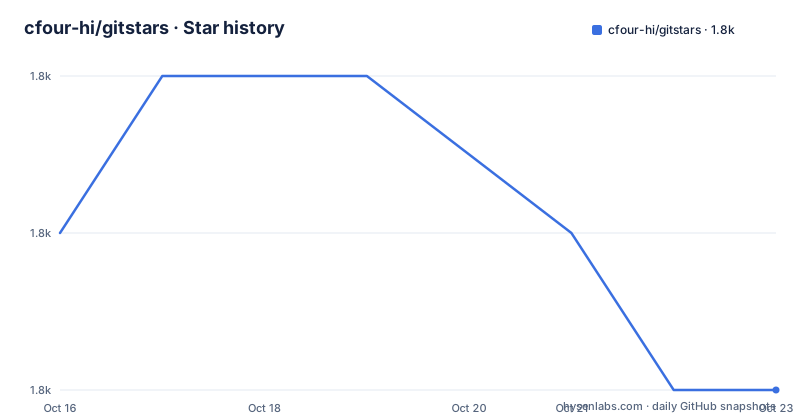
Star history
- cfour-hi/gitstars1,787 ★ · -1
| Repository | 2026-10-16 | 2026-10-23 |
|---|---|---|
| cfour-hi/gitstars | 1.8k | 1.8k |
-1 Stars in the last 7 days, measured from the daily GitHub snapshot. Compare with other projects
Editorial analysis
Stars are grouped two ways, and the two ways are not the same thing
The premise is that a starred-repositories list outgrows GitHub's own view. Gitstars syncs the public stars of the current GitHub account and reorganises them along two axes. The first is Topics, which the README describes as topic labels maintained by repository authors and suited to describing a project's purpose and technical area. The second is Language, which GitHub derives statistically from the files in a repository.
Keeping those apart is the useful idea here, and the interface makes a point of it with separate screenshots. Topic tags are curated by humans and drift; language is computed and cannot lie about which files dominate. A repository you starred for a topic can turn out to be primarily written in a language you did not expect, and the grouping surfaces that.
On top of the grouped list there is search across developer, repository name and description, sorting by star time or by star count, a README preview that opens without leaving the site, and direct links to the repository or its project site. A separate Ranking view shows the top 100 repositories per programming language, which is a discovery feature rather than a library feature, and is the part most likely to send you off to read code.
The interface itself switches between Simplified Chinese and English. The frontend is Vue 3 with Pinia and vue-i18n, styled with Tailwind CSS, and it uses vue-virtual-scroller.
The licence is not stated. GitHub reports no licence identifier for this repository, and there is no LICENSE file among the top-level entries, so the default copyright applies and the permission to run your own copy is not something the project grants explicitly.
The OAuth callback must match your address exactly
Before anything runs you register a GitHub OAuth App. The defaults the README gives are both `https://localhost:8080`, one for Homepage URL and one for Authorization callback URL, and it is emphatic that the scheme, host and port must match what the browser actually uses.
The failure mode has a name: `The redirect_uri is not associated with this application`. The reason is visible in the implementation. Gitstars uses the browser's current `location.origin` as the OAuth `redirect_uri`, so there is no configuration to correct a mismatch. The address you visit is the address GitHub is told to redirect to.
The README lists three things that must not be mixed, and they are the usual causes: `http` versus `https`, `localhost` versus `127.0.0.1`, and different ports. So `https://127.0.0.1:8080` needs a callback registered as exactly that, not the localhost one. If you change the exposed Docker port through `GITSTARS_PORT`, the OAuth App callback has to change with it.
One more detail that catches people: the callback should be the site root, not `/api/oauth/access_token`.
The access token ends up in browser LocalStorage, which the README flags as a reason to use the app only on devices you trust. That is a direct consequence of running the OAuth exchange through a client-side app rather than a backend session store.
Local HTTPS is the default, not an option
The Docker deployment enables HTTPS by default, and the certificate work is a documented step rather than something the container invents. You need Docker with Docker Compose, mkcert, and a GitHub OAuth App.
First copy the environment template and fill in the credentials:
cp .env.example .envThe `.env` file holds four values. `VITE_GITSTARS_CLIENT_ID` and `GITHUB_CLIENT_SECRET` come from the OAuth App, `GITSTARS_PORT` defaults to `8080`, and `GITSTARS_CERT_DIR` defaults to `./.certs`.
Then generate a locally trusted certificate through mkcert:
./scripts/setup-local-https.shThat installs the local development CA and writes `.certs/localhost.pem` and `.certs/localhost-key.pem`, covering `localhost`, `127.0.0.1` and `::1`. The `.certs` directory is ignored by Git and by the Docker build context, and the certificates are mounted into the running container read-only.
Then build and start:
docker compose up -d --buildYou should end up with Gitstars at `https://localhost:8080` and a health endpoint at `https://localhost:8080/healthz`. `docker compose ps` shows status and `docker compose logs -f gitstars` follows the output; `docker compose down` stops it.
If the browser still complains about the certificate, rerun the setup script and restart the browser. Firefox keeps its own certificate store, so the mkcert CA may have to be trusted there separately.
A VITE_ prefix that decides whether you rebuild or recreate
The two credentials are not treated the same way, and the difference shows up in how you deploy changes.
`VITE_GITSTARS_CLIENT_ID` is baked into the frontend bundle at build time, which the README states plainly: it is written into the static assets when the image is built. Change it in `.env` and you must rebuild the image with `docker compose up -d --build`, otherwise the running container keeps serving the old Client ID and GitHub sends the browser back to the previous OAuth App. There is a dedicated troubleshooting entry for exactly this, titled that changing the Client ID still redirects to the old application.
`GITHUB_CLIENT_SECRET` is injected only into the running container and never written to frontend assets or the final image. Changing it therefore only needs the container recreated, with `docker compose up -d --force-recreate`.
The compose file makes the distinction structural rather than documentary. The client ID arrives as a build arg, and because it is required the compose specification refuses to start without it. The secret arrives as a runtime environment variable, equally required. Two required values, injected at different lifecycle stages, which is exactly why one needs a rebuild and the other does not.
The container itself is locked down in ways worth noting for a self-hosted deployment: a read-only root filesystem, a tmpfs at `/tmp`, `no-new-privileges:true`, running as the `node` user, and a health check that calls `/healthz` over the scheme implied by whether a certificate file is configured.
Two deployment routes, and a front-end dev server that uses a different port
Local front-end work is a separate path with its own port and the same certificate directory. It needs Node.js 18 or higher and pnpm 9:
pnpm install
pnpm cert:local
pnpm dev
The Vite dev server runs on `https://localhost:30000`, not 8080, and the README says explicitly that this port comes from the Vite development configuration and is unrelated to the Docker default. That is a real trap for anyone who registered an OAuth callback at 8080 and then switches to `pnpm dev`: the redirect URI becomes `https://localhost:30000` so the Authorization callback URL must be updated to that address.
The certificate story is shared, since `pnpm cert:local` runs the same `scripts/setup-local-https.sh` and reuses `.certs`. If the OAuth calls need to reach a backend while developing the frontend, `VITE_API_PROXY` points at that backend's address.
The other route is a hosted deployment. There is a public demo on Vercel at the repository's homepage field, and the README sends you to a Vercel deployment wiki page for the full instructions rather than inlining them. That is a reasonable split: the Docker path is documented in full because it is the path with the certificate and callback complexity.
There are no GitHub releases for this project, and the last push was on 2026-08-14, two months before today. The package manifest sits at version 2.0.0 with pnpm 9.15.9 pinned as the package manager and Vite 4 plus Vue 3.2 on the front end, while the Docker build stage uses Node 22 on Alpine.
Editorial conclusion
Run Gitstars yourself if you want your stars grouped by topic and language with a search box over developers, names and descriptions, and if you are willing to register a GitHub OAuth App and keep a callback URL in sync with whatever port you serve on. Do not adopt it for private stars, since the README describes syncing public stars only, and do not skip the HTTPS step, because Gitstars uses the browser's `location.origin` as the OAuth `redirect_uri` and a plain http origin will not match the callback you registered. After `docker compose up -d --build`, check the service status with `docker compose ps`, ensure the mkcert CA is trusted in your browser, and rebuild when changing `VITE_GITSTARS_CLIENT_ID`.
Frequently asked questions
How do I run Gitstars locally with Docker?
Copy `.env.example` to `.env`, fill in the OAuth client ID and secret, generate certificates with `./scripts/setup-local-https.sh`, then run `docker compose up -d --build` and open `https://localhost:8080`. Health is at `https://localhost:8080/healthz`.
Why do I get "The redirect_uri is not associated with this application"?
Gitstars uses the browser's `location.origin` as the OAuth `redirect_uri`, so the address you visit must match the Authorization callback URL registered in your GitHub OAuth App exactly. `http` and `https`, `localhost` and `127.0.0.1`, and different ports cannot be mixed, and the callback should be the site root rather than `/api/oauth/access_token`.
What is the difference between VITE_GITSTARS_CLIENT_ID and GITHUB_CLIENT_SECRET when deploying?
The client ID is written into the frontend static assets at build time, so changing it requires `docker compose up -d --build`. The secret is injected only into the running container and is never written into frontend assets or the image, so `docker compose up -d --force-recreate` is enough.
Can Gitstars show my private repositories?
The README describes syncing your public stars. It does not describe any private repository support, and the OAuth access token is stored in browser LocalStorage, which the README limits to trusted devices.
Does Gitstars work without Docker?
Yes for front-end development. With Node.js 18 or higher and pnpm 9 you can run `pnpm install`, `pnpm cert:local` and `pnpm dev`, which starts Vite on `https://localhost:30000`, a different port from the Docker default of 8080.
How does Gitstars group my stars?
By Topics, which repository authors maintain and which describe a project's purpose, and by Language, which GitHub computes from the repository files. The two groupings are shown separately in the interface.
Official sources
Add this badge to your README
If you maintain this project, the badge below links readers to this analysis and shows its maintenance status from the daily GitHub snapshot. Paste the markdown into your README; add ?metric=license or ?metric=stars to the image URL for a different field.

[](https://hysenlabs.com/projects/cfour-hi-gitstars)Star history chart for your README
[](https://hysenlabs.com/projects/cfour-hi-gitstars)Was this useful?