EchoFlow: click-a-sentence audio practice that ships with no lessons at all
Online sentence-by-sentence reader for English audio files - click a sentence to play it, with continuous playback, supporting EN / EN+CN / CN modes.
At a glance
- What is it?
- EchoFlow plays your own mp3 and lrc files one sentence at a time, keeps them in browser storage, and deploys as static files or a Docker image. This review covers the import path, the three ways to run it, and the gaps the project states about itself.
- Who is it for?
- EchoFlow fits English learners who already own mp3 and lrc pairs and want click-to-replay at sentence level, hosted on their own machine or a small server. It does not fit anyone expecting bundled lessons, since the repository ships none.
- Can I use it commercially?
- Yes. MIT is a permissive licence: you can use, modify and sell software built on it, as long as you keep its copyright and licence notices.
- Is it still maintained?
- Yes. The repository last received commits 111 days ago.
- What is it written in?
- Mainly JavaScript, according to GitHub's language statistics.
Answers come from the project's GitHub data, last synced on November 25, 2026, and from our analysis. They are not legal advice.
Star history
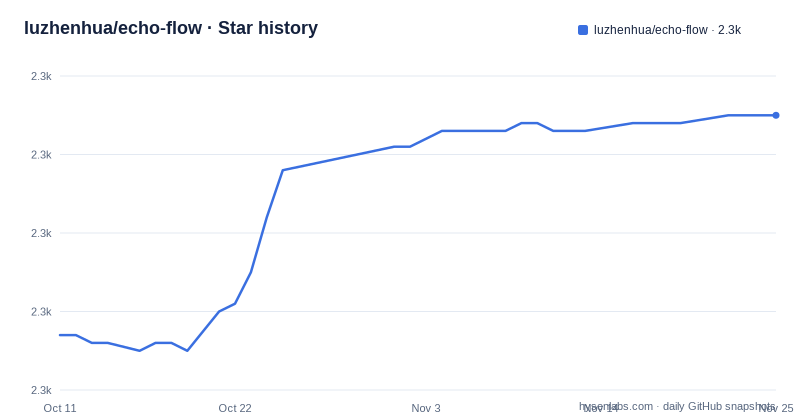
- luzhenhua/echo-flow2,325 ★ · +28
| Repository | 2026-10-11 | 2026-11-25 |
|---|---|---|
| luzhenhua/echo-flow | 2.3k | 2.3k |
28 Stars in the last 45 days, measured from the daily GitHub snapshot. Compare with other projects
Editorial analysis
Your mp3 and lrc files stay in IndexedDB and the app ships empty
EchoFlow contains no textbook audio and no lesson text. The README opens with a warning to that effect and puts the same statement in a disclaimer section: you supply the mp3 and lrc files, and they are stored in your local browser's IndexedDB, not uploaded to a server.
Three import routes exist: a whole folder, several selected files, or a zip package. Each pairs an mp3 with its lrc subtitle file, and the home page, index.html, doubles as course library and import screen. The player lives in lesson.html.
Because storage is per browser, clearing site data in that browser is the failure to plan for. The README does describe a server-side option for that (covered below), but only when you run the Docker Compose setup with a mounted data directory.
One docker run command starts it on port 8080
The shortest path is a published image, with no source download:
docker run -d -p 8080:80 --name echo-flow --restart unless-stopped luzhenhua/echo-flow:latestThen open http://localhost:8080. To move it to another host port, change the left side of the mapping:
docker run -d -p 3000:80 --name echo-flow --restart unless-stopped luzhenhua/echo-flow:latestThe container listens on port 80 internally and the restart policy is unless-stopped, so it comes back after a host reboot. The README sends readers to DOCKER.md for further deployment notes. A hosted copy also runs at echoflow.zhenhua.lu, listed as the online demo, which suits a quick look before installing anything.
Compose mounts ./data and an optional NCE_DATA_TOKEN for sync
The Compose route is for people who want to change settings. It is a clone, then docker-compose up -d, then a visit to http://localhost:8080:
# 克隆项目
git clone https://github.com/luzhenhua/echo-flow.git
cd echo-flow

# 启动服务
docker-compose up -d

# 访问 http://localhost:8080
The docker-compose.yml mounts ./data on the host to /app/data in the container. Its comment says user data is then written to the host and survives a cache clear, which also supports syncing across devices. A commented-out environment line, NCE_DATA_TOKEN=change-me, is there for an access token: when set, the same token has to be entered in the app's settings before sync works.
The image is built on openresty/openresty:alpine, and the Dockerfile describes an optional /api/userData persistence endpoint. The plain docker run command above has no volume mount, so it gives you the static site without that persistence.
Python's http.server can make a sentence click restart the audio from zero
A third route skips Docker. Clone the repository, then serve the folder with any static server. The Python option is:
python -m http.server 8000The README attaches a warning to it. Some Python versions ship an http.server without HTTP Range request support, and the symptom is that clicking a sentence jumps back and plays from the start. The README prefers Node, Docker or NGINX for that reason. The Node form is npx serve . and the third option is VS Code's Live Server extension, opened by right-clicking index.html and choosing Open with Live Server.
One more constraint: double-clicking index.html does not work. Browser security policy blocks loading the data files from a file path, so a server is required even for local use. Range support matters here because sentence-level seeking depends on jumping inside a long mp3.
Display modes, loop scopes and auto-advance: what the player controls
Each lesson can show English only, English with Chinese, or Chinese only. Playback controls cover speed adjustment, a switch between continuous play and click-to-play, a loop mode, and resume from where you stopped. Space plays and pauses, arrow keys navigate, and volume has its own shortcuts.
The changelog in the README fills in details. Version 1.3.0 added single-sentence loop and whole-lesson loop. Version 1.1.0 added automatic continuation to the next lesson, and 1.7.5 added an auto-stop after N consecutive lessons. Version 1.4.4 added an opening-skip option that can be switched off. Version 1.7.0 introduced lists for favourite sentences with read-aloud, and 1.6.0 added a follow-along mode. Playback speed persistence came from a pull request by @reaishijie.
iOS gets specific handling: 1.7.2 fixed auto-next not autoplaying and now shows a one-tap continue prompt, which suggests Safari's autoplay rules interrupt unattended lesson chains.
Personal study only, with no lessons, no OCR and no commercial use
The disclaimer sets three limits that decide who can use this. Content copyright stays with the original rights holders and you should import only material you legally own. The tool is for personal study, and the README forbids commercial use and unauthorised distribution. Using the project counts as agreement to those terms, even though the licence is MIT.
The README also asks users to buy official textbooks first. A user without a legitimate mp3 and lrc pair has nothing to load, and the README describes no tool for generating subtitles from audio. If your recordings have no lrc timing file, sentence-level clicking has no sentence boundaries to work from.
A contact address, [email protected], is given for copyright complaints, with a promise to handle them immediately.
A Dockerfile that copies a static folder the top-level listing does not show
Building from source deserves a check before you trust it. The Dockerfile contains COPY static /usr/share/nginx/html/static, yet the repository's top-level entries include assets, icons, images, lua and several HTML files but no directory named static. The prebuilt luzhenhua/echo-flow:latest image avoids that question, and building locally is the case where it matters.
The repository has no GitHub releases. The README keeps its own version history instead, with v1.7.9 dated 2026-02-06 as the newest entry, and the last push to the main branch was 2026-08-07. The project is licensed MIT, written in JavaScript, and PWA support arrived in v1.4.8 with a service worker in sw.js.
Release numbers and the code are therefore not linked by a GitHub tag. When pinning a deployment, the image tag latest moves, so recording the image digest is the only way to keep a known version.
Editorial conclusion
EchoFlow fits English learners who already own mp3 and lrc pairs and want click-to-replay at sentence level, hosted on their own machine or a small server. It does not fit anyone expecting bundled lessons, since the repository ships none. Before relying on it, import one real lesson folder and test a click mid-file, because the README says some servers restart playback from the beginning.
Frequently asked questions
What is EchoFlow?
EchoFlow is an online sentence-by-sentence reader for English audio files. You click a sentence to play it, with continuous playback and EN, EN+CN or CN display modes.
Does EchoFlow include lesson audio?
No. The README states the tool provides no textbook audio or lesson text. You import your own mp3 and lrc files, which are stored in your browser's IndexedDB.
How do I run EchoFlow locally with Docker?
Run docker run -d -p 8080:80 --name echo-flow --restart unless-stopped luzhenhua/echo-flow:latest and open http://localhost:8080. Change the first port number to use another host port.
Official sources
Add this badge to your README
If you maintain this project, the badge below links readers to this analysis and shows its maintenance status from the daily GitHub snapshot. Paste the markdown into your README; add ?metric=license or ?metric=stars to the image URL for a different field.

[](https://hysenlabs.com/projects/luzhenhua-echo-flow)Star history chart for your README
[](https://hysenlabs.com/projects/luzhenhua-echo-flow)Was this useful?