blivechat: an OBS overlay whose public servers disable plugins and translation
A YouTube-style bilibili live chat overlay for OBS.
At a glance
- What is it?
- blivechat renders a YouTube style live chat bar for bilibili streams and is designed to be pasted into an OBS browser source. Its documentation is in Chinese, and it reaches you four ways: four public servers, an x64 Windows build, a source build that needs Node.js and uv, and a Docker image that edits your configuration file while it builds.
- Who is it for?
- blivechat is a good fit if you run bilibili streams through OBS and want a comment bar that looks like YouTube's, with role highlighting for fleet members, room admins and the streamer, gift merging, danmaku blocking and pronunciation annotations. Pick the route that matches what you need enabled.
- Can I use it commercially?
- Yes. MIT is a permissive licence: you can use, modify and sell software built on it, as long as you keep its copyright and licence notices.
- Is it still maintained?
- Yes. The repository last received commits 88 days ago.
- What is it written in?
- Mainly JavaScript, according to GitHub's language statistics.
Answers come from the project's GitHub data, last synced on November 15, 2026, and from our analysis. They are not legal advice.
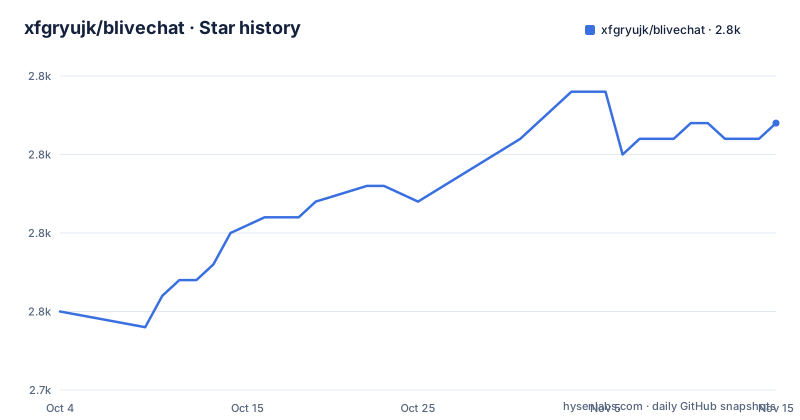
Star history
- xfgryujk/blivechat2,762 ★ · +12
| Repository | 2026-10-04 | 2026-11-15 |
|---|---|---|
| xfgryujk/blivechat | 2.8k | 2.8k |
12 Stars in the last 42 days, measured from the daily GitHub snapshot. Compare with other projects
Editorial analysis
Two routes, and each one costs you a different feature
The choice between the hosted servers and a local copy is a straight trade, and the documentation states both sides. Running locally does not upgrade itself, so a version with a problem can sit unfixed on your machine for a while. Running online upgrades on its own, but some advanced features are switched off there. The advanced features named in that sentence are plugin support and automatic translation, and the stated rule is that if you need them you have to run locally. Everything else is shared: the YouTube style bar, role highlighting for fleet members, room admins and the streamer, two style generators for a classic YouTube look and a WeChat like one, danmaku blocking, gift merging, custom emotes that do not require an official bilibili emote membership, and custom HTML templates. The translation is specifically danmaku and highlighted messages, with the target language set in the backend.
Four public nodes, and each one has a named failure mode
The four hosted servers are not interchangeable, and each entry names what it is good for and what breaks it. blive.chat is the automatic node, generally the same as cn.blive.chat, and it switches over when it stops working, though the switch takes a while. cn.blive.chat is for users inside the network boundary: not easily blocked, but it becomes unavailable if it comes under attack. cloudflare.blive.chat is a Cloudflare node in the United States, described as not easily attacked but easily blocked. vercel.blive.chat is a Vercel node in the United States with the same two properties. So the choice is between being reachable and being durable, and the automatic node inherits the trade of the node it points at. The connection itself is the second decision: the front end can talk to bilibili servers directly or go through this project's backend.
Getting it into OBS takes a room code, a URL and a generated stylesheet
Whichever server you pick, the steps are the same four. Enter the identity code the streamer receives when the stream starts. Copy the room URL. Generate a style with one of the two style generators and copy the resulting CSS. Then add a browser source in OBS and paste in the URL and the custom CSS. The stylesheet is therefore generated outside the application and applied by the browser source, which is why two different visual styles ship without either being hard coded. For a local copy the process is the same after the first step: start the server, then open http://localhost:12450 in a browser. The local distribution is taken from the releases page or from the project's page in the bilibili store, and it is offered as an x64 Windows build only. Two executables are named for starting it, blivechat.exe and start.exe.
The source build needs Node.js first, then uv, and it is the only non Windows route
Building from source is the documented path for self hosting or for any platform other than Windows, and it is two steps in two ecosystems. The front end is compiled first, from inside the frontend directory, with npm. The server then runs through uv, either with no arguments so it takes its own defaults, or with the address and port spelled out as --host 127.0.0.1 --port 12450. Python 3.12 or later is required, which the packaging metadata states as >=3.12. The Windows binary in the releases is produced by a different tool, PyInstaller, which sits in the development dependency group at ~=6.20.0 rather than among the runtime requirements. So there are three toolchains in one project, Node for the front end, uv for the server, and PyInstaller for the packaged Windows copy, and only the last one is pinned loosely enough to move between patch releases.
The package is marked private, so there is nothing to install from an index
The packaging metadata closes off the obvious route. The classifiers carry a single entry, Private :: Do Not Upload, and the pdm settings set distribution = false, so this is not something that gets published for pip to find. That is consistent with how the project ships: an x64 Windows binary on the releases page, a listing in the bilibili store, and a Docker image. The version is not written in the manifest either. It is declared dynamic and read from update.py, so the number lives in a Python file rather than in pyproject.toml, which is what makes it available for a self built binary to report. Every runtime dependency is pinned to an exact version, including aiohttp, cachetools, circuitbreaker, pycryptodome, sqlalchemy, tornado and yarl, and two libraries are pulled from elsewhere: blcsdk is a workspace member installed editable from the blcsdk directory in this tree, and blivedm comes from a git URL pinned to one commit.
The Docker image rewrites your bind address and blanks one setting
The image does more than copy files, and the line that does it is a sed expression run during the build. It takes data/config.example.ini and appends it to data/config.ini with the host line rewritten to 0.0.0.0 and the loader_url line emptied. So the container listens on every interface rather than on loopback, and the port it exposes is 12450, which is the same port the documented run command publishes:
docker run --name blivechat -d -p 12450:12450 \
  --mount source=blivechat-data,target=/mnt/data \
  xfgryujk/blivechat:latest
Persistence is handled by moving the data and log directories into the mounted volume and replacing each with a symlink, so a config edit, a database and the logs all live under /mnt/data. That also means the configuration the build wrote is the configuration you get back on the next start, and the README asks self hosters to delete loader_url themselves, which the image has already done. The runtime stage sets UV_NO_DEV and UV_NO_CACHE, and the front end arrives only as compiled dist copied out of the first stage.
The front end build depends on a third party npm mirror
The first stage of the image builds the front end on node:18.17.0-bullseye, and the dependency install names its registry explicitly: npm is pointed at registry.npmmirror.com. Everything else in the front end step is unremarkable, copy frontend/package.json, install, copy the frontend directory, run the build. Two things follow. The image build reaches out to a mirror run outside the project, which is the usual trade for a faster install inside one region and the place to look first if a build starts failing on dependency resolution. And the builder stage has no lockfile step in it, while the Python side does use one, with the server stage running uv sync against the locked set. The base path is also an argument rather than a constant, defaulting to /root/blivechat in both stages, which is what lets the compiled front end be copied from one stage to the other by relative path.
One config file, changes need a restart, and loader_url is the trap
Server side settings live in a single file, data/config.ini, and they cover at least two things: which database to use, and whether automatic translation is allowed. The rule for editing is that a restart is required, so there is no live reload of either setting. The one instruction the documentation singles out is a warning for self hosters: delete the loader_url setting, because leaving it in place stops the room page from loading. That makes the three deployment routes differ in a small but real way. The image blanks loader_url for you while building. A source install starts from whatever config.example.ini contains and needs the edit by hand. And the note that the site is meant to load room pages is the only place loader_url is explained at all, so a first time self hoster meets it only through the failure.
Editorial conclusion
blivechat is a good fit if you run bilibili streams through OBS and want a comment bar that looks like YouTube's, with role highlighting for fleet members, room admins and the streamer, gift merging, danmaku blocking and pronunciation annotations. Pick the route that matches what you need enabled. Use the public servers for the plain overlay, since four nodes exist and each has a stated failure mode. Go local when plugins or automatic translation matter, and accept that a local copy does not update itself. Go to Docker when you are self hosting, and read what the image does to your config before you mount a volume over it. Two practical warnings: the packaged Windows binary is x64 only, and the project is marked as never publishable, so there is no pip install to fall back on when something breaks.
Frequently asked questions
Which blivechat server should I use for my stream?
It depends on your network. cn.blive.chat is not easily blocked but goes down if attacked, cloudflare.blive.chat and vercel.blive.chat are United States nodes that are not easily attacked but are easily blocked, and blive.chat is the automatic node that points at one of them and switches over, slowly, when it fails.
Why will my self hosted blivechat not load the room page?
The documentation points at one setting: delete loader_url from data/config.ini, because leaving it in place prevents the room page from loading. The Docker image already empties that line while building, so this applies to source installs.
Can I install blivechat with pip?
No. The packaging metadata sets distribution = false and its only classifier is Private :: Do Not Upload, so nothing is published to an index. The alternatives are the x64 Windows build from releases, a source build needing Node.js and uv, or the Docker image.
Do plugins and automatic translation work on the blivechat public servers?
No. The documentation states that the online servers disable some advanced features, naming plugin support and automatic translation, and that anything needing them has to be run locally. A local copy is the trade, since it does not upgrade itself.
What does the blivechat Docker image change in my configuration?
During the build it generates data/config.ini from data/config.example.ini with sed, rewriting host to 0.0.0.0 and emptying loader_url. It also moves the data and log directories into /mnt/data behind symlinks, so config, database and logs persist in that mount.
Official sources
Add this badge to your README
If you maintain this project, the badge below links readers to this analysis and shows its maintenance status from the daily GitHub snapshot. Paste the markdown into your README; add ?metric=license or ?metric=stars to the image URL for a different field.

[](https://hysenlabs.com/projects/xfgryujk-blivechat)Star history chart for your README
[](https://hysenlabs.com/projects/xfgryujk-blivechat)Was this useful?