RetopoFlow: sketch-based retopology inside Blender
A suite of retopology tools for Blender
At a glance
- What is it?
- RetopoFlow is a GPL 3.0 Blender add-on that generates snapped geometry as you draw on a high-poly surface. This covers what the repository documents, how to install it, and where it stops being the right tool.
- Who is it for?
- Adopt RetopoFlow if you retopologize scanned or sculpted meshes inside Blender and want to draw the new topology rather than place vertices one at a time. Skip it if you need an automated remesher, or if you are on Blender 2.9x or older, which the 3.4.x line does not support.
- Can I use it commercially?
- Not without permission. GitHub finds no licence file in the repository, and without a licence all rights are reserved by default: you may read the code but not reuse it. Check the README, or ask the authors, before using it.
- Is it still maintained?
- Yes. The repository last received commits 13 days ago.
- What is it written in?
- Mainly Python, according to GitHub's language statistics.
Answers come from the project's GitHub data, last synced on November 22, 2026, and from our analysis. They are not legal advice.
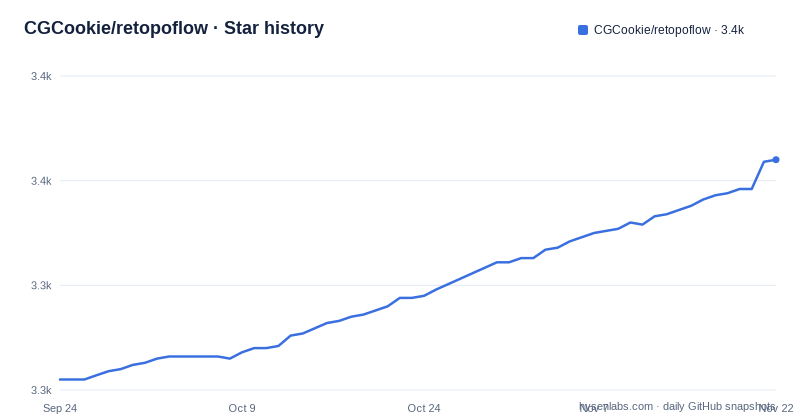
Star history
- CGCookie/retopoflow3,360 ★ · +105
| Repository | 2026-09-24 | 2026-11-22 |
|---|---|---|
| CGCookie/retopoflow | 3.3k | 3.4k |
105 Stars in the last 59 days, measured from the daily GitHub snapshot. Compare with other projects
Editorial analysis
What RetopoFlow solves, and who actually needs it
Retopology is the step where you rebuild a clean, low-polygon mesh over a dense one, usually a sculpt or a 3D scan. The dense mesh carries detail; the clean mesh carries usable edge flow for animation, UVs and further editing. Doing this by hand means placing vertices one at a time over a surface you cannot easily see through.
RetopoFlow is a suite of sketch-based retopology tools for Blender that generate geometry which snaps to your high poly objects as you draw on the surface. The README describes the add-on as coming from Orange Turbine and positions it for anyone rebuilding topology inside Blender rather than in a separate application. The topics listed on the repository are blender, python and retopology, which matches that scope: it is a Blender add-on, not a standalone program.
The people who get the most out of it are character and asset artists working from sculpts, and students or teachers who want the tool for educational work. The README explicitly says the GitHub page exists especially for students, teachers, and those using RetopoFlow for educational purposes, while future updates are funded by Blender Market purchases.
The drawing-on-surface mechanism and the add-on's version table
The core idea is that you draw on the surface of the high-poly object and the add-on builds the retopology geometry underneath your strokes, snapping it to that surface. That is the whole design: the dense mesh acts as a reference you sketch against, rather than a mesh you cut into.
The repository layout backs this up. There are separate top-level directories for retopoflow/, addon_common/, config/, icons/, matcaps/ and help/, plus a blender_manifest.toml. The presence of matcaps suggests the add-on ships its own shading presets for viewing the surface while you work, which matters because default Blender shading is often poor for judging a dense form.
Version compatibility is explicit and worth reading before anything else, because the add-on tracks Blender's own API changes:
| RetopoFlow | Blender | | --- | --- | | 3.4.0 | 3.6 or later | | 3.3.0 | 2.93 to 3.5 | | 3.2.4 | 2.8x to 2.9x | | 2.0.3 | 2.79 or before |
All versions work on any operating system that Blender supports, so there is no separate platform build to pick.
Installing RetopoFlow from the zip and enabling it
Get the package from the GitHub Releases page or from your Blender Market account dashboard if you have purchased it. The README is blunt about one thing: do not use the zip files that GitHub creates with the green Code button, because Blender has issues with them. Use the officially packaged versions instead.
Once you have the zip, install it from inside Blender. Open Edit > Preferences > Add-ons and click Install, then navigate to the zip and confirm:
# In Blender: Edit > Preferences > Add-ons > Install
# Select the RetopoFlow zip you downloaded (do not unzip it first)
After installation Blender should filter the add-on list down to RetopoFlow. Enable it by ticking the checkbox next to the entry labelled 3D View: RetopoFlow.
If the browser auto-extracted the download, the README says you must re-compress the RetopoFlow folder before installing, or save the file again without extracting. If a previous version is interfering, the documented recovery path is to search for RetopoFlow in the add-ons list, expand it with the triangle, press Remove, close Blender completely, reopen it, and then install the fresh zip. Closing Blender is part of the sequence, not an optional step.
For developers, the README also notes you can symlink a clone of the GitHub repository into your add-ons folder instead of installing a zip.
The parts the README does not answer
The README is an installation and support document. It does not describe the individual tools in the suite, does not list keyboard shortcuts, and does not explain how the snapping behaves on non-manifold or open surfaces. For any of that it points to the external documentation site and to a Quick Start page.
That is a real gap for evaluation. You cannot tell from the repository alone how the add-on handles a surface with hard creases, or whether it copes with a mesh that has overlapping shells. The README recommends sending a .blend file when reporting a problem, which implies the maintainers expect issues that are specific to the input mesh rather than to the add-on in isolation.
The release cadence is visible but modest: 3.4.10 on 2026-01-29, 3.4.9 on 2025-11-27, and 3.4.8 on 2025-08-05. The last push to the repository was on 2026-09-16, so the project has activity between releases, but the tagged versions arrive roughly every few months. If you need a fix for a Blender point release on day one, that interval is the thing you are accepting.
When a sketch-based retopology tool is the wrong choice
RetopoFlow is manual retopology with a faster input method. You are still the one deciding where the edge loops go. If your goal is to take a 3-million-polygon scan and get a game-ready mesh without making those decisions yourself, an automatic remesher is the correct tool and RetopoFlow will feel like a detour.
It is also the wrong tool outside Blender. There is no standalone build, no command-line mode, and no export path to another DCC application. The add-on lives inside Blender's 3D View, and the installation instructions are Blender's add-on preferences. If your pipeline is built around Maya or ZBrush for retopology, adopting this means adopting Blender as the place that step happens.
Finally, the licence splits the repository in a way that matters for anyone planning to redistribute. The README states the code is open source under GPL 3.0, and that the non-code assets in this repository are not. The repository carries a separate RetopoFlow.LICENSE file at the top level alongside the README, which is consistent with that split. Shipping the code and shipping the bundled assets are therefore two different questions, and the README does not answer the asset one.
How this differs from Blender's built-in retopology tools
Blender ships its own retopology features, including a poly-build style workflow and remesh modifiers. The difference in approach is direction of control. A remesh modifier computes a new surface from the input geometry and gives you parameters to steer it; you get a result quickly but you do not choose individual edge loops.
RetopoFlow inverts that. Nothing is generated until you draw, and what gets generated follows your strokes and snaps to the high-poly surface. For a character face where the loops around the eyes and mouth determine how the mesh deforms, that control is the point. For a background rock or a piece of terrain, the control is wasted effort and the automatic route wins.
The two are not mutually exclusive. A common shape of the work is to remesh or decimate first to get a rough form, then use a sketch-based tool to lay down clean topology in the areas that need to deform. RetopoFlow's contribution is the second half of that, and it is priced and packaged as a commercial add-on for it, with the GitHub repository offered as the accessible route for educational use.
Editorial conclusion
Adopt RetopoFlow if you retopologize scanned or sculpted meshes inside Blender and want to draw the new topology rather than place vertices one at a time. Skip it if you need an automated remesher, or if you are on Blender 2.9x or older, which the 3.4.x line does not support. Before committing, open the GitHub Releases page and confirm the release tag matches your Blender version in the compatibility table, because the README warns that GitHub's green Code button zip files will not install.
Frequently asked questions
Is there a free version of RetopoFlow?
The README says future updates are funded by Blender Market purchases, but the project was also made accessible on its GitHub page, especially for students, teachers, and those using it for educational purposes. Downloads are available from the GitHub Releases page as well as the Blender Market dashboard.
What is RetopoFlow for Blender?
It is a suite of sketch-based retopology tools for Blender from Orange Turbine. It generates geometry that snaps to your high poly objects as you draw on the surface.
How do I install RetopoFlow in Blender?
Download an officially packaged zip from the GitHub Releases page or the Blender Market, then go to Edit > Preferences > Add-ons > Install, select the zip without unzipping it, and enable the entry labelled 3D View: RetopoFlow. The README warns against using the zip files GitHub creates with the green Code button.
What are the differences between RetopoFlow 3 and 4?
The README and release list only cover the 3.4.x line, so the differences between 3 and 4 are not documented in this material. The compatibility table does show that 3.4.0 requires Blender 3.6 or later, while 3.3.0 covers Blender 2.93 to 3.5.
How do I use RetopoFlow in Blender?
The README points new users to the Quick Start page on the documentation site and to the Table of Contents for the usage of all tools included in the add-on. It does not itself describe the individual tools or their shortcuts.
Official sources
Add this badge to your README
If you maintain this project, the badge below links readers to this analysis and shows its maintenance status from the daily GitHub snapshot. Paste the markdown into your README; add ?metric=license or ?metric=stars to the image URL for a different field.

[](https://hysenlabs.com/projects/cgcookie-retopoflow)Star history chart for your README
[](https://hysenlabs.com/projects/cgcookie-retopoflow)Was this useful?