ShotEasy: a browser image editor whose files never leave the tab
Take a screenshot online and compresses images in browser with Webassembly
At a glance
- What is it?
- ShotEasy is an Astro site that bundles a screenshot tool, an image editor, a video to GIF converter, a document viewer and browser-based OCR with searchable PDF export. The interesting engineering is that the heavy work, OCR and video conversion, happens on the client, and the repo carries an unusual offline test suite for the site's own SEO and trust content.
- Who is it for?
- ShotEasy is worth adopting as a starting point for a small browser tool site where you want the media to stay on the client, since the OCR and video conversion paths are already wired to run locally and the privacy claim follows from that design. It is not a drop-in library, and the site you fork is coupled to a deployment story built around Node 24, Astro 5 and Vercel.
- Can I use it commercially?
- Yes. MIT is a permissive licence: you can use, modify and sell software built on it, as long as you keep its copyright and licence notices.
- Is it still maintained?
- Yes. The repository last received commits 2 days ago.
- What is it written in?
- Mainly JavaScript, according to GitHub's language statistics.
Answers come from the project's GitHub data, last synced on November 7, 2026, and from our analysis. They are not legal advice.
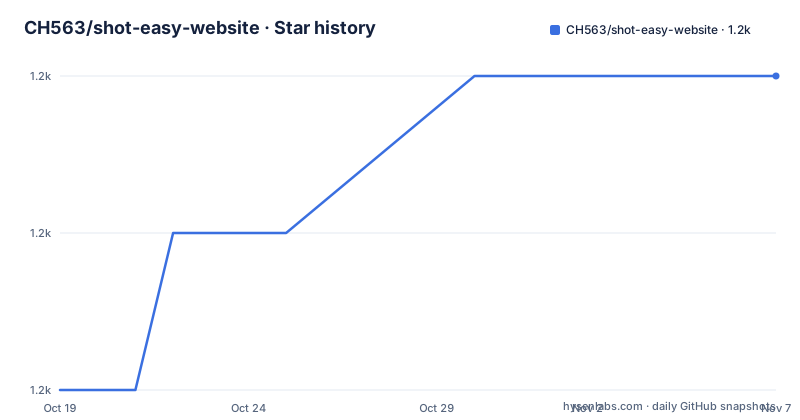
Star history
- CH563/shot-easy-website1,169 ★ · +2
| Repository | 2026-10-19 | 2026-11-07 |
|---|---|---|
| CH563/shot-easy-website | 1.2k | 1.2k |
2 Stars in the last 19 days, measured from the daily GitHub snapshot. Compare with other projects
Editorial analysis
A toolbox of small utilities that all run in the page
ShotEasy is a website rather than a library, and its scope is wide. The README lists photo editing online for free, resizing and filtering photos, converting image formats, merging images or PDF pages into a long image, converting video to GIF, opening documents, recognising text with browser-based OCR, creating searchable PDFs, and taking a screenshot of an area or a full page. Each of those has its own URL on the site, and there is also a Chrome Extension for the screenshot side of it.
The architecture underneath is an Astro application with React islands, Tailwind for styling, and Ant Design for the interface components. The dependency list shows the shape of the work: @ffmpeg/core, @ffmpeg/ffmpeg and @ffmpeg/util for the video to GIF path, pdf-lib and pdfjs-dist for PDF reading and writing, @pdf-lib/fontkit for font embedding, @silurus/ooxml and libarchive.js for office documents, jszip for archive handling, konva for canvas editing, html-to-image for exporting DOM nodes as images, mobx and mobx-react-lite for state, colorthief for palette extraction, js-sha256 for hashing, and markdown-it with highlight.js for rendering.
What ties the tools together is that the media stays in the browser. The project description says it takes a screenshot online and compresses images in the browser with Webassembly. Nothing in the dependency list suggests a server-side image pipeline, and the README says so directly for the OCR tool, which keeps document images, rendered PDF pages and recognised text in browser memory without uploading the selected file to an OCR server.
OCR runs on PaddleOCR compiled to WebAssembly
The OCR tool is the most substantial feature and the README describes it in unusual detail. It uses @paddleocr/paddleocr-js with PP-OCRv5 to recognise text from one image or a scanned PDF directly in the browser.
The capabilities are worth listing because they describe the whole pipeline. Input can be JPG, PNG, WebP, BMP or a scanned PDF. Recognition starts automatically once a file is selected, so there is no button to press. The tool displays the detected text regions along with recognition confidence scores, which matters when you are deciding whether to trust a given block. Line-by-line correction and full-text editing are possible before export.
The model is downloaded on first use, along with the WebAssembly runtime, and the README notes that browser caching can make later recognition faster. So the first run of the tool on a fresh machine is a download, and everything after that is local computation.
The contrast with the obvious alternative is the whole design. A server-side OCR service would take an upload, process the file on someone else's machine, and return text, which puts a document in transit and adds a per-file cost and a latency floor. The browser approach keeps the file on the device, but it pays for that with a large first-use download and with compute that depends on the user's machine. Neither is better in the abstract; they are different products, and the choice follows from whether the documents are sensitive.
The searchable PDF is rebuilt from recognised text, not from the image
One line in the README describes the most interesting engineering decision in the project: the tool reconstructs visible OCR text at the detected positions in a selectable, searchable PDF without embedding the source image.
That is a different artefact from the usual approach. Embedding the scanned page as an image and adding a hidden text layer underneath gives you a PDF that is searchable in most viewers but whose visual appearance is exactly the scan. Rebuilding the page from the recognised text means the output is a new document, with real text objects placed at the coordinates the OCR reported, and the source image left out entirely.
The consequence is a file that is smaller, that is genuinely selectable, and whose text layer matches the visible content because it is the visible content. The cost is that the reconstruction is only as good as the recognition and the layout guess. A page with a complex table, a multi column layout or a diagram will not survive the round trip, and the line-by-line correction step exists precisely because the raw recognition needs human review before it becomes a document.
The same principle explains the confidence scores in the interface. When the text is going to be the page, not an annotation on it, a low confidence score is a real problem with the output, not a curiosity.
The blog is a folder of Markdown files, not a GitHub issue tracker
The blog is a deliberate change of direction, and the README states the reason. It uses Astro Content Collections and local Markdown files instead of GitHub Issues.
The structure is simple. Posts live in src/content/blog/*.md, and each one is a Markdown file with frontmatter for title, description, publish date, cover image, author, tags and draft status. The frontmatter is validated by src/content.config.ts, which the README credits with keeping article metadata consistent, and cover images are stored under public/blog/ and referenced with a path such as /blog/image-name.webp.
The stated benefits are about the build rather than the writing. Static blog pages are generated by Astro during build, so articles are fast and search friendly. No GitHub access token is required for rendering, which removes a credential from the deployment entirely. Article content is versioned with the website source code, so a post lives in the same commit history as the rest of the site.
The dependency on octokit in package.json hints at what was removed rather than what remains, and it is a reasonable trade. An Issues based blog can be written by anyone with a GitHub account and needs no deploy, at the cost of a runtime API call on every page view and a third party dependency in the request path. The Markdown approach inverts that: a pull request instead of an issue, a build instead of a fetch, and full control over the URLs.
pnpm install, pnpm run dev, and a test suite that runs offline
The commands are documented as a table in the README, all run from the root of the project. pnpm install installs the dependencies, pnpm run dev starts the local dev server at localhost:4321, pnpm run build builds the production site to ./dist/, pnpm run preview previews the build locally before deploying, and pnpm run astro gives access to the Astro CLI for commands such as astro add and astro check.
The package manager is pinned. The package metadata names [email protected] as the packageManager, the engines field pins node to 24.x, and the repository carries both a .nvmrc and a .node-version file. The README says to use Node 24 as specified in package.json, .nvmrc and .node-version.
The test scripts are the part that makes this repository unusual. package.json defines four of them, all built on the Node test runner rather than a third party framework:
{
  "scripts": {
    "dev": "astro dev",
    "build": "astro check && astro build",
    "test:geo": "node --test tests/geo.test.mjs",
    "test:seo": "node --test tests/search-growth.test.mjs",
    "test:runtime": "node --test tests/runtime.test.mjs",
    "test:navigation": "node --test tests/navigation.test.mjs",
    "preview": "astro preview"
  }
}
The offline check is the GEO suite, run with npm run test:geo. The README describes how to widen it: with the dev server running, GEO_BASE_URL=http://127.0.0.1:4321 npm run test:geo also checks the server-rendered HTML for every supported locale, and after a production build, setting GEO_CHECK_BUILD=1 adds the sitemap and the generated trust pages to the checks.
The environment section lists one variable, and the naming deserves a look:
PUBLIC_SECRET_KEY=It is described as a request secret key. In Astro, a variable with the PUBLIC_ prefix is exposed to the client bundle, so a value that is really a secret does not belong behind that name, and that is the first thing to check in a fork.
The site carries rules about what it is allowed to claim
There is a section of the README about what it calls GEO and trust content, and it reads more like a policy document than documentation. That policy is enforced by the test suite rather than by good intentions.
The rules include where things live. Project identity and stable JSON-LD IDs are centralised in src/lib/siteIdentity.js, and homepage introductions and answers for every configured locale live in src/lib/homepageCopy.js. All privacy routes share src/components/PrivacyPolicyPage.astro and canonicalise to /privacy-policy/. The About and Contact pages are English public pages, and the README says explicitly not to advertise untranslated versions with hreflang.
Two of the rules are about honesty, and they are unusual enough to quote. Set updatedDate only when an article actually changes, and trust-page dates are fixed content dates rather than something refreshed on every build. And the blunt one: never add ratings, usage statistics, or processing guarantees without a verifiable source.
The privacy page carries a similar caveat. The disclosure reflects source-configured services, and the README says the live GTM container, advertising consent settings, retention settings and jurisdiction-specific obligations still require operator review, and that changing the page does not itself establish legal compliance.
For a fork, this is a governance surface, not just code. The tests will fail if a page starts making an unverifiable claim or if the canonical URLs drift, which is a reasonable way to keep a site that is largely generated content honest about what it says.
Deploying to Vercel means taking on the Node 24 requirement
The deployment target is Vercel, and the README treats it as a specific set of obligations rather than a button.
Locally you use Node 24 with nvm install and nvm use, and pnpm 10.10.0 with pnpm install --frozen-lockfile. The package.json pins engines.node to 24.x, and the README notes that Vercel uses that for the next deployment, overriding an older Project Settings version, and that you can also align Project Settings to 24.x. Astro 5 and @astrojs/vercel 9 produce Node 24 serverless functions, Vercel Web Analytics uses the shared @vercel/analytics/astro component, and the blog content uses the Astro content loader without changing existing article URLs.
The verification step is spelled out:
pnpm build
pnpm test:geo
pnpm test:seo
RUNTIME_CHECK_BUILD=1 pnpm test:runtime
The runtime check verifies that every generated Node function declares nodejs24.x, that all existing blog pages remain available, and that the production HTML includes the Analytics script. Setting RUNTIME_BASE_URL=http://127.0.0.1:4321 while the dev server runs adds the live SSR blog index check. Astro 5 also requires the updated TypeScript 5.9 configuration for a real source-file type check, and the README warns that a local build does not verify the remote runtime, so the Node version has to be confirmed in the Vercel build and function logs after deployment.
One security setting is called out specifically. Astro's security.allowedDomains trusts the production hostname explicitly, internal redirects and language-switch links use root-relative paths rather than the proxy request origin, canonical and schema URLs come from CONFIG.website, and origin protection should stay enabled rather than being replaced with a wildcard allowlist. The navigation regression checks run with pnpm test:navigation, with NAVIGATION_BASE_URL pointing at a running server or a deployment.
The licence is MIT, and the last push to the repository was on 2026-09-18, with no GitHub releases published. The version field in package.json still reads 0.0.1, which is what a project without releases usually looks like: the source is the artefact, and the site is the deliverable.
Editorial conclusion
ShotEasy is worth adopting as a starting point for a small browser tool site where you want the media to stay on the client, since the OCR and video conversion paths are already wired to run locally and the privacy claim follows from that design. It is not a drop-in library, and the site you fork is coupled to a deployment story built around Node 24, Astro 5 and Vercel. Before you deploy a fork, run pnpm test:geo, pnpm test:seo and RUNTIME_CHECK_BUILD=1 pnpm test:runtime on Node 24, and check the PUBLIC_SECRET_KEY variable, since a value described as a request secret sits behind a name that Astro exposes to the browser.
Frequently asked questions
Does ShotEasy upload my images or documents to a server?
For the OCR tool the README states that document images, rendered PDF pages and recognised text are kept in browser memory without uploading the selected file to an OCR server. The OCR model and the WebAssembly runtime are downloaded on first use, and browser caching can make later recognition faster.
What does the ShotEasy OCR tool produce?
It reconstructs the visible OCR text at the detected positions in a selectable, searchable PDF without embedding the source image. It shows detected text regions and recognition confidence scores, and allows line-by-line correction and full-text editing before export.
How do I run ShotEasy locally?
Run pnpm install and then pnpm run dev, which starts the dev server at localhost:4321. pnpm run build builds the production site to ./dist/ and pnpm run preview previews that build. The README asks for Node 24 and pnpm 10.10.0.
What does npm run test:geo check in the ShotEasy repository?
It runs the offline GEO checks with node --test tests/geo.test.mjs. With the dev server running, GEO_BASE_URL=http://127.0.0.1:4321 also checks server-rendered HTML for every supported locale, and GEO_CHECK_BUILD=1 adds sitemap and generated trust-page checks after a production build.
How are blog posts written in ShotEasy?
The blog uses Astro Content Collections with local Markdown files instead of GitHub Issues. Posts live in src/content/blog/*.md with frontmatter for title, description, publish date, cover image, author, tags and draft status, and the frontmatter is validated by src/content.config.ts.
Official sources
Add this badge to your README
If you maintain this project, the badge below links readers to this analysis and shows its maintenance status from the daily GitHub snapshot. Paste the markdown into your README; add ?metric=license or ?metric=stars to the image URL for a different field.

[](https://hysenlabs.com/projects/ch563-shot-easy-website)Star history chart for your README
[](https://hysenlabs.com/projects/ch563-shot-easy-website)Was this useful?