chatwoot-mobile-app: the React Native agent inbox for Chatwoot
Mobile app for Chatwoot - React Native
At a glance
- What is it?
- The Chatwoot mobile app is a React Native and Expo client that gives support agents the same inbox on a phone, with canned responses, private notes and status assignment. It talks to a self-hosted or cloud Chatwoot instance over the platform API, and its Expo toolchain is what shapes the build story.
- Who is it for?
- Adopt chatwoot-mobile-app if you run Chatwoot and want your support agents to work from a phone rather than only from a desktop browser, and if you are prepared to own an Expo and EAS build pipeline for your own distribution. Do not adopt it if you need an offline-capable or desktop client, or if you need a Chatwoot version outside the supported range.
- Can I use it commercially?
- Yes. MIT is a permissive licence: you can use, modify and sell software built on it, as long as you keep its copyright and licence notices.
- Is it still maintained?
- Yes. The repository last received commits 3 days ago.
- What is it written in?
- Mainly TypeScript, according to GitHub's language statistics.
Answers come from the project's GitHub data, last synced on November 7, 2026, and from our analysis. They are not legal advice.
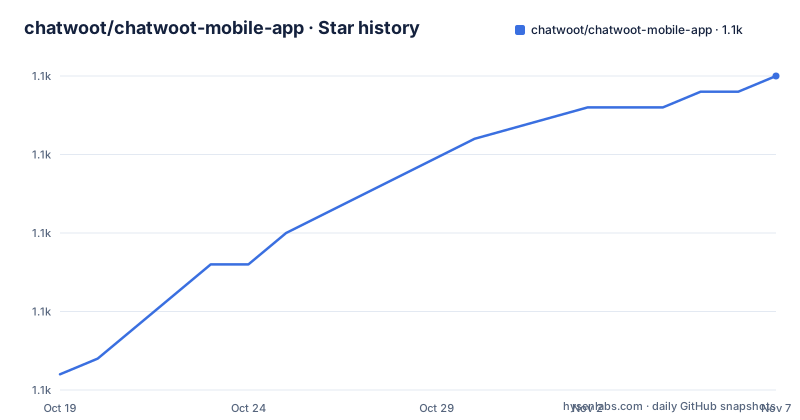
Star history
- chatwoot/chatwoot-mobile-app1,085 ★ · +19
| Repository | 2026-10-19 | 2026-11-07 |
|---|---|---|
| chatwoot/chatwoot-mobile-app | 1.1k | 1.1k |
19 Stars in the last 19 days, measured from the daily GitHub snapshot. Compare with other projects
Editorial analysis
A mobile inbox for agents who are not at their desk
The Chatwoot mobile app is a React Native client for the Chatwoot support platform, built with React Native and Expo, and the primary language of the repository is TypeScript. The stated purpose is narrow and practical: to let support agents handle conversations away from a desk.
The feature list in the README reads like a list of the things an agent actually does between meetings. Do not miss out on new customers, follow up on conversations on the go, reply easily with canned responses, receive realtime notifications about system activities, communicate with other team members through private notes, and assign statuses to conversations. There is no mention of reporting, administration, or campaign tooling. This is the agent's inbox, not the manager's console, and the mobile app is not trying to be a second Chatwoot.
The compatibility statement at the top of the README is the constraint that matters most. The app supports Chatwoot version 3.13.0 and newer, iOS 13.4 and newer, and Android 6.0 and newer. That Android floor is unusually old, which is consistent with a support tool that has to run on whatever hardware your agents already own.
The app is distributed through the App Store and Google Play, and the repository points at chatwoot.com/mobile-apps as the product page. For a self-hosted Chatwoot operator, the interesting question is whether this is the app you want to point your own team at, or whether you need your own build, and that question is answered by the environment configuration rather than by the README.
Expo and EAS decide how the build works
The toolchain is visible in package.json, and it explains most of the operational shape of the project.
The package is @chatwoot/mobile-app at version 4.9.11, and the package manager is pinned with packageManager set to [email protected]. The start script is expo start --dev-client, which is the important detail: this app runs through an Expo development client rather than through Expo Go, so a native binary is required before any development workflow begins. There are matching scripts for expo run:android and expo run:ios, and the run:ios and run:android variants pass a -d flag to deploy straight to a connected device.
The generate scripts show the native project lifecycle. `npx expo prebuild --clean` regenerates the native android and ios directories from scratch, while `npx expo prebuild` does the same without the clean step. This is the managed workflow in practice: the native projects are generated, not hand-maintained, which is why the repository does not contain an android/ or ios/ directory at the top level.
Release builds go through EAS. build:android runs eas build -p android --profile production and build:ios runs eas build -p ios --profile production, with local variants that add --local and prefix the command with dotenv -c so the .env file is loaded. Submission follows the same pattern with eas submit. There are also convenience targets such as build:all and build-and-submit:ios:local, which chains a local build with a submission of the produced .ipa file.
Two verification scripts are worth knowing about: run:doctor runs npx expo-doctor, and check:config runs npx expo-config check. Expo Doctor is the standard way to catch a dependency version that has drifted out of step with the SDK, and check:config validates the app configuration, which matters here because the native project is generated from it.
The environment file tells you which Chatwoot the app talks to
The .env.example file is the most informative file in the repository for an operator, because it is where the app is told which Chatwoot to talk to and what to send alongside the request.
EXPO_PUBLIC_CHATWOOT_WEBSITE_TOKEN=
EXPO_PUBLIC_CHATWOOT_BASE_URL=https://app.chatwoot.com
EXPO_PUBLIC_JUNE_SDK_KEY=
EXPO_PUBLIC_MINIMUM_CHATWOOT_VERSION=4.1.0
EXPO_PUBLIC_SENTRY_DSN=
EXPO_PUBLIC_PROJECT_ID=
EXPO_PUBLIC_APP_SLUG=
The names prefixed with EXPO_PUBLIC are inlined into the JavaScript bundle at build time. That has a direct consequence: a self-hosted operator who wants to point the app at their own instance at runtime cannot, because the base URL is baked into the binary. Changing the target means rebuilding and resubmitting, or running a local build with a different .env. There is no in-app server picker for the default configuration, and the .env.example ships with the hosted app.chatwoot.com as the base URL.
The website token is what authenticates the app against a Chatwoot instance, and EXPO_PUBLIC_MINIMUM_CHATWOOT_VERSION=4.1.0 is the version the app checks against the server at runtime. That value sits in tension with the README, which says the supported Chatwoot version is 3.13.0+. Which of the two governs in practice depends on which value the shipped build carries, and that is worth checking on your own instance before you point agents at it.
The rest of the file is standard mobile app configuration. The June SDK key and the Sentry DSN, project and organisation names point at an analytics product and an error tracking service. The Google services file variables point at the Firebase configuration for iOS and Android, which is consistent with the firebase.json file at the repository root. The Apple identifiers, EXPO_APPLE_ID and EXPO_APPLE_TEAM_ID, and EXPO_STORYBOOK_ENABLED=false round out the set.
Config plugins for the native bits Expo does not handle
The top-level files with names beginning with with- are Expo config plugins, and they are the clearest evidence of where the native work actually lives.
There is with-android-notification-channel.js, which adds a notification channel on Android, with-ffmpeg-pod.js, which handles the FFmpeg pod on iOS, with-ios-modular-headers.js for modular headers, and with-notifee-maven-repo.js, which points the Android build at a Maven repository for the Notifee library. The react-native.config.js file, reanimatedConfig.js, babel.config.js, metro.config.js and app.config.ts complete the native configuration surface.
What this tells you is that the app is a managed Expo project that has had to reach into native for a handful of specific capabilities, chiefly push notifications and media. A plugin is a small module that mutates the generated native project, and the presence of four of them means the team has accepted that pattern rather than ejecting to a bare React Native workflow. The cost of that acceptance is that anything requiring a new native capability needs a new plugin, and a plugin is not portable to an app you build with a different toolchain.
The rest of the development scaffolding is conventional and worth recognising. jest.config.js and the __mocks__/ directory hold the test setup, .eslintrc.js, .eslintignore and .prettierrc hold the lint and format rules, .storybook/ and wdyr.js support the Storybook and why-did-you-render setups, patches/ holds patch-package patches, and crowdin.yml configures Crowdin for translation. The ReactotronConfig.js file shows Reactotron is used for inspecting the app's state during development, and .circleci/ holds the CI configuration.
Distribution: app stores, TestFlight, and the beta track
The README treats testing and distribution as first-class, and gives the exact routes for each.
The published apps are on the App Store under id 1495796682 and on Google Play as com.chatwoot.app. For testing unreleased updates, the instructions are to sign up as a beta tester: on Android, open the Play testing link from the device, and on iOS, join the TestFlight link. Leaving the program is documented too, with the Play link while logged in with the account used to opt in, and the Stop Testing button on the app's TestFlight page.
For an operator running their own Chatwoot, this is where the fork question comes up. The app as published talks to app.chatwoot.com by default, so pointing agents at a self-hosted instance means building from this repository with your own EXPO_PUBLIC_CHATWOOT_BASE_URL and EXPO_PUBLIC_CHATWOOT_WEBSITE_TOKEN, then distributing the result yourself through EAS build and submit, or through a private channel. The scripts support exactly this, since build:android:local and build:ios:local load the .env before invoking EAS.
That route has a cost the README does not spell out. Store distribution of a self-hosted build means either publishing under your own developer accounts, or running an entirely separate distribution channel, because the App Store and Play listings point at the hosted configuration. A team that only needs a handful of agents to reach a self-hosted instance has to decide whether that operational cost is worth the mobile workflow, and the answer depends on how many agents and how urgent the requirement is.
Maintenance, versioning, and the licence
The project is moving. The last push was on 2026-10-19, the repository is not archived, and the release list shows a steady sequence: v4.7.0 on 2026-06-03, v4.8.0 on 2026-07-27, and v4.9.0 on 2026-08-18. The version field in package.json reads 4.9.11, which is ahead of the most recent tag, so the default branch, develop, carries work that has not been cut as a release yet.
That branch choice has a practical effect. Anyone who wants the current published behaviour should take a tag, and anyone who wants the latest work takes develop and accepts the churn. The develop branch is the default in the repository, which tells you the team's own workflow is branch-based rather than release-based.
The licence is MIT, with the LICENSE file at the repository root and the copyright line in the README reading Chatwoot, 2017-2026, Chatwoot Inc, released under the MIT License. That is a permissive licence, provided the copyright and permission notice is kept, and it means the fork-and-self-host path for a self-hosted operator carries no licensing obstacle. The repository also carries SECURITY.md for reporting vulnerabilities, a.github/ directory for issue and pull request templates, and a CONTRIBUTING.md link that points at the Chatwoot contributing guide with a mobile app setup page.
The upgrade cost falls on whoever runs a self-hosted build, and it is not trivial. A Chatwoot platform upgrade can change the API the app depends on, and an app upgrade can require a new native build, a new EAS profile, or a new store submission. The version constraints on both sides, 3.13.0+ for the server and the app's own minimum version check, are the thing to keep an eye on during a platform upgrade.
Editorial conclusion
Adopt chatwoot-mobile-app if you run Chatwoot and want your support agents to work from a phone rather than only from a desktop browser, and if you are prepared to own an Expo and EAS build pipeline for your own distribution. Do not adopt it if you need an offline-capable or desktop client, or if you need a Chatwoot version outside the supported range. Verify first that your Chatwoot instance is 3.13.0 or newer, that the app and the server agree on the minimum version because the app's own environment file sets EXPO_PUBLIC_MINIMUM_CHATWOOT_VERSION to 4.1.0, and that your Expo account and EAS project are configured before you attempt a release build.
Frequently asked questions
Which Chatwoot and mobile versions does the chatwoot mobile app support?
The README lists Chatwoot 3.13.0 and newer, iOS 13.4 and newer, and Android 6.0 and newer. The app's own .env.example sets EXPO_PUBLIC_MINIMUM_CHATWOOT_VERSION to 4.1.0, so the value your instance is checked against depends on which build you install.
How do I point the mobile app at my own self-hosted Chatwoot instance?
Set EXPO_PUBLIC_CHATWOOT_BASE_URL and EXPO_PUBLIC_CHATWOOT_WEBSITE_TOKEN in your .env file before building, since EXPO_PUBLIC values are inlined into the bundle at build time. The repository ships local build scripts that load the .env before invoking EAS.
What can support agents actually do in the Chatwoot mobile app?
The README lists replying with canned responses, receiving realtime notifications about system activities, communicating with teammates through private notes, and assigning statuses to conversations. It is the agent inbox on a phone, not the management console.
How are the app builds produced?
The project uses Expo with a development client, native projects generated by npx expo prebuild, and EAS for release builds and store submission. There are scripts for android, ios, all-platform and local variants, plus npx expo-doctor and npx expo-config check for verification.
Official sources
Add this badge to your README
If you maintain this project, the badge below links readers to this analysis and shows its maintenance status from the daily GitHub snapshot. Paste the markdown into your README; add ?metric=license or ?metric=stars to the image URL for a different field.

[](https://hysenlabs.com/projects/chatwoot-chatwoot-mobile-app)Star history chart for your README
[](https://hysenlabs.com/projects/chatwoot-chatwoot-mobile-app)Was this useful?