Orange Cloud: A Native, OAuth-First Cloudflare Client for Apple Devices
Open-source native Cloudflare client for iPhone, iPad & Apple Watch — sign in with OAuth, no API tokens to paste. Native Android app (Kotlin/Compose) in development.
At a glance
- What is it?
- Orange Cloud is a SwiftUI app for iPhone, iPad, and Apple Watch that manages Cloudflare through OAuth 2.0 + PKCE, avoiding API token pasting. It offers deep system integration and a Pro tier, with an Android client in development.
- Who is it for?
- Orange Cloud suits individual Cloudflare users who want a native iOS experience without handling API tokens, especially those who need on-the-go DNS, WAF, or Workers management. It is not for you if you require a web-based interface, prefer a token-based workflow, or need commercial support.
- Can I use it commercially?
- Check first. The repository uses a licence we do not classify automatically, so read its LICENSE file before any commercial use.
- Is it still maintained?
- Yes. The repository last received commits 18 days ago.
- What is it written in?
- Mainly Swift, according to GitHub's language statistics.
Answers come from the project's GitHub data, last synced on October 22, 2026, and from our analysis. They are not legal advice.
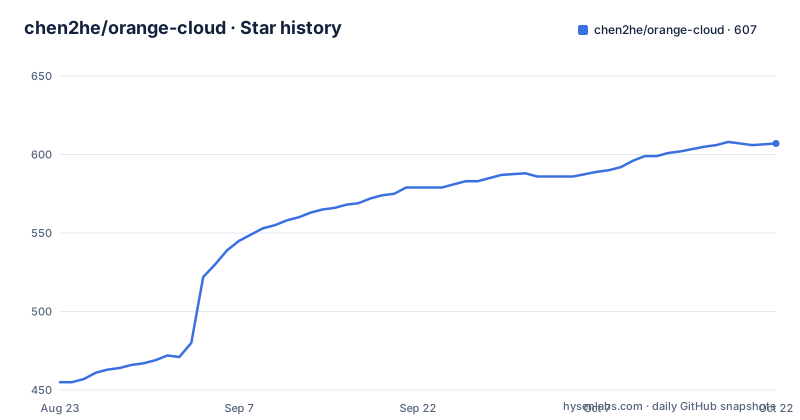
Star history
- chen2he/orange-cloud607 ★ · +152
| Repository | 2026-08-23 | 2026-10-22 |
|---|---|---|
| chen2he/orange-cloud | 455 | 607 |
152 Stars in the last 60 days, measured from the daily GitHub snapshot. Compare with other projects
Editorial analysis
What Orange Cloud Solves
Orange Cloud addresses a specific pain point: managing Cloudflare resources from an iPhone, iPad, or Apple Watch without the friction of generating and pasting API tokens. The README states that it signs you in through Cloudflare's official OAuth 2.0 + PKCE flow, so there is no token to copy and paste. This is a meaningful difference from many third-party clients that require you to create a token in the Cloudflare dashboard and then paste it into the app. The target user is someone who needs to manage DNS records, WAF rules, Workers, or R2 storage while away from a desktop browser, and who prefers a native app with system integrations like widgets and Siri shortcuts.
OAuth-First Sign-In and Token Handling
The core mechanism is OAuth 2.0 with PKCE, which is a standard authorization code flow with a proof key. The README explains that the app allows per-scope permission selection, so you can grant only the permissions you need. Tokens are stored exclusively in the iOS Keychain, and multiple Cloudflare accounts can be signed in simultaneously. The app also supports one-tap re-authorization. This design removes the risk of accidentally exposing a long-lived API token, since OAuth tokens are scoped and can be revoked. However, the repository notes that the official client ID and the o-c.do callback relay are not available for third-party builds. If you build from source, you must create your own Cloudflare OAuth client and deploy your own callback relay, which is a non-trivial prerequisite.
Feature Set and System Integration
The feature list is extensive and organized into sections. Under Domains & Network, you get zone list, DNS CRUD, Cache Rules, Load Balancing, Bulk Redirects, Purge Cache by URL, a Global Traffic Map, and a one-tap proxy toggle. The Developer Platform tab aggregates Workers and Pages, allowing you to view script details and create or deploy resources directly. Real-time log streaming uses a WebSocket trace similar to wrangler tail, and it can be displayed as a Live Activity on the Lock Screen and in the Dynamic Island. Storage and AI include R2 object storage integrated into the iOS Files app, a D1 SQL console, KV management, and on-device AI. Security features cover WAF custom rules with a full editor, SSL and Transform Rules, IP Access Rules, Zero Trust settings, and Tunnel status. Analytics use the GraphQL Analytics API, rendered with Swift Charts. The Apple Watch app shows domains and 24-hour requests, with complications. Beyond that, the app integrates with Home Screen and Lock Screen widgets, Control Center, Siri and App Intents, Spotlight indexing, background token refresh, and an iPad split-view layout.
Free vs. Pro and the Open Source Unlock
The app has a freemium model. The free tier includes a single account and the complete Domains and DNS toolset. A Pro subscription or one-time purchase in the App Store build unlocks multiple accounts, the Storage tab (R2, D1, KV), live Workers logs, WAF, Tunnel, Snippets, and 7-day or 30-day analytics. However, the repository is licensed under AGPL-3.0 with a Commons Clause. The README says that adding the OPENSOURCE_UNLOCKED compilation condition unlocks every Pro feature in your own build at no cost. This is a clever way to keep the open source version fully featured while still offering a paid app in the App Store. The Commons Clause forbids selling the software commercially, but the README states that everything else the AGPL allows is permitted. You still need to comply with AGPL obligations if you distribute modified versions.
Building from Source: Commands and Config
The README gives specific build steps. You need Xcode 26 or later, and you open the Xcode project at apps/ios/Orange Cloud/Orange Cloud.xcodeproj. The app targets iOS 17 and watchOS 10.6, with an embedded Apple Watch companion app. Before building, you must create your own Cloudflare OAuth client and deploy your own callback relay, as the official client ID and the o-c.do relay are not available to third-party builds. Then, add OPENSOURCE_UNLOCKED to the main target's SWIFT_ACTIVE_COMPILATION_CONDITIONS to get the full feature set. Finally, change the Bundle ID, App Group, and signing team to your own. The repository also includes an Android client in apps/android, built with Kotlin and Jetpack Compose, which is described as feature-complete but in closed testing. There is no direct APK download link in the README, only a mention that you can download the direct APK or follow the project.
Limitations and Trade-offs
The most obvious limitation is the dependency on your own OAuth callback relay when building from source. The README does not provide the relay code or deployment instructions within the visible text; it only points to apps/web/README.md, which is not included in the material. This means a self-hosted build requires additional infrastructure, which is a barrier for casual users. Another limitation is that the Android client is not yet publicly released, so cross-platform users cannot rely on it today. The Pro tier gates several features, so if you want WAF or R2 in the App Store build, you must pay. The app is also tied to Apple platforms only for the primary client, so Android users have to wait. Finally, the license is not a standard open source license due to the Commons Clause, which restricts commercial use, so organizations that want to sell a derivative product cannot do so.
Alternatives and How They Differ
The main alternative is the official Cloudflare dashboard in a mobile browser, which requires no installation but offers a poor experience on a phone and still requires you to log in with your Cloudflare credentials. Another alternative is a generic HTTP client like Postman or a script that uses the Cloudflare API with a token, but that is not a native app and does not offer OAuth. There are also other third-party Cloudflare clients, but the README does not name any. The key difference with Orange Cloud is the OAuth-first approach and native system integrations, which are absent from a web dashboard. If you need to manage Cloudflare from a desktop with complex workflows, a browser-based dashboard is more practical. For mobile, Orange Cloud's approach is more secure than token-based clients because tokens are not stored or pasted.
Maintenance and Upgrade Considerations
The repository shows no recent releases and the last push is unknown, so the maintenance cadence is unclear. The README mentions a TestFlight beta and a Telegram channel for release notes, which suggests active development, but the lack of release tags means you cannot assess version history. The app targets iOS 17 as a baseline and layers iOS 18 and iOS 26 capabilities progressively, so you will need to keep Xcode updated to build the latest code. The Android client is in closed testing, which means it may change significantly before a public release. The license is AGPL-3.0 with Commons Clause, so if you modify and distribute the app, you must share your source code under the same license, but you cannot sell it. For personal use, the OPENSOURCE_UNLOCKED condition is a clear path to get all features without paying, but you must maintain your own OAuth relay and signing configuration.
Editorial conclusion
Orange Cloud suits individual Cloudflare users who want a native iOS experience without handling API tokens, especially those who need on-the-go DNS, WAF, or Workers management. It is not for you if you require a web-based interface, prefer a token-based workflow, or need commercial support. Before adopting, verify the OAuth callback relay setup, the AGPL-3.0 + Commons Clause license implications, and the current state of the Android client, which is in closed testing and not yet publicly released.
Frequently asked questions
How does Orange Cloud sign in to Cloudflare?
Through the official OAuth 2.0 with PKCE flow, with per scope permission selection and one tap re-authorisation. Tokens are stored in the iOS Keychain or the Android Keystore, and multiple Cloudflare accounts can stay signed in side by side. No API token is pasted.
How do I unlock the paid features of Orange Cloud?
Add `OPENSOURCE_UNLOCKED` to the main target's active Swift compilation conditions when you build it yourself. That unlocks every Pro feature in your own build at no cost. The Android client uses an `oss` build flavour for the same thing.
What is free and what costs money in the store build?
Free: one account, the complete domains and DNS toolset, every home and lock screen widget, the Apple Watch app, and all Siri shortcuts. Paid: multiple accounts, the storage tab, live Workers logs, WAF, tunnel, snippets and the longer analytics windows.
What licence is Orange Cloud released under?
AGPL version 3 with the Commons Clause added, alongside a separate trademark file and a contributor licence agreement. The repository listing records no recognised identifier for that combination. The stated restriction is on commercial sale of the software.
Can I build Orange Cloud from source?
Yes, with a current Xcode. You must also create your own Cloudflare OAuth client and deploy your own callback relay, since the official client identifier and the project's relay are not available to third-party builds, and you must change the bundle identifier, app group and signing team.
Official sources
Add this badge to your README
If you maintain this project, the badge below links readers to this analysis and shows its maintenance status from the daily GitHub snapshot. Paste the markdown into your README; add ?metric=license or ?metric=stars to the image URL for a different field.

[](https://hysenlabs.com/projects/chen2he-orange-cloud)Star history chart for your README
[](https://hysenlabs.com/projects/chen2he-orange-cloud)