OpenExecutive: nine agents, one voice, and a scheduler that refuses to scale out
AI-powered virtual executive team — a single coherent executive persona backed by 8 specialist agents (FastAPI + Next.js).
At a glance
- What is it?
- How the SenteLabsAI project turns one prompt into a single executive answer with parallel specialist agents, what its ChromaDB, SQLite and scheduler layers actually do, and what a reader inherits when the API has to run as one instance.
- Who is it for?
- OpenExecutive fits a small team that wants strategy, finance, legal, product and sales answers in one voice and can keep a single API instance running. It does not fit an evaluation that needs per-answer attribution, a published cost ceiling or a second replica.
- Can I use it commercially?
- Yes. Apache-2.0 is a permissive licence: you can use, modify and sell software built on it, as long as you keep its copyright and licence notices.
- Is it still maintained?
- Yes. The repository received new commits within the last day.
- What is it written in?
- Mainly Python, according to GitHub's language statistics.
Answers come from the project's GitHub data, last synced on November 15, 2026, and from our analysis. They are not legal advice.
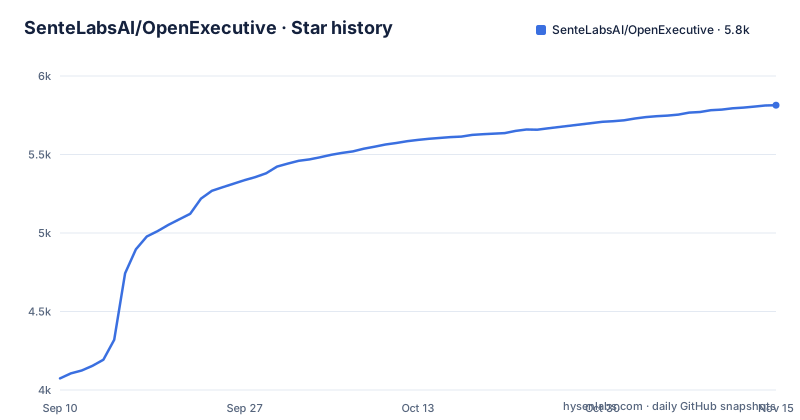
Star history
- SenteLabsAI/OpenExecutive5,814 ★ · +1,740
| Repository | 2026-09-10 | 2026-11-15 |
|---|---|---|
| SenteLabsAI/OpenExecutive | 4.1k | 5.8k |
1,740 Stars in the last 66 days, measured from the daily GitHub snapshot. Compare with other projects
Editorial analysis
Nine roles in the roster, eight in the architecture diagram
Nine specialist roles each get their own bullet: Chief Strategy Officer for competitive analysis, M&A, market positioning and OKRs; Chief Financial Officer for financial modeling, fundraising, unit economics and cash flow; Chief HR/People Officer for hiring, compensation, performance and culture; General Counsel for contracts, IP, employment law basics and compliance; Chief Operating Officer for process design, vendor management and operational scaling; Chief Marketing Officer for GTM strategy, brand, communications and PR; Chief Product Officer for roadmap, prioritization and product strategy; Head of Sales for pipeline and qualification, founder-led sales, pricing conversations, proposals and forecasting; and a Board Communications Director for board decks, investor relations and governance.
The count does not agree with itself elsewhere. The specialist line of the architecture diagram reads `CSO / CFO / CHRO / GC / COO / CMO / CPO / Board`, which is eight entries and leaves Head of Sales out. The repository description says 8 specialist agents, while the package layout comment in the repo tree says 9 specialist agents. The model split assigns `claude-opus-5-5` with adaptive thinking to CSO, CFO, GC and Board, and `claude-sonnet-5-5` to the Executive and most specialists.
So do not plan capacity or attribution from the diagram. If it matters to you whether a pricing or pipeline question reaches a dedicated agent, the README points you at `docs/architecture.md` for the full design, and that file is where the roster of nine has to be confirmed.
One synthesized voice from parallel specialist calls
One prompt goes in, one synthesized answer comes out. An Executive Orchestrator running `claude-sonnet-5-5` receives the user message, uses tool use to make parallel specialist calls, and returns a synthesized executive response. Each specialist pulls relevant context from ChromaDB first, where the built-in MBA knowledge and your own documents sit side by side.
User message
    ↓
Executive Orchestrator (claude-sonnet-5-5)
    ↓ tool use → parallel specialist calls
CSO / CFO / CHRO / GC / COO / CMO / CPO / Board
    ↓ each specialist retrieves relevant context from ChromaDB
Built-in MBA knowledge + Your company documents
    ↓
Synthesized executive response
The internal agent architecture is never exposed to the user, so the nine roles read as one voice rather than a panel you address separately. Out of the box the project handles spend approval thresholds, pulls from corporate knowledge systems, and carries defined governance for how it answers human colleagues and other AI systems. Named integrations cover Slack, Discord, Telegram, email, Microsoft 365 (Outlook mail and calendar, OneDrive), Notion, Confluence and any MCP-compatible AI tool.
The hidden routing is also the audit gap. Nothing in the response tells you which specialists were consulted, so a figure that came from the CFO agent and a figure that came from the CSO agent look identical once they are merged into prose.
Two retrieval layers, and documents in their own collection
Every specialist call hits two retrieval layers. The first is built-in MBA-level Markdown under `knowledge/builtin/`, git-tracked and seeded into ChromaDB at startup. The second is what you upload: company documents are chunked and stored in a separate `company_docs` collection, so your files never mix with the shipped business knowledge. Retrieved context is injected into the user turn and never into the cached system prompt, which is what keeps prompt caching useful. The system prompt is split so the Executive persona, the company profile and the knowledge index cache separately, with no dynamic content in any cached block.
The stack underneath is deliberately small. The backend is Python 3.11 with FastAPI and `uv` handles packages; the vector store is a local embedded ChromaDB; episodic memory lives in SQLite; the web app is Next.js 15 on the App Router with Tailwind. Nothing there asks you to provision a database server, and nothing there is shared between machines.
That choice is also the limit. Both stores are files on one disk next to the API process, so work out where those files land before you rely on them.
Episodic memory in SQLite, private notes that expire in 90 days
Memory arrives in two layers with different lifetimes. The first is automatic: after every response a background `claude-haiku-5-5` pass extracts key decisions, initiatives and advice into SQLite, and the next session opens with a `<past_decisions>` block so the Executive remembers what it recommended last month.
The second is opt-in per person. Under Settings, Memory, turning on `Keep track of what happens` makes the Executive keep private dated notes of what that person said, in chat where it can confirm it is them (the signed-in web app, their own Slack or Discord, a Telegram chat authenticated with a webhook secret) and in Act as me replies they send. Every note rests on their own words, checked word for word. Only that person sees them, in Memories, History, where they can correct, pin or forget a note. Notes expire after 90 days by default and the owner can change the window.
With Act as me on, the Executive drafts email in the leader's own voice from their own mailbox, and the leader reviews and sends. The final say stays human, which also means nothing goes out without that click. The owner's morning brief and evening digest include what their own notes say is due, and anyone with notes on gets a short reminder on the day something they promised by email falls due. The README says notes are read back only to their owner, in a private chat, so treat them as a personal log rather than shared state.
The scheduler claims due actions with UPDATE ... RETURNING
This is where a second machine turns into a bug. A built-in job runner claims due actions with `UPDATE ... RETURNING`, a deliberate way to stop two workers grabbing the same reminder, and the consequence is stated plainly: the API must run as a single instance, and you should not horizontally scale it without gating the scheduler first. Two replicas behind a load balancer before that gating work exists is what the README warns against.
What you can call is a fixed set of Makefile targets: `dev`, `stop`, `test`, `test-changed`, `lint`, `check`, `eval`, `docker`, `clean`, `install`, `discord`, `embed-outputs`. Release automation sits in the repo root too, through `release-please-config.json` and `.release-please-manifest.json`, which is why the version moved from v0.6.6 to v0.6.8 across four days in late October 2026.
Because the job runner is described as part of the API rather than a separate service, plan around the assumption that API uptime is a precondition for due actions. If your morning brief depends on a follow-up landing on time, the container has to be up at the due hour, not merely at the workday start.
make dev keeps the owner seat on the loopback interface
The quick start is five commands, and the install target is two more hiding inside it.
# Clone the repo
git clone https://github.com/SenteLabsAI/OpenExecutive.git
cd OpenExecutive

# Install the backend and web app dependencies
make install

# Set your Anthropic API key
cp .env.example .env
# Edit .env and add ANTHROPIC_API_KEY=sk-ant-...

# Start everything
make dev
`make install` is two commands in disguise: `uv sync` inside `packages/core` and `npm install` inside `packages/ui`. `make dev` then starts the API and the web app, which is served on http://localhost:3000.
Leave the sign-in settings in the `AUTH_*` block blank and you get local login with no account setup: the web app binds to `127.0.0.1`, exports `OE_LOCAL_LOGIN=1`, shows you an Open button, and makes you the owner. The API refuses requests not addressed to this computer, which is the DNS rebinding guard. If `AUTH_SECRET` is blank everywhere, the run gets a throwaway one, so you click Open again after each restart. `make dev` is also the only recipe that sets `OE_LOCAL_LOGIN`; anywhere else it exports that flag empty, which shadows any value in `packages/ui/.env*`. A second run installs the web app's packages itself when `packages/ui/node_modules` is missing.
The root .env decides sign-in and whether the API starts
All configuration lives in the repo-root `.env`, and both `make dev` and `make docker` load it into the API and the UI. `packages/ui/.env.local` is also read for UI-only keys, but the root file wins whenever a key appears in both, and exported values win over that file. Values must be shell-safe, so quote anything containing spaces or `$`.
Two keys are read from `os.environ` rather than pydantic Settings: `BACKEND_SHARED_SECRET` and `BACKEND_ALLOWED_ORIGINS`. The Makefile comment is blunt about why: dotenv alone does not surface them, which silently leaves the API gate open. Check those two on a first run rather than after you have invited people.
Sign-in has its own rules. `ALLOWED_EMAILS` is a comma-separated list that is always honored and always sufficient on its own, and non-archived Person rows in the backend roster that carry an email are allowed in addition to it, never instead of it, so roster edits cannot lock out an operator named there. Any other email is rejected even with a valid login. Generate the session secret with `openssl rand -base64 32`.
Model access follows the same plain style. `ANTHROPIC_API_KEY` is required unless you run entirely on local or OpenRouter models, and with no provider configured the app refuses to start. A key issued at the organisation level rather than inside a workspace is rejected with HTTP 400 unless every request carries the workspace id.
The gaps that matter before you point a company at it
Read this as a fast moving v0.x system and a few things are simply not written down. The last push to the repository landed on 2 November 2026, with v0.6.8 released on 30 October and v0.6.7 and v0.6.6 in the four days before it, so expect the surface to shift.
The README gives the cache figure only as up to 85 percent after the first few turns. It does not say when only one specialist is called instead of all of them, so latency cannot be predicted from the architecture diagram. Because the agent architecture is never exposed, an answer carries no visible attribution, and if a board deck needs to know which specialist produced a number, the interface will not tell you.
A managed cloud offering is planned at openexecutive.ai, and the project says it will stay open source, so a hosted path is coming but is not something to plan against yet. Before you point a company at this, decide who owns the Anthropic key, where the SQLite and ChromaDB files live, how long tracked notes should survive, and what you will do the first morning the scheduler needs gating.
Editorial conclusion
OpenExecutive fits a small team that wants strategy, finance, legal, product and sales answers in one voice and can keep a single API instance running. It does not fit an evaluation that needs per-answer attribution, a published cost ceiling or a second replica. Before inviting anyone else, confirm who holds the Anthropic key, where the SQLite and ChromaDB files sit, how long tracked notes should live, and what you will do the first morning the scheduler needs gating.
Frequently asked questions
Can I run OpenExecutive on my own machine without setting up sign-in?
Yes. While the sign-in settings in the `AUTH_*` block stay blank, `make dev` uses local login: the web app binds to `127.0.0.1`, exports `OE_LOCAL_LOGIN=1`, shows an Open button, and makes you the owner. The API then refuses requests not addressed to that computer. Set up OAuth or SSO before inviting a team or running `make docker`.
Does OpenExecutive need more than one API instance?
Not without extra work. The built-in scheduler claims due actions with `UPDATE ... RETURNING` to prevent double-firing, and the project states the API must run as a single instance and should not be horizontally scaled until the scheduler is gated first.
How long does OpenExecutive keep the notes it writes about me?
Notes expire after 90 days by default, and the owner can change that window. They live in Memories, History where only that person sees them, and each one can be corrected, pinned or forgotten.
Where do my uploaded company documents end up?
Uploaded documents are chunked and stored in a separate `company_docs` collection in the local embedded ChromaDB, kept apart from the built-in MBA-level Markdown under `knowledge/builtin/` that is seeded at startup. Each specialist call retrieves from both layers.
Official sources
Add this badge to your README
If you maintain this project, the badge below links readers to this analysis and shows its maintenance status from the daily GitHub snapshot. Paste the markdown into your README; add ?metric=license or ?metric=stars to the image URL for a different field.

[](https://hysenlabs.com/projects/sentelabsai-openexecutive)Star history chart for your README
[](https://hysenlabs.com/projects/sentelabsai-openexecutive)Was this useful?