ChristianLempa/homelab: one person's homelab notes, organised by tool, with no install path
This is my entire homelab documentation files. Here you'll find notes, setups, and configurations for infrastructure, applications, networking, and more.
At a glance
- What is it?
- ChristianLempa/homelab is a personal documentation repository with one top-level directory per tool, from Proxmox to Traefik to Wazuh. It is a reference to read and fork, not a package to install, and it does not accept contributions.
- Who is it for?
- Read it as a tour of how one homelab owner lays out configuration for roughly three dozen tools, and fork it if you want a starting structure. Do not treat it as a tested, versioned baseline, because it has no releases, no contribution path and an explicit warning that products move on.
- Can I use it commercially?
- Yes. MIT is a permissive licence: you can use, modify and sell software built on it, as long as you keep its copyright and licence notices.
- Is it still maintained?
- Yes. The repository last received commits 85 days ago.
- What is it written in?
- Mainly HCL, according to GitHub's language statistics.
Answers come from the project's GitHub data, last synced on November 23, 2026, and from our analysis. They are not legal advice.
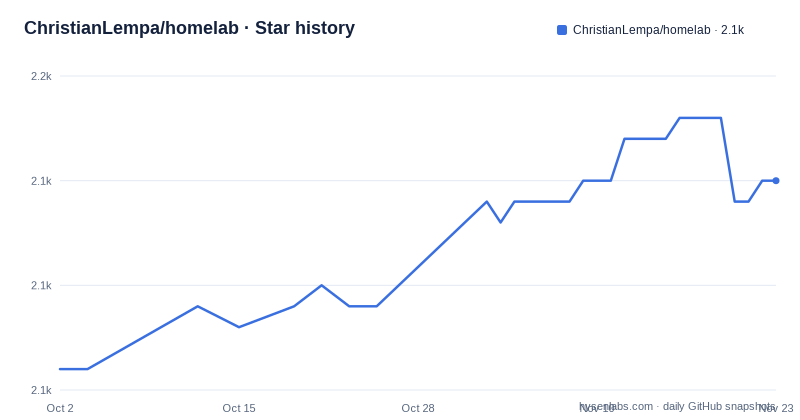
Star history
- ChristianLempa/homelab2,145 ★ · +9
| Repository | 2026-10-02 | 2026-11-23 |
|---|---|---|
| ChristianLempa/homelab | 2.1k | 2.1k |
9 Stars in the last 52 days, measured from the daily GitHub snapshot. Compare with other projects
Editorial analysis
There is nothing to install, and no release to pin
This repository is documentation, not software. Its own description calls it the author's entire homelab documentation files, with notes, setups and configurations for infrastructure, applications and networking. The README contains no install command and no setup procedure, and the repository has no GitHub releases.
That shapes how you use it. There is no version number to depend on, no changelog to read before updating, and no tag to return to if a later push changes a file you copied. You get whatever the main branch holds on the day you look. If you want stability, the only mechanism available is to fork the repository and freeze your own copy.
GitHub labels the primary language as HCL, but that label is only a summary of file types. The top level is organised by tool name rather than by language, so the language tag tells you very little about how to navigate it.
One directory per tool is the whole organising idea
The top-level entries are a flat list of tool names: ansible, argocd, authentik, cadvisor, certmanager, dns, dockge, gitlab, grafana, homeassistant, homepage, influxdb, kestra, longhorn, mariadb, metallb, netbird, nginx, passbolt, portainer, postgres, prometheus, proxmox, renovate, semaphore, teleport, traefik, twingate, uptimekuma and wazuh. Beside them sit .github, .gitignore, LICENSE, README.md and SECURITY.md.
The layout has a practical upside: if you already know which tool you are setting up, you go straight to its folder. The downside is that nothing at the top level ties the tools together. There is no directory for an overall architecture, a network diagram, or a build order, so how the proxy, the monitoring stack, the databases and the hypervisor fit one machine or one network is something you have to reconstruct by reading across folders.
The author takes no contributions, so corrections do not flow back
The README is direct about this: because it is personal homelab documentation, the author does not accept any contributions. Forking and reusing it for your own documentation is explicitly welcome.
For a reader, the consequence is that a stale step you notice will not be fixed by a pull request from you. Whatever you correct stays in your fork. Anyone who forks gets a snapshot that diverges from the original the moment either side changes, and keeping up means merging from upstream yourself.
It also means the repository is closer to a published notebook than to a community project. The MIT license lets you reuse the files, but the project does not offer a place to discuss them through its own contribution process.
A warning that products change, with no version record to check against
The README carries a warning that products can change over time, that the author does his best to keep up with the latest changes and releases, and that this will not always be the case.
Taken at its word, that means a configuration in one of these folders may describe an older release of the tool than the one you will download today. The README gives no table of tested versions, and the repository publishes no releases to anchor one. The last push was on 2026-08-31, but a repository-wide push date does not tell you when a particular tool directory was last touched.
The working rule is to treat each folder as a worked example, read it against the current upstream documentation for that tool, and expect to adjust options that have been renamed or removed.
Remote access is a question the layout hints at but the README never answers
A common homelab need is reaching the lab from outside the house. The repository has no top-level folder named for remote access as a topic. What it does have are directories named after products: netbird, twingate, teleport, traefik, nginx and dns.
Those names show which tools the author has notes for. They do not tell you which one he recommends, how they compare, or which combination he actually runs for external access. The README does not state any of that, and the descriptions of the folders are left to the folders themselves.
So a reader who wants outside access should open the relevant directories and read them, rather than expect the repository to give a single recommended route.
Cost, hardware and purpose are outside what this repository covers
Questions such as what a homelab costs or whether it can pay for itself are not what this repository sets out to answer. The top-level entries are software and service directories only: there is no folder for hardware, racks, power or budget, and the README gives no price or parts list.
If you arrive wanting to size a purchase, this is the wrong source. What it does offer is the other end of the process, which is the configuration you apply once you already own a machine. The proxmox directory is the one named for a hypervisor, so it is the natural place to begin if your plan involves Proxmox, but the directory name alone does not guarantee a full walkthrough, and the README does not promise one.
Tutorials and sibling repositories live elsewhere
The README sends anyone who wants detailed, in-depth tutorials to the author's YouTube channel, so the repository is meant to sit beside the videos rather than replace them. That is a real limit: the written files hold notes, setups and configurations, and the explanations of why a setting is chosen are placed in a different medium.
Three sibling repositories are named as other resources. Dotfiles holds his personal configuration files on macOS. Boilerplates holds templates for projects such as Docker, Kubernetes and Ansible. Cheat-Sheets is a command reference for various tools and technologies. If you want reusable templates or a command reference, those are the places the author points to, rather than this homelab repository.
Editorial conclusion
Read it as a tour of how one homelab owner lays out configuration for roughly three dozen tools, and fork it if you want a starting structure. Do not treat it as a tested, versioned baseline, because it has no releases, no contribution path and an explicit warning that products move on. Before copying anything, check the tool version in the directory against what you run, and check the YouTube channel for the explanation the repository itself does not give.
Frequently asked questions
What exactly is the ChristianLempa homelab repository?
It is the author's personal homelab documentation: notes, setups and configurations for infrastructure, applications and networking, kept as one top-level directory per tool. It is licensed MIT and has no GitHub releases.
How do I access a homelab remotely using ChristianLempa/homelab?
The README gives no remote-access procedure. The repository does contain directories named netbird, twingate, teleport, traefik and nginx, so those are where to look for the author's notes.
Can I use ChristianLempa/homelab to set up a homelab with Proxmox?
The repository has a top-level proxmox directory. The README links to the author's YouTube channel for detailed tutorials and warns that products change over time, so check the folder against current Proxmox documentation.
Official sources
Add this badge to your README
If you maintain this project, the badge below links readers to this analysis and shows its maintenance status from the daily GitHub snapshot. Paste the markdown into your README; add ?metric=license or ?metric=stars to the image URL for a different field.

[](https://hysenlabs.com/projects/christianlempa-homelab)Star history chart for your README
[](https://hysenlabs.com/projects/christianlempa-homelab)Was this useful?